Unlike your LAN, a WLAN does not have exact boundaries. Vulnerabilities exist both inside and outside your buildings. Because of the popularity of Wi-Fi and the low cost of equipment, hackers can easily obtain devices and software to exploit a Wi-Fi network. Like the LAN, the WLAN needs security.
與 LAN 不同,WLAN 沒有明確的邊界,弱點存在於建築物內外。由於 Wi-Fi 的普及以及設備成本低廉,駭客很容易取得裝置與軟體來攻擊 Wi-Fi 網路。與 LAN 一樣,WLAN 也需要安全性。
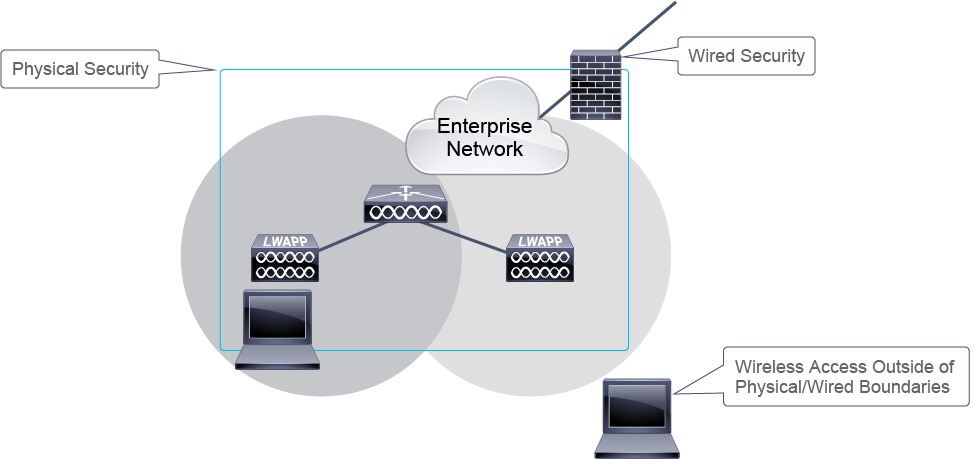
The two primary facilities for securing the WLAN are authentication and encryption.
保護 WLAN 的兩項主要機制是驗證(authentication)與加密(encryption)。
Current security standards require that both authentication and encryption are used to protect the client devices from having their data intercepted.
目前的安全標準要求同時使用驗證與加密,以防止用戶端裝置的資料遭到攔截。
Authentication
驗證
Authentication is a process of discovering whether something is exactly what it appears to be. In wireless networks, authentication is used to prove the identity of the person or device that is trying to gain access.
驗證是確認某個對象是否確實如其所宣稱的過程。在無線網路中,驗證用來證明嘗試取得存取權的使用者或裝置的身分。
Proving an identity is difficult because it is rarely possible to physically identify the person that is trying to connect. Approaches for human authentication rely on at least one of these methods:
證明身分很困難,因為幾乎不可能實際確認正在連線的人是誰。人員驗證的方法至少依賴以下其中一種:
- Something that you know (such as a password): This type of authentication is the most common for users. Unfortunately, something that users know can easily become something that they forget. And if users write down the information to help them remember it, other people might find it.你所知道的事物(例如密碼):這是使用者最常見的驗證方式。可惜的是,使用者知道的事物很容易變成他們忘記的事物;而如果使用者為了方便記憶而把資訊寫下來,其他人也可能發現它。
- Something that you have (such as a smart card):This method offers no risk of forgetting information, but users must have physical possession of the item or they cannot be authenticated. This object can be lost or stolen, after which it might be used by an attacker.你所擁有的事物(例如智慧卡):這種方式沒有忘記資訊的風險,但使用者必須實際持有該物品,否則無法通過驗證。這個物品可能會遺失或被偷,之後可能被攻擊者利用。
- Something that you are (such as a fingerprint): This method is based on something that is specific to the person who is being authenticated. Unfortunately, biometric sensors imply physical contact, which is not a reasonable user-authentication method in wireless networks. (However, this technique can be used to authenticate devices.)你本身的特徵(例如指紋):此方法是根據被驗證者本身特有的特徵。可惜的是,生物特徵感應器需要實體接觸,這在無線網路中並非合理的使用者驗證方式。(不過,此技術可用於裝置驗證。)
These authentication methods apply to human or user-based authentication. In secured environments, authenticating the devices that are used to access the network is also common. A device can be authenticated by using a signature that is based on its specific hardware characteristics.
這些驗證方法適用於人員或以使用者為基礎的驗證。在安全環境中,對用來存取網路的裝置進行驗證也很常見。裝置可以透過根據其特定硬體特徵所產生的簽章來進行驗證。
The limitation of device authentication is that it does not authenticate the person who makes the connection. The same authentication process occurs whether the device is being used by a valid user or by an attacker. For this reason, storing personal passwords on laptop or desktop computers is considered dangerous, although many systems allow this possibility. Unless authentication requires the user to enter information, then the device, not the user, is being authenticated.
裝置驗證的限制在於它無法驗證進行連線的人員。無論裝置是由合法使用者還是攻擊者使用,都會經過相同的驗證程序。因此,將個人密碼儲存在筆記型電腦或桌上型電腦上被認為是危險的做法,儘管許多系統都允許這種可能性。除非驗證要求使用者輸入資訊,否則被驗證的是裝置,而不是使用者。
Encryption
加密
In wireless networks, privacy means that although an eavesdropper might receive the wireless signal, this signal cannot be read and understood. Keeping the data private is the role of encryption.
在無線網路中,隱私意味著即使竊聽者接收到無線訊號,也無法讀取或理解該訊號。保持資料隱密是加密的作用。
Several methods of encryption can be used:
可以使用多種加密方法:
- WEP:Wired Equivalent Privacy (WEP) uses a shared key (both sides have the key) and was a very weak form of encryption (no longer used).WEP:有線等效隱私(WEP)使用共享金鑰(雙方都持有該金鑰),是一種非常弱的加密方式(已不再使用)。
- TKIP:Temporal Key Integrity Protocol (TKIP) uses a suite of algorithms surrounding WEP and Wi-Fi Protected Access (WPA) to enhance its security (no longer used with WEP).TKIP:暫時金鑰完整性協定(TKIP)使用一套環繞 WEP 與 Wi-Fi 保護存取(WPA)的演算法來強化其安全性(已不再與 WEP 搭配使用)。
- AES: AES allows for longer keys and is used for most WLAN security.AES:AES 允許使用較長的金鑰,是大多數 WLAN 安全性所採用的加密方式。
Key Management
金鑰管理
Whether keys are used to authenticate users or to encrypt data, they are the secret values upon which wireless networks rely.
無論金鑰是用來驗證使用者還是加密資料,它們都是無線網路所依賴的秘密值。
Common Keys
共用金鑰
A key can be common to several users. For wireless networks, the key can be stored on the access point (AP) and shared among users who are allowed to access the network via this AP.
金鑰可以由多個使用者共用。對於無線網路而言,該金鑰可以儲存在無線基地台(AP)上,並在允許透過此 AP 存取網路的使用者之間共享。
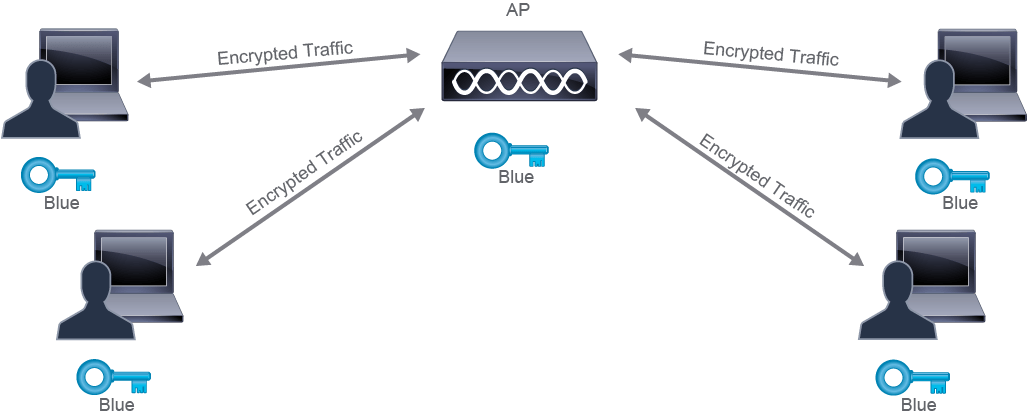
A common key can be used in three ways:
共用金鑰可以有三種使用方式:
- For authentication only: Limits access to the network to only users who have the key, but their subsequent communication is sent unencrypted.僅用於驗證:只允許擁有金鑰的使用者存取網路,但後續的通訊仍以未加密的方式傳送。
- For encryption only:Any user can associate to the WLAN, but only users who have a valid key can send and receive traffic to and from other users of the AP.僅用於加密:任何使用者都可以連結至 WLAN,但只有擁有有效金鑰的使用者才能與 AP 上的其他使用者互相傳送與接收流量。
- For authentication and encryption: The key is used for both authentication and encryption.同時用於驗證與加密:該金鑰同時用於驗證與加密。
The advantage of this common key system is its simplicity. Everyone uses the same algorithm and the same key. The risk is that anyone who has the key can capture and read the frames of any other user from the same AP. A hacker needs only to compromise one device to be able to read the traffic of all the clients in the cell.
這種共用金鑰系統的優點在於其簡單性,每個人都使用相同的演算法與相同的金鑰。風險在於,任何擁有該金鑰的人都可以擷取並讀取來自同一 AP 的其他使用者的訊框。駭客只需入侵一部裝置,就能讀取該小區內所有用戶端的流量。
Individual Keys
個別金鑰
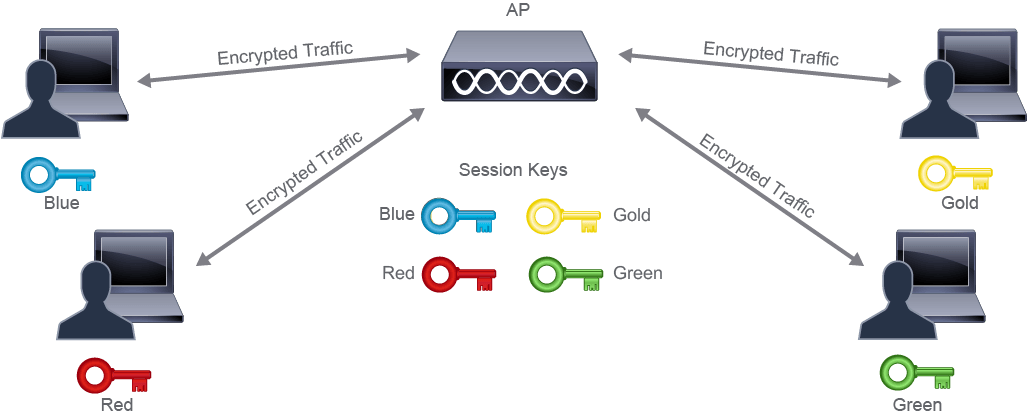
To provide more security, an individual key can be defined for each user. This approach can be accomplished in two ways:
為了提供更高的安全性,可以為每位使用者定義個別金鑰。此做法可以透過兩種方式完成:
- The key is individual from the beginning. This method implies that the infrastructure must store and manage individual user keys, typically by using a central authentication server.金鑰從一開始就是個別的。此方法意味著基礎架構必須儲存並管理個別使用者的金鑰,通常是透過中央驗證伺服器來完成。
- The key is common at first, but it is used to create a second key that is unique to each user. This system has many advantages. A single key is stored on the AP, and then individual keys are created in real time and are valid only during the user session.金鑰一開始是共用的,但會用來產生每個使用者專屬的第二把金鑰。此系統有許多優點:AP 上只儲存一把金鑰,個別金鑰則即時產生,且僅在該使用者的工作階段中有效。
Security Standards
安全標準
When WEP was found to be weak and easily breakable, both the IEEE 802.11 committee and the Wi-Fi Alliance worked to replace it. Two generations of solutions emerged: WPA and IEEE 802.11i Wi-Fi Protected Access 2 (WPA2). These solutions offer an authentication and encryption framework.
當 WEP 被發現安全性薄弱且容易被破解後,IEEE 802.11 委員會與 Wi-Fi 聯盟共同努力尋求替代方案。最終出現了兩代解決方案:WPA 與 IEEE 802.11i Wi-Fi 保護存取 2(WPA2)。這些解決方案提供了驗證與加密的架構。
Currently, multiple wireless security standards exist:
目前存在多種無線安全標準:
- WPA:Determines two modes of wireless protected access: WPA-Personal mode, which uses PSKs (WPA-PSK), or WPA-Enterprise mode, which uses IEEE 802.1X.WPA:定義了兩種無線保護存取模式:使用 PSK 的 WPA-Personal 模式(WPA-PSK),或使用 IEEE 802.1X 的 WPA-Enterprise 模式。
- WPA2:WPA2 is the current implementation of the 802.11i security standard and deprecates the use of WEP, WPA, and TKIP. WPA2 supports either 802.1X or PSK authentication.WPA2:WPA2 是目前 802.11i 安全標準的實作,並取代了 WEP、WPA 與 TKIP 的使用。WPA2 支援 802.1X 或 PSK 驗證。
- WPA3:Wi-Fi Protected Access 3 (WPA3) was announced as a replacement of WPA2 and is the next generation of wireless security standard that provides more resiliency to network attacks.WPA3:Wi-Fi 保護存取 3(WPA3)被宣布為 WPA2 的替代方案,是下一代無線安全標準,能對網路攻擊提供更強的韌性。
WPA, WPA2, and WPA3 support two modes of wireless protected access, WPA-Enterprise and WPA-Personal:
WPA、WPA2 與 WPA3 支援兩種無線保護存取模式:WPA-Enterprise 與 WPA-Personal:
Enterprise (802.1X Authentication) 企業版(802.1X 驗證) | Personal (PSK Authentication) 個人版(PSK 驗證) |
Authentication server required 需要驗證伺服器 | Authentication server not required 不需要驗證伺服器 |
RADIUS used for authentication and key distribution 使用 RADIUS 進行驗證與金鑰分發 | Shared secret used for authentication 使用共享密碼進行驗證 |
Centralized access control 集中式存取控制 | Local access control 本地存取控制 |
Encryption uses TKIP and optional AES 加密使用 TKIP 與選用的 AES | Encryption uses TKIP and optional AES 加密使用 TKIP 與選用的 AES |
Wi-Fi Protected Access
Wi-Fi 保護存取
Both WPA-Personal and WPA-Enterprise modes use TKIP for encryption, but they use different authentication features for WLAN clients.
WPA-Personal 與 WPA-Enterprise 模式都使用 TKIP 進行加密,但對 WLAN 用戶端使用不同的驗證機制。
- WPA-Personal: Uses a PSK to authenticate WLAN clients. It is designed for home and small office networks, because it does not require an external authentication server.WPA-Personal:使用 PSK 驗證 WLAN 用戶端,專為家庭與小型辦公室網路設計,因為不需要外部驗證伺服器。
- WPA-Enterprise:Adds 802.1X and Extended Authentication Protocol (EAP) based authentication. It is designed for enterprise networks, and requires an external authentication server. It requires a more complicated setup, but provides additional security.WPA-Enterprise:加入以 802.1X 與延伸驗證協定(EAP)為基礎的驗證,專為企業網路設計,需要外部驗證伺服器。其設定較為複雜,但提供額外的安全性。
The initial authentication process of WLAN clients is either performed with a pre-shared key or after an EAP exchange through 802.1X. This process ensures that the WLAN client is authenticated with the AP. After the authentication process, a shared secret key, which is called Pairwise Master Key (PMK), is generated. The PMK is derived from the password that is put through the hash function. In WPA-Personal mode, the PSK is the PMK. On the other hand, if WPA-Enterprise is used, then the PMK is derived during EAP authentication.
WLAN 用戶端的初始驗證程序,是透過預先共享金鑰或經由 802.1X 進行 EAP 交換來完成的。此過程可確保 WLAN 用戶端已與 AP 完成驗證。驗證程序完成後,會產生一把共享密碼金鑰,稱為配對主金鑰(Pairwise Master Key,PMK)。PMK 是由密碼經過雜湊函式運算所衍生出來的。在 WPA-Personal 模式中,PSK 即是 PMK;另一方面,若使用 WPA-Enterprise,則 PMK 是在 EAP 驗證過程中衍生出來的。
The four-way handshake was designed so that both the AP and WLAN client can prove to each other that they know the PMK, without ever sharing the key. The access point and WLAN client encrypt messages with the PMK and send them to each other. Therefore, those messages can only be decrypted by using the PMK that they already have in common. If the decryption is successful, then this proves that they know the PMK.
四向交握(four-way handshake)的設計目的,是讓 AP 與 WLAN 用戶端能夠向對方證明彼此都知道 PMK,而不必真正分享該金鑰。無線基地台與 WLAN 用戶端使用 PMK 加密訊息並互相傳送。因此,這些訊息只能使用雙方共同持有的 PMK 來解密。如果解密成功,就證明了雙方都知道該 PMK。
The four-way handshake is established to derive another two keys called Pairwise Transient Key (PTK), and Group Transient Key (GTK). Those two keys are generated using various attributes, including PMK. PTK is a unique key, which is used for unicast frames, and GTK is a common key, which is used for broadcast and multicast frames.
建立四向交握是為了衍生出另外兩把金鑰,分別稱為配對暫時金鑰(Pairwise Transient Key,PTK)與群組暫時金鑰(Group Transient Key,GTK)。這兩把金鑰是根據包括 PMK 在內的多項屬性所產生的。PTK 是一把唯一的金鑰,用於單播訊框;GTK 則是一把共用金鑰,用於廣播與群播訊框。
Another important thing to note is that in WPA-Personal, all WLAN clients encrypt their data with the same PMK. This means if someone gets a hold of the PMK, then it can be used to decrypt all data encrypted with that key. On the other hand, in WPA-Enterprise, each WLAN client has a unique PMK, therefore if a single PMK is compromised, then only that client session can be decrypted. In conclusion, WPA-Enterprise is more secure than WPA-Personal.
另一個值得注意的重點是,在 WPA-Personal 中,所有 WLAN 用戶端都使用相同的 PMK 加密其資料。這表示如果有人取得該 PMK,就能用它來解密所有使用該金鑰加密的資料。另一方面,在 WPA-Enterprise 中,每個 WLAN 用戶端都擁有唯一的 PMK,因此即使單一 PMK 遭到入侵,也只有該用戶端的工作階段會被解密。因此,WPA-Enterprise 比 WPA-Personal 更安全。
Wi-Fi Protected Access 2
Wi-Fi 保護存取 2
WPA2 is the current implementation of the 802.11i security standard and deprecates the use of WEP, WPA, and TKIP. WPA2 supports either 802.1X or PSK authentication:
WPA2 是目前 802.11i 安全標準的實作,並取代了 WEP、WPA 與 TKIP 的使用。WPA2 支援 802.1X 或 PSK 驗證:
- PSK is for home or small office and is also known as WPA2-Personal.PSK 適用於家庭或小型辦公室,也稱為 WPA2-Personal。
- 802.1X is used by enterprise-class networks and is often referred to as WPA2-Enterprise.802.1X 由企業級網路使用,通常稱為 WPA2-Enterprise。
WPA2-Personal uses the same shared key as in WPA, but it uses AES-Counter with CBC-MAC Protocol (AES-CCMP) to encrypt and protect frames. Strong keys should be used because there are tools available that can successfully perform a dictionary attack on WPA2-Personal.
WPA2-Personal 使用與 WPA 相同的共享金鑰,但採用 AES 計數器搭配 CBC-MAC 協定(AES-CCMP)來加密並保護訊框。應使用強度足夠的金鑰,因為目前已有工具可對 WPA2-Personal 成功執行字典攻擊。
WPA2-Enterprise uses the same 802.1X or EAP authentication as in WPA, but it uses the AES-CCMP to encrypt and protect frames.
WPA2-Enterprise 使用與 WPA 相同的 802.1X 或 EAP 驗證方式,但採用 AES-CCMP 來加密並保護訊框。
Wi-Fi Protected Access 3
Wi-Fi 保護存取 3
WPA was the stopgap security measure that replaced WEP, but it was then replaced (deprecated) by WPA2. However, the "KRACK attack" blog, published in October 2017, put a spotlight on Wi-Fi security that highlighted a need for the industry to move to a new generation of authentication and encryption mechanisms. This need brought forward enhancements to the existing WPA2 features, creating the next iteration, named WPA3.
WPA 曾是取代 WEP 的過渡性安全措施,之後又被 WPA2 取代(並淘汰)。然而,2017 年 10 月發布的「KRACK 攻擊」部落格文章,讓 Wi-Fi 安全性受到關注,凸顯業界需要轉向新一代的驗證與加密機制。這項需求促成了對現有 WPA2 功能的強化,進而產生下一代標準,命名為 WPA3。
WPA3 covers four different features, with four different contexts:
WPA3 涵蓋四種不同功能,各自對應不同情境:
- WPA3-PersonalWPA3-Personal
- WPA3-EnterpriseWPA3-Enterprise
- Open Networks開放網路(Open Networks)
- IoT secure onboardingIoT 安全上線
WPA3 will be backward compatible with WPA2, meaning your WPA3 devices will be able to run WPA2. However, it is expected that it will take a few years for vendors to fully transition to WPA3-only modes, therefore WPA2 transmission capabilities may still be in use in the near future. Cisco has been instrumental in the development of WPA3, and as this transition starts to happen, Cisco will roll WPA3 support in the wireless LAN controllers (WLCs) and APs, allowing early adopters to start enjoying this added level of security.
WPA3 將向下相容 WPA2,也就是說使用 WPA3 的裝置也能執行 WPA2。然而,預期廠商要完全轉換到僅支援 WPA3 的模式仍需數年時間,因此在可預見的未來,WPA2 的傳輸能力可能仍會持續使用。Cisco 在 WPA3 的開發過程中扮演了重要角色,隨著這項轉換逐步展開,Cisco 將在無線 LAN 控制器(WLC)與 AP 中推出 WPA3 支援,讓早期採用者能夠開始享受這種更高層級的安全性。
WPA3-Personal
WPA3-Personal
WPA-Personal uses passwords, called PSKs. Attackers can eavesdrop on a WPA2 valid initial "handshake," and attempt to use brute force to deduce the PSK. With the PSK, the attacker can connect to the network, but also decrypt passed captured traffic. The likelihood of succeeding in such an attack depends on the password complexity: dictionary words or other simple passwords are vulnerable.
WPA-Personal 使用稱為 PSK 的密碼。攻擊者可以竊聽有效的 WPA2 初始「交握」過程,並嘗試以暴力破解方式推算出 PSK。取得 PSK 後,攻擊者不僅可以連上網路,還能解密先前擷取的流量。這類攻擊成功與否取決於密碼的複雜度:字典單字或其他簡單密碼很容易受到攻擊。
WPA3-Personal utilizes Simultaneous Authentication of Equals (SAE), defined in the IEEE 802.11-2016 standard. With SAE, the experience for the user is unchanged (create a password and use it for WPA3-Personal). However, WPA3 adds a step to the "handshake" that makes brute force attacks ineffective. The passphrase is never exposed, making it impossible for an attacker to find the passphrase through brute force dictionary attacks. WPA3 also makes management frames more robust with the mandatory addition of Protected Management Frames (PMF) that adds an extra layer of protection from deauthentication and disassociation attacks.
WPA3-Personal 採用對等實體同時驗證(Simultaneous Authentication of Equals,SAE),此技術定義於 IEEE 802.11-2016 標準中。使用 SAE 時,使用者的體驗不會改變(建立密碼並用於 WPA3-Personal)。然而,WPA3 在「交握」過程中新增了一個步驟,使暴力破解攻擊失去效用。密碼片語永遠不會外洩,使攻擊者無法透過暴力字典攻擊找出密碼片語。WPA3 也透過強制加入受保護管理訊框(Protected Management Frames,PMF),使管理訊框更為強健,可對抗解除驗證與解除關聯攻擊,提供額外的保護層。
WPA3-Enterprise
WPA3-Enterprise
Enterprise Wi-Fi commonly uses individual user authentication through 802.1X/EAP. Within such networks, PMF is also mandatory with WPA3. WPA3 also introduces a 192-bit cryptographic security suite. This level of security provides consistent cryptography and eliminates the "mixing and matching of security protocols" that are defined in the 802.11 Standards. This security suite is aligned with the recommendations from the Commercial National Security Algorithm (CNSA) Suite, commonly in place in high security Wi-Fi networks in government, defense, finance, and industrial verticals.
企業級 Wi-Fi 通常透過 802.1X/EAP 進行個別使用者驗證。在這類網路中,WPA3 也強制要求使用 PMF。WPA3 還導入了 192 位元的密碼學安全套件,此安全等級提供一致的密碼學運算,並消除了 802.11 標準中定義的「混用不同安全協定」的問題。此安全套件符合商用國家安全演算法(Commercial National Security Algorithm,CNSA)套件的建議,該套件常見於政府、國防、金融與工業領域的高安全性 Wi-Fi 網路中。
Open Networks
開放網路
In public spaces, Wi-Fi networks are often unprotected, with no encryption and no authentication, or simply a web-based onboarding page. As a result, Wi-Fi traffic is visible to any eavesdropper. The upgrade to WPA3 Open Networks includes an extra mechanism for public Wi-Fi, Opportunistic Wireless Encryption (OWE). With this mechanism, the end user onboarding experience is unchanged and the Wi-Fi communication is automatically encrypted.
在公共場所,Wi-Fi 網路通常沒有保護,既無加密也無驗證,或僅提供一個基於網頁的上線頁面。因此,Wi-Fi 流量對任何竊聽者都是可見的。升級至 WPA3 的開放網路新增了一項針對公共 Wi-Fi 的額外機制:機會式無線加密(Opportunistic Wireless Encryption,OWE)。使用此機制時,終端使用者的上線體驗不會改變,而 Wi-Fi 通訊會自動加密。
IoT Secure Onboarding—DPP
物聯網安全上線,DPP
Device Provisioning Protocol (DPP) is used for provisioning of IoT devices, making onboarding of such devices easier. DPP allows an IoT device to be provisioned with the Service Set Identifier (SSID) name and secure credentials through an out-of-band connection. DPP is based on quick response (QR) code, and in the future Bluetooth, near field communication (NFC), or other connections.
裝置佈建協定(Device Provisioning Protocol,DPP)用於佈建物聯網裝置,使這類裝置的上線更加容易。DPP 允許透過頻外連線,為物聯網裝置佈建服務集識別碼(Service Set Identifier,SSID)名稱與安全憑證。DPP 目前是以快速反應(QR)碼為基礎,未來也將支援藍牙、近距離無線通訊(NFC)或其他連線方式。