Introduction
簡介
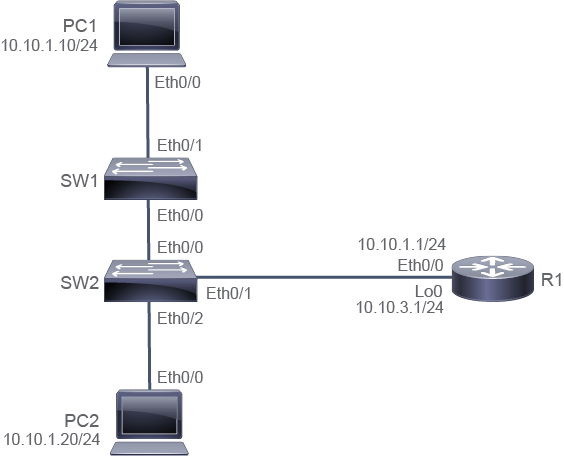
This activity will guide you through the initial configuration of a switch with Cisco IOS Software. The lab is prepared with the devices that are represented in the topology diagram, with the IPv4 addresses depicted in the table. Note that PC1, PC2, SW2, and R1 are fully configured. In this discovery session, your task will be to provide an initial configuration for SW1. During the session, you will configure and verify each of the following settings on SW1:
本活動將引導你完成一台執行 Cisco IOS 軟體之交換器的初始設定。此實驗已備妥拓樸圖中所示的裝置,以及表格中列出的 IPv4 位址。請注意,PC1、PC2、SW2 與 R1 皆已完成完整設定。在這次探索實驗中,你的任務是為 SW1 提供初始設定。在此過程中,你將在 SW1 上設定並驗證以下各項設定:
- Hostname主機名稱
- IPv4 addressIPv4 位址
- IPv4 address of default gateway預設閘道的 IPv4 位址
- Interface descriptions on the interfaces connecting to PC1 and SW2連接至 PC1 與 SW2 之介面上的介面描述
You will also verify switch settings by using different show commands.
你也將使用不同的 show 指令來驗證交換器設定。
Topology
拓樸
Job Aid
工作輔助資料
Device Information
裝置資訊
Device Information Table
裝置資訊表
Device 裝置 | Characteristic 特性 | Value 值 |
PC1 PC1 | IPv4 address IPv4 位址 | 10.10.1.10/24 10.10.1.10/24 |
PC1 PC1 | Default gateway 預設閘道 | 10.10.1.1 10.10.1.1 |
PC2 PC2 | IPv4 address IPv4 位址 | 10.10.1.20/24 10.10.1.20/24 |
PC2 PC2 | Default gateway 預設閘道 | 10.10.1.1 10.10.1.1 |
SW1 SW1 | VLAN 1 IPv4 address VLAN 1 IPv4 位址 | 10.10.1.2/24 10.10.1.2/24 |
SW1 SW1 | Default gateway 預設閘道 | 10.10.1.1 10.10.1.1 |
SW2 SW2 | VLAN 1 IPv4 address VLAN 1 IPv4 位址 | 10.10.1.3/24 10.10.1.3/24 |
SW2 SW2 | Default gateway 預設閘道 | 10.10.1.1 10.10.1.1 |
R1 R1 | Ethernet0/0 IPv4 address Ethernet0/0 IPv4 位址 | 10.10.1.1/24 10.10.1.1/24 |
R1 R1 | Loopback 0 IPv4 address Loopback 0 IPv4 位址 | 10.10.3.1/24 10.10.3.1/24 |
R1 R1 | Password 密碼 | Cisco123 Cisco123 |
Task 1: Configure a Switch from the Command Line
任務 1:從命令列設定交換器
Activity
活動
Access the console of SW1 and use the enable command to access the privileged EXEC mode.
存取 SW1 的主控台,並使用 enable 指令進入特權 EXEC 模式。
On SW1, enter the following command:
在 SW1 上,輸入以下指令:
Switch> enable
Switch#You can use unambiguous abbreviations for commands, such as en. You can also take advantage of tab completion using something like en.
你可以使用不會產生歧義的縮寫來輸入指令,例如 en。你也可以利用 Tab 鍵補齊功能,輸入類似 en 的內容。
The change of the last character in the prompt from > to # is an indication that you have successfully accessed privileged mode.
提示字元最後一個字元由 > 變為 # ,即表示你已成功進入特權模式。
Enter the global configuration mode using the configure terminal command.
使用 configure terminal 指令進入全域設定模式。
On SW1, enter the following command:
在 SW1 上,輸入以下指令:
Switch# configure terminal
Enter configuration commands, one per line.  End with CNTL/Z.
Switch(config)#
The change in prompt to include (config) indicates that you are now in the global configuration mode.
提示字元變更為包含 (config),表示你目前已進入全域設定模式。
Set the hostname of the switch to SW1 by using the hostname command.
使用 hostname 指令,將交換器的主機名稱設定為 SW1。
On SW1, enter the following command:
在 SW1 上,輸入以下指令:
Switch(config)# hostname SW1
SW1(config)#
The prompt reflects the hostname.
提示字元會反映出主機名稱。
In this topology, only VLAN 1 is in use. Set the IPv4 address that SW1 uses on VLAN 1 to 10.10.1.2 with the subnet mask 255.255.255.0. To do so, you will have to enter the interface configuration mode and use the ip address command. You will also need to enable the interface with the no shutdown command.
在此拓樸中,僅使用 VLAN 1。請將 SW1 在 VLAN 1 上使用的 IPv4 位址設定為 10.10.1.2,子網路遮罩為 255.255.255.0。為此,你需要進入介面設定模式並使用 ip address 指令,也需要使用 no shutdown 指令啟用該介面。
On SW1, enter the following command:
在 SW1 上,輸入以下指令:
SW1(config)# interface vlan 1
SW1(config-if)# ip address 10.10.1.2 255.255.255.0
SW1(config-if)# no shutdown
Again, the prompt changes as you move through the hierarchy of CLI modes. The prompt includes config, indicating that you are in the global configuration mode. On the other hand, config-if indicates that you are in the interface configuration mode.
同樣地,當你在 CLI 模式階層中移動時,提示字元會隨之變化。提示字元中包含 config 表示你處於全域設定模式;而 config-if 則表示你處於介面設定模式。
Next, set the SW1 default gateway to 10.10.1.1. You do this action from the global configuration mode. Use the exit command to return to the global configuration mode, then use the ip default-gateway command appropriately.
接著,將 SW1 的預設閘道設定為 10.10.1.1。此動作須在全域設定模式下執行。使用 exit 指令回到全域設定模式,然後適當地使用 ip default-gateway 指令。
On SW1, enter the following command:
在 SW1 上,輸入以下指令:
SW1(config-if)# exit
SW1(config)# ip default-gateway 10.10.1.1
Again, the prompt changes as you move through the hierarchy of CLI modes. The prompt includes config, indicating that you are in the global configuration mode.
同樣地,當你在 CLI 模式階層中移動時,提示字元會隨之變化。提示字元中包含 config 表示你處於全域設定模式。
Finish the configuration requirements by setting the descriptions on interfaces Ethernet 0/0 and Ethernet 0/1, which are links to SW2 and PC1, respectively. The description command is available in the interface configuration mode.
在介面 Ethernet 0/0 與 Ethernet 0/1(分別連接至 SW2 與 PC1)上設定描述,以完成所有設定需求。description 指令可在介面設定模式下使用。
On SW1, enter the following command:
在 SW1 上,輸入以下指令:
SW1(config)# interface ethernet 0/0
SW1(config-if)# description Link to SW2
SW1(config-if)# interface ethernet 0/1
SW1(config-if)# description Link to PC1SW1 is now properly configured. Leave configuration mode and return to privileged EXEC mode.
SW1 現已正確設定完成。請離開設定模式,回到特權 EXEC 模式。
On SW1, enter the following command:
在 SW1 上,輸入以下指令:
SW1(config-if)# end
SW1#
You can accomplish the same thing in several ways within Cisco IOS Software. Instead of using the end command to go from interface configuration mode all the way back to privileged EXEC, you could also have used the exit command twice or simply pressedCtrl-Z.
在 Cisco IOS 軟體中,有多種方式可以達成相同目的。除了使用 end 指令直接從介面設定模式回到特權 EXEC 模式外,你也可以輸入兩次 exit 指令,或直接按Ctrl-Z。
Task 2: Verify the Switch Initial Startup Status
任務 2:驗證交換器初始啟動狀態
Activity
活動
This activity assumes that you have just finished the configuration of the following settings on SW1:
此活動假設你剛完成 SW1 上以下設定:
- Hostname主機名稱
- IPv4 addressIPv4 位址
- IPv4 address of default gateway預設閘道的 IPv4 位址
- Interface descriptions on the interfaces connecting to PC1 and SW2連接至 PC1 與 SW2 之介面上的介面描述
You will now verify these settings on SW1. Consult the topology diagram and configuration specifications table for the complete connectivity and configuration details. Note that PC1, PC2, SW2, and R1 were already fully configured. In this discovery task, you will focus solely on SW1. But feel free to explore the other devices on your own.
你現在將在 SW1 上驗證這些設定。請參閱拓樸圖與設定規格表,以取得完整的連線與設定詳細資訊。請注意,PC1、PC2、SW2 與 R1 皆已完成完整設定。在此探索任務中,你將只專注於 SW1,但也歡迎自行探索其他裝置。
On SW1, verify the correct IPv4 address configuration on interface VLAN1. To verify proper IPv4 configuration, you have several options. Often, these include directly viewing the configuration, showing operational status, and verifying behavior. You will utilize all three methodologies here.
在 SW1 上,驗證介面 VLAN1 上正確的 IPv4 位址設定。要驗證正確的 IPv4 設定,你有多種選擇,通常包括直接檢視設定、顯示運作狀態,以及驗證行為。你將在此使用這三種方法。
One way that you can verify that the configuration is by simply viewing it with the show running-config command. You can pare down the output of this command by piping it to the include or section filter. But, because viewing the configuration of a particular interface is a common exercise, you can specify an interface directly to the show running-config command. Give the following a try on SW1.
驗證設定的其中一種方式,是直接使用 show running-config 指令檢視它。你可以透過管線輸出至 include 或 section 篩選器,來精簡此指令的輸出結果。不過,由於檢視特定介面的設定是常見的操作,你可以直接對 show running-config 指令指定介面。請在 SW1 上試試以下操作。
SW1# show running-config interface vlan 1
Building configuration...

Current configuration : 59 bytes
!
interface Vlan1
 ip address 10.10.1.2 255.255.255.0
endAnother way to verify the IPv4 address configuration is by viewing the status of interfaces. Use the show ip interface brief command to see the status of interface VLAN1. Verify that it is up and that the IPv4 address is correct.
另一種驗證 IPv4 位址設定的方式,是檢視介面的狀態。使用 show ip interface brief 指令查看介面 VLAN1 的狀態,確認其為 up 且 IPv4 位址正確。
SW1# show ip interface brief
Interface              IP-Address      OK? Method Status                Protocol
<... output omitted ...>
Vlan1                  10.10.1.2       YES manual up                    up
You might find that looking at the configuration or at system status is useful, but often the most satisfying method is to verify the system behavior. If the interface has been properly configured, you should be able to ping other IPv4 addresses on the local subnet. Try to ping PC1, PC2, and R1.
你可能會發現檢視設定或系統狀態很有幫助,但通常最令人滿意的方法是驗證系統行為。若介面已正確設定,你應該能夠 ping 通本地子網路上的其他 IPv4 位址。請嘗試 ping PC1、PC2 與 R1。
SW1# ping 10.10.1.10
Type escape sequence to abort.
Sending 5, 100-byte ICMP Echos to 10.10.1.10, timeout is 2 seconds:
.!!!!
Success rate is 80 percent (4/5), round-trip min/avg/max = 1/2/5 ms
SW1# ping 10.10.1.20
Type escape sequence to abort.
Sending 5, 100-byte ICMP Echos to 10.10.1.20, timeout is 2 seconds:
.!!!!
Success rate is 80 percent (4/5), round-trip min/avg/max = 1/1/1 ms
SW1# ping 10.10.1.1
Type escape sequence to abort.
Sending 5, 100-byte ICMP Echos to 10.10.1.1, timeout is 2 seconds:
!!!!!
Success rate is 100 percent (5/5), round-trip min/avg/max = 1/202/1009 ms
The ping command will send five Internet Control Message Protocol (ICMP) echo requests and wait for a reply after each request. A period (.) indicates a timeout on the reply. An exclamation point (!) indicates that the reply was received.
ping 指令會傳送五個網際網路控制訊息協定(ICMP)回應請求,並在每次請求後等待回覆。句點(.)表示回覆逾時;驚嘆號(!)表示已收到回覆。
It is common for a timeout to occur on the first echo request, but you may not see it. It happens when the local system does not have an entry in its Address Resolution Protocol (ARP) table for the remote system.
第一次回應請求發生逾時是很常見的情況,但你可能不會注意到。這是因為本地系統的位址解析協定(ARP)表中,尚未有遠端系統的項目。
A ping can provide rudimentary performance indications. Timeouts are obviously bad, but the command also displays response time statistics for the replies that were received.
ping 可以提供初步的效能指標。逾時顯然不理想,但此指令也會顯示已收到回覆的回應時間統計資料。
Now verify that the default gateway is configured appropriately. Again, you have multiple options.
現在驗證預設閘道是否已正確設定。同樣地,你有多種方式可以選擇。
View the running configuration, including only lines that include the string "default."
檢視執行中設定,僅顯示包含字串「default」的行。
On SW1, enter the following command:
在 SW1 上,輸入以下指令:
SW1# show running-config | include default
ip default-gateway 10.10.1.1
Besides looking at the configuration, you can verify the status. Use the show ip route command to view the IP routing table of SW1.
除了檢視設定外,你也可以驗證狀態。使用 show ip route 指令檢視 SW1 的 IP 路由表。
SW1# show ip route
Default gateway is 10.10.1.1
Host               Gateway           Last Use    Total Uses  Interface
ICMP redirect cache is empty
Again, you can also verify system behavior. If your default gateway is properly set, you should be able to ping IPv4 addresses on remote subnets. Try to ping address 10.10.3.1, which is on the other side of R1. SW1 will use its default gateway to get to any address, not on its local subnet.
同樣地,你也可以驗證系統行為。若預設閘道設定正確,你應該能夠 ping 通遠端子網路上的 IPv4 位址。請嘗試 ping 位址 10.10.3.1(位於 R1 另一側)。對於不在本地子網路上的任何位址,SW1 都會使用其預設閘道來到達。
SW1# ping 10.10.3.1
Type escape sequence to abort.
Sending 5, 100-byte ICMP Echos to 10.10.3.1, timeout is 2 seconds:
!!!!!
Success rate is 100 percent (5/5), round-trip min/avg/max = 1/203/1012 mThe last thing to verify is the description of the appropriate interfaces. You should have configured descriptions on both Ethernet 0/0 and Ethernet 0/1. As usual, there are multiple strategies that you can use for verification.
最後要驗證的是適當介面的描述。你應已在 Ethernet 0/0 與 Ethernet 0/1 上設定描述。與往常一樣,有多種驗證策略可供使用。
View the running configuration, but use the section filter to view sections that include the "0/0" string. Repeat this action for the "0/1" string.
檢視執行中設定,並使用 section 篩選器來檢視包含「0/0」字串的區段,接著針對「0/1」字串重複此操作。
On SW1, enter the following command:
在 SW1 上,輸入以下指令:
SW1# show running-config | section 0/0
interface Ethernet0/0
 description Link to SW2
 duplex auto
SW1# show running-config | section 0/1
interface Ethernet0/1
 description Link to PC1
 duplex auto
Verify the system status by using the show interface status command.
使用 show interface status 指令驗證系統狀態。
SW1# show interfaces status
Port        Name          Status       Vlan       Duplex  Speed Type
Et0/0       Link to SW2   connected    trunk        auto   auto unknown
Et0/1       Link to PC1   connected    1            auto   auto unknown
<... output omitted ...>