Static NAT is a one-to-one mapping between a local address and global address. It can apply to both inside and outside addresses; however, you will focus only on inside addresses.
靜態 NAT 是本地位址與全域位址之間的一對一對映。它可以套用在內部與外部位址上,不過本節將只聚焦於內部位址。
As shown in the figure, static mappings define a global version of the local addresses. The mapping includes local to global mapping for both inside and outside addresses. When only inside address translation is performed, outside local and outside global address are the same. In an outbound packet (a packet leaving an inside network and going to an outside network), the inside address is present in the source address IPv4 header field, and the outside address is present in the destination address IPv4 header field.
如圖所示,靜態對映定義了本地位址對應的全域版本。此對映包含內部與外部位址各自的本地到全域對映。當只執行內部位址轉譯時,外部本地位址與外部全域位址是相同的。在出向封包(離開內部網路、前往外部網路的封包)中,內部位址位於來源位址 IPv4 標頭欄位,外部位址則位於目的位址 IPv4 標頭欄位。
Static mappings are present from the moment they are manually configured until they are manually removed. They do not have a timeout period defined. Because the mappings are always present, the border device can perform translation for inside to outside traffic and also for the outside to inside traffic, regardless of whether it was first initiated from the inside. Remember that dynamic NAT does not allow requests initiated from the outside. This "always present" property of static mappings allows external devices to initiate connections to internal devices. Static NAT is especially useful when you want to make a company's resources available to external networks. An example of such a resource is a company's web server. With static NAT, you ensure that the web server will be presented to the outside world with the same global address, so it will always be accessible at that address.
靜態對映從手動設定的那一刻起就會存在,直到手動移除為止,並沒有定義逾時期限。由於對映一律存在,邊界裝置可以同時處理內部到外部的流量,以及外部到內部的流量,無論該通訊最初是否由內部發起。請記住,動態 NAT 不允許由外部發起的請求。靜態對映這種「永遠存在」的特性,讓外部裝置得以主動對內部裝置發起連線。當你想讓公司的資源可供外部網路存取時,靜態 NAT 特別有用,例如公司的網頁伺服器就是這樣的資源。使用靜態 NAT,你可以確保該網頁伺服器一律以相同的全域位址呈現給外部世界,因此該位址將永遠可供存取。
The figure illustrates a router that is performing inside address translation when static NAT is configured. Outside addresses, local and global, are the same. The router is translating the source IPv4 address from a local to a global source IPv4 address. PC1 is initiating communication with the SRV1 server.
圖中說明的是一台在設定靜態 NAT 時執行內部位址轉譯的路由器。外部位址(本地與全域)是相同的。路由器會將來源 IPv4 位址從本地位址轉譯為全域來源 IPv4 位址。PC1 正在對 SRV1 伺服器發起通訊。
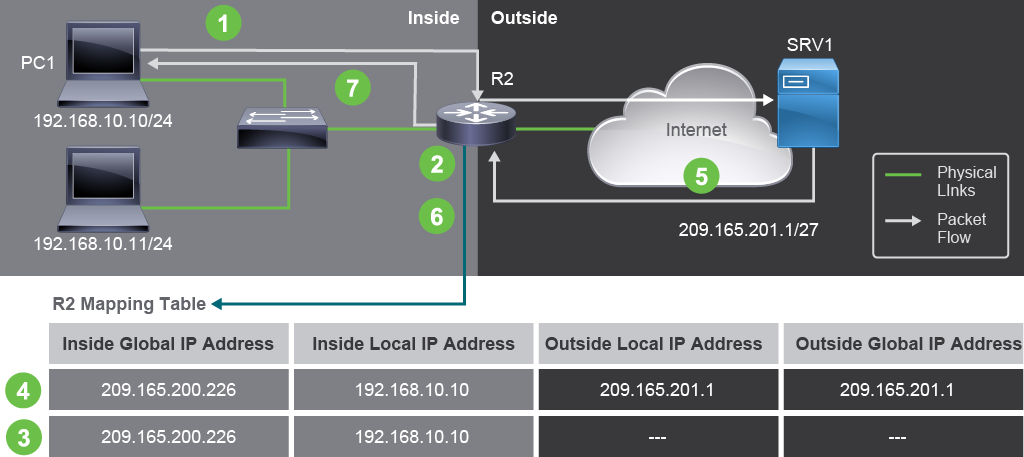
In the figure, you can see these steps:
在圖中,你可以看到以下步驟:
- The user at PC1 with IPv4 address 192.168.10.10 wants to open a connection to SRV1 using its public IPv4 address 209.165.201.1.位於 PC1、IPv4 位址為 192.168.10.10 的使用者,想要使用 SRV1 的公有 IPv4 位址 209.165.201.1 與其建立連線。
- The first packet from 192.168.10.10 that the router receives on its interface in the inside network causes the router to check its NAT table.路由器在其內部網路介面上收到來自 192.168.10.10 的第一個封包,觸發路由器檢查其 NAT 表。
- For static NAT, the router finds a mapping that specifies that 192.168.10.10 IPv4 address should be replaced with 209.165.200.226. You can see the mapping in the table under the topology. This mapping was configured previously by the network administrator. Note that configuration-based entries in the mapping table do not have values for the outside parameters.對於靜態 NAT,路由器會找到一筆對映,指定應將 192.168.10.10 這個 IPv4 位址替換為 209.165.200.226。你可以在拓樸下方的表格中看到此對映,這是網路管理員先前已設定好的。請注意,以設定為基礎建立的對映表項目,並沒有外部參數的數值。
- The source IPv4 address of the packet is swapped with the inside global IPv4 address. At this point, the new mapping that has the outside values is created. Since only inside NAT is performed, both local and global outside IPv4 addresses are the same, destination IPv4 address 209.165.201.1.封包的來源 IPv4 位址會被替換為內部全域 IPv4 位址。此時,系統會建立一筆帶有外部參數值的新對映。由於只執行內部 NAT,外部本地與外部全域 IPv4 位址相同,皆為目的 IPv4 位址 209.165.201.1。
- SRV1 receives the packet and responds to it. Since SRV1 sees the 209.165.200.226 as the source IPv4 address, it addresses its response to that address—the inside global address of PC1.SRV1 收到封包並做出回應。由於 SRV1 看到的來源 IPv4 位址是 209.165.200.226,因此它會將回應傳送至該位址——也就是 PC1 的內部全域位址。
- When the router receives the response packet on its outside interface, it will check the mapping table for the 209.165.200.226 inside global entry. Since the entry exists, the router will replace the destination IPv4 address in the header with the inside local address 192.168.10.10 found in the mapping. The packet is then routed based on the 192.168.10.10 destination address and forwarded out of the router's interface in the inside network.當路由器在其外部介面收到回應封包時,會在對映表中查詢 209.165.200.226 這個內部全域項目。由於該項目存在,路由器會將標頭中的目的 IPv4 位址替換為對映中找到的內部本地位址 192.168.10.10。接著封包會依據目的位址 192.168.10.10 進行路由,並從路由器在內部網路的介面轉送出去。
- PC1 receives a packet at its inside local address 192.168.10.10 and continues the conversation. The router performs Steps 2 through 6 for each packet.PC1 在其內部本地位址 192.168.10.10 收到封包,並繼續進行對話。路由器對每個封包都會重複執行步驟 2 到 6。
The example illustrated the inside address translation. In the same manner, the outside address could be translated, as long as the outside local to outside global mapping is configured. In the outbound packet, the outside address is the destination IPv4 address.
此範例說明的是內部位址轉譯。同樣地,只要設定好外部本地到外部全域的對映,外部位址也可以被轉譯。在出向封包中,外部位址是目的 IPv4 位址。
Port Forwarding
連接埠轉發(Port Forwarding)
Besides configuring static mapping for IPv4 addresses, it is possible to configure static mapping that also involves TCP and UDP port numbers. Port numbers can be used to identify network services, because network services use application protocols, which use different port numbers. Port forwarding uses this identifying property of port numbers. Port forwarding specifies a static mapping that translates both inside local IPv4 address and port number to inside global IPv4 address and port number. As with all static mappings, port forwarding mapping will always be present at the border device, and when packets arrive from outside networks, the border device would be able to translate global address and port to corresponding local address and port.
除了為 IPv4 位址設定靜態對映之外,也可以設定同時涉及 TCP 與 UDP 連接埠號的靜態對映。連接埠號可用來識別網路服務,因為網路服務使用的應用程式通訊協定會使用不同的連接埠號。連接埠轉發正是利用連接埠號的這種識別特性。連接埠轉發指定了一筆靜態對映,將內部本地 IPv4 位址與連接埠號一併轉譯為內部全域 IPv4 位址與連接埠號。與所有靜態對映一樣,連接埠轉發的對映會一律存在於邊界裝置上,當封包從外部網路到來時,邊界裝置就能將全域位址與連接埠轉譯為對應的本地位址與連接埠。
Port forwarding allows users on the internet to access internal servers by using the WAN (ISP facing) address of the border device and a selected outside port number. To the outside, the border device appears to be providing the service. Outside devices are not aware of the mapping that exists between the border device and the inside server. The static nature of the mapping ensures that any traffic received at the specified port will be translated and then forwarded to the internal server. The internal servers are typically configured with RFC 1918 private IPv4 addresses.
連接埠轉發讓網際網路上的使用者能透過邊界裝置面向 WAN(面向 ISP)的位址及選定的外部連接埠號來存取內部伺服器。對外部而言,邊界裝置本身看起來就是在提供該服務,外部裝置並不知道邊界裝置與內部伺服器之間存在的對映關係。此對映的靜態特性確保任何送達指定連接埠的流量都會被轉譯並轉送至內部伺服器。內部伺服器通常設定為使用 RFC 1918 私有 IPv4 位址。
Because the mapping in port forwarding is static and always present, a request from the internet will always be "forwarded" to the inside server. The only condition for a packet to be forwarded is that it must be properly addressed—the destination IPv4 address must be the inside global address in the mapping and the destination port number must match the chosen and configured port number. So the administrators can choose any value for the global port number. For instance, instead of specifying port 80 for web service, the administrator can choose to specify 8080. When you wish to specify an arbitrary value for web service, the browser must be instructed to use this value, otherwise, the browser would always attempt to connection to the well-defined port number 80. To instruct the browser to use unconventional port number, specify the URL in the following format URL:port_number, for instance http://www.example.com: 8080.
由於連接埠轉發中的對映是靜態且一律存在的,來自網際網路的請求永遠會被「轉發」到內部伺服器。封包能被轉發的唯一條件,就是位址必須正確:目的 IPv4 位址必須是對映中的內部全域位址,且目的連接埠號必須符合所選擇並設定的連接埠號。因此管理員可以為全域連接埠號選擇任意數值。例如,管理員可以選擇指定 8080,而不是為網頁服務指定連接埠 80。若想為網頁服務指定任意數值,就必須指示瀏覽器使用這個數值,否則瀏覽器一律會嘗試連線至公認的連接埠號 80。若要指示瀏覽器使用非慣例的連接埠號,需以下列格式指定 URL:URL:port_number,例如 http://www.example.com: 8080。
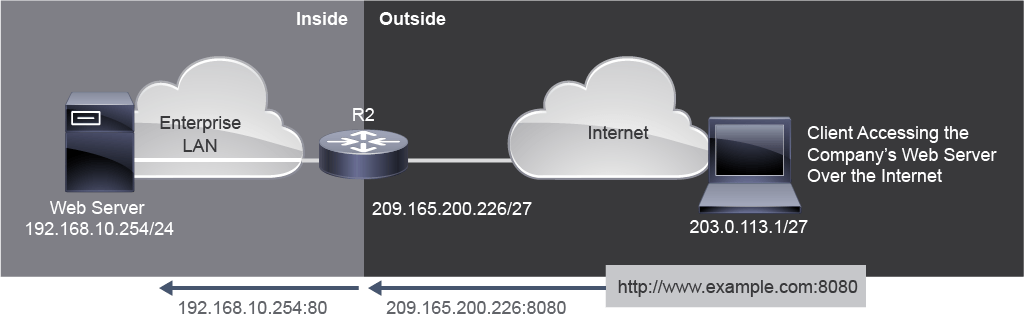
The figure shows an example of port forwarding on router R2. IPv4 address 192.168.10.254 is the inside local IPv4 address of the web server listening on port 80. Users will access this internal web server using the global IPv4 address 209.165.200.226, a globally unique public IPv4 address. In this case, it is the address of the outside interface of R2. The global port is configured as 8080. This port will be the destination port used, along with the global IPv4 address of 209.165.200.226 to access the internal web server.
圖中顯示了在路由器 R2 上設定連接埠轉發的範例。IPv4 位址 192.168.10.254 是監聽連接埠 80 的網頁伺服器的內部本地 IPv4 位址。使用者將透過全域 IPv4 位址 209.165.200.226(一個全域唯一的公有 IPv4 位址)來存取這台內部網頁伺服器,在此案例中,該位址即為 R2 外部介面的位址。全域連接埠設定為 8080,此連接埠將與全域 IPv4 位址 209.165.200.226 一起作為存取內部網頁伺服器所使用的目的連接埠。