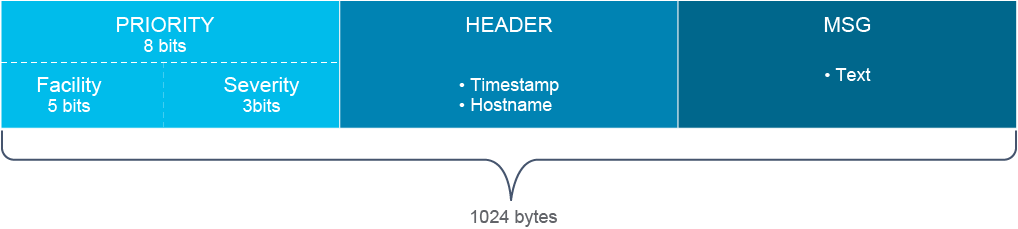
The full format of a syslog message as sent by a device has three distinct parts:
裝置發出的 syslog 訊息完整格式包含三個獨立部分:
- PRI (priority)PRI(優先權)
- Header標頭(Header)
- MSG (message text)MSG(訊息文字)
The syslog packet size is limited to 1024 bytes.
syslog 封包大小限制為 1024 位元組。
Priority
優先權(Priority)
Priority is an 8-bit number and its value represents the facility and severity of the message. The three least significant bits represent the severity of the message (with 3 bits, you can represent eight different severity levels), and the upper 5 bits represent the facility of the message.
優先權是一個 8 位元的數值,代表訊息的機能(facility)與嚴重性(severity)。最低有效的 3 個位元代表訊息的嚴重性(3 位元可表示 8 種不同的嚴重等級),高位的 5 個位元代表訊息的機能。
You can use the facility and severity values to apply certain filters on the events in the syslog daemon.
你可以使用機能與嚴重性數值,對 syslog 常駐程式(daemon)中的事件套用特定篩選條件。
Facility
機能(Facility)
Syslog messages are broadly categorized based on the sources that generate them. These sources can be the operating system, process, or an application. The source is defined in a syslog message by a numeric value.
syslog 訊息會依據產生來源大致分類,來源可以是作業系統、處理程序或應用程式。syslog 訊息中以數值代表來源。
These integer values are called facilities. The local use facilities are not reserved; the processes and applications that do not have preassigned facility values can choose any of the eight local use facilities. As such, Cisco devices use one of the local use facilities for sending syslog messages.
這些整數值稱為機能(facility)。本地使用機能(local use facility)並未保留給特定用途;沒有預先指定機能值的處理程序與應用程式,可以選用八個本地使用機能中的任一個。因此,Cisco 裝置會使用其中一個本地使用機能來傳送 syslog 訊息。
By default, Cisco IOS Software-based devices use facility local7. Most Cisco devices provide options to change the facility level from their default value.
根據預設,以 Cisco IOS 軟體為基礎的裝置使用機能 local7。大多數 Cisco 裝置都提供選項,可以變更機能等級的預設值。
This table lists all facility values.
下表列出所有機能值。
Numerical Code 數值代碼 | Facility 機能 |
0 0 | Kernel messages 核心訊息 |
1 1 | User-level messages 使用者層級訊息 |
2 2 | Mail system 郵件系統 |
3 3 | System daemons 系統常駐程式 |
4 4 | Security/authorization messages 安全性/授權訊息 |
5 5 | Messages generated internally by syslogd 由 syslogd 內部產生的訊息 |
6 6 | Line printer subsystem 列印子系統 |
7 7 | Network news subsystem 網路新聞子系統 |
8 8 | UUCP subsystem UUCP 子系統 |
9 9 | Clock daemon 時鐘常駐程式 |
10 10 | Security/authorization messages 安全性/授權訊息 |
11 11 | FTP daemon FTP 常駐程式 |
12 12 | NTP subsystem NTP 子系統 |
13 13 | Log audit 記錄稽核(Log audit) |
14 14 | Log alert 記錄警示(Log alert) |
15 15 | Clock daemon (note 2) 時鐘常駐程式(附註 2) |
16 16 | Local use 0 (local0) 本地使用 0(local0) |
17 17 | Local use 1 (local1) 本地使用 1(local1) |
18 18 | Local use 2 (local2) 本地使用 2(local2) |
19 19 | Local use 3 (local3) 本地使用 3(local3) |
20 20 | Local use 4 (local4) 本地使用 4(local4) |
21 21 | Local use 5 (local5) 本地使用 5(local5) |
22 22 | Local use 6 (local6) 本地使用 6(local6) |
23 23 | Local use 7 (local7) 本地使用 7(local7) |
Severity
嚴重性(Severity)
The log source or facility (a router or mail server, for example) that generates the syslog message specifies the severity of the message using single-digit integers 0-7.
產生 syslog 訊息的記錄來源或機能(例如路由器或郵件伺服器),會以 0 到 7 的單位數整數指定訊息的嚴重性。
The severity levels are often used to filter out messages which are less important, to make the amount of messages more manageable. Severity levels define how severe the issue reported is, which is reflected in the severity definitions in the table.
嚴重性等級通常用來篩掉較不重要的訊息,以使訊息數量更容易管理。嚴重性等級定義所回報問題的嚴重程度,如下表中的嚴重性定義所示。
The following table explains the eight levels of message severity, from the most severe level to the least severe level.
下表說明訊息嚴重性的八個等級,由最嚴重排到最不嚴重。
Header
標頭(Header)
The header contains these fields:
標頭包含下列欄位:
- Time stamp時間戳記
- Hostname主機名稱
Time Stamp
時間戳記
The time stamp field is used to indicate the local time, in MMM DD HH:MM:SS format, of the sending device when the message is generated.
時間戳記欄位用來表示訊息產生時,發送裝置的本地時間,格式為 MMM DD HH:MM:SS。
For the time stamp information to be accurate, it is good administrative practice to configure all the devices to use the Network Time Protocol (NTP). In recent years, however, the time stamp and hostname in the header field have become less relevant in the syslog packet itself because the syslog server will time stamp each received message with the server time when the message is received, as well as the IP address (or hostname) of the sender, taken from the source IP address of the packet.
為使時間戳記資訊準確,建議所有裝置都設定使用網路時間協定(Network Time Protocol,NTP),這是良好的管理實務。然而近年來,syslog 封包本身標頭欄位中的時間戳記與主機名稱已較不重要,因為 syslog 伺服器在收到訊息時,會以伺服器時間為每則收到的訊息加上時間戳記,並記錄由封包來源 IP 位址取得的傳送端 IP 位址(或主機名稱)。
A correct sequence of events is vital for troubleshooting in order to accurately determine the cause of an issue. Often an informational message can indicate the cause of a critical message. The events can follow each other by milliseconds.
正確的事件順序對疑難排解至關重要,才能準確判斷問題的原因。資訊性訊息通常能指出嚴重訊息的成因。這些事件之間可能只相隔幾毫秒。
Hostname
主機名稱
The hostname field consists of the host name (as configured on the host) or the IP address. In devices such as routers or firewalls, which have multiple interfaces, syslog uses the IP address of the interface from which the message is transmitted.
主機名稱欄位包含主機名稱(依主機上的設定)或 IP 位址。在路由器或防火牆等擁有多個介面的裝置上,syslog 會使用傳送訊息之介面的 IP 位址。
Many people can get confused by "host name" and "hostname." The latter is typically associated with a Domain Name System (DNS) lookup. If the device includes its "host name" in the actual message, it may be (and often is) different than the actual DNS hostname of the device. A properly configured DNS system should include reverse lookups to help facilitate proper sourcing for incoming messages.
許多人會混淆「host name」與「hostname」。後者通常與網域名稱系統(Domain Name System,DNS)查詢有關。如果裝置在實際訊息中包含自己的「host name」,它可能(且經常)與該裝置真正的 DNS 主機名稱不同。正確設定的 DNS 系統應包含反向查詢,以協助對傳入訊息做正確的來源判定。
Syslog MSG
Syslog MSG
The message is the text of the syslog message, with additional information about the process that generated the message.
訊息是 syslog 訊息的文字內容,並附帶產生該訊息的處理程序的額外資訊。
How to Read System Messages
如何解讀系統訊息
The general format of syslog messages that the syslog process on Cisco IOS Software generates by default are structured as follows:
Cisco IOS 軟體上的 syslog 處理程序預設產生的 syslog 訊息一般格式如下:
seq no:timestamp: %facility-severity-MNEMONIC:descriptionThe following table explains the items that a Cisco IOS Software syslog message contains.
下表說明 Cisco IOS 軟體 syslog 訊息所包含的項目。
Item 項目 | Explanation 說明 |
Seq no Seq no | Log message sequence number 記錄訊息序號 |
timestamp timestamp | Date and time of the message or event 訊息或事件的日期與時間 |
Facility Facility | The facility to which the message refers (for example, SNMP, system). 訊息所屬的機能(例如 SNMP、system)。 |
Severity Severity | Single-digit code from 0 to 7 that is the severity of the message 0 到 7 的單位數代碼,代表訊息的嚴重性 |
MNEMONIC MNEMONIC | The text string that uniquely describes the message such as "UPDOWN" 唯一描述該訊息的文字字串,例如「UPDOWN」 |
Description Description | The text string containing detailed information about the event that the message is reporting 包含該訊息所回報事件詳細資訊的文字字串 |
An example of a syslog message that is informing the administrator that FastEthernet0/22 came up follows (note that this message does not contain a sequence number):
以下是一則通知管理員 FastEthernet0/22 已啟用的 syslog 訊息範例(請注意此訊息不含序號):
*Apr 22 11:05:55.423: %LINEPROTO-5-UPDOWN: Line protocol on Interface FastEthernet0/22, changed state to upNote these elements of the syslog message:
請注意此 syslog 訊息的下列元素:
- LINEPROTO is the facility code.LINEPROTO 是機能代碼。
- 5 is the severity level.5 是嚴重性等級。
- UPDOWN is the mnemonic code.UPDOWN 是助憶代碼(mnemonic)。
- "Line protocol on Interface FastEthernet0/22, changed state to up" is the description.「Line protocol on Interface FastEthernet0/22, changed state to up」是說明文字。
This table explains some of the facility codes that you may see in a Cisco IOS Software syslog message:
下表說明你可能在 Cisco IOS 軟體 syslog 訊息中看到的部分機能代碼:
Code 代碼 | Facility 機能 |
LINEPROTO LINEPROTO | Line Protocol 線路協定 |
LINK LINK | Data Link 資料鏈結 |
OSPF OSPF | Open Shortest Path First (OSPF) 開放式最短路徑優先(OSPF) |
CDP CDP | Cisco Discovery Protocol Cisco 探索協定(CDP) |
SYS SYS | Operating System 作業系統 |
Note that sequence numbers are not enabled by default. You can change this behavior with the following commands:
請注意,序號預設並未啟用。你可以使用下列指令變更此行為:
Router(config)# service sequence-numbers
Router(config)# end
Router#
000047: Apr 10 05:24:07.660: %SYS-5-CONFIG_I: Configured from console by console
Note that time stamps are enabled by default because it is much easier to identify the problem in a chronological order if you can see the time stamps on syslog messages. The time stamp can be turned off with the following command:
請注意,時間戳記預設是啟用的,因為若能在 syslog 訊息上看到時間戳記,較容易依時間順序判斷問題所在。可使用下列指令關閉時間戳記:
Router(config)# no service timestamps
Router(config)# end
Router#
000048: %SYS-5-CONFIG_I: Configured from console by console
Within Cisco IOS Software, the severity levels that are associated with events often relate more to device health and network management than to security. For example, the following four messages are listed in order of severity:
在 Cisco IOS 軟體中,與事件相關的嚴重性等級,通常較與裝置健康狀態及網路管理相關,而非安全性。舉例來說,下列四則訊息依嚴重性排列如下:
%PLATFORM_ENV-1-PWR: Faulty internal power supply detected
%LINK-3-UPDOWN: Interface FastEthernet0/0, changed state to down
%SYS-5-CONFIG_I: Configured from console by console
%SEC-6-IPACCESSLOGDP: list dmz-acl denied icmp 10.10.10.2 -> 10.10.99.1
Obviously, a power supply failure (severity level 1) is an urgent issue, as it affects the operating health of a device and of the network in which it resides. An interface failure (severity level 3) is generally less severe than a complete device failure, but it can certainly affect the device and the network. A configuration change (severity level 5) is routine in network maintenance and is assigned a relatively low severity. But from a security perspective, auditing configuration changes is very important. The last example is a logged hit on an access control list (ACL). If a security administrator has specified the log option on a particular line in the ACL, this event is probably significant. However, the severity level is only a 6. It is important to note that the severity levels on syslog messages are not necessarily prioritized according to security.
顯然,電源供應器故障(嚴重性等級 1)是一個緊急問題,因為它會影響裝置及所在網路的運作健康狀態。介面故障(嚴重性等級 3)通常沒有整台裝置故障那麼嚴重,但仍會影響裝置與網路。設定變更(嚴重性等級 5)在網路維護中屬於例行事務,因此指定較低的嚴重性。但從安全性角度來看,稽核設定變更非常重要。最後一個範例是存取控制清單(ACL)上記錄到的一次命中。如果安全性管理員在 ACL 特定行上指定了 log 選項,此事件可能相當重要,但其嚴重性等級只有 6。務必注意,syslog 訊息的嚴重性等級並不一定按安全性重要程度排序。
Syslog Configuration
Syslog 設定
By default, the console receives debugging messages and numerically lower levels. To change the level of messages that are sent to the console, use thelogging console level command. If severity level 0 is configured, it means that only emergency-level messages will be displayed. For example, if severity level 4 is configured, all messages with severity levels up to 4 will be displayed (Emergency, Alert, Critical, Error, and Warning).
根據預設,主控台會收到偵錯(debugging)等級以下的所有數值較低等級訊息。若要變更傳送到主控台的訊息等級,可使用logging console 等級指令。若設定嚴重性等級為 0,代表只會顯示緊急(emergency)等級的訊息。舉例來說,若設定嚴重性等級為 4,則會顯示所有嚴重性等級 4 以內的訊息(緊急、警報、嚴重、錯誤、警告)。
While logging to the console is enabled by default, it is very expensive in terms of CPU resources on a Cisco IOS device. The reason is that the console is a character-by-character serial device. Each character that is displayed to the console requires a CPU interrupt. As such, it is common to disable logging to the console when logging to a centralized syslog server is configured.
雖然預設會啟用主控台記錄功能,但這在 Cisco IOS 裝置上非常消耗 CPU 資源。原因是主控台是逐字元傳輸的序列裝置,每顯示一個字元到主控台就需要一次 CPU 中斷。因此,在設定將訊息記錄到集中式 syslog 伺服器時,通常會停用主控台記錄功能。
To log messages to a syslog server, specify a syslog server host as a destination for syslog messages and limit the syslog messages that are sent to the syslog server based on severity, as shown in the example:
若要將訊息記錄到 syslog 伺服器,須指定一台 syslog 伺服器主機作為 syslog 訊息的目的地,並依嚴重性限制傳送到 syslog 伺服器的訊息,如下列範例所示:
Router(config)# logging host 10.1.1.10
Router(config)# logging trap informational
Router(config)# logging source-interface Loopback0
The example shows a configuration for logging syslog messages to a syslog server with the IPv4 address 10.1.1.10. The router will send syslog messages with interface Loopback0’s IPv4 address. The details of the commands used are shown in the table.
此範例展示將 syslog 訊息記錄到 IPv4 位址為 10.1.1.10 的 syslog 伺服器的設定。路由器會使用介面 Loopback0 的 IPv4 位址傳送 syslog 訊息。下表說明所使用指令的細節。
Command 指令 | Description 說明 |
logging {hostname | ip-address}logging {hostname | ip-address} | Identifies a syslog server host to receive logging messages. 指定用來接收記錄訊息的 syslog 伺服器主機。 |
logging host {hostname | ip-address}logging host {hostname | ip-address} | Accomplishes the same thing as the logging ip-address command, except it allows you to change the default port and protocol.與 logging ip-address 指令效果相同,但可讓你變更預設連接埠與通訊協定。 |
logging trap severitylogging trap severity | Limits the syslog messages that are sent to the syslog server. It limits the messages based on severity. 限制傳送到 syslog 伺服器的訊息,依嚴重性限制訊息數量。 |
logging source-interface interfacelogging source-interface interface | Identifies which interface is used as source IP address, when syslog messages will be sent. 指定傳送 syslog 訊息時,作為來源 IP 位址所使用的介面。 |
The Cisco IOS devices can also send syslog messages to multiple syslog servers. To do so, you have to enter multiple logging host ip-address commands, each with a different IP address.
Cisco IOS 裝置也可以將 syslog 訊息傳送到多台 syslog 伺服器。若要這麼做,須輸入多筆 logging host ip-address 指令,每筆使用不同的 IP 位址。
If you want to check syslog messages that are stored in the router, you can use the show logging command. This command also shows you how many messages are logged to various destinations, and what severity level is configured for that destination.
若要檢查儲存在路由器中的 syslog 訊息,可以使用 show logging 指令。此指令也會顯示各目的地已記錄多少則訊息,以及該目的地所設定的嚴重性等級。
R1# show logging
Syslog logging: enabled (0 messages dropped, 3 messages rate-limited, 0 flushes, 0 overruns, xml disabled, filtering disabled)
No Active Message Discriminator.
No Inactive Message Discriminator.
 Console logging: level debugging, 29 messages logged, xml disabled,
                     filtering disabled
 Monitor logging: level debugging, 0 messages logged, xml disabled,
                     filtering disabled
 Buffer logging:  level debugging, 29 messages logged, xml disabled,
                    filtering disabled
    Exception Logging: size (4096 bytes)
    Count and timestamp logging messages: disabled
    Persistent logging: disabled
 No active filter modules.
 Trap logging: level informational, 32 message lines logged
 Logging to 10.1.1.10  (udp port 514, audit disabled,
              link up),
 5 message lines logged,
              0 message lines rate-limited,
              0 message lines dropped-by-MD,
              xml disabled, sequence number disabled
              filtering disabled
        Logging Source-Interface:       VRF Name:
        Loopback0
Log Buffer (4096 bytes):
<... output omitted ...>
*Apr 10 14:37:21.630: %SYS-5-CONFIG_I: Configured from console by console
*Apr 10 14:37:23.019: %LINK-3-UPDOWN: Interface Ethernet0/1, changed state to up
*Apr 10 14:37:24.023: %LINEPROTO-5-UPDOWN: Line protocol on Interface Ethernet0/1, changed state to up
<... output omitted ...>
The output indicates that R1 is now sending syslog messages to 10.1.1.10 with the minimum severity threshold set to "informational." The output also indicates that five messages have been sent to the syslog server. Syslog uses UDP for transport and is inherently not reliable. If these five messages are lost somewhere in the transport path, there is no mechanism to recognize the lost message or to request a retransmission.
輸出顯示 R1 目前正將 syslog 訊息傳送到 10.1.1.10,且最低嚴重性門檻設為「informational」。輸出也顯示已傳送五則訊息到該 syslog 伺服器。Syslog 使用 UDP 傳輸,本質上並不可靠。若這五則訊息在傳輸路徑中遺失,並沒有機制可偵測遺失的訊息或要求重新傳送。
There is a local logging buffer. It is in its default state, with a severity threshold of "debugging" (severity 7) and sized at 4096 bytes. In the sample output, 29 messages have been logged in the local buffer. The end of the show logging command output displays the contents of the buffer. At the start, the buffer is mostly filled with the messages that were produced when R1 booted. At the end of the buffer, however, are the three syslog messages that were produced when a no shutdown command was issued on the router.
本地有一個記錄緩衝區。在預設狀態下,其嚴重性門檻為「debugging」(嚴重性 7),大小為 4096 位元組。在範例輸出中,本地緩衝區已記錄 29 則訊息。show logging 指令輸出的最後部分會顯示緩衝區的內容。緩衝區開頭大多是 R1 開機時所產生的訊息;緩衝區結尾則是在路由器上執行 no shutdown 指令時所產生的三則 syslog 訊息。