FASTLab 4: Implement IPv6 Static Routing
FASTLab 4:實作 IPv6 靜態路由
Scenario
情境
You are piloting the IPv6 implementation. The ISP has provided you with the following IPv6 addresses for testing; you need to ensure that these addresses are reachable from your network:
你正在試行 IPv6 部署。ISP 提供了以下 IPv6 位址供測試;你需要確保這些位址可從你的網路連線抵達:
- 2001:db8:0:1a::1/642001:db8:0:1a::1/64
- 2001:db8:0:1b::1/642001:db8:0:1b::1/64
- 2001:db8:0:1c::1/642001:db8:0:1c::1/64
You need to complete these tasks to enable IPv6 routing in the network:
你需要完成以下任務,以在網路中啟用 IPv6 路由:
- Configure a default route on R1, using the IPv6 global address to establish connectivity with the internet router. Do not use the autoconfiguration method on R1.在 R1 上使用 IPv6 全球位址設定預設路由,以建立與網際網路路由器的連線。R1 上不要使用自動設定方法。
- Configure R4 to receive an IPv6 address and a default route from R1 using stateless autoconfiguration method.設定 R4 使用無狀態自動設定方法,從 R1 取得 IPv6 位址與預設路由。
- Configure a default route on R3 that points to R1. In default route configuration, include an exit interface and use a link-local address for the next-hop address.在 R3 上設定指向 R1 的預設路由。設定預設路由時,需包含出口介面,並使用鏈路本地位址作為下一跳位址。
- IPv6 configurations are already configured on the other devices. However, you need to investigate any incomplete configurations or misconfigurations. Also, ensure that the connectivity from all devices exists to the test IPv6 addresses that are provided by the ISP.其他裝置上已設定好 IPv6 組態。不過,你需要調查是否有未完成或錯誤的設定。同時,請確保所有裝置都能連線到 ISP 提供的測試 IPv6 位址。
Topology
拓樸
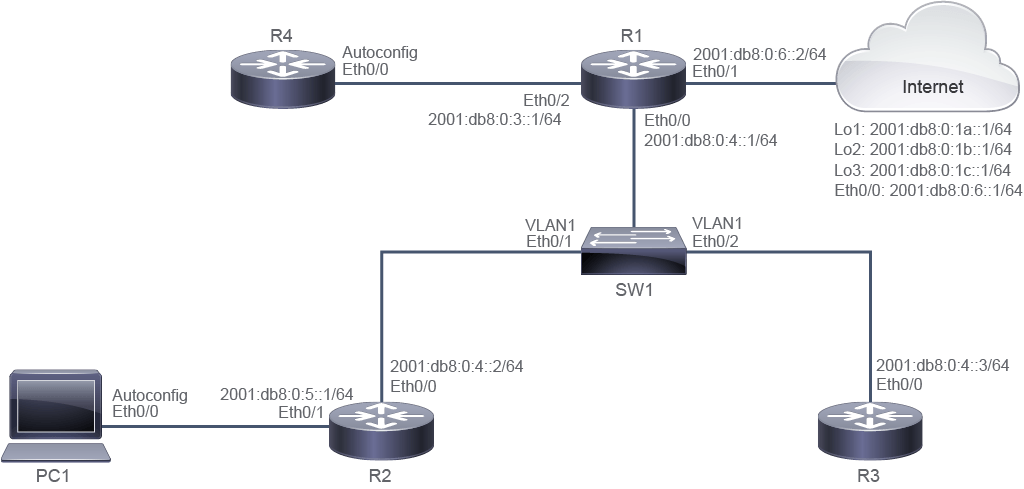
Job Aid
輔助資料
Device Information
裝置資訊
Device 裝置 | Interface 介面 | IPv6 Address IPv6 位址 | Remote 遠端 | Interface 介面 | IPv6 Address IPv6 位址 |
R1 R1 | Ethernet0/0 Ethernet0/0 | 2001:db8:0:4::1/64 2001:db8:0:4::1/64 | SW1 SW1 | Ethernet0/0 Ethernet0/0 | VLAN 1 VLAN 1 |
R1 R1 | Ethernet0/1 Ethernet0/1 | 2001:db8:0:6::2/64 2001:db8:0:6::2/64 | Internet 網際網路 | Ethernet0/0 Ethernet0/0 | 2001:db8:0:6::1/64 2001:db8:0:6::1/64 |
R1 R1 | Ethernet0/2 Ethernet0/2 | 2001:db8:0:3::1/64 2001:db8:0:3::1/64 | R4 R4 | Ethernet0/0 Ethernet0/0 | Autoconfig 自動設定 |
R2 R2 | Ethernet0/0 Ethernet0/0 | 2001:db8:0:4::2/64 2001:db8:0:4::2/64 | SW1 SW1 | Ethernet0/1 Ethernet0/1 | VLAN 1 VLAN 1 |
R2 R2 | Ethernet0/1 Ethernet0/1 | 2001:db8:0:5::1/64 2001:db8:0:5::1/64 | PC1 PC1 | Ethernet0/0 Ethernet0/0 | Autoconfig 自動設定 |
R3 R3 | Ethernet0/0 Ethernet0/0 | 2001:db8:0:4::3/64 2001:db8:0:4::3/64 | SW1 SW1 | Ethernet0/2 Ethernet0/2 | VLAN 1 VLAN 1 |
Internet 網際網路 | Loopback 1 Loopback 1 | 2001:db8:0:1a::1/64 2001:db8:0:1a::1/64 | " " | " " | " " |
Internet 網際網路 | Loopback 2 Loopback 2 | 2001:db8:0:1b::1/64 2001:db8:0:1b::1/64 | " " | " " | " " |
Internet 網際網路 | Loopback 3 Loopback 3 | 2001:db8:0:1c::1/64 2001:db8:0:1c::1/64 | " " | " " | " " |
Configuration Tips
設定提示
- Configure a default route on R1 that points to the internet router. In the default route configuration command
ipv6 routeipv6 address, use a global IPv6 address for the next-hop address.在 R1 上設定指向網際網路路由器的預設路由。在預設路由設定指令ipv6 route的 IPv6 位址部分,使用全球 IPv6 位址作為下一跳位址。 - Configure R4 to receive an IPv6 address and a default route from R1 through the stateless autoconfiguration method. Use the
ipv6 address autoconfig defaultcommand to receive the IPv6 address and default route from the IPv6-enabled neighbor router. Remember that you need to enter the interface configuration mode to perform this command. Verify that connectivity exists to the ISP-provided IPv6 addresses using thepingcommand.設定 R4 透過無狀態自動設定方法,從 R1 取得 IPv6 位址與預設路由。使用ipv6 address autoconfig default指令,從已啟用 IPv6 的鄰居路由器取得 IPv6 位址與預設路由。請記得需要先進入介面設定模式才能執行此指令。使用ping指令確認可連線至 ISP 提供的 IPv6 位址。 - Configure a default route on R3 that points to R1. In the default route configuration command, include an exit interface and use a link-local address for the next-hop address. You can use the
show ipv6 interface briefcommand on R1 to identify the link-local address of the next-hop interface.在 R3 上設定指向 R1 的預設路由。設定預設路由指令時,需包含出口介面,並使用鏈路本地位址作為下一跳位址。你可以在 R1 上使用show ipv6 interface brief指令,找出下一跳介面的鏈路本地位址。 - Use the
ipv6 route ::/0command with the correct exit interface and next-hop global IPv6 address to configure the default route.使用ipv6 route ::/0指令搭配正確的出口介面與下一跳全球 IPv6 位址來設定預設路由。 - Using the
show running-configandshow ipv6 routecommands, check the static route configuration on R2 and the static route configuration on R1 for traffic from the internet router to PC1. Check if the correct next-hop IPv6 address are configured. Observe that the static routes that are configured on R1 and R2 have an incorrect IPv6 global address configured for the next-hop address; fix these issues.使用show running-config與show ipv6 route指令,檢查 R2 與 R1 上針對從網際網路路由器到 PC1 之流量的靜態路由設定。檢查是否設定了正確的下一跳 IPv6 位址。你會發現 R1 與 R2 上設定的靜態路由,其下一跳位址所設定的 IPv6 全球位址不正確,請修正這些問題。
Answer Key
解答
You need to complete the following tasks:
你需要完成以下任務:
- Configure a default route on R1 using the IPv6 global address to establish connectivity with the internet router. Do not use the autoconfiguration method on R1.在 R1 上使用 IPv6 全球位址設定預設路由,以建立與網際網路路由器的連線。R1 上不要使用自動設定方法。
- Use the following command to accomplish this task:使用以下指令完成此任務:
R1(config)# ipv6 route ::/0 2001:db8:0:6::1 - Configure R4 to receive an IPv6 address and a default route from R1 through the stateless autoconfiguration method.設定 R4 透過無狀態自動設定方法,從 R1 取得 IPv6 位址與預設路由。
- Use the following command to accomplish this task:使用以下指令完成此任務:
R4(config)# interface e0/0 R4(config-if)# ipv6 address autoconfig default - Configure a default route on R3 that points to R1. In default route configuration, include an exit interface and use a link-local address for the next-hop address.在 R3 上設定指向 R1 的預設路由。設定預設路由時,需包含出口介面,並使用鏈路本地位址作為下一跳位址。
- Use the
show ipv6 interface briefcommand on R1 to identify the link-local address of the next-hop interface:在 R1 上使用show ipv6 interface brief指令,找出下一跳介面的鏈路本地位址:
R1# show ipv6 int brief Ethernet0/0 [up/up] FE80::A8BB:CCFF:FE00:100 2001:DB8:0:4::1 Ethernet0/1 [up/up] FE80::A8BB:CCFF:FE00:110 2001:DB8:0:6::2 Ethernet0/2 [up/up] FE80::A8BB:CCFF:FE00:120 2001:DB8:0:3::1 Ethernet0/3 [administratively down/down] unassigned NVI0 [up/up] unassigned- Use the following command to configure a default route on R3:使用以下指令在 R3 上設定預設路由:
R3(config)# ipv6 route ::/0 e0/0 FE80::A8BB:CCFF:FE00:100 - IPv6 configurations are already configured on the other devices. However, you need to investigate any incomplete configurations or misconfigurations. Also, ensure that the connectivity from all devices exists to the test IPv6 addresses that are provided by the ISP.其他裝置上已設定好 IPv6 組態。不過,你需要調查是否有未完成或錯誤的設定。同時,請確保所有裝置都能連線到 ISP 提供的測試 IPv6 位址。
- Examine the configuration on R2. Observe that the static route that is configured on R2 has an incorrect IPv6 global address configured for the next-hop address.檢查 R2 上的設定。你會發現 R2 上設定的靜態路由,其下一跳位址所設定的 IPv6 全球位址不正確。
R2# show running-config | include ipv6 route
ipv6 route 2001:DB8:0:1A::/64 2001:DB8:0:4::3
ipv6 route 2001:DB8:0:1B::/64 2001:DB8:0:4::3
ipv6 route 2001:DB8:0:1C::/64 2001:DB8:0:4::3
!
The output of the
show runcommand shows that the static route next-hop IPv6 global address is pointing to R3 instead of the next-hop global IPv6 address of R1.show run指令的輸出顯示,該靜態路由的下一跳 IPv6 全球位址指向 R3,而非 R1 的下一跳全球 IPv6 位址。- Use the following configuration commands to fix the static route configuration on R2:使用以下設定指令修正 R2 上的靜態路由設定:
R2(config)# no ipv6 route 2001:DB8:0:1A::/64 2001:DB8:0:4::3 R2(config)# no ipv6 route 2001:DB8:0:1B::/64 2001:DB8:0:4::3 R2(config)# no ipv6 route 2001:DB8:0:1C::/64 2001:DB8:0:4::3 R2(config)# ipv6 route 2001:DB8:0:1A::/64 2001:DB8:0:4::1 R2(config)# ipv6 route 2001:DB8:0:1B::/64 2001:DB8:0:4::1 R2(config)# ipv6 route 2001:DB8:0:1C::/64 2001:DB8:0:4::1- Examine the configuration on R1. Observe that the static route that is configured on R1 for the reverse traffic flow to IPv6 address 2001:DB8:0:5::/64 from the ISP-provided IPv6 address has an incorrect IPv6 global address configured for the next-hop address.檢查 R1 上的設定。你會發現 R1 上設定的靜態路由,用於將反向流量從 ISP 提供的 IPv6 位址送回 2001:DB8:0:5::/64,其下一跳位址所設定的 IPv6 全球位址不正確。
R1# show running-config | include ipv6 route ipv6 route 2001:DB8:0:5::/64 2001:DB8:0:6::1ipv6 route ::/0 2001:DB8:0:6::1- The static route has the next-hop IPv6 global address is pointing to the internet router instead of the next-hop IPv6 global address of R2. Use the following configuration commands to fix the static route configuration on R1.該靜態路由的下一跳 IPv6 全球位址指向網際網路路由器,而非 R2 的下一跳 IPv6 全球位址。使用以下設定指令修正 R1 上的靜態路由設定。
R1(config)# no ipv6 route 2001:DB8:0:5::/64 2001:DB8:0:6::1 R1(config)# ipv6 route 2001:DB8:0:5::/64 2001:DB8:0:4::2- Use the
show ipv6 route staticandshow running-configcommands to verify that the static route configurations are correct. Ping from PC1 to the ISP-provided IPv6 addresses such as 2001:db8:0:1a::1, 2001:db8:0:1b::1, and 2001:db8:0:1c::1 to verify connectivity.使用show ipv6 route static與show running-config指令確認靜態路由設定正確。從 PC1 對 ISP 提供的 IPv6 位址(如 2001:db8:0:1a::1、2001:db8:0:1b::1 與 2001:db8:0:1c::1)執行 ping 以確認連線。R2# show running-config Building configuration... Current configuration : 1201 bytes ! ipv6 route 2001:DB8:0:1A::/64 2001:DB8:0:4::1 ipv6 route 2001:DB8:0:1B::/64 2001:DB8:0:4::1 ipv6 route 2001:DB8:0:1C::/64 2001:DB8:0:4::1 ! ! R2# show ipv6 route static IPv6 Routing Table - default - 8 entries Codes: C - Connected, L - Local, S - Static, U - Per-user Static route B - BGP, HA - Home Agent, MR - Mobile Router, R - RIP H - NHRP, I1 - ISIS L1, I2 - ISIS L2, IA - ISIS interarea IS - ISIS summary, D - EIGRP, EX - EIGRP external, NM - NEMO ND - ND Default, NDp - ND Prefix, DCE - Destination, NDr - Redirect O - OSPF Intra, OI - OSPF Inter, OE1 - OSPF ext 1, OE2 - OSPF ext 2 ON1 - OSPF NSSA ext 1, ON2 - OSPF NSSA ext 2, l - LISP S 2001:DB8:0:1A::/64 [1/0] via 2001:DB8:0:4::1 S 2001:DB8:0:1B::/64 [1/0] via 2001:DB8:0:4::1 S 2001:DB8:0:1C::/64 [1/0] via 2001:DB8:0:4::1 R2# R1# show run | incl ipv6 route ipv6 route 2001:DB8:0:5::/64 2001:DB8:0:4::2 ipv6 route ::/0 2001:DB8:0:6::1 R1# show ipv6 route static IPv6 Routing Table - default - 9 entries Codes: C - Connected, L - Local, S - Static, U - Per-user Static route B - BGP, HA - Home Agent, MR - Mobile Router, R - RIP H - NHRP, I1 - ISIS L1, I2 - ISIS L2, IA - ISIS interarea IS - ISIS summary, D - EIGRP, EX - EIGRP external, NM - NEMO ND - ND Default, NDp - ND Prefix, DCE - Destination, NDr - Redirect O - OSPF Intra, OI - OSPF Inter, OE1 - OSPF ext 1, OE2 - OSPF ext 2 ON1 - OSPF NSSA ext 1, ON2 - OSPF NSSA ext 2, l - LISP S ::/0 [1/0] via 2001:DB8:0:6::1 S 2001:DB8:0:5::/64 [1/0] via 2001:DB8:0:4::2 PC1# ping 2001:db8:0:1a::1 Type escape sequence to abort. Sending 5, 100-byte ICMP Echos to 2001:DB8:0:1A::1, timeout is 2 seconds: !!!!! Success rate is 100 percent (5/5), round-trip min/avg/max = 4/7/19 ms PC1# ping 2001:db8:0:1b::1 Type escape sequence to abort. Sending 5, 100-byte ICMP Echos to 2001:DB8:0:1B::1, timeout is 2 seconds: !!!!! Success rate is 100 percent (5/5), round-trip min/avg/max = 1/1/1 ms PC1# ping 2001:db8:0:1c::1 Type escape sequence to abort. Sending 5, 100-byte ICMP Echos to 2001:DB8:0:1C::1, timeout is 2 seconds: !!!!! Success rate is 100 percent (5/5), round-trip min/avg/max = 1/1/1 ms PC1#
Implement IPv6 Static Routing Questions
實作 IPv6 靜態路由測驗題
When using the
show running-config | include ipv6 route ::/0 command on the R1, what is the expected result?在 R1 上使用 show running-config | include ipv6 route ::/0 指令時,預期結果為何?When using the
show running-config interface e0/0 command on the R4, what is the expected result?在 R4 上使用 show running-config interface e0/0 指令時,預期結果為何?When using the
show running-config | include ipv6 route ::/0 command on the R3, what is the expected result?在 R3 上使用 show running-config | include ipv6 route ::/0 指令時,預期結果為何?Which command would you use to display this output on the R2 router? IPv6 Routing Table - default - 8 entries
Codes: C - Connected, L - Local, S - Static, U - Per-user Static route
B - BGP, HA - Home Agent, MR - Mobile Router, R - RIP
H - NHRP, I1 - ISIS L1, I2 - ISIS L2, IA - ISIS interarea
IS - ISIS summary, D - EIGRP, EX - EIGRP external, NM - NEMO
ND - ND Default, NDp - ND Prefix, DCE - Destination, NDr - Redirect
O - OSPF Intra, OI - OSPF Inter, OE1 - OSPF ext 1, OE2 - OSPF ext 2
ON1 - OSPF NSSA ext 1, ON2 - OSPF NSSA ext 2, l - LISP
S 2001:DB8:0:1A::/64 [1/0]
via 2001:DB8:0:4::1
S 2001:DB8:0:1B::/64 [1/0]
via 2001:DB8:0:4::1
S 2001:DB8:0:1C::/64 [1/0]
via 2001:DB8:0:4::1在 R2 路由器上,要顯示以下輸出應使用哪個指令?IPv6 Routing Table - default - 8 entries
Codes: C - Connected, L - Local, S - Static, U - Per-user Static route
B - BGP, HA - Home Agent, MR - Mobile Router, R - RIP
H - NHRP, I1 - ISIS L1, I2 - ISIS L2, IA - ISIS interarea
IS - ISIS summary, D - EIGRP, EX - EIGRP external, NM - NEMO
ND - ND Default, NDp - ND Prefix, DCE - Destination, NDr - Redirect
O - OSPF Intra, OI - OSPF Inter, OE1 - OSPF ext 1, OE2 - OSPF ext 2
ON1 - OSPF NSSA ext 1, ON2 - OSPF NSSA ext 2, l - LISP
S 2001:DB8:0:1A::/64 [1/0]
via 2001:DB8:0:4::1
S 2001:DB8:0:1B::/64 [1/0]
via 2001:DB8:0:4::1
S 2001:DB8:0:1C::/64 [1/0]
via 2001:DB8:0:4::1
Codes: C - Connected, L - Local, S - Static, U - Per-user Static route
B - BGP, HA - Home Agent, MR - Mobile Router, R - RIP
H - NHRP, I1 - ISIS L1, I2 - ISIS L2, IA - ISIS interarea
IS - ISIS summary, D - EIGRP, EX - EIGRP external, NM - NEMO
ND - ND Default, NDp - ND Prefix, DCE - Destination, NDr - Redirect
O - OSPF Intra, OI - OSPF Inter, OE1 - OSPF ext 1, OE2 - OSPF ext 2
ON1 - OSPF NSSA ext 1, ON2 - OSPF NSSA ext 2, l - LISP
S 2001:DB8:0:1A::/64 [1/0]
via 2001:DB8:0:4::1
S 2001:DB8:0:1B::/64 [1/0]
via 2001:DB8:0:4::1
S 2001:DB8:0:1C::/64 [1/0]
via 2001:DB8:0:4::1在 R2 路由器上,要顯示以下輸出應使用哪個指令?IPv6 Routing Table - default - 8 entries
Codes: C - Connected, L - Local, S - Static, U - Per-user Static route
B - BGP, HA - Home Agent, MR - Mobile Router, R - RIP
H - NHRP, I1 - ISIS L1, I2 - ISIS L2, IA - ISIS interarea
IS - ISIS summary, D - EIGRP, EX - EIGRP external, NM - NEMO
ND - ND Default, NDp - ND Prefix, DCE - Destination, NDr - Redirect
O - OSPF Intra, OI - OSPF Inter, OE1 - OSPF ext 1, OE2 - OSPF ext 2
ON1 - OSPF NSSA ext 1, ON2 - OSPF NSSA ext 2, l - LISP
S 2001:DB8:0:1A::/64 [1/0]
via 2001:DB8:0:4::1
S 2001:DB8:0:1B::/64 [1/0]
via 2001:DB8:0:4::1
S 2001:DB8:0:1C::/64 [1/0]
via 2001:DB8:0:4::1