After the Cisco IOS Software image is loaded and started, the networking device must be configured to be useful. If there is an existing saved configuration file (startup-config) in NVRAM, it is executed. If there is no saved configuration file in NVRAM, the device typically either begins autoinstall or enters the setup utility. An example below illustrates the procedure in a Cisco IOS router.
Cisco IOS 軟體映像檔載入並啟動後,必須先設定該網路裝置才能使用。若 NVRAM 中已存在已儲存的設定檔(startup-config),則會執行該檔案。若 NVRAM 中沒有已儲存的設定檔,裝置通常會啟動自動安裝(autoinstall),或進入設定精靈(setup utility)。以下範例說明 Cisco IOS 路由器上的此程序。
The router loads and executes the configuration from NVRAM. If no configuration is present in NVRAM, it prompts for an initial configuration dialog (also called setup utility or setup mode).
路由器會從 NVRAM 載入並執行設定。若 NVRAM 中沒有任何設定,會提示進入初始設定對話(也稱為設定精靈或設定模式)。
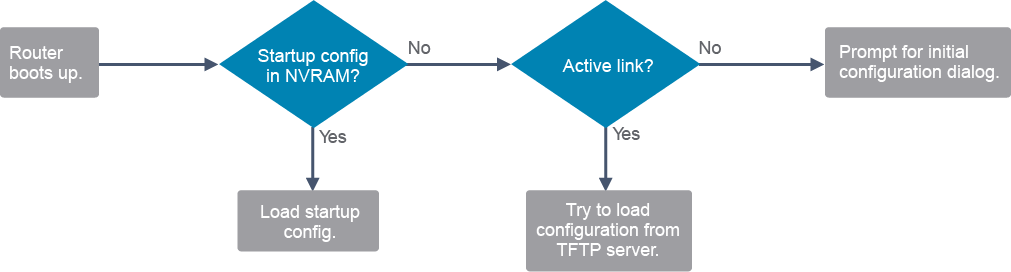
If the startup configuration file does not exist in NVRAM, the router may search for a TFTP server. If the router detects that it has an active link, it sends a broadcast searching for a configuration file across the active link. This condition will cause the router to pause, but if the configuration source is not discovered, you will eventually see a console message such as this one:
若 NVRAM 中不存在啟動設定檔,路由器可能會搜尋 TFTP 伺服器。若路由器偵測到有作用中的連線,會透過該連線發出廣播以搜尋設定檔。此情況會使路由器暫停,但若未找到設定來源,最終您會看到類似以下的主控台訊息:
%Error opening tftp://255.255.255.255/network-confg(Timed out)
%Error opening tftp://255.255.255.255/cisconet.cfg (Timed out)
The setup utility prompts the user at the console for specific configuration information to create a basic initial configuration on the router, as shown in this example:
設定精靈會在主控台上提示使用者輸入特定的設定資訊,以在路由器上建立基本的初始設定,如以下範例所示:
<... output omitted ...>
If you require further assistance please contact us by sending email to
export@cisco.com.

Cisco CISCO2901/K9 (revision 1.0) with 483328K/40960K bytes of memory.
Processor board ID FCZ1642C5XJ
2 Gigabit Ethernet interfaces
1 Serial(sync/async) interface
1 terminal line
DRAM configuration is 64 bits wide with parity enabled.
255K bytes of non-volatile configuration memory.
250880K bytes of ATA System CompactFlash 0 (Read/Write)

         --- System Configuration Dialog ---

Would you like to enter the initial configuration dialog? [yes/no]: To display the current configuration, enter the show running-config command.
若要顯示目前的設定,請輸入 show running-config 指令。
To display the saved configuration, enter the show startup-config command.
若要顯示已儲存的設定,請輸入 show startup-config 指令。
The show running-config and show startup-config commands are among the most common Cisco IOS Software EXEC commands because they allow you to see the current running configuration in RAM on the router or the startup configuration commands in the startup configuration file in NVRAM that the router will use at the next restart.
show running-config 與 show startup-config 指令是最常用的 Cisco IOS 軟體 EXEC 指令之一,因為它們讓您可以查看路由器 RAM 中目前的執行中設定,或 NVRAM 中啟動設定檔裡的啟動設定指令,也就是路由器下次重新啟動時會使用的設定。
If the words "Current configuration" are displayed, the active running configuration from RAM is being displayed.
若顯示「Current configuration」字樣,表示目前顯示的是 RAM 中作用中的執行中設定。
If there is a message at the top indicating how much nonvolatile memory is being used ("Using 1318 out of 262136 bytes" in this example), the startup configuration file from NVRAM is being displayed.
若最上方出現訊息指出使用了多少非揮發性記憶體(在此範例中為「Using 1318 out of 262136 bytes」),表示目前顯示的是 NVRAM 中的啟動設定檔。