The proper placement of an ACL to filter traffic can make the network operate more efficiently. An ACL can be placed to reduce unnecessary traffic. The general logic with filtering packets is to filter them as soon as possible. You do not want to carry and route them through the network and waste resources on the path for nothing if you eventually end up dropping those packets somewhere else.
正確放置用於過濾流量的 ACL,能讓網路運作得更有效率。ACL 可放置在能減少不必要流量的位置。過濾封包的一般邏輯是盡早進行過濾。你不會希望在最終仍會於其他地方丟棄封包的情況下,還讓封包在網路中被承載並繞送,白白浪費路徑上的資源。
To decide on the proper placement, you need to understand how ACLs process the packets. Standard and extended ACLs process packets differently.
要決定正確的放置位置,你需要了解 ACL 如何處理封包。標準 ACL 與延伸 ACL 對封包的處理方式不同。
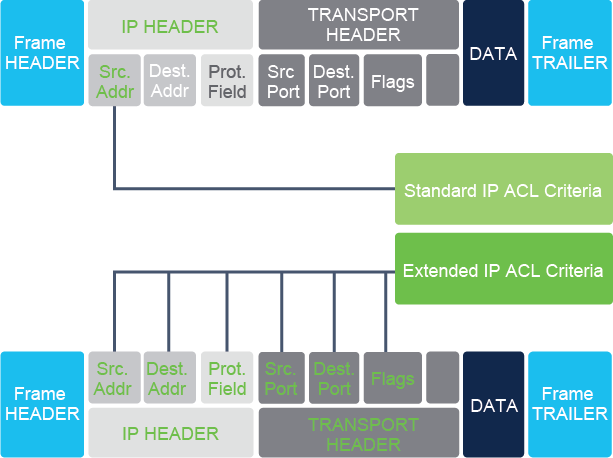
Standard IPv4 ACLs, whether numbered (1 to 99 and 1300 to 1999) or named, filter packets based solely on the source address, and they permit or deny the entire TCP/IP suite. It is not possible to implement granular, per protocol policies with standard ACLs.
標準 IPv4 ACL,無論是編號式(1 到 99 以及 1300 到 1999)或具名,都僅根據來源位址過濾封包,並且是允許或拒絕整個 TCP/IP 套組。標準 ACL 無法針對個別協定實施精細的政策。
When processing a standard ACL, devices need to inspect only one field in the IP packet, and that's the source IP address in the IP header. The source IP address is then taken and matched to the matching criteria that is specified in the ACL statement. And when a match is found, the packet is permitted or denied, based on the instructions specified in the ACL statement.
在處理標準 ACL 時,裝置只需要檢查 IP 封包中的一個欄位,也就是 IP 標頭中的來源 IP 位址。接著取出來源 IP 位址,並與 ACL 陳述式中指定的比對條件進行比對。找到相符項目後,即依照 ACL 陳述式中指定的指令,允許或拒絕該封包。
The best practice is to place standard ACLs as close to the destination of traffic as possible. It may sound inefficient because you are allowing traffic almost to its destination and allow it to consume resource even if it is going to be discarded. But, because standard ACLs are simple, if you place them too close to the source, they might filter out more traffic than you actually want.
最佳作法是將標準 ACL 盡可能放置在靠近流量目的地的位置。這聽起來可能沒有效率,因為你讓流量幾乎抵達目的地,即使最終會被丟棄,也讓它消耗資源。但因為標準 ACL 很簡單,若將它們放置得太靠近來源,可能會過濾掉比你實際想要的更多流量。
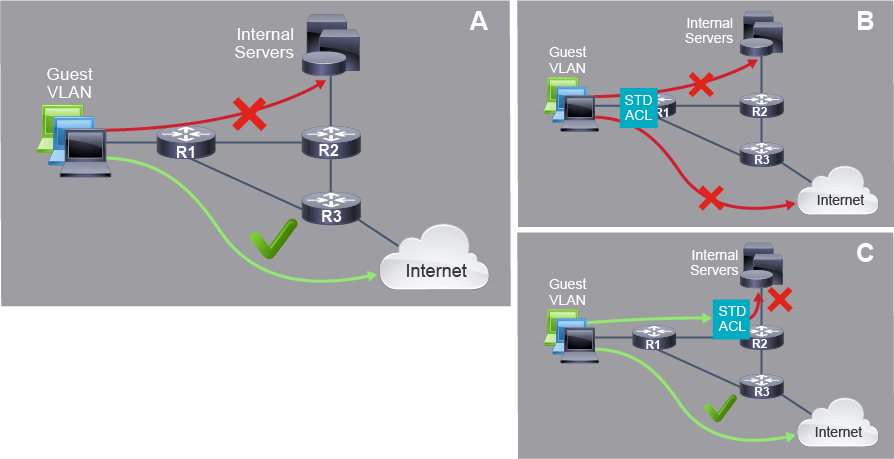
The figure illustrates the logic for placing standard ACLs. In the example network, you want to block IP traffic from Guest VLAN to your internal servers (A). If you place standard ACL too close to the source of the traffic at router R1, you would block traffic going to internal servers, but you will also block access to the internet (B). Standard access lists do not consider the destination IP address or protocols carried, so they cannot differentiate between traffic flows going to internal servers and traffic flows going to the internet. Because you wanted to block the access to internal servers and still allow guests to access the internet, the best placement for standard ACL would be at router R2, which is closest to the internal servers (C). Now you can see that it is very important to correctly place standard ACLs.
圖中說明了放置標準 ACL 的邏輯。在此範例網路中,你想要封鎖來自訪客 VLAN 到內部伺服器(A)的 IP 流量。若你將標準 ACL 放置得太靠近流量來源(路由器 R1),你將會封鎖前往內部伺服器的流量,但也會連帶封鎖對網際網路的存取(B)。標準存取清單不考慮目的 IP 位址或所承載的協定,因此無法區分前往內部伺服器的流量與前往網際網路的流量。由於你希望封鎖對內部伺服器的存取,同時仍允許訪客存取網際網路,標準 ACL 最佳的放置位置會是最靠近內部伺服器的路由器 R2(C)。由此可見,正確放置標準 ACL 非常重要。
In many situations, a standard ACL may not provide the required level or type of control you need. You may need a more precise tool for selecting network traffic and more flexibility in how you place the ACL. One of the solutions is to use extended access lists, which allow you more granular control of traffic flows.
在許多情況下,標準 ACL 可能無法提供你所需的控制程度或類型。你可能需要更精確的工具來選擇網路流量,並在放置 ACL 時擁有更多彈性。其中一個解決方案是使用延伸存取清單,它能讓你對流量進行更細緻的控制。
When you are using extended ACLs, it is best practice to place them as close to the source of discarded traffic as possible. This way, you deny packets as soon as possible and do not allow them to cross network infrastructure. Extended ACLs allow you to define matching criteria that consider the carried protocol and destination addresses and ports, therefore, refining packet selection.
使用延伸 ACL 時,最佳作法是將它們盡可能放置在被丟棄流量來源的位置。如此一來,你可以盡早拒絕封包,不讓它們跨越網路基礎架構。延伸 ACL 允許你定義考慮所承載協定、目的位址與連接埠的比對條件,因此能更精細地選擇封包。
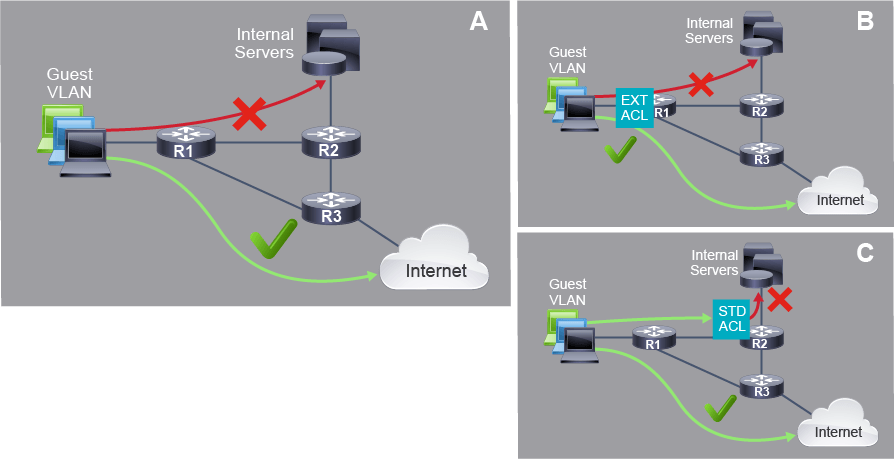
In the example from the previous figure, you wanted to block IP access from Guest VLAN to your internal servers (A). With an extended access list, you can be selective and block traffic destined to the internal servers. Therefore, you can place the extended access list on the router R1 closest to the Guest VLAN and prevent it from crossing other devices (B). Note how extended access list restricts traffic so that is discarded and it does not cross other network devices and consume network resources like in example when using standard ACL (C).
在前述圖示的範例中,你想要封鎖來自訪客 VLAN 到內部伺服器(A)的 IP 存取。使用延伸存取清單,你可以有選擇性地封鎖前往內部伺服器的流量。因此,你可以將延伸存取清單放置在最靠近訪客 VLAN 的路由器 R1 上,防止它跨越其他裝置(B)。請注意,延伸存取清單如何限制流量,使其被丟棄且不會跨越其他網路裝置、消耗網路資源,這與使用標準 ACL 的範例(C)不同。
Placement of the ACL and, therefore, the type of ACL used may also depend on these parameters:
ACL 的放置位置,以及因此決定所使用的 ACL 類型,也可能取決於以下參數:
- The extent of the network administrator’s control: Placement of the ACL can depend on whether the network administrator has control of both the source and destination networks.網路管理員的控制範圍:ACL 的放置可能取決於網路管理員是否同時掌控來源與目的網路。
- The bandwidth of the networks involved:Filtering unwanted traffic at the source prevents transmission of the traffic before it consumes bandwidth on the path to a destination—especially important in networks that have low bandwidth.相關網路的頻寬:在來源端過濾不需要的流量,可避免該流量在消耗前往目的地路徑上的頻寬之前就被傳送,這在低頻寬網路中尤其重要。
- Ease of configuration:If a network administrator wants to deny traffic coming from several networks, one option is to use a single standard ACL on the router closest to the destination. The disadvantage is that traffic from these networks will use bandwidth unnecessarily. An extended ACL could be used on each router where the traffic originated, which will save bandwidth by filtering the traffic at the source, but requires the knowledge to create extended ACLs.設定的難易度:若網路管理員想拒絕來自多個網路的流量,其中一個選項是在最靠近目的地的路由器上使用單一標準 ACL。缺點是這些網路的流量仍會不必要地消耗頻寬。也可以在流量的每個來源路由器上使用延伸 ACL,藉由在來源端過濾流量來節省頻寬,但這需要具備建立延伸 ACL 的知識。
Traffic filtering is a common application of ACLs. Traffic filtering controls access to a network by analyzing the incoming and outgoing packets and forwarding them or discarding them based on ACL criteria. Traffic filtering can occur at Layer 3 or Layer 4. Standard ACLs only filter at Layer 3. Extended ACLs can filter at both Layer 3 and Layer 4.
流量過濾是 ACL 常見的應用。流量過濾透過分析進出的封包,並依 ACL 條件將其轉送或丟棄,藉以控制對網路的存取。流量過濾可發生在第 3 層或第 4 層。標準 ACL 只能在第 3 層過濾,延伸 ACL 則可同時在第 3 層與第 4 層過濾。
When you decide which device and which interface is the most appropriate for the placement of an access list for traffic filtering, you need to decide to which traffic direction the ACL should be applied.
當你決定哪個裝置及哪個介面最適合放置流量過濾用的存取清單時,你需要決定 ACL 應套用到哪個流量方向。
There are two possible traffic directions: inbound and outbound.
流量方向有兩種可能:入向(inbound)與出向(outbound)。
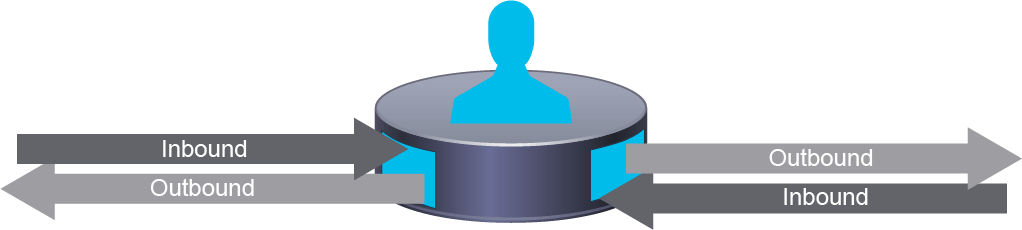
Traffic directions are determined from the device’s point of view. The figure illustrates the concept. Imagine that you are standing inside the device. Traffic arriving on an interface that enters the device to be processed is called inbound, ingress, or incoming traffic. Traffic leaving the device out through an interface is called outbound, egress, or exiting traffic.
流量方向是從裝置的角度來判定的。圖中說明了這個概念。試想你站在裝置內部,從介面進入裝置以待處理的流量稱為入向、進入或傳入流量;從介面離開裝置的流量則稱為出向、外出或傳出流量。
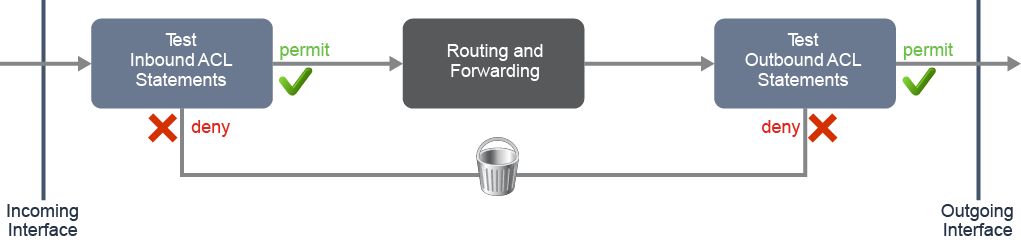
The figure illustrates how packet processing occurs when ACLs are applied:
圖中說明了套用 ACL 時封包處理的過程:
- Inbound ACLs process incoming packets as they enter the interface, before they are routed to the outbound interface. An inbound ACL is efficient because it saves the overhead of routing lookups if the packet is discarded. If the packet is permitted by the ACL, it is then processed for routing.入向 ACL 在傳入封包進入介面時就進行處理,早於它們被路由到出向介面之前。入向 ACL 較有效率,因為若封包被丟棄,就能省下路由查找的額外負擔。若封包被 ACL 允許,接著才會進行路由處理。
- Outbound ACLs process packets that are routed to the outbound interface. They are processed before they exit the interfaces.出向 ACL 處理已被路由至出向介面的封包,這些封包在離開介面之前會先被處理。
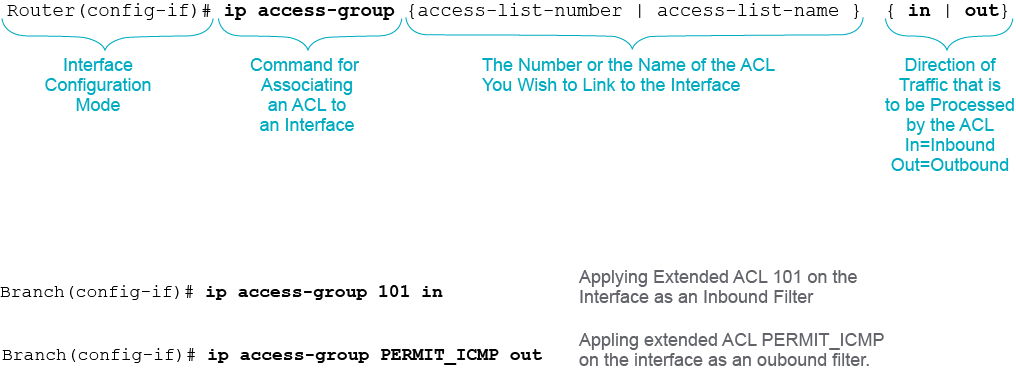
After you have configured an ACL, you link the ACL to an interface using the ip access-group command. The following figure describes the command syntax and shows examples of applying standard and extended access lists on an interface.
設定好 ACL 後,你可以使用 ip access-group 指令將 ACL 連結至介面。下圖說明了該指令的語法,並展示了在介面上套用標準與延伸存取清單的範例。
To remove an ACL from an interface, first enter the no ip access-group command on the interface, then enter the global no access-list command to remove the entire ACL if needed.
若要從介面移除 ACL,請先在介面上輸入 no ip access-group 指令,若有需要,再輸入全域指令 no access-list 以移除整個 ACL。
You can configure one ACL per protocol, per direction, per interface:
你可以針對每個協定、每個方向、每個介面各設定一個 ACL:
- One ACL per protocol: To control traffic flow on an interface, an ACL must be defined for each protocol enabled on the interface. For instance, if you wish to filter both IPv4 and IPv6 traffic on the interface in one direction, you have to create and apply two access lists, one for each protocol.每個協定一個 ACL:為控制介面上的流量,必須為介面上啟用的每個協定定義一個 ACL。例如,若你希望在介面的某一方向同時過濾 IPv4 與 IPv6 流量,就必須建立並套用兩個存取清單,每個協定各一個。
- One ACL per direction: ACLs control traffic in one direction at a time. Two separate ACLs may be created to control both inbound and outbound traffic on an interface, or you can use the same ACL and apply it in both directions, if it makes sense to do so.每個方向一個 ACL:ACL 一次只能控制一個方向的流量。你可以建立兩個獨立的 ACL 來分別控制介面上的入向與出向流量,或者若合理的話,也可以在兩個方向套用同一個 ACL。
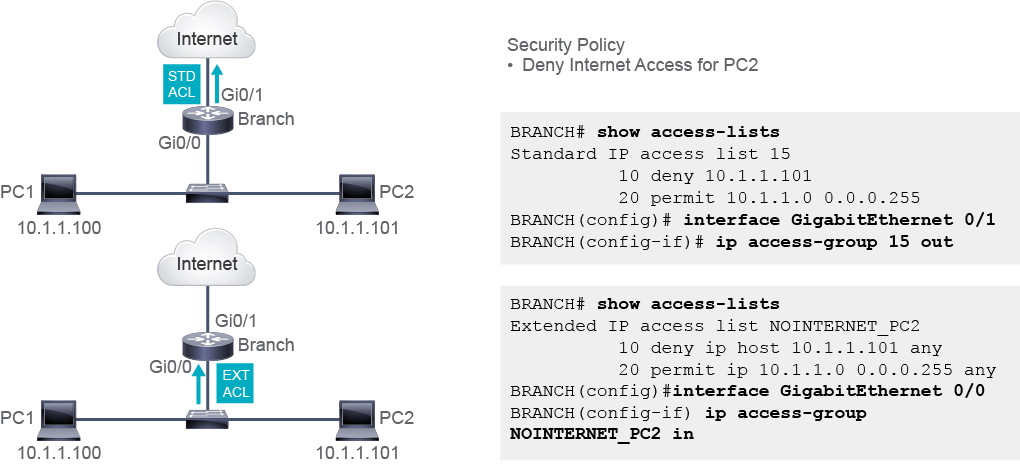
The figure shows a scenario in which ACL is used to deny access to the internet only to the host IPv4 address 10.1.1.101. Traffic from other hosts within 10.1.1.0/24 is allowed.
圖中展示了一個情境:使用 ACL 僅拒絕主機 IPv4 位址 10.1.1.101 存取網際網路,10.1.1.0/24 內其他主機的流量則予以允許。
Two ACL implementations are represented in the figure. The first uses a standard ACL 15. A standard ACL is applied at the point closest to the destination. That point is the Gi0/1 interface on the Branch router. Filtering should happen for the traffic exiting Gi0/1 interface, in the outbound direction. Note that PC2 traffic would reach the router, be processed to determine the outbound interface (it will be routed), and, only at the very exit, it will be discarded. The processing power and bandwidth of the router are used for both permitted and discarded traffic.
圖中呈現了兩種 ACL 實作方式。第一種使用標準 ACL 15。標準 ACL 套用在最靠近目的地的位置,也就是分支路由器上的 Gi0/1 介面。過濾應該發生在離開 Gi0/1 介面的流量上,也就是出向方向。請注意,PC2 的流量會先抵達路由器,經處理以判斷出向介面(會先進行路由),直到最後離開的那一刻才會被丟棄。無論是被允許還是被丟棄的流量,都會用到路由器的處理能力與頻寬。
Note that another possible placement for standard ACL 15 would be the GigabitEthernet0/0 interface. For the traffic to be filtered, the direction would have to be inbound. However, this solution would not only prevent host PC2 from accessing the internet but would also deny all communication between PC2 and the router.
請注意,標準 ACL 15 的另一個可能放置位置是 GigabitEthernet0/0 介面。若要過濾該流量,方向就必須是入向。然而,這個做法不僅會阻止主機 PC2 存取網際網路,也會拒絕 PC2 與路由器之間的所有通訊。
The second implementation uses an extended ACL NOINTERNET_PC2. An extended access list should be placed as close to the source of the denied traffic as possible. In the example, the denied traffic is the PC2 traffic. The closest point to PC2 is the Gi0/0 interface on the Branch router. It should filter traffic incoming to the router; therefore, the ACL should be applied in the inbound direction. Traffic from PC2 will be discarded before it is routed, which saves the processing power and bandwidth of the router.
第二種實作方式使用延伸 ACL NOINTERNET_PC2。延伸存取清單應盡可能放置在被拒絕流量的來源附近。在此範例中,被拒絕的流量是 PC2 的流量,最靠近 PC2 的位置是分支路由器上的 Gi0/0 介面。它應過濾傳入路由器的流量,因此該 ACL 應套用在入向方向。來自 PC2 的流量會在被路由之前就被丟棄,這樣能節省路由器的處理能力與頻寬。
In real life networks, you could encounter complex security policies and ACLs. As network engineers, you need to have solid knowledge of how the ACL statements affect the traffic, so that you can place ACLs where they have the greatest impact on efficiency.
在實際的網路中,你可能會遇到複雜的安全政策與 ACL。身為網路工程師,你需要扎實了解 ACL 陳述式如何影響流量,才能將 ACL 放置在對效率影響最大的位置。