Routing for IPv6 is not enabled by default on Cisco routers. Therefore, you need to enable IPv6 routing by using the ipv6 unicast-routing command in global configuration mode before you start configuring IPv6 static routes. The ipv6 unicast-routing command is required for forwarding and configuring the routing protocol but not required to configure IPv6 addresses on interfaces.
在 Cisco 路由器上,IPv6 路由預設並未啟用。因此,在開始設定 IPv6 靜態路由之前,必須先在全域設定模式下使用 ipv6 unicast-routing 指令啟用 IPv6 路由。ipv6 unicast-routing 指令是轉送封包與設定路由協定所必需的,但在介面上設定 IPv6 位址則不需要它。
There is an IPv6-specific requirement per RFC 2461 that a router must be able to determine the link-local address of each of its neighboring routers to ensure that the target address of a redirect message identifies the neighbor router by its link-local address. This requirement means that using a global unicast address as a next-hop address with IPv6 routing is not recommended.
根據 RFC 2461,IPv6 有一項特定要求:路由器必須能夠判斷每個相鄰路由器的鏈路本地位址,以確保重新導向訊息的目標位址是以相鄰路由器的鏈路本地位址來識別。這項要求意味著,在 IPv6 路由中不建議使用全球單播位址作為下一跳位址。
Configuring a static route for IPv6 is almost the same as it is in IPv4. In IPv4, the next-hop IPv4 address or the exit interface can be specified in the static route configuration, although using a next-hop is highly recommended and using an exit interface alone should be avoided. The same approach applies in IPv6, but the next-hop IPv6 address in IPv6 can either be a link-local address or a global address. If a link-local address is used then the exit interface must also be specified.
設定 IPv6 靜態路由的方式與 IPv4 幾乎相同。在 IPv4 中,靜態路由設定可以指定下一跳 IPv4 位址或送出介面,不過強烈建議使用下一跳,應避免只使用送出介面。IPv6 也採取相同做法,但 IPv6 的下一跳位址可以是鏈路本地位址或全球位址。若使用鏈路本地位址,則必須同時指定送出介面。
Static routes are used in IPv6 in the same situations as they are used in IPv4. They can point to specific networks or hosts, or default static routes can be used for identifying a "gateway of last resort". In addition, when redundancy to specific networks is required, you can configure a backup route (floating static route) with higher administrative distance than the primary route.
IPv6 靜態路由的使用情境與 IPv4 相同。它們可以指向特定網路或主機,也可以用預設靜態路由來識別「最後手段閘道」。此外,當特定網路需要備援時,可以設定管理距離高於主要路由的備份路由(浮動靜態路由)。
This example shows how to configure an IPv6 static route using different methods (link-local or a global address):
此範例說明如何使用不同方法(鏈路本地或全球位址)設定 IPv6 靜態路由:
Router# configure terminal
Router(config)# ipv6 unicast-routing
Router(config)# ipv6 route 2001:0db8:beef::/32 fa1/0 fe80::2
Router(config)# ipv6 route 2001:0db8:beef::/32 2001:0db8:feed::1
The first static route uses a link-local next hop address, specified with the fe80 prefix. When using a link-local address as the next hop, you must also use an exit interface because this link-local address could be used on any interface. The second static route points to the next hop global IPv6 address 2001:0db8:feed::1.
第一條靜態路由使用鏈路本地下一跳位址,以 fe80 前綴表示。使用鏈路本地位址作為下一跳時,必須同時指定送出介面,因為此鏈路本地位址可能用於任何介面上。第二條靜態路由則指向下一跳全球 IPv6 位址 2001:0db8:feed::1。
IPv6 Static Route Configuration Example
IPv6 靜態路由設定範例
Consider the next example to understand IPv6 static route configuration.
請參考下例以了解 IPv6 靜態路由設定。
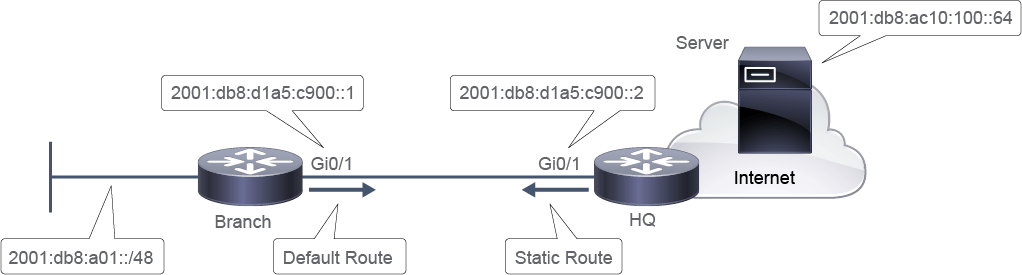
In this example, an IPv6 static network route is configured on the HQ router, pointing to the Branch router in order to reach the Branch router’s LAN. An IPv6 default route is configured on the Branch router, pointing to the HQ router in order to reach all other networks:
在此範例中,HQ 路由器上設定了一條指向 Branch 路由器的 IPv6 靜態網路路由,以便到達 Branch 路由器的 LAN。Branch 路由器上則設定了一條指向 HQ 路由器的 IPv6 預設路由,以便到達所有其他網路:
HQ(config)# ipv6 route 2001:db8:a01::/48 2001:db8:d1a5:c900::1
Branch(config)# ipv6 route ::/0 2001:db8:d1a5:c900::2
The table shows IPv6 static and default route commands:
下表列出 IPv6 靜態路由與預設路由指令:
Configuring an IPv6 Static Route
設定 IPv6 靜態路由
Command and Variable 指令與變數 | Description 說明 |
ipv6 routeipv6-network/ipv6-mask [outgoing_interface] ipv6-next-hopipv6 routeipv6-network/ipv6-mask [outgoing_interface] ipv6-next-hop | Configures an IPv6 static route. When the next hop is a link-local address, the outgoing interface must be specified. 設定一條 IPv6 靜態路由。當下一跳為鏈路本地位址時,必須指定送出介面。 |
ipv6 route ::/0[outgoing-interface] ipv6-next-hopipv6 route ::/0[outgoing-interface] ipv6-next-hop | Configures a default IPv6 route. When the next hop is a link-local address, the outgoing interface must be specified. 設定一條 IPv6 預設路由。當下一跳為鏈路本地位址時,必須指定送出介面。 |
Verifying IPv6 Static Route Configuration
驗證 IPv6 靜態路由設定
Use the show ipv6 route static command to verify only the IPv6 static route configuration in the routing table.
使用 show ipv6 route static 指令,僅驗證路由表中的 IPv6 靜態路由設定。
Alternatively, you can verify the static IPv6 route using the show ipv6 static command. For example, here is the static route on the HQ router:
此外,也可以使用 show ipv6 static 指令來驗證 IPv6 靜態路由。舉例來說,以下是 HQ 路由器上的靜態路由:
HQ# show ipv6 static
IPv6 Static routes Table - default
Codes: * - installed in RIB, u/m - Unicast/Multicast only
       U - Per-user Static route
       N - ND Static route
       M - MIP Static route
       P - DHCP-PD Static route
       R - RHI Static route
*   2001:db8:a01::/48 via 2001:db8:d1a5:c900::1, distance 1
The table shows IPv6 static route verification commands:
下表列出 IPv6 靜態路由驗證指令:
IPv6 Static Route Verification
IPv6 靜態路由驗證
Command and Variable 指令與變數 | Description 說明 |
show ipv6 staticrecursive] [detail]or show ipv6 route staticshow ipv6 staticrecursive] [detail]或 show ipv6 route static | Displays the current contents of the IPv6 routing table. These examples show two different ways of displaying IPv6 static routes. 顯示 IPv6 路由表目前的內容。這些範例展示了兩種顯示 IPv6 靜態路由的不同方式。 |
You can also verify that the default IPv6 route on the Branch router is working by issuing the ping command to the server:
你也可以透過對伺服器執行 ping 指令,來驗證 Branch 路由器上的 IPv6 預設路由是否正常運作:
Branch# ping 2001:db8:ac10:100::64
Type escape sequence to abort.
Sending 5, 100-byte ICMP Echos to 2001:DB8:AC10:100::64, timeout is 2 seconds:
!!!!!
Success rate is 100 percent (5/5), round-trip min/avg/max = 0/0/0 ms