Virtualization is a technology that transforms a hardware element into a software element that emulates the behavior of the hardware. Virtualization is not new in computing. The first work began as early as the 1960s. Today, virtualization is applied to various elements of IT infrastructure, from end device hardware to storage and entire networks.
虛擬化是一種將硬體元件轉換為軟體元件、並模擬該硬體行為的技術。虛擬化在運算領域並非新概念,最早的相關工作可追溯至 1960 年代。今日,虛擬化已應用於 IT 基礎架構的各種元素,從終端裝置硬體到儲存設備乃至整個網路。
Virtualization is commonly used on servers. A virtual system is also referred to as a virtual machine (VM). A VM is an emulation of a computer system. To create and run a VM on a physical machine, you use specialized virtualization software. Virtualization software runs on the physical hardware and emulates hardware elements that are required by the VM. The VM operates like it has its own physical hardware and installs its own operating system and other software.
虛擬化最常見的應用是在伺服器上。虛擬系統也稱為虛擬機器(VM)。VM 是對一套電腦系統的模擬。若要在實體機器上建立並執行 VM,需要使用專用的虛擬化軟體。虛擬化軟體在實體硬體上運作,並模擬 VM 所需的硬體元件。VM 運作時就如同擁有自己的實體硬體,並安裝自己的作業系統與其他軟體。
Like a physical PC or a server, a VM also has hardware specifications. The difference is that in the VM environment, some hardware specifications, such as memory and CPU capacity, can vary according to the physical resources that are available. Other hardware specifications do not vary, such as network interface cards (NICs) and disk controllers.
如同實體個人電腦或伺服器,VM 也具有硬體規格。差別在於,在 VM 環境中,某些硬體規格(例如記憶體與 CPU 容量)可依可用的實體資源而變動;而其他硬體規格則不會變動,例如網路介面卡(NIC)與磁碟控制器。
Prior to virtualization, data centers and server farms consisted of multiple, clustered physical servers that provided necessary redundancy for stable operation of applications. However, they were often underutilized and it was difficult or impossible to redistribute unused resources. Underutilization directly impacts both operational and capital expenditure by increasing the number of servers that are required. Each extra server requires additional physical space, power, and cooling systems. As the number of servers grows, management challenges also increase.
在虛擬化出現之前,資料中心與伺服器叢集由多台叢集式實體伺服器組成,以提供應用程式穩定運作所需的備援。然而,這些伺服器經常未被充分利用,且難以(甚至無法)重新分配未使用的資源。使用率不足會直接影響營運與資本支出,因為需要更多的伺服器。每增加一台伺服器,就需要額外的實體空間、電力與散熱系統。隨著伺服器數量增加,管理上的挑戰也隨之增加。
The figure shows how three physical systems that are running different operating systems can be consolidated on a single physical device that is split into three VMs, to better manage resources.
下圖顯示三部執行不同作業系統的實體系統,如何整併到一部被切分為三個 VM 的單一實體裝置上,以更妥善地管理資源。
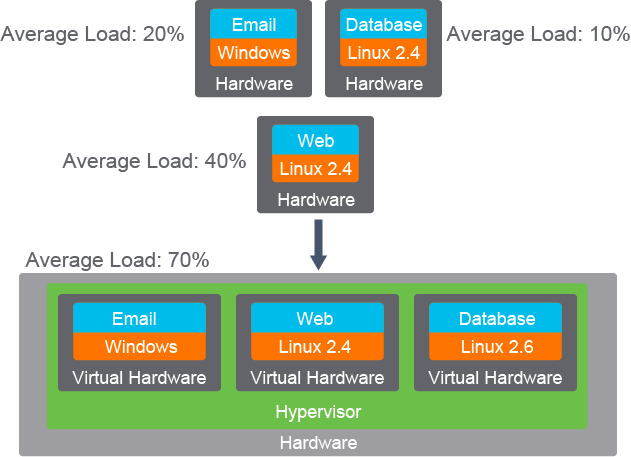
Depending on the average load of existing deployments, it is not unusual to be able to put three or more servers onto a single piece of hardware. In data center environments, the ratio of virtual servers to physical servers can be in the range of hundreds.
依現有部署的平均負載而定,將三台或更多伺服器整併到單一硬體上並不罕見。在資料中心環境中,虛擬伺服器與實體伺服器的比例可高達數百倍。
The virtualization software is known as a hypervisor. The hypervisor divides (partitions) physical hardware resources in software and allocates them to create multiple VM instances. The hypervisor abstracts (isolates) operating systems and applications from the underlying computer hardware. This abstraction allows the underlying physical machine, also called the host machine, to independently operate one or more VMs as guest machines.
虛擬化軟體稱為虛擬機器監視器(hypervisor)。虛擬機器監視器以軟體方式劃分(分割)實體硬體資源,並將其分配以建立多個 VM 實例。虛擬機器監視器將作業系統與應用程式從底層電腦硬體中抽象化(隔離)出來。這種抽象化讓底層實體機器(也稱為主機)可以獨立地運作一個或多個作為客體機器的 VM。
The figure illustrates how the hypervisor isolates virtual hardware resources from underlying physical hardware, for each VM.
下圖說明虛擬機器監視器如何為每個 VM 將虛擬硬體資源與底層實體硬體隔離開來。
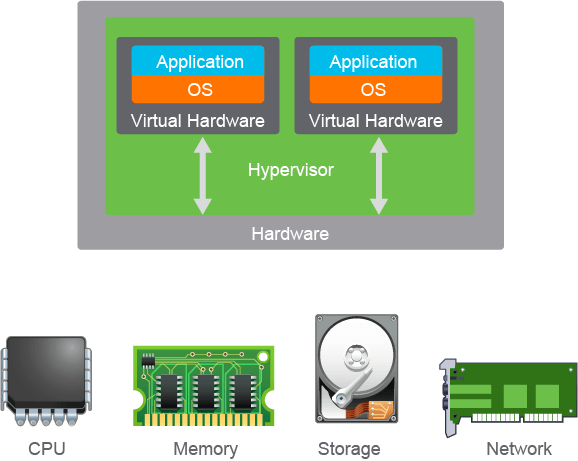
A VM runs its own operating system and applications. The applications are not aware that they are running in a virtualized environment.
VM 執行自己的作業系統與應用程式。應用程式並不知道自己是在虛擬化環境中執行。
A hypervisor has these tasks:
虛擬機器監視器具有以下工作:
- Providing an operating platform to VMs, providing unified and consistent access to the host machine CPU, memory, network, and input and output units.提供 VM 的運作平台,為主機的 CPU、記憶體、網路及輸入輸出裝置提供統一且一致的存取方式。
- Managing the execution of the guest operating system.管理客體作業系統的執行。
- Providing connectivity between VMs, and between the VMs and external network resources.提供 VM 之間、以及 VM 與外部網路資源之間的連線能力。
There are different virtualization implementations in use today, which differ in how the guest operating system, hypervisor, and hardware communicate. The most common implementation is full virtualization.
目前業界使用多種不同的虛擬化實作方式,差異在於客體作業系統、虛擬機器監視器與硬體之間的溝通方式。其中最常見的實作方式是完全虛擬化。
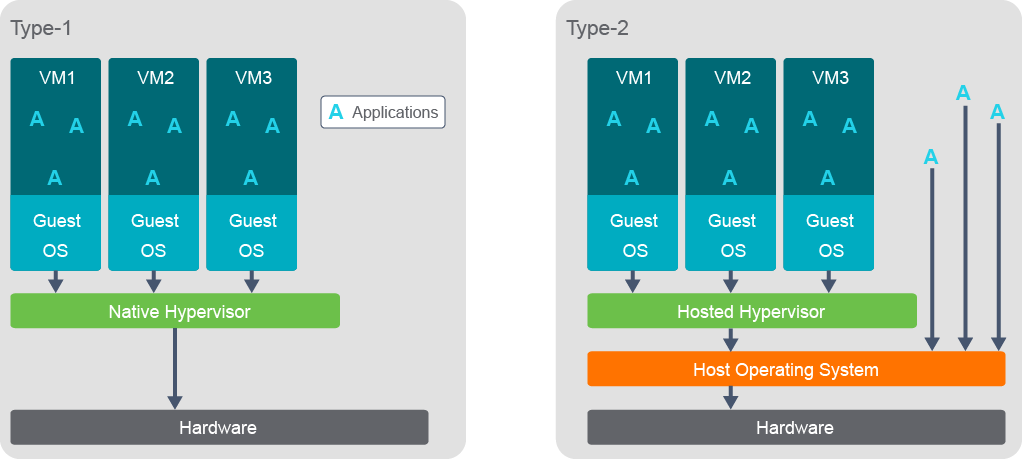
Full virtualization provides a complete emulation of the hardware environment. VM operating systems are completely unaware that they are running in a virtual environment. There are two types of full virtualizations:
完全虛擬化提供對硬體環境的完整模擬。VM 的作業系統完全不知道自己是在虛擬環境中執行。完全虛擬化有兩種類型:
- The hypervisor is running directly on the physical server hardware. This is also called native, bare-metal, or Type-1 hypervisors.虛擬機器監視器直接在實體伺服器硬體上執行。這也稱為原生(native)、裸機(bare-metal)或第 1 型(Type-1)虛擬機器監視器。
- The hypervisor runs on a host operating system (in other words the operating system of the physical device). This is also called a hosted or Type-2 hypervisor.虛擬機器監視器在主機作業系統(也就是實體裝置的作業系統)上執行。這也稱為託管式(hosted)或第 2 型(Type-2)虛擬機器監視器。
The figure illustrates types of full virtualization.
下圖說明完全虛擬化的類型。
Examples of hypervisor software are VMware ESXi and VMware Workstation, Microsoft Hyper-V and Microsoft Virtual PC, Citrix XenServer, Oracle VM and Oracle VM Virtual Box, Red Hat Enterprise Virtualization, and others.
虛擬機器監視器軟體的範例包括 VMware ESXi 與 VMware Workstation、Microsoft Hyper-V 與 Microsoft Virtual PC、Citrix XenServer、Oracle VM 與 Oracle VM Virtual Box、Red Hat Enterprise Virtualization 等。
VMs offer several benefits over physical devices.
相較於實體裝置,VM 提供了幾項優勢。
- Partitioning:分割:
- VMs allow for a more efficient use of resources, because a single physical device can serve many VMs, which can be rearranged across different servers, according to load.VM 可讓資源使用更有效率,因為單一實體裝置可服務許多 VM,並可依負載在不同伺服器間重新配置。
- A hypervisor divides host system resources between VMs and allows VM provisioning and management.虛擬機器監視器會在 VM 之間分配主機系統資源,並允許 VM 佈建與管理。
- Isolation:隔離:
- VMs in a virtualized environment have as much security as is present in traditional physical server environments because VMs are unaware of the presence of other VMs.虛擬化環境中的 VM 具有與傳統實體伺服器環境相同程度的安全性,因為 VM 並不知道其他 VM 的存在。
- VMs that share the same host are completely isolated from each other, but can communicate over the network.共用同一主機的 VM 彼此完全隔離,但可透過網路互相通訊。
- Recovery in cases of failure is much faster with VMs than with physical servers. Failure of a critical hardware component, such as a motherboard or power supply, can bring down all the VMs that reside on the affected host. Affected VMs can be easily and automatically migrated to other hosts in the virtual infrastructure, providing for shorter downtime.發生故障時,VM 的復原速度比實體伺服器快得多。關鍵硬體元件(例如主機板或電源供應器)故障,可能導致該主機上所有 VM 停止運作。受影響的 VM 可輕鬆且自動地遷移至虛擬基礎架構中的其他主機,藉此縮短停機時間。
- Encapsulation:封裝:
- VMs reside in a set of files that describe them and define their resource usage and unique identifiers.VM 儲存於一組描述其自身、並定義其資源使用方式與唯一識別碼的檔案中。
- VMs are extremely simple to back up, modify, or even duplicate in a number of ways.VM 可用多種方式輕鬆備份、修改甚至複製。
- This encapsulation can be deployed in environments that require multiple instances of the same VM, such as classrooms.這種封裝方式可部署於需要同一 VM 多個實例的環境中,例如教室環境。
- Hardware abstraction:硬體抽象化:
- Any VM can be provisioned or migrated to any other physical server that has similar characteristics.任何 VM 都可佈建或遷移至任何具有相似特性的其他實體伺服器。
- Support is provided for multiple operating systems: Windows, Linux, and so on.支援多種作業系統,例如 Windows、Linux 等。
- Broader support for hardware, since the VM is not reliant on drivers for physical hardware.由於 VM 不依賴實體硬體的驅動程式,因此對硬體的支援更廣泛。
An issue with hosting multiple VMs on physical servers is that the physical server represents a single point of failure for all guest machines and services running on them. Also, if maintenance of the physical server requires machine shutdown, it shuts down all the software components on it. Since VMs exist as files, the migration of an entire VM, with its operating system and applications, is a matter of copying a file to another physical machine. Once files are copied, the VM can be started and resume its operation on the new physical host.
在實體伺服器上代管多個 VM 的一個問題是,該實體伺服器成為其上所有客體機器與服務的單一故障點。此外,若實體伺服器需要停機以進行維護,會導致其上所有軟體元件一併停止運作。由於 VM 是以檔案形式存在,因此遷移整個 VM(包含其作業系統與應用程式)只需將檔案複製到另一部實體機器即可。檔案複製完成後,即可在新的實體主機上啟動 VM 並恢復其運作。
The mobility of VMs is an advantage of virtualized environment and is beneficial for these reasons:
VM 的可移動性是虛擬化環境的一項優勢,原因如下:
- Optimum performance: If a VM on a given host starts exceeding the resources of the host, it can be moved to another host that has sufficient resources.最佳效能:如果某台主機上的 VM 開始超出該主機的資源限制,可將其移至擁有足夠資源的另一台主機。
- Maintenance: If there is a need to perform maintenance or upgrade a host, the VMs from that host can be temporarily redistributed to other hosts. After the maintenance is complete, the process can be reversed, resulting in no downtime for users.維護:如果需要對主機進行維護或升級,可先將該主機上的 VM 暫時重新分配到其他主機。維護完成後,可再將程序反向操作,使使用者不會有任何停機時間。
- Resource optimization: If the resource usage of one or more VMs decreases, one or more hosts may no longer be needed. In this case, the VMs can be redistributed and the hosts that are emptied can be powered off to reduce cooling and power requirements.資源最佳化:如果一個或多個 VM 的資源使用量下降,可能就不再需要某些主機。此時可重新分配這些 VM,並將空出的主機關機,以降低散熱與電力需求。
Virtualization is not limited to servers but also extends to other infrastructure components, including networks. Virtualized servers communicate among themselves and with the external resources. Virtualization affects networking requirements because communications of multiple VMs are multiplexed onto the same physical network connections provided by the host machine. Networking functions such as NIC cards, firewalls, and switches can also be virtualized and moved to reside inside a host machine.
虛擬化不僅限於伺服器,也延伸至其他基礎架構元件,包括網路。虛擬化伺服器彼此之間、以及與外部資源之間都會進行通訊。虛擬化會影響網路需求,因為多個 VM 的通訊會多工傳送於主機提供的相同實體網路連線上。網路功能,例如 NIC 卡、防火牆與交換器,也可虛擬化並移入主機內部。
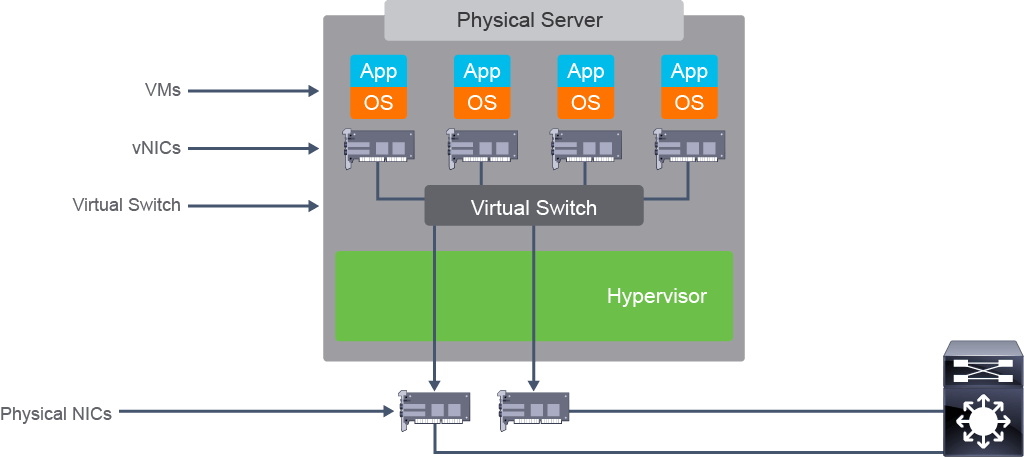
A virtual switch emulates a Layer 2 switch. It runs as part of a hypervisor and provides network connectivity for all VMs. When connected to a virtual switch, VMs behave as if they are connected to a normal network switch.
虛擬交換器可模擬第 2 層交換器。它作為虛擬機器監視器的一部分執行,並為所有 VM 提供網路連線。連接到虛擬交換器時,VM 的行為就如同連接到一般的網路交換器。
The figure shows four VMs that are connected to the same virtual switch that has access to the outside network.
下圖顯示四個 VM 連接到同一台可存取外部網路的虛擬交換器。
Containers
容器
Containers are similar to VMs in many ways, but also different. Just as with VMs, containers are instances that run on a host (bare metal or virtual) machine. Like VMs, they can be customized and built to whatever specification is desired, and can be used the same way that a VM is used, allowing isolated processes, networking, users, and so on.
容器在許多方面與 VM 相似,但也有所不同。與 VM 一樣,容器是在主機(裸機或虛擬機器)上執行的實例。與 VM 一樣,容器可依需求自訂並建置,使用方式也與 VM 相同,可實現行程、網路、使用者等方面的隔離。
Containers differ from VMs in that a guest operating system is not installed. Rather, when application code is run, the container only runs the necessary processes that support the application. This is because containers are made possible using kernel features of the host operating system and a layered file system instead of the emulation layer required to run VMs. This also means that containers do not consist of different operating systems with installed applications, but instead have the necessary components that set them aside as different Linux vender versions and variants.
容器與 VM 的不同之處在於,容器不會安裝客體作業系統。相反地,當執行應用程式程式碼時,容器只會執行支援該應用程式所需的行程。這是因為容器是利用主機作業系統的核心功能與分層檔案系統來實現,而非執行 VM 所需的模擬層。這也意味著容器並非由安裝了應用程式的不同作業系統組成,而是具備使其有別於不同 Linux 廠商版本與變體的必要元件。
Even more so, this means that because a container does not require its own operating system, it uses fewer resources and consumes only the resources required for the application that is run upon starting the container. Therefore applications can consist of smaller containerized components (which are the binaries and libraries required by the applications) instead of legacy monolithic applications installed on a virtual or bare metal system.
更進一步來說,這意味著由於容器不需要自己的作業系統,因此使用的資源較少,僅消耗啟動容器後所執行應用程式所需的資源。因此,應用程式可由較小的容器化元件(即應用程式所需的二進位檔與函式庫)組成,而非安裝在虛擬機器或裸機系統上的傳統單體式應用程式。
How containers are similar to VMs is that they also are stored as images, although a big difference is that container images are much smaller and more portable to use than VM images for the aforementioned reasons of not requiring an operating system installation as part of the image. This makes it possible to have a packaged, ready-to-use application that runs the same regardless of where it is, as long as the host system runs containers (Linux containers specifically).
容器與 VM 相似之處在於,它們同樣以映像檔形式儲存,不過一個很大的差異是,容器映像檔遠比 VM 映像檔更小、更容易攜帶使用,原因如前所述,容器映像檔不需要在其中安裝作業系統。這使得建立一個封裝好、隨時可用的應用程式成為可能,只要主機系統可執行容器(特別是 Linux 容器),該應用程式在任何地方執行都能有相同的表現。
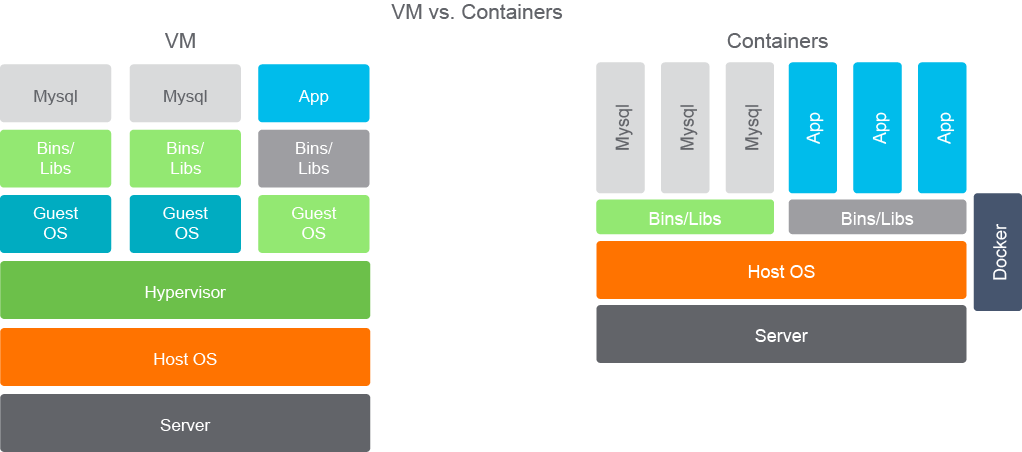
A number of container technologies are available, with Linux leading the charge. One of the more popular platforms is Docker, which is now based on Linux libcontainer. Actually, Docker is a management system that is used to create, manage, and monitor Linux containers. Ansible is another container-management system favored by Ansible.
目前市面上有許多容器技術可供使用,其中 Linux 居於領先地位。較受歡迎的平台之一是 Docker,目前是以 Linux libcontainer 為基礎。實際上,Docker 是一套用於建立、管理與監控 Linux 容器的管理系統。Ansible 則是另一套受 Ansible 愛好者青睞的容器管理系統。
Virtualization of Networking Functions
網路功能的虛擬化
Networking functions can also be virtualized with networking devices acting as hosts. The virtualization main principle remains the same: one physical device can be segmented into several devices that function independently. Examples include subinterfaces and virtual interfaces, Layer 2 VLANs, Layer 3 virtual routing and forwarding (VRF), and Layer 2 virtual device contexts.
網路功能也可虛擬化,由網路裝置扮演主機角色。虛擬化的基本原則不變:一部實體裝置可切分為數個可獨立運作的裝置。範例包括子介面與虛擬介面、第 2 層 VLAN、第 3 層虛擬路由與轉送(VRF),以及第 2 層虛擬裝置環境。
Network device interfaces can be logically divided into subinterfaces, which are created without special virtualization software. Rather, subinterfaces are a configuration feature supported by the network device operating system. Subinterfaces are used when providing router-on-a-stick inter-VLAN routing, but there are other use cases also.
網路裝置介面可在邏輯上劃分為子介面,此過程不需要特殊的虛擬化軟體,而是網路裝置作業系統所支援的一項設定功能。子介面常用於提供單臂路由的 VLAN 間路由,但也有其他使用情境。
VLANs are a virtual element mostly related to Layer 2 switches. VLANs divide a Layer 2 switch into multiple virtual switches, one for each VLAN, effectively creating separate network segments. Traffic from one VLAN is isolated from the traffic of another VLAN.
VLAN 是主要與第 2 層交換器相關的虛擬元素。VLAN 將第 2 層交換器劃分為多個虛擬交換器,每個 VLAN 各一個,實際上建立出各自獨立的網路區段。來自某一 VLAN 的流量會與另一 VLAN 的流量隔離。
A switch virtual interface (SVI) is another virtualization element in Layer 2 devices. It is a virtual interface that can have multiple physical ports associated with it. In a way, it acts as a virtual switch in a virtualized machine. Again, to create VLANs and SVIs you only need to configure them using features included in the device operating system.
交換器虛擬介面(SVI)是第 2 層裝置中的另一種虛擬化元素。它是一種可關聯多個實體連接埠的虛擬介面,某種程度上就像虛擬機器中的虛擬交換器。同樣地,要建立 VLAN 與 SVI,只需使用裝置作業系統內建的功能加以設定即可。
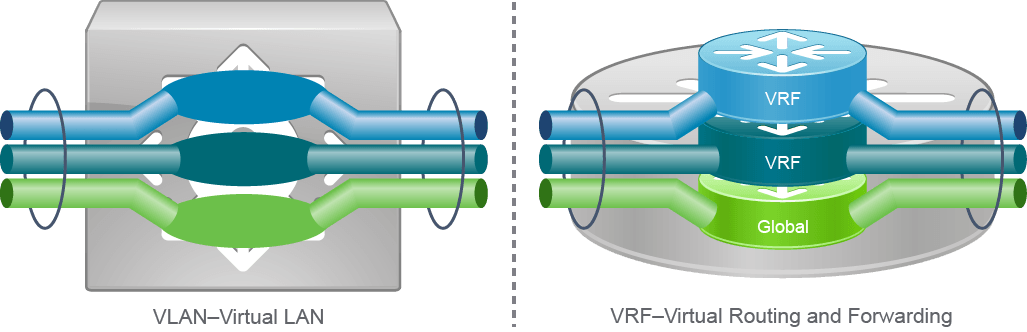
To provide logical Layer 3 separation within a Layer 3 device, the data plane and control plane functions of the device must be segmented into different VRF contexts. This process is similar to the way that a Layer 2 switch separates the Layer 2 control and data planes into different VLANs.
若要在第 3 層裝置內提供邏輯上的第 3 層隔離,必須將該裝置的資料平面與控制平面功能區隔到不同的 VRF 環境中。此過程類似於第 2 層交換器將第 2 層控制與資料平面區隔到不同 VLAN 的方式。
With VRFs, routing and related forwarding information is separated from other VRFs. Each VRF is isolated from other VRFs. Each VRF contains a separate address space, and makes routing decisions that are independent of any other VRF Layer 3 interfaces, logical or physical.
透過 VRF,路由與相關轉送資訊會與其他 VRF 區隔開來。每個 VRF 都與其他 VRF 隔離,各自擁有獨立的位址空間,並獨立於任何其他 VRF 的第 3 層介面(無論邏輯或實體)之外做出路由決策。