Network automation has a growing number of use cases. Automation is more than using APIs and automation tools to configure a bunch of network devices—it is about determining the short-term and long-term use cases that appropriately address your organization's business needs.
網路自動化的應用案例正日益增加。自動化不僅是使用 API 與自動化工具來設定一堆網路裝置,更重要的是找出能適切滿足組織短期與長期業務需求的應用案例。
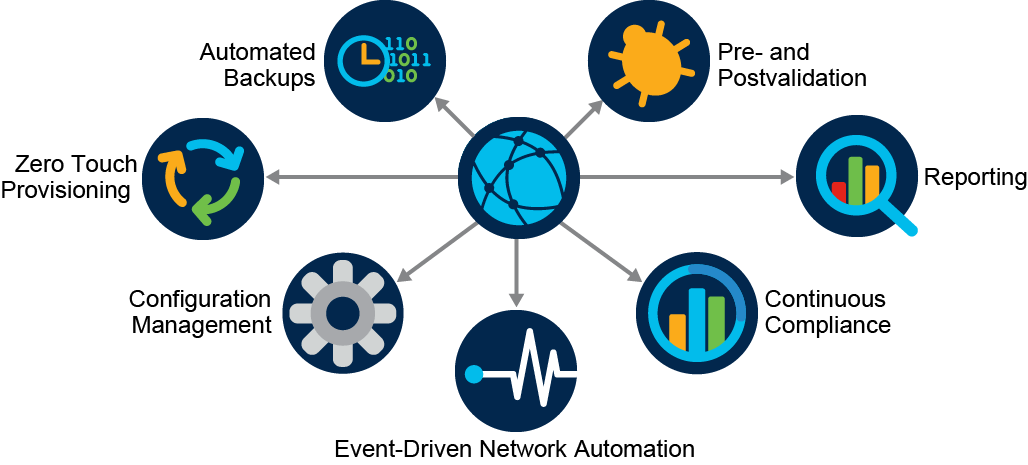
Here are several key use cases for network automation:
以下是網路自動化的幾項關鍵應用案例:
- Automated backups: Imagine an infrastructure with tens or hundreds or thousands of nodes requiring daily backups of every node's configuration. This requirement should exist for all teams, but the reality is, it does not always happen. Without the proper tools, this task is repetitive and might take hours to days to complete. It is a true waste of time and resources. The alternative is to have some type of tool or automation that can be scheduled to run every day. Furthermore, this approach enables historical tracking of changes for compliance and audits.自動備份:設想一個擁有數十、數百甚至數千個節點的基礎架構,每個節點的設定都需要每日備份。這項需求應該適用於所有團隊,但實際上並非總能落實。若沒有適當的工具,這項工作既重複又可能耗費數小時甚至數天才能完成,實在是浪費時間與資源。替代方案是採用某種可排程每日執行的工具或自動化機制。此外,這種做法還能為合規與稽核提供變更歷史紀錄追蹤功能。
- Pre- and post-validation:A method of procedure (MOP) is a detailed and sometimes complex document that outlines step-by-step procedures that need to be followed to complete a given network change. They usually include information that must be gathered before and after each change, such as pre- and post-device-state capture (for example, interface, Border Gateway Protocol [BGP], operating system version) for validation reasons. This information provides assurance that the change went as expected. Because humans normally execute changes and the pre- and post-change verification commands, each engineer must perform this function. If it is a late-night change, commands can be missed or validation can be incorrectly performed. This situation is a great use case for automation while still making the change manually. This function can be automated so the script completes the entire MOP with both pre- and post-validation included. Or as mentioned, the script does pre- and post-validation and compares the results while the engineer performs the actual change. The scripts can easily communicate with several devices, obtain the necessary information, and store the information in a text file or database. After the MOP is complete, the same commands can be used to retrieve the same information, make a comparison, and present the final results to the supervising engineer.變更前與後驗證:方法程序文件(method of procedure,MOP)是一份詳細、有時相當複雜的文件,說明完成特定網路變更所需遵循的逐步程序。其中通常包含每次變更前後必須蒐集的資訊,例如變更前後裝置狀態擷取(例如介面、邊界閘道協定〔Border Gateway Protocol,BGP〕、作業系統版本),以供驗證之用。這些資訊可確認變更是否如預期進行。由於變更以及變更前後驗證指令通常由人工執行,因此每位工程師都必須自行完成這項工作。若是深夜進行的變更,指令可能被遺漏,或驗證可能執行不正確。這正是自動化的絕佳應用情境,即使變更本身仍以人工方式進行。這項功能可以自動化,讓腳本完成整個 MOP,包含變更前後驗證。或者如前所述,腳本執行變更前後驗證並比對結果,同時由工程師實際執行變更。腳本可輕鬆與多台裝置通訊、取得所需資訊,並將資訊儲存於文字檔或資料庫中。MOP 完成後,可使用相同指令再次取得相同資訊,進行比對,並將最終結果呈報給督導工程師。
- Reporting: Statistical data that is properly analyzed on a day-to-day basis can be very beneficial to a network team. Generating reports from different endpoints can also be assigned to the automation systems. They can be as robust as obtaining the information, creating charts and graphs, putting the information in a PDF file format, and emailing it to the responsible parties for further review. With automated reports, you own what goes in the report, how the report looks, where the report goes, and if there should be any notifications after completing the report (chat, email, phone, text).報告產出:妥善分析的每日統計資料,對網路團隊而言非常有價值。從不同端點產生報告的工作,同樣也可以交由自動化系統負責。這些系統的功能可以十分完善,包括取得資訊、建立圖表,將資訊轉為 PDF 檔案格式,並電子郵件寄送給相關負責人員以供進一步審閱。透過自動化報告,你可以掌控報告內容、報告呈現方式、報告寄送對象,以及報告完成後是否需要通知(聊天、電子郵件、電話、簡訊)。
- Continuous compliance: Based on your vertical or industry, there are different types of regulations with which you need to comply. Some industries require very strict compliance from their participants, for example, financial, healthcare, and education. Perhaps compliance requires that network devices only communicate with each other using secured mechanisms. Checking the entire infrastructure would be a time-consuming job, along with making sure that any changes that are made to devices are not violating compliance requirements. This approach can be extended to ensure that the configuration complies with enterprise standards, but also to ensure that the operational state is as expected; for example, there are a certain number of active neighbors, certain routes exist in every branch, and so on. Continuous compliance automation involves continuously checking all networking devices and making sure that they meet the set requirements.持續合規:依據所屬產業或垂直領域不同,你需要遵循不同類型的法規。有些產業要求極為嚴格的合規性,例如金融、醫療與教育產業。也許合規要求網路裝置之間只能使用安全機制進行通訊。逐一檢查整個基礎架構將是一項耗時的工作,同時還須確保對裝置所做的任何變更不會違反合規要求。這種做法可延伸至確保設定符合企業標準,同時也確保作業狀態符合預期,例如有一定數量的活躍鄰居、每個分支機構都存在特定路由等。持續合規自動化涉及持續檢查所有網路裝置,確保它們符合所設定的要求。
- Event-driven network automation: What is the course of action when a connection to a strategic partner fails? First, some mechanism needs to capture that event. Then a responsible party must see it so they can act on it by following certain steps to identify the root cause and fix it. How much time do you think will pass between the event occurrence and the time when someone begins working on it? The answer depends on the event capturing and reporting mechanisms. The crucial issue is when the engineer sees it, and sometimes it can be minutes or hours. To fix the time delay issue, companies can use event-driven automation and reduce the delay in root cause identification and resolution from hours or minutes to seconds. If you can identify a particular event and have a known course of action ready, it can be automated.事件驅動網路自動化:當與策略合作夥伴的連線中斷時,該採取什麼行動?首先,需要有某種機制擷取該事件。接著,負責人員必須看到該事件,才能依循特定步驟找出根本原因並加以修復。你認為從事件發生到有人開始處理,會經過多長時間?答案取決於事件擷取與回報機制。關鍵問題在於工程師何時看到事件,有時可能需要數分鐘或數小時。為解決這種延遲問題,企業可採用事件驅動自動化,將根本原因識別與解決的延遲時間,從數小時或數分鐘縮短至數秒。若能識別特定事件並備妥已知的處理方式,就可以將其自動化。
- Configuration management: Configuration management is the most common use case for network automation. Configuration management is the act of making the changes on the devices in a more consistent, scalable, and deterministic way across the infrastructure.設定管理:設定管理是網路自動化最常見的應用案例。設定管理是指以更一致、可擴充且具確定性的方式,在整個基礎架構上對裝置進行變更。
- Zero touch provisioning: When a device is introduced to the environment, it needs to go through a series of steps like upgrading the operating system, adding a management IP to the interface, and pushing the configuration. Zero Touch Provisioning (ZTP) can automate all these steps. It can listen for new devices that come online on the network, determine the vendor and model, and configure them accordingly. Therefore, when this process is done, the device is fully ready for a configuration management platform to manage it and for it to actively participate in the network.零接觸佈建:當一台裝置被導入環境時,需要經過一系列步驟,例如升級作業系統、為介面新增管理 IP,以及推送設定。零接觸佈建(Zero Touch Provisioning,ZTP)可以將這些步驟全部自動化。它能監聽網路上新上線的裝置,判斷廠牌與型號,並依此進行對應設定。因此,這項流程完成後,裝置便已完全就緒,可交由設定管理平台管理,並主動參與網路運作。
Network Automation Usage
網路自動化的使用方式
Network automation does not do any engineer, person, or team any good if the tools that are selected and deployed are too cumbersome to use. You must pay special attention to the target user of a given use case (and workflow) and to the desired user experience. Not everyone is technically inclined and not everyone should be logging into a Linux server to execute a workflow.
如果所選用並部署的工具過於繁瑣難用,網路自動化對任何工程師、個人或團隊都沒有好處。你必須特別留意特定應用案例(及工作流程)的目標使用者,以及所期望的使用者體驗。並非每個人都擅長技術,也並非每個人都應該登入 Linux 伺服器來執行工作流程。
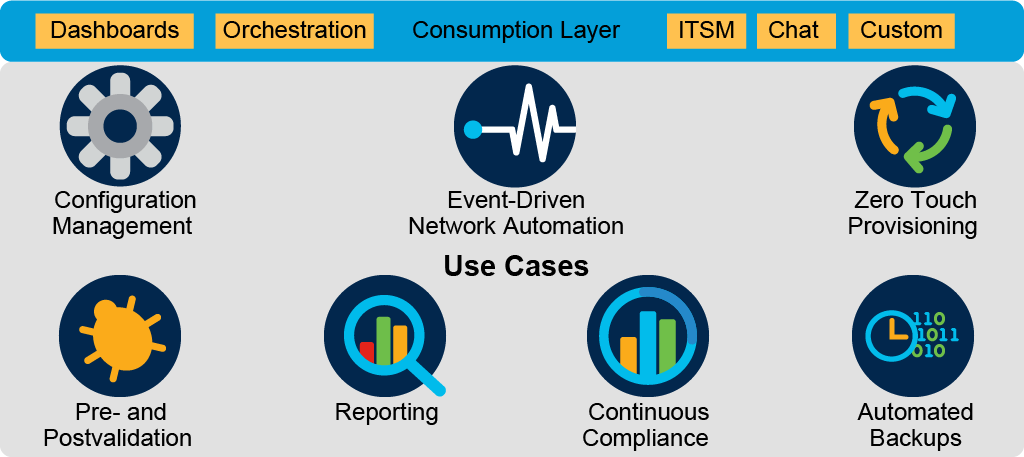
You will need a catalog of tools that exist within the presentation layer or consumption layer that communicate with automation tools. For example, the following are common options for using network automation:
你需要一份工具目錄,這些工具存在於與自動化工具溝通的呈現層或消費層之中。舉例來說,以下是使用網路自動化時常見的選項:
- Chat: Chat is often referred to as Chat Operations or ChatOps. Applications such as Cisco Webex can be used to receive notifications from automation tools to alert a group, channel, or person, or can be used to start certain workflows or jobs by sending a chat command to a bot.聊天:聊天通常也稱為聊天維運(Chat Operations)或 ChatOps。像 Cisco Webex 這類應用程式,可用來接收來自自動化工具的通知,以提醒群組、頻道或個人,也可以用來透過向機器人(bot)傳送聊天指令,啟動特定工作流程或工作。
- IT Service Management (ITSM): Enterprises have widely adopted platforms such as ServiceNow for ITSM. ITSM requests IT changes, tracks problems and incidents, and so on. Proper integration permits direct integration of ITSM tools and automation software so that when changes are approved and scheduled, they are then executed.IT 服務管理(ITSM):企業已廣泛採用如 ServiceNow 之類的平台進行 ITSM。ITSM 負責提出 IT 變更請求、追蹤問題與事件等。透過適當整合,可讓 ITSM 工具與自動化軟體直接串接,使變更在核准並排程後即可自動執行。
- Dashboards: Dashboards can be used to show data that are obtained from continuous compliance and reporting tools.儀表板:儀表板可用來呈現從持續合規與報告工具取得的資料。
- Orchestration: ITSM platforms have orchestration engines, but options exist from various vendors. Very common in the world of the cloud, orchestrators provide an intuitive way to request IT resources that, upon execution, automate several tasks transparently.協調(Orchestration):ITSM 平台具備協調引擎,但市面上也有各家廠商提供的選項。在雲端領域中相當常見,協調工具提供一種直覺的方式來請求 IT 資源,一旦執行,便會透明地自動完成多項工作。
- Dashboards, reports, user interface, custom: Visibility offers you two options: find tools that provide the right layer of visibility, build dashboards that show exactly what you want to see, or use a combination of these options. When you decide on a tool, you should ensure that it is flexible, so that you can customize reports, and that it has an API to extract the data so you can customize dashboards in the future if needed.儀表板、報告、使用者介面、客製化:可見性提供你兩種選擇:尋找能提供適當可見性層級的工具、建立能精確呈現你想看到內容的儀表板,或結合這兩種方式。選定工具時,應確保其具備彈性,以便客製化報告,並具備 API 以擷取資料,方便未來依需求客製化儀表板。
Ultimately, the way that network automation is used is critical to its success. Automation allows you to create the right abstraction and hide the complexity of underlying tools from humans. It also provides visual tools to present the received data or send instructions to the automation tools.
歸根結柢,網路自動化的使用方式對其成功與否至關重要。自動化讓你能建立適當的抽象層,向使用者隱藏底層工具的複雜性,同時也提供視覺化工具,用以呈現接收到的資料或向自動化工具傳送指令。
| Zero Touch Provisioning零接觸佈建 | Verifying that the network is in its intended state驗證網路是否處於預期狀態 |
| Continuous Compliance持續合規 | Automatically bootstrap devices as they are powered on for the first time在裝置首次開機時自動完成初始設定 |
| Configuration management設定管理 | Deploying and maintaining network services部署並維護網路服務 |