Introduction
簡介
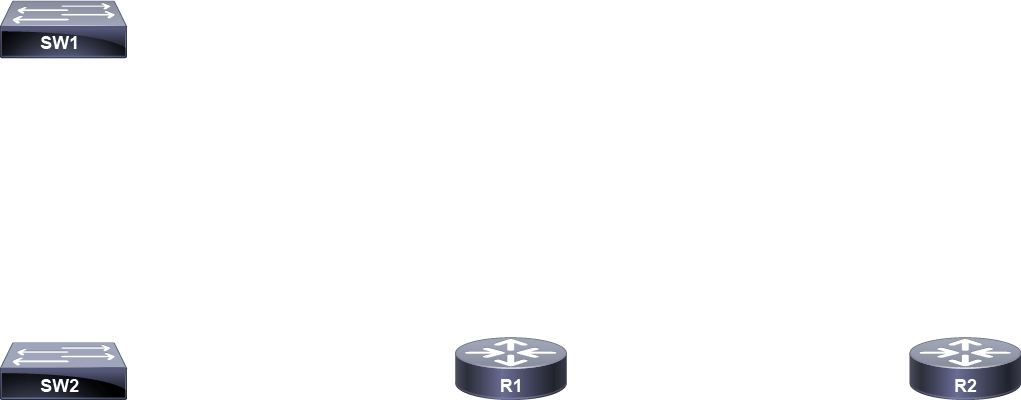
During this activity, you will use Cisco Discovery Protocol and LLDP to map the connectivity within an unfamiliar network. There are four devices in the topology, and you have access to their console ports, but you do not know how they are connected. Using Cisco Discovery Protocol and LLDP commands, you will determine the actual topology.
在本次活動中,您將使用 Cisco 探索協定(CDP)與 LLDP 來繪製一個陌生網路內的連線圖。拓樸中有四台裝置,您可以存取它們的主控台連接埠,但不知道它們之間如何連接。您將透過 CDP 與 LLDP 指令,判定實際的拓樸架構。
Topology
拓樸
Job Aid
工作輔助資料
There are no Job Aids for this lab exercise because the objective of the lab is to map the connectivity within an unfamiliar network.
本實驗練習沒有工作輔助資料,因為此實驗的目標就是要繪製陌生網路內的連線圖。
Task 1: Discover Neighbors Using Cisco Discovery Protocol
任務 1:使用 Cisco 探索協定探索鄰居
Activity
活動
Before accessing the console of switch SW1, wait 60 seconds for Cisco Discovery Protocol to populate its database. On SW1, use the show cdp neighbors command to determine the devices to which SW1 is connected. Note that the Cisco Discovery Protocol table shows both the local port on SW1 and the port on the remote device to which SW1 is connected.
在存取交換器 SW1 的主控台之前,請先等待 60 秒,讓 CDP 填入其資料庫。在 SW1 上,使用 show cdp neighbors 指令來判定 SW1 連接到哪些裝置。請注意,CDP 表格同時顯示 SW1 上的本地連接埠,以及 SW1 所連接之遠端裝置上的連接埠。
On SW1, enter this command:
在 SW1 上,輸入以下指令:
SW1# show cdp neighbors
Capability Codes: R - Router, T - Trans Bridge, B - Source Route Bridge
                  S - Switch, H - Host, I - IGMP, r - Repeater, P - Phone,
                  D - Remote, C - CVTA, M - Two-port Mac Relay

Device ID Local Intrfce     Holdtme    Capability  Platform  Port ID
SW2 Eth 0/0           153              S I   Linux Uni Eth 0/0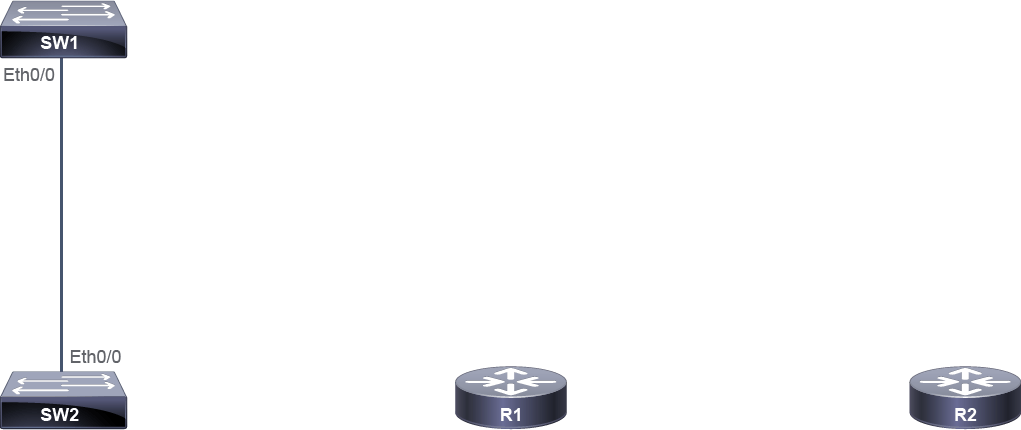
The Device ID column in the output indicates the remote device connected to SW1, which is switch SW2. The Local Intrfce column indicates the local port (Ethernet0/0) on SW1. The Port ID column indicates the remote port (Ethernet0/0) on SW2 used for connecting to SW1.
輸出中的 Device ID 欄位代表連接到 SW1 的遠端裝置,即交換器 SW2。Local Intrfce 欄位代表 SW1 上的本地連接埠(Ethernet0/0)。Port ID 欄位代表用來連接 SW1 的 SW2 遠端連接埠(Ethernet0/0)。
Execute the show cdp neighbors command again, but this time, use the detail keyword. What is the IPv4 address of SW2?
再次執行 show cdp neighbors 指令,但這次加上 detail 關鍵字。SW2 的 IPv4 位址是什麼?
On SW1, enter this command:
在 SW1 上,輸入以下指令:
SW1# show cdp neighbors detail
-------------------------
Device ID: SW2
Entry address(es):
 IP address: 10.10.1.3
Platform: Linux Unix,  Capabilities: Switch IGMP
Interface: Ethernet0/0,  Port ID (outgoing port): Ethernet0/0
Holdtime : 147 sec

Version :
Cisco IOS Software, Solaris Software (I86BI_LINUXL2-ADVENTERPRISEK9-M), Experimental Version 15.1(20130919:231344) [dstivers-sept19-2013pm-team_track 107]
Copyright (c) 1986-2013 by Cisco Systems, Inc.
Compiled Thu 19-Sep-13 22:38 by dstivers

advertisement version: 2
VTP Management Domain: ''
Duplex: half
Management address(es):
  IP address: 10.10.1.3
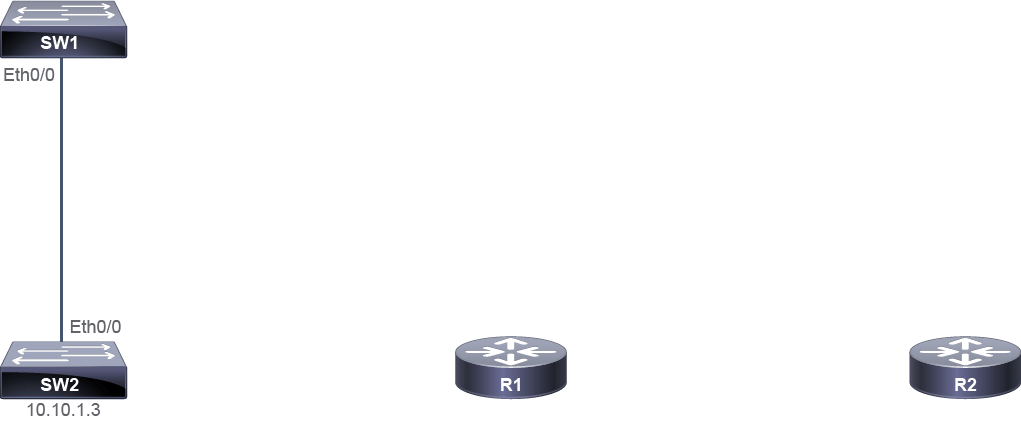
The IPv4 address of SW2 switch is 10.10.1.3.
SW2 交換器的 IPv4 位址是 10.10.1.3。
Continue the topology inspection from SW2. You know that SW1 is one of the neighbors of SW2. What are the other neighbors of SW2?
從 SW2 繼續進行拓樸檢視。您已知道 SW1 是 SW2 的鄰居之一,那麼 SW2 還有哪些其他鄰居?
On SW2, enter these commands:
在 SW2 上,輸入以下指令:
SW2# show cdp neighbors
Capability Codes: R - Router, T - Trans Bridge, B - Source Route Bridge
                  S - Switch, H - Host, I - IGMP, r - Repeater, P - Phone,
                  D - Remote, C - CVTA, M - Two-port Mac Relay

Device ID        Local Intrfce     Holdtme    Capability  Platform  Port ID
SW1              Eth 0/0           130              S I   Linux Uni Eth 0/0
R1               Eth 0/1           153               R    Linux Uni Eth 0/0
SW2# show cdp neighbors detail
-------------------------
Device ID: SW1
Entry address(es):
 IP address: 10.10.1.2
Platform: Linux Unix,  Capabilities: Switch IGMP
Interface: Ethernet0/0,  Port ID (outgoing port): Ethernet0/0
Holdtime : 124 sec

Version :
Cisco IOS Software, Solaris Software (I86BI_LINUXL2-ADVENTERPRISEK9-M), Experimental Version 15.1(20130919:231344) [dstivers-sept19-2013pm-team_track 107]
Copyright (c) 1986-2013 by Cisco Systems, Inc.
Compiled Thu 19-Sep-13 22:38 by dstivers

advertisement version: 2
VTP Management Domain: ''
Duplex: half
Management address(es):
  IP address: 10.10.1.2

-------------------------
Device ID: R1
Entry address(es):
 IP address: 10.10.1.1
Platform: Linux Unix,  Capabilities: Router
Interface: Ethernet0/1,  Port ID (outgoing port): Ethernet0/0
Holdtime : 147 sec

Version :
Cisco IOS Software, Linux Software (I86BI_LINUX-ADVENTERPRISEK9-M), Version 15.2(4)M3, DEVELOPMENT TEST SOFTWARE
Technical Support: http://www.cisco.com/techsupport
Copyright (c) 1986-2013 by Cisco Systems, Inc.
Compiled Tue 26-Feb-13 19:06 by prod_rel_team

advertisement version: 2
Duplex: half
Management address(es):
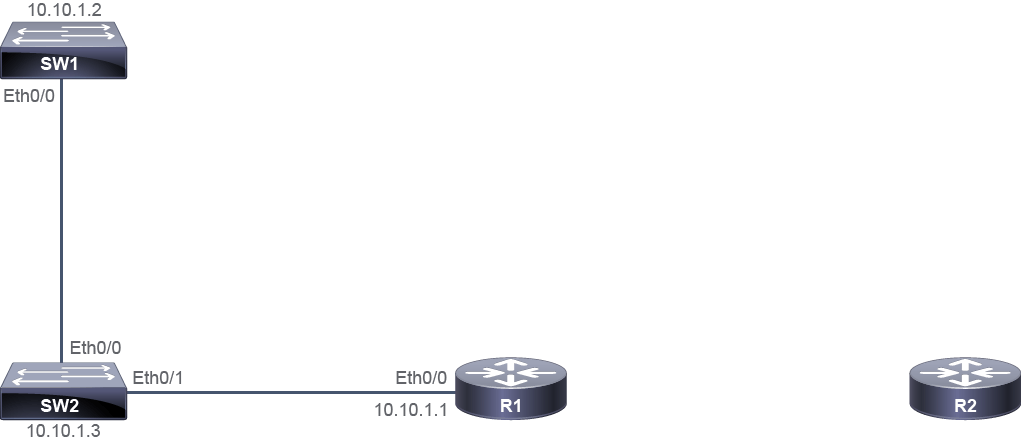
Based on the output, SW2 has two neighboring devices, SW1 and router R1. The IPv4 address of SW1 is 10.10.1.2, and the IPv4 address of R1 is 10.10.1.1.
根據輸出結果,SW2 有兩個鄰近裝置,SW1 與路由器 R1。SW1 的 IPv4 位址為 10.10.1.2,R1 的 IPv4 位址為 10.10.1.1。
Continue the topology inspection from R1. What are the other neighbors of R1?
從 R1 繼續進行拓樸檢視。R1 還有哪些其他鄰居?
On R1, enter these commands:
在 R1 上,輸入以下指令:
R1# show cdp neighbors
Capability Codes: R - Router, T - Trans Bridge, B - Source Route Bridge
                  S - Switch, H - Host, I - IGMP, r - Repeater, P - Phone,
                  D - Remote, C - CVTA, M - Two-port Mac Relay

Device ID        Local Intrfce     Holdtme    Capability  Platform  Port ID
SW2              Eth 0/0            164             S I   Linux Uni Eth 0/1
R2               Eth 0/1            173              R    Linux Uni Eth 0/0

R1# show cdp neighbors detail
-------------------------
Device ID: SW2
Entry address(es):
 IP address: 10.10.1.3
Platform: Linux Unix,  Capabilities: Switch IGMP
Interface: Ethernet0/0,  Port ID (outgoing port): Ethernet0/1
Holdtime : 161 sec

Version :
Cisco IOS Software, Solaris Software (I86BI_LINUXL2-ADVENTERPRISEK9-M), Experimental Version 15.1(20130919:231344) [dstivers-sept19-2013pm-team_track 107]
Copyright (c) 1986-2013 by Cisco Systems, Inc.
Compiled Thu 19-Sep-13 22:38 by dstivers

advertisement version: 2
VTP Management Domain: ''
Native VLAN: 1
Duplex: half

-------------------------
Device ID: R2
Entry address(es):
 IP address: 192.168.3.2
Platform: Linux Unix,  Capabilities: Router
Interface: Ethernet0/1,  Port ID (outgoing port): Ethernet0/0
Holdtime : 170 sec

Version :
Cisco IOS Software, Linux Software (I86BI_LINUX-ADVENTERPRISEK9-M), Version 15.2(4)M3, DEVELOPMENT TEST SOFTWARE
Technical Support: http://www.cisco.com/techsupport
Copyright (c) 1986-2013 by Cisco Systems, Inc.
Compiled Tue 26-Feb-13 19:06 by prod_rel_team

advertisement version: 2
Duplex: half
The output shows that R1 has connections to SW2 and router R2, connected to local interfaces Ethernet0/0 and Ethernet0/1, respectively. SW2 has 10.10.1.3 IPv4 address. The IPv4 address of R2 is 192.168.3.2.
輸出結果顯示,R1 分別透過本地介面 Ethernet0/0 與 Ethernet0/1,連接到 SW2 與路由器 R2。SW2 的 IPv4 位址為 10.10.1.3。R2 的 IPv4 位址為 192.168.3.2。
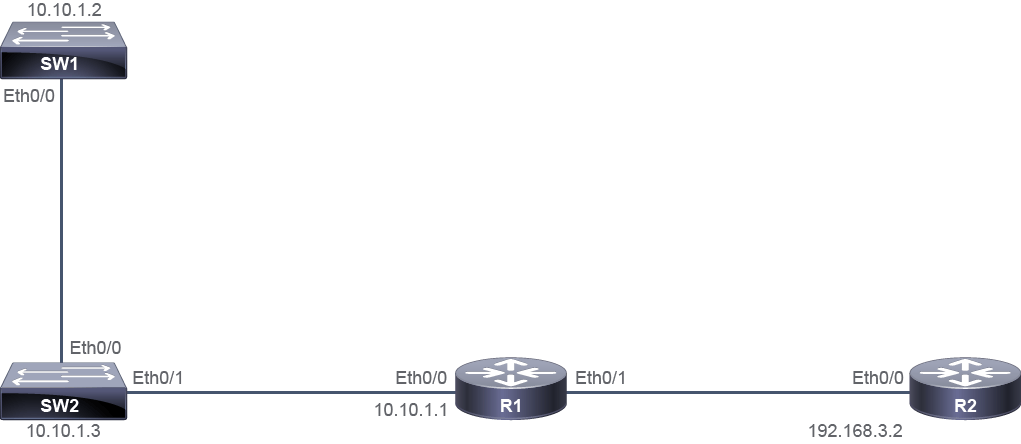
Continue the topology inspection from R2.
從 R2 繼續進行拓樸檢視。
On R2, enter these commands:
在 R2 上,輸入以下指令:
R2# show cdp neighbors
Capability Codes: R - Router, T - Trans Bridge, B - Source Route Bridge
                  S - Switch, H - Host, I - IGMP, r - Repeater, P - Phone,
                  D - Remote, C - CVTA, M - Two-port Mac Relay

Device ID        Local Intrfce     Holdtme    Capability  Platform  Port ID
R1               Eth 0/0            176              R    Linux Uni Eth 0/1
R2# show cdp neighbors detail
-------------------------
Device ID: R1
Entry address(es):
 IP address: 192.168.3.1
Platform: Linux Unix,  Capabilities: Router
Interface: Ethernet0/0,  Port ID (outgoing port): Ethernet0/1
Holdtime : 174 sec

Version :
Cisco IOS Software, Linux Software (I86BI_LINUX-ADVENTERPRISEK9-M), Version 15.2(4)M3, DEVELOPMENT TEST SOFTWARE
Technical Support: http://www.cisco.com/techsupport
Copyright (c) 1986-2013 by Cisco Systems, Inc.
Compiled Tue 26-Feb-13 19:06 by prod_rel_team

advertisement version: 2
Duplex: half
R2 has no additional neighbors, so the only neighboring device is R1. The 192.168.3.1 IPv4 address is used on R1 Ethernet0/1 interface.
R2 沒有其他鄰居,唯一的鄰近裝置是 R1。192.168.3.1 這個 IPv4 位址是用在 R1 的 Ethernet0/1 介面上。
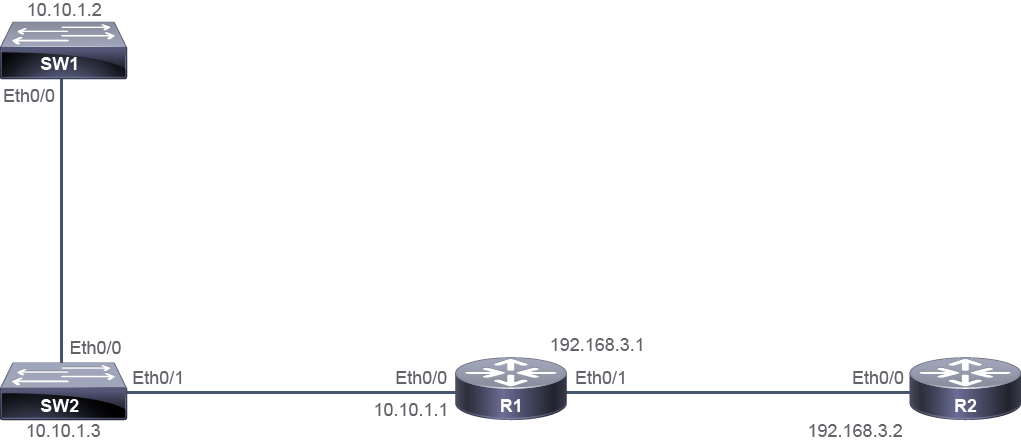
Task 2: Discover Neighbors Using Link Layer Discovery Protocol
任務 2:使用鏈路層探索協定探索鄰居
Activity
活動
Before configuring LLDP, disable Cisco Discovery Protocol on all devices (SW1, SW2, R1, and R2).
在設定 LLDP 之前,請先在所有裝置(SW1、SW2、R1 與 R2)上停用 Cisco 探索協定。
On SW1, enter these commands:
在 SW1 上,輸入以下指令:
SW1# configure terminalSW1(config)# no cdp runOn SW2, enter these commands:
在 SW2 上,輸入以下指令:
SW2# configure terminalSW2(config)# no cdp runOn R1, enter these commands:
在 R1 上,輸入以下指令:
R1# configure terminalR1(config)# no cdp runOn R2, enter these commands:
在 R2 上,輸入以下指令:
R2# configure terminalR2(config)# no cdp runOn the SW1, SW2, R1, and R2 globally enable LLDP and exit to the Privileged EXEC mode.
在 SW1、SW2、R1 與 R2 上全域啟用 LLDP,然後離開至特權 EXEC 模式。
On SW1, enter these commands:
在 SW1 上,輸入以下指令:
SW1(config)# lldp runSW1(config)# exitOn SW2, enter these commands:
在 SW2 上,輸入以下指令:
SW2(config)# lldp runSW2(config)# exitOn R1, enter these commands:
在 R1 上,輸入以下指令:
R1(config)# lldp runR1(config)# exitOn R2, enter these commands:
在 R2 上,輸入以下指令:
R2(config)# lldp runR2(config)# exitOn SW1, execute the show lldp neighbors command.
在 SW1 上,執行 show lldp neighbors 指令。
On SW1, enter this command:
在 SW1 上,輸入以下指令:
SW1# show lldp neighbor
SW1# show lldp neighbor
Capability codes:
    (R) Router, (B) Bridge, (T) Telephone, (C) DOCSIS Cable Device
    (W) WLAN Access Point, (P) Repeater, (S) Station, (O) Other

Device ID Local Intf     Hold-time  Capability      Port ID
SW2 Et0/0          120                        Et0/0
Total entries displayed: 1
Note that the LLDP table shows the name of the remote device and both the local port on SW1 and the remote port on the remote device connected to each other. The output is very similar to the output produced by the Cisco Discovery Protocol. The Device ID column indicates the remote device connected to SW1, which is switch SW2. The Local Intf column indicates the local port (Ethernet0/0) used for connecting to the remote port (Ethernet0/0) on SW2 identified by the Port ID column.
請注意,LLDP 表格會顯示遠端裝置的名稱,以及互相連接的 SW1 本地連接埠與遠端裝置上的遠端連接埠。此輸出與 CDP 產生的輸出非常相似。Device ID 欄位代表連接到 SW1 的遠端裝置,即交換器 SW2。Local Intf 欄位代表用來連接 Port ID 欄位所標示之 SW2 遠端連接埠(Ethernet0/0)的本地連接埠(Ethernet0/0)。
Execute the show lldp neighbors command again, but this time, use the detail keyword. What is the IPv4 address of SW2?
再次執行 show lldp neighbors 指令,但這次加上 detail 關鍵字。SW2 的 IPv4 位址是什麼?
On SW1, enter this command:
在 SW1 上,輸入以下指令:
SW1# show lldp neighbors detail
------------------------------------------------
Chassis id: aabb.cc00.3b00
Port id: Et0/0
Port Description: Ethernet0/0
System Name: SW2

System Description:
Cisco IOS Software, Solaris Software (I86BI_LINUXL2-ADVENTERPRISEK9-M), Experimental Version 15.1(20130919:231344) [dstivers-sept19-2013pm-team_track 107]
Copyright (c) 1986-2013 by Cisco Systems, Inc.
Compiled Thu 19-Sep-13 22:38 by dstivers

Time remaining: 108 seconds
System Capabilities: B,R
Enabled Capabilities - not advertised
Management Addresses:
 IP: 10.10.1.3
Auto Negotiation - not supported
Physical media capabilities - not advertised
Media Attachment Unit type - not advertised
Vlan ID: - not advertised
The output is similar to the output from the Cisco Discovery Protocol, and the IPv4 address of SW2 switch is 10.10.1.3.
此輸出與 CDP 的輸出類似,SW2 交換器的 IPv4 位址是 10.10.1.3。
The output of both show cdp neighbors and show lldp neighbors commands is very similar and provides the same information, except for the Platform column (provides information about the platform used on the remote device), which is only available in the output of the show cdp neighbors command.
show cdp neighbors 與 show lldp neighbors 兩個指令的輸出非常相似,提供的資訊也大致相同,唯一的差異是 Platform 欄位(提供遠端裝置所使用平台的資訊),此欄位僅出現在 show cdp neighbors 指令的輸出中。
It is recommended that you continue the topology inspection using LLDP on the other devices to verify that you get the same results as you got from the previous Cisco Discovery Protocol inspection.
建議您在其他裝置上繼續使用 LLDP 進行拓樸檢視,以驗證所得結果與先前使用 CDP 檢視所得的結果一致。
show cdp neighbor detail command displays? (Choose two.)下列哪兩個選項代表 show cdp neighbor detail 指令所顯示之鄰居路由器的詳細資訊?(選兩項)