Static routes are commonly used when you are routing from a network to a stub network. Static routes can also be useful for specifying a "gateway of last resort" to which all packets with an unknown destination address are sent.
靜態路由常用於從某個網路路由到末端網路的情況。靜態路由也可以用來指定「最後選擇閘道」(gateway of last resort),將所有目的位址未知的封包都傳送到該處。
Configure unidirectional static routes to and from a stub network to allow communication to occur.
設定往返末端網路的單向靜態路由,以讓通訊得以進行。
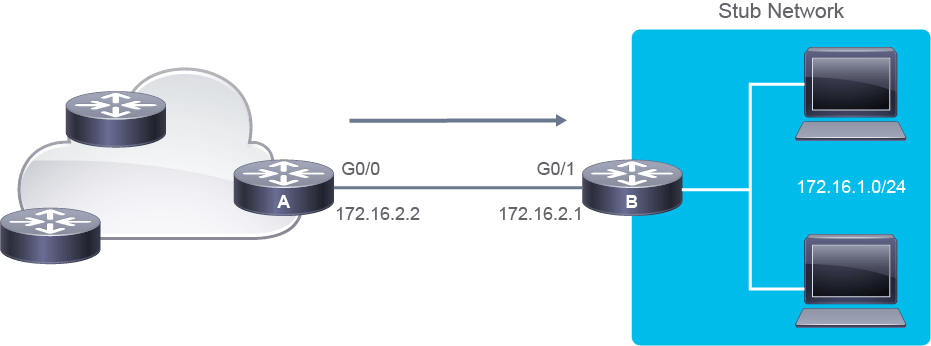
When configuring a static route, follow these steps as illustrated in the example in the figure for router A:
設定靜態路由時,請依照圖中路由器 A 的範例,遵循下列步驟:
- Specify an IPv4 destination network (172.16.1.0 255.255.255.0).指定 IPv4 目的網路(172.16.1.0 255.255.255.0)。
- Use the IPv4 address of the next-hop router (172.16.2.1).使用下一跳路由器的 IPv4 位址(172.16.2.1)。
- Use the outbound interface of the local router (G0/0).使用本機路由器的出口介面(G0/0)。
- Use the outbound interface of the local router and the IPv4 address of the next hop (fully specified route).同時使用本機路由器的出口介面與下一跳的 IPv4 位址(完全指定的路由)。
Use the following command to configure a static route pointing to the next-hop IPv4 address:
使用下列指令設定指向下一跳 IPv4 位址的靜態路由:
RouterA(config)# ip route 172.16.1.0 255.255.255.0 172.16.2.1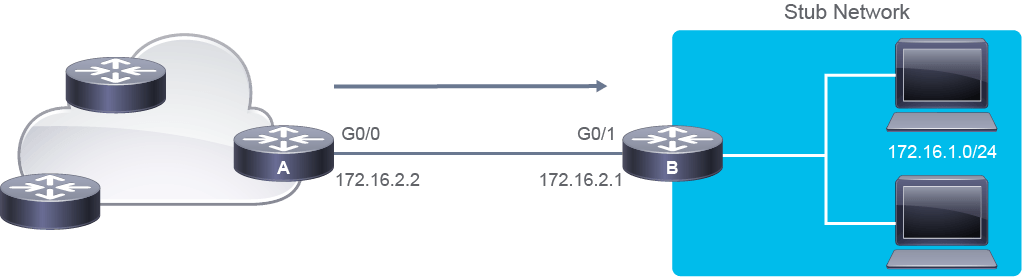
In the figure, router A is configured with a static route to reach the 172.16.1.0/24 subnet via the next-hop IPv4 address 172.16.2.1 using the ip route command.
圖中,路由器 A 已設定一條靜態路由,透過下一跳 IPv4 位址 172.16.2.1,使用 ip route 指令連往 172.16.1.0/24 子網路。
Alternatively, you can configure the static route by pointing to the exit interface instead of using the next-hop IPv4 address—This configuration is typically only used on point-to-point interfaces.
另一種方式是設定指向出口介面而非下一跳 IPv4 位址的靜態路由,這種設定通常只用於點對點介面。
- Static route pointing to the exit router interface:指向出口路由器介面的靜態路由:
RouterA(config)# ip route 172.16.1.0 255.255.255.0 GigabitEthernet0/0
- Static route pointing to exit interface and the next-hop IPv4 address:同時指向出口介面與下一跳 IPv4 位址的靜態路由:
RouterA(config)# ip route 172.16.1.0 255.255.255.0 GigabitEthernet0/0 172.16.2.1
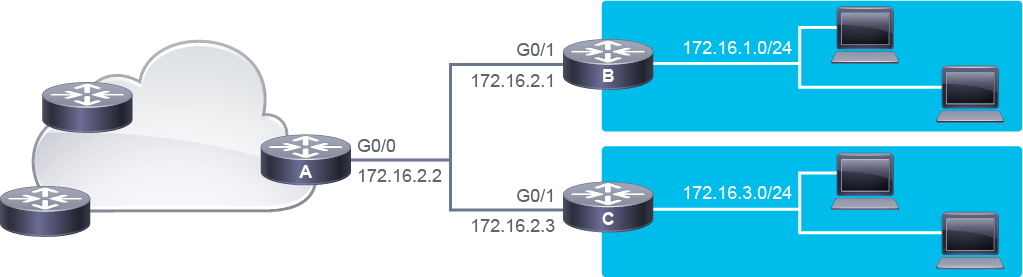
In the figure, router A cannot forward the packet based on the exit interface because the destination network can be directly connected to router B or C. This is one example why it is required to configure the next-hop IP address on Ethernet interfaces.
圖中,路由器 A 無法僅根據出口介面轉送封包,因為目的網路可能直接連接到路由器 B 或 C。這正是為什麼在乙太網路介面上需要設定下一跳 IP 位址的原因之一。
Although there is no significant advantage to configuring a fully specified route over a next-hop based static route, it can be useful to force the exit interface in some situations
雖然設定完全指定路由相較於以下一跳為基礎的靜態路由,並沒有明顯優勢,但在某些情況下,它有助於強制指定出口介面。
The table lists the ip route command parameters for this example.
下表列出此範例中 ip route 指令的參數。
Command Parameters 指令參數 | Description 說明 |
ip routeip route | Identifies the static route 識別靜態路由 |
172.16.1.0172.16.1.0 | Destination network in the static route 靜態路由中的目的網路 |
255.255.255.0255.255.255.0 | Indicates the subnet mask of the destination network; there are 8 bits of subnetting in effect 表示目的網路的子網路遮罩,有效子網路化位元數為 8 位元 |
172.16.2.1172.16.2.1 | IPv4 address of the next-hop router in the path to the destination 通往目的地路徑上,下一跳路由器的 IPv4 位址 |
Serial 0/0/0 or GigabitEthernet 0/0Serial 0/0/0 or GigabitEthernet 0/0 | Identifies the interface that will be used to reach the next-hop router 識別用來連往下一跳路由器的介面 |
In the figure, you would also need to configure router B with a static or default route to reach the networks behind router A via the GigabitEthernet 0/1 interface of router B.
在圖中,你還需要在路由器 B 上設定靜態路由或預設路由,讓封包透過路由器 B 的 GigabitEthernet 0/1 介面,到達路由器 A 後方的網路。
A host route is a static route for a single host. A host route has a subnet mask of 255.255.255.255.
主機路由是針對單一主機的靜態路由,其子網路遮罩為 255.255.255.255。
A floating staticroute is a static route with administrative distance greater than 1. By default, static routes have a very low administrative distance of 1, which means that your router will prefer a static route over any routes that were learned through a dynamic routing protocol. If you want to use a static route as a backup route (so called floating static route), you will have to change its administrative distance.
浮動靜態路由是管理距離大於 1 的靜態路由。預設情況下,靜態路由的管理距離非常低,為 1,這表示你的路由器會優先選用靜態路由,而非透過動態路由協定學到的任何路由。若你想將靜態路由作為備用路由(即所謂的浮動靜態路由),就必須變更它的管理距離。
To change administrative distance of a static route, add the admin distance parameter to the command. For example, to change the administrative distance to 10, add number 10 at the end of the IP route configuration.
若要變更靜態路由的管理距離,請在指令中加入管理距離參數。例如,若要將管理距離改為 10,就在 IP 路由設定指令的最後加上數字 10。
RouterA(config)# ip route 172.16.1.0 255.255.255.0 172.16.2.1 10In order for a router to forward a packet, it needs to know the outgoing interface. In P2P segments, configuring a static route using the egress interface in the syntax is sufficient. In a multiaccess segment, such as Ethernet, the next-hop address is required in the event a Layer 2 switch resides between the routers. The configuration could use the ip route 172.16.1.0 255.255.255.0 172.16.2.1 command, but the router will do a recursive lookup of the routing table. The first lookup is to find the next hop and the second lookup is to find the egress interface to reach the next hop.
路由器要轉送封包,就必須知道出口介面。在點對點(P2P)網段中,使用語法中的出口介面來設定靜態路由就已足夠。在多重存取網段(例如乙太網路)中,若路由器之間存在第 2 層交換器,就需要下一跳位址。此設定可以使用 ip route 172.16.1.0 255.255.255.0 172.16.2.1 指令,但路由器會對路由表進行遞迴查詢:第一次查詢是為了找到下一跳,第二次查詢則是為了找到通往下一跳的出口介面。
RouterA# show ip route
Codes: L - local, C - connected, S - static, R - RIP, M - mobile, B - BGP
       D - EIGRP, EX - EIGRP external, O - OSPF, IA - OSPF inter area
       N1 - OSPF NSSA external type 1, N2 - OSPF NSSA external type 2
<... output omitted ...>
Gateway of last resort is not set

   10.0.0.0/24 is subnetted, 1 subnets
C    10.0.0.0 is directly connected, FastEthernet0/0
   172.16.0.0/24 is subnetted, 2 subnets
S    172.16.1.0/24 [1/0] via 172.16.2.1 (first lookup)
C    172.16.2.0/24 is directly connected, FastEthernet0/1 (second lookup)
L    172.16.2.2/32 is directly connected, FastEthernet0/1 (second lookup)
A fully specified route can solve this problem. The router is not forced to look in the routing table twice if the command indicates the next-hop address and the egress interface (172.16.1.0 255.255.255.0 FastEthernet0/1 172.16.2.1) to reach the destination. Only one lookup is needed.
完全指定路由可以解決這個問題。若指令同時指出下一跳位址與出口介面(172.16.1.0 255.255.255.0 FastEthernet0/1 172.16.2.1)來到達目的地,路由器就不必查詢路由表兩次,只需要一次查詢即可。
RouterA# show ip route
Codes: L - local, C - connected, S - static, R - RIP, M - mobile, B - BGP
       D - EIGRP, EX - EIGRP external, O - OSPF, IA - OSPF inter area
       N1 - OSPF NSSA external type 1, N2 - OSPF NSSA external type 2
<... output omitted ...>
Gateway of last resort is not set

   10.0.0.0/24 is subnetted, 1 subnets
C    10.0.0.0 is directly connected, FastEthernet0/0
   172.16.0.0/24 is subnetted, 2 subnets
S    172.16.1.0/24 [1/0] via 172.16.2.1, FastEthernet0/1
C    172.16.2.0/24 is directly connected, FastEthernet0/1
L    172.16.2.2/32 is directly connected, FastEthernet0/1
A common use case for floating routes is configuring a backup default route for internet accesses via a second Internet Service Provider (ISP).
浮動路由常見的使用案例,是為透過第二家網際網路服務供應商(ISP)的網際網路存取設定備用預設路由。
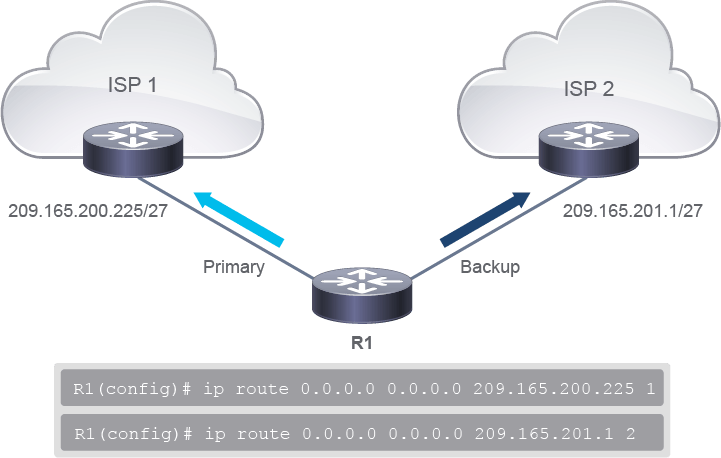
In the figure, R1 is acting as the internet gateway router that is configured with two static default routes. The first static default route indicates R1 to use the ISP 1 as its primary default route for all internet traffic. The second static default route is a floating route with the administrative distance set to 2. If reachability to the next hop (ISP 1 Router) through the primary route fails, the floating route will be used as a backup route.
圖中,R1 作為網際網路閘道路由器,設定了兩條靜態預設路由。第一條靜態預設路由指示 R1 將 ISP 1 作為所有網際網路流量的主要預設路由。第二條靜態預設路由是浮動路由,管理距離設定為 2。若透過主要路由前往下一跳(ISP 1 路由器)的可到達性失敗,就會使用浮動路由作為備用路由。