Introduction
簡介
In this activity, you will use troubleshooting guidelines to isolate and correct switch media issues. You will follow troubleshooting guidelines to determine the source of connectivity problems between a computer and a switch and between a router and a switch and fix them.
在本活動中,你將運用疑難排解準則來找出並修正交換器媒介問題。你將依照疑難排解準則,判斷電腦與交換器之間、以及路由器與交換器之間連線問題的成因,並加以修正。
John calls you about an issue that he is experiencing while using computer PC2. He says that PC2 has no network connectivity, and he insists that somebody unplugged his computer from the switch. The senior engineers are out. You are the only one who can solve this problem right now. You only have access to the SW1 and SW2 switches. Troubleshoot connectivity between PC2 and SW1.
John 打電話向你反映他使用電腦 PC2 時遇到的問題。他表示 PC2 沒有網路連線,並堅稱有人把他的電腦從交換器上拔掉了。資深工程師都不在,目前只有你能解決這個問題,而且你只能存取 SW1 與 SW2 這兩台交換器。請排解 PC2 與 SW1 之間的連線問題。
Topology
拓樸
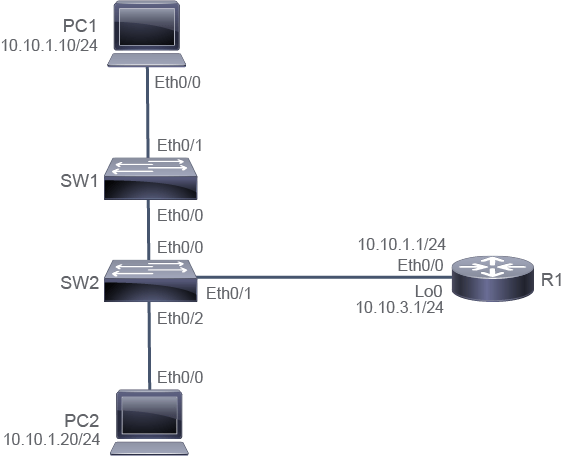
Job Aid
工作輔助資料
Device Information
裝置資訊
Device Information Table
裝置資訊表
Device 裝置 | Characteristic 特性 | Value 值 |
PC1 PC1 | IPv4 address IPv4 位址 | 10.10.1.10/24 10.10.1.10/24 |
PC1 PC1 | Default gateway 預設閘道 | 10.10.1.1 10.10.1.1 |
PC2 PC2 | IPv4 address IPv4 位址 | 10.10.1.20/24 10.10.1.20/24 |
PC2 PC2 | Default gateway 預設閘道 | 10.10.1.1 10.10.1.1 |
SW1 SW1 | VLAN 1 IPv4 address VLAN 1 IPv4 位址 | 10.10.1.2/24 10.10.1.2/24 |
SW1 SW1 | Default gateway 預設閘道 | 10.10.1.1 10.10.1.1 |
SW2 SW2 | VLAN 1 IPv4 address VLAN 1 IPv4 位址 | 10.10.1.3/24 10.10.1.3/24 |
SW2 SW2 | Default gateway 預設閘道 | 10.10.1.1 10.10.1.1 |
R1 R1 | Ethernet0/0 IPv4 address Ethernet0/0 IPv4 位址 | 10.10.1.1/24 10.10.1.1/24 |
R1 R1 | Loopback 0 IPv4 address Loopback 0 IPv4 位址 | 10.10.3.1/24 10.10.3.1/24 |
R1 R1 | Password 密碼 | Cisco123 Cisco123 |
Task 1: Troubleshoot Port Issues
任務 1:疑難排解連接埠問題
Activity
活動
From SW1, determine if you can ping PC2.
從 SW1 判斷是否能 ping 到 PC2。
SW1# ping 10.10.1.20
Type escape sequence to abort.
Sending 5, 100-byte ICMP Echos to 10.10.1.20, timeout is 2 seconds:
.....
Success rate is 0 percent (0/5)
When you issue a ping from SW1 to PC2, your success rate is 0 percent, so there is no Layer 3 connectivity between these two devices.
從 SW1 對 PC2 執行 ping 時,成功率為 0%,代表這兩台裝置之間沒有第 3 層連線。
Verify the status of interface Ethernet0/2 on SW2 using the show interfaces Ethernet0/2 command. Interface Ethernet0/2 connects to PC2.
使用 show interfaces Ethernet0/2 指令驗證 SW2 上 Ethernet0/2 介面的狀態,Ethernet0/2 介面連接到 PC2。
SW2# show interfaces Ethernet0/2
Ethernet0/2 is administratively down, line protocol is down (disabled)
  Hardware is AmdP2, address is aabb.cc00.0520 (bia aabb.cc00.0520)
  Description: Link to PC2
  MTU 1500 bytes, BW 10000 Kbit/sec, DLY 1000 usec,
     reliability 255/255, txload 1/255, rxload 1/255
  Encapsulation ARPA, loopback not set
  Keepalive set (10 sec)
  Auto-duplex, Auto-speed, media type is unknown
<... output omitted ...>
The output of the show interfaces Ethernet0/2 command tells you that the interface toward PC2 is administratively down, which indicates that the administrator has disabled the interface.
show interfaces Ethernet0/2 指令的輸出顯示,通往 PC2 的介面處於 administratively down 狀態,代表管理員已停用該介面。
Fix the issue so that John can continue his work. Do not forget to verify Layer 3 connectivity between PC2 and SW1.
修正此問題,讓 John 能繼續工作。別忘了驗證 PC2 與 SW1 之間的第 3 層連線。
Enter the interface configuration mode for Ethernet0/2 and enable the interface with the no shutdowncommand.
進入 Ethernet0/2 的介面設定模式,並使用 no shutdown指令啟用該介面。
SW2# configure terminal
SW2(config)# interface Ethernet 0/2
SW2(config-if)# no shutdown SW2(config-if)# end
Wait for 30 seconds and verify interface status, and test Layer 3 connectivity between PC2 and SW1 by issuing the ping command from SW1. It should be successful.
等待 30 秒後驗證介面狀態,並從 SW1 執行 ping 指令測試 PC2 與 SW1 之間的第 3 層連線,應能成功。
SW2# show interfaces Ethernet0/2
Ethernet0/2 is up, line protocol is up (connected)
  Hardware is AmdP2, address is aabb.cc00.0520 (bia aabb.cc00.0520)
  Description: Link to PC2
  MTU 1500 bytes, BW 10000 Kbit/sec, DLY 1000 usec,
     reliability 255/255, txload 1/255, rxload 1/255
  Encapsulation ARPA, loopback not set
  Keepalive set (10 sec)
  Full-duplex, Auto-speed, media type is 100BaseTX
<... output omitted ...>
SW1# ping 10.10.1.20
Type escape sequence to abort.
Sending 5, 100-byte ICMP Echos to 10.10.1.20, timeout is 2 seconds:
!!!!!
Success rate is 100 percent (5/5), round-trip min/avg/max = 1/1/1 msSave the configuration of SW2.
儲存 SW2 的設定。
It is important to save the configuration of SW2 because the no shutdown command would disappear if the switch is restarted. John would again be cut off from the network.
儲存 SW2 的設定很重要,因為若交換器重新啟動,no shutdown 指令的設定會消失,John 就會再次無法連上網路。
SW2# copy running-config startup-config
Destination filename [startup-config]?
Building configuration...
Compressed configuration from 985 bytes to 686 bytes[OK]