Cisco provides several different types of router hardware, including routers that only do routing, while other routers offer additional functions. In fact, Cisco has a series of integrated services routers (ISRs), with the name emphasizing the fact that many functions are integrated into a single device.
Cisco 提供多種不同類型的路由器硬體,其中有些路由器只執行路由功能,而其他路由器則提供額外的功能。事實上,Cisco 有一系列整合服務路由器(ISR),其名稱強調的正是將多項功能整合於單一裝置的特性。
The following figure shows a Cisco ISR with some of the more important features highlighted.
下圖顯示了一台 Cisco ISR,並標示出一些較重要的功能。
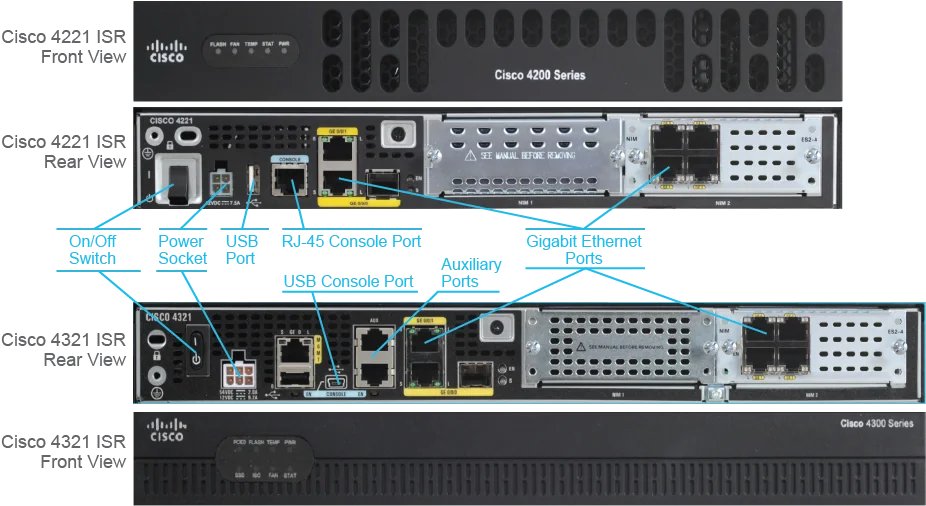
Unlike a computer end device, Cisco routers do not have a keyboard, monitor, or mouse device to allow direct user interaction. However, you can configure the router from a PC. At the initial installation, the PC has to be connected to the router directly through the console port. To connect to the console port, you use a console cable, which is also called a rollover cable.
與電腦終端裝置不同,Cisco 路由器沒有鍵盤、螢幕或滑鼠可供使用者直接互動。不過,你可以從一台 PC 來設定路由器。在初次安裝時,PC 必須透過主控台埠(console port)與路由器直接連接。若要連接主控台埠,你需要使用主控台線,也稱為反轉線(rollover cable)。
The console port can be an RJ-45 port or a USB port. A Cisco router might have only one type or both types of console ports. When the console port on a device is an RJ-45 port, you require a console cable with an RJ-45 connector on one end. The other end can be a serial DB-9 connector or a USB connector. Most modern computers have USB ports and rarely include built-in serial ports. If your console cable has a serial connector, you will need a serial-to-USB adapter and operating system driver (USB-to-RS-232-compatible serial port adapter) to establish connectivity.
主控台埠可以是 RJ-45 埠或 USB 埠。Cisco 路由器可能只具備其中一種,也可能兩種主控台埠都有。當裝置上的主控台埠是 RJ-45 埠時,你需要一條一端為 RJ-45 接頭的主控台線,另一端則可以是序列 DB-9 接頭或 USB 接頭。大多數現代電腦都具備 USB 埠,而很少內建序列埠。若你的主控台線是序列接頭,你需要一個序列轉 USB 轉接器,以及作業系統驅動程式(USB 轉 RS-232 相容序列埠轉接器),才能建立連線。
When the console port is a USB port, you need a suitable USB cable (for example, a USB Type A-to-5-pin mini Type B) and an operating system device driver to establish connectivity.
當主控台埠是 USB 埠時,你需要一條合適的 USB 傳輸線(例如 USB Type A 轉 5 針 mini Type B),以及作業系統裝置驅動程式,才能建立連線。
Your PC also needs a serial port and the communications software, such as Tera Term or putty, configured with the following settings:
你的 PC 也需要有序列埠,以及通訊軟體(例如 Tera Term 或 putty),並設定以下參數:
- Speed: 9600 bps速度:9600 bps
- Data bits: 8資料位元:8
- Parity: None同位檢查:無
- Stop bit: 1停止位元:1
- Flow control: None流量控制:無
The startup of a Cisco router requires verifying the physical installation, powering up the router, and viewing the Cisco IOS Software output on the console.
啟動 Cisco 路由器需要驗證實體安裝、開啟路由器電源,並在主控台上檢視 Cisco IOS 軟體的輸出內容。
The router completes these tasks to start router operations:
路由器會完成以下工作以啟動路由器運作:
- Runs the power-on self-test (POST) to test the hardware. During POST, the router executes diagnostics to verify the basic operation of the CPU, memory, and interface circuitry.執行開機自我測試(POST)以測試硬體。在 POST 期間,路由器會執行診斷,以驗證 CPU、記憶體及介面電路的基本運作。
- Finds and loads the Cisco IOS Software that the router uses for its operating system.尋找並載入路由器作業系統所使用的 Cisco IOS 軟體。
- Finds and loads the configuration file if one exists. The configuration file contains statements about router-specific attributes, protocol functions, and interface addresses.尋找並載入設定檔(若存在的話)。設定檔包含關於路由器特定屬性、通訊協定功能與介面位址的陳述式。
After a router completes POST and loads a Cisco IOS Software image, it looks for a device configuration file in its NVRAM, known as the startup-config. If the router does not find one, it executes a question-driven, initial configuration routine that is called "setup." Setup is a prompt-driven program that allows minimal device configuration. If the router has a startup configuration file in NVRAM, the user EXEC mode prompt appears.
當路由器完成 POST 並載入 Cisco IOS 軟體映像檔後,會在其 NVRAM 中尋找裝置設定檔,該設定檔稱為啟動設定(startup-config)。若路由器找不到設定檔,就會執行一個以問答方式引導的初始設定程序,稱為「setup」。setup 是一個以提示訊息引導使用者的程式,可用於進行最基本的裝置設定。若路由器的 NVRAM 中已有啟動設定檔,則會顯示使用者 EXEC 模式提示字元。

A router without an existing configuration enters the system configuration dialog.
沒有現有設定的路由器會進入系統設定對話。
         ....System Configuration Dialog....
Continue with configuration dialog? [yes/no]:
A configured router with an existing configuration displays a user EXEC mode prompt.
具有現有設定的已設定路由器會顯示使用者 EXEC 模式提示字元。
RouterX con0 is now available
Press RETURN to get started.
RouterX>RouterX> enablePassword: The setup mode is not intended to enter complex protocol features in the router but rather for a minimal configuration. You do not have to use the setup mode; you can use other configuration modes to configure the router.
setup 模式的目的並非用來在路由器上輸入複雜的通訊協定功能,而是用於最基本的設定。你不一定要使用 setup 模式,也可以使用其他設定模式來設定路由器。
The primary purpose of the setup mode is to rapidly bring up a minimal-feature configuration for any router that cannot find its configuration from some other source. In addition to being able to run the setup mode when the router boots, you may also initiate it by entering the setup privileged EXEC mode command.
setup 模式的主要目的,是為任何無法從其他來源找到其設定的路由器,快速建立一個具備最基本功能的設定。除了可以在路由器開機時執行 setup 模式之外,你也可以透過輸入特權 EXEC 模式指令 setup 來啟動它。
To skip the system configuration dialog and configure the router manually, answer the first question in the system configuration dialog with no, or press Ctrl-C.
若要略過系統設定對話並手動設定路由器,請在系統設定對話的第一個問題回答 no,或按下 Ctrl-C。
Router# setup
         ....System Configuration Dialog....
Continue with configuration dialog? [yes/no]: no
To verify the router status, use the show version command:
若要驗證路由器狀態,請使用 show version 指令:
R1# show version
Cisco IOS Software, Linux Software (I86BI_LINUX-ADVENTERPRISEK9-M), Version 15.2(4)M3, DEVELOPMENT TEST SOFTWARE
Technical Support: http://www.cisco.com/techsupport
Copyright (c) 1986-2013 by Cisco Systems, Inc.
Compiled Tue 26-Feb-13 19:06 by prod_rel_team

ROM: Bootstrap program is Linux

R1 uptime is 0 minutes
System returned to ROM by reload at 0
System restarted at 03:00:23 CET Wed May 7 2019
System image file is "unix:/iou_root/images/IOL/i86bi_linux-adventerprisek9-ms.152-4.M3"
<... output omitted ...>
To verify the running configuration of the router, use the show running-config command:
若要驗證路由器的執行中設定,請使用 show running-config 指令:
R1# show running-config
Building configuration...

Current configuration : 2919 bytes
!
! No configuration change since last restart
version 15.2
service timestamps debug datetime msec
service timestamps log datetime msec
no service password-encryption
!
hostname R1
<... output omitted ...>