In a world that is driven by the Internet and ever-increasing amounts of data, technologies that enable and standardize the way we exchange information are very useful. HTTP and HTTP-based (Application Programmable Interfaces) APIs form one of the foundations of the World Wide Web and provide us with a way to communicate with remote systems.
在這個由網際網路與與日俱增的資料量所驅動的世界中,能夠實現並標準化資訊交換方式的技術非常有用。HTTP 與以 HTTP 為基礎的(應用程式可程式化介面)API,構成全球資訊網(World Wide Web)的基礎之一,讓我們能夠與遠端系統通訊。

HTTP is an application layer protocol and is the foundation of communication for the World Wide Web. It is based on a client-server computing model, where the client (e.g., a web browser) and the server (e.g., a web server) use a request-response message format to transfer information. HTTP presumes a reliable underlying transport layer protocol, so TCP is commonly used. However, UDP can also be used in some cases.
HTTP 是一種應用層協定,是全球資訊網通訊的基礎。它以主從式運算模型(client-server model)為基礎,用戶端(例如網頁瀏覽器)與伺服器(例如網頁伺服器)以請求-回應(request-response)訊息格式來傳輸資訊。HTTP 假設底層傳輸層協定是可靠的,因此通常使用 TCP,不過在某些情況下也可以使用 UDP。
The web browser's primary tool is the address bar. By entering a URL into an address bar, it is possible to describe to the browser where to search for the necessary item. The URL will point to a web server and a file on that web server. Consequently, the web browser contacts the web server and requests the item that the server should send back.
網頁瀏覽器最主要的工具是網址列。透過在網址列輸入 URL,即可告訴瀏覽器要到哪裡尋找所需的項目。URL 會指向一個網頁伺服器以及該伺服器上的一個檔案。因此,網頁瀏覽器會聯絡該網頁伺服器,並要求伺服器將該項目回傳。
A URL typically consists of three things:
一個 URL 通常由三個部分組成:
- The protocol to use (specifying what language a browser and a server should use for the transaction).要使用的協定(指定瀏覽器與伺服器在此次交易中應使用的語言)。
- A name of the webserver to contact.要聯絡的網頁伺服器名稱。
- A path specifying a file on that webserver.指定該伺服器上某檔案的路徑。
https://www.cisco.com/c/en/us/index.html
https://www.cisco.com/c/en/us/index.html
\___/ \____________/\______________/
\___/ \____________/\______________/
| | |
| | |
server protocol path on web server's filesystem
伺服器 協定 網頁伺服器檔案系統上的路徑
The server is referenced by a domain name, such as www.cisco.com. The concept of the domain name will be further explained in the next topic. The path points to a relative path from a certain point in the web server's filesystem.
伺服器是以網域名稱來指稱的,例如 www.cisco.com。網域名稱的概念會在下一個主題中進一步說明。路徑則是指從網頁伺服器檔案系統中某個位置開始的相對路徑。
Most browsers support several protocols, such as HTTP, its secure version (HTTPS), local PC file browsing (file), mail sending (MAILTO), and FTP. The most common way to access the global collection of digital resources in the world wide web is performed by communication via the HTTP protocol. The HTTPS protocol has improved security by adding an encryption layer and can be used when data confidentiality is required, such as in e-commerce activities.
大多數瀏覽器支援多種協定,例如 HTTP、其安全版本(HTTPS)、本機 PC 檔案瀏覽(file)、郵件傳送(MAILTO)以及 FTP。在全球資訊網中存取全球數位資源集合最常見的方式,就是透過 HTTP 協定通訊。HTTPS 協定透過加入加密層來提升安全性,適用於需要資料機密性的場合,例如電子商務活動。
By default, HTTP is a stateless (or connectionless) protocol, meaning it works without the receiver retaining any client information. Each request can be understood in isolation, without knowing any commands that came before it. HTTP does have some mechanisms, namely HTTP headers, to make the protocol behave as if it was stateful.
根據預設,HTTP 是一種無狀態(或稱無連線)的協定,意即它運作時,接收端不會保留任何用戶端資訊。每個請求都可以獨立理解,不需知道之前發生過哪些命令。HTTP 確實有一些機制,也就是 HTTP 標頭,可讓協定的行為表現得像具狀態一樣。
The information is media-independent, which means that any type of data can be sent by HTTP as long as both the client and the server know how to handle the data content. Web browsers commonly use HTTP and servers to transfer the files that make up web pages.
這些資訊與媒體類型無關,也就是說,只要用戶端與伺服器都知道如何處理該資料內容,HTTP 就能傳送任何類型的資料。網頁瀏覽器通常會使用 HTTP 與伺服器來傳輸構成網頁的檔案。
Although the HTTP specification allows for data to be transferred on port 80 using either TCP or UDP, most implementations use TCP. A secure version of the protocol, HTTPS, uses TCP port 443.
雖然 HTTP 規範允許使用 TCP 或 UDP 在連接埠 80 上傳輸資料,但大多數實作都使用 TCP。該協定的安全版本 HTTPS 則使用 TCP 連接埠 443。
HTTP Request-Response Cycle
HTTP 請求-回應循環
The data is exchanged via HTTP Requests and HTTP Responses, which are specialized data formats, used for HTTP communication. A sequence of requests and responses is called an HTTP Session and is initiated by a client by establishing a connection to the server.
資料是透過 HTTP 請求與 HTTP 回應交換的,這些是用於 HTTP 通訊的特殊資料格式。一連串的請求與回應稱為 HTTP 工作階段(HTTP Session),由用戶端與伺服器建立連線後開始。
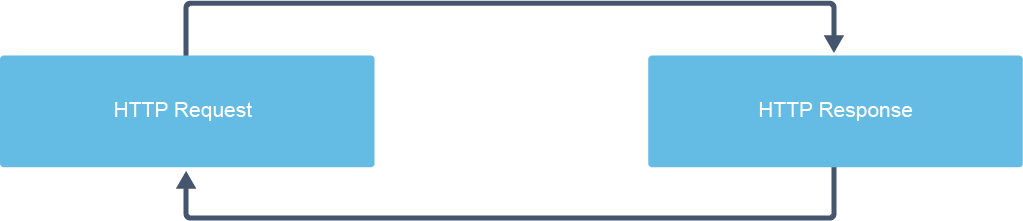
An example of using a request-response cycle is web browsing. When a user is browsing the web, a browser sends an HTTP request to get the HTML document representing the page. The server responds to the request and returns the HTTP response with a response code and the content of the page, which is an HTML document. The client browser parses this document, displaying its content according to layout information and resources contained within the page (usually images and videos) and sometimes processing additional requests corresponding to execute scripts. The web browser presents all of this content to a user as a complete webpage.
使用請求-回應循環的一個範例是網頁瀏覽。當使用者瀏覽網頁時,瀏覽器會傳送 HTTP 請求以取得代表該網頁的 HTML 文件。伺服器會回應該請求,並回傳包含回應代碼與網頁內容(即 HTML 文件)的 HTTP 回應。用戶端瀏覽器會解析此文件,依照版面配置資訊與網頁中所含的資源(通常是圖片與影片)來顯示其內容,有時還會處理額外的請求以執行指令碼。網頁瀏覽器會將所有這些內容以完整網頁的形式呈現給使用者。
When a URL, such as http://www.cisco.com c/en/us/index.html is inserted into the browser's address bar, it initiates the following sequence of actions:
當網址列中輸入 URL,例如 http://www.cisco.com c/en/us/index.html 時,會啟動以下一連串動作:
- The client (web browser) sends an HTTP GET request to the server www.cisco.com and asks it to get the file c/en/us/index.html.用戶端(網頁瀏覽器)向伺服器 www.cisco.com 傳送 HTTP GET 請求,要求取得檔案 c/en/us/index.html。
- The server receives the request.伺服器接收該請求。
- The server processes the request, retrieves the c/en/us/index.html file, and sends it to the browser.伺服器處理該請求、擷取 c/en/us/index.html 檔案,並將其傳送給瀏覽器。
- The server returns an HTTP response.伺服器回傳一個 HTTP 回應。
- The client receives the response (for example, the webpage content from the file on the server) and presents it on screen in your browser window.用戶端接收回應(例如伺服器上該檔案的網頁內容),並在瀏覽器視窗中呈現於畫面上。
When clicking the Learn link within a www.cisco.com webpage, another GET request is sent to the server to fetch a different file, as shown in the figure below.
當在 www.cisco.com 網頁中點選「Learn」連結時,會向伺服器傳送另一個 GET 請求,以取得不同的檔案,如下圖所示。
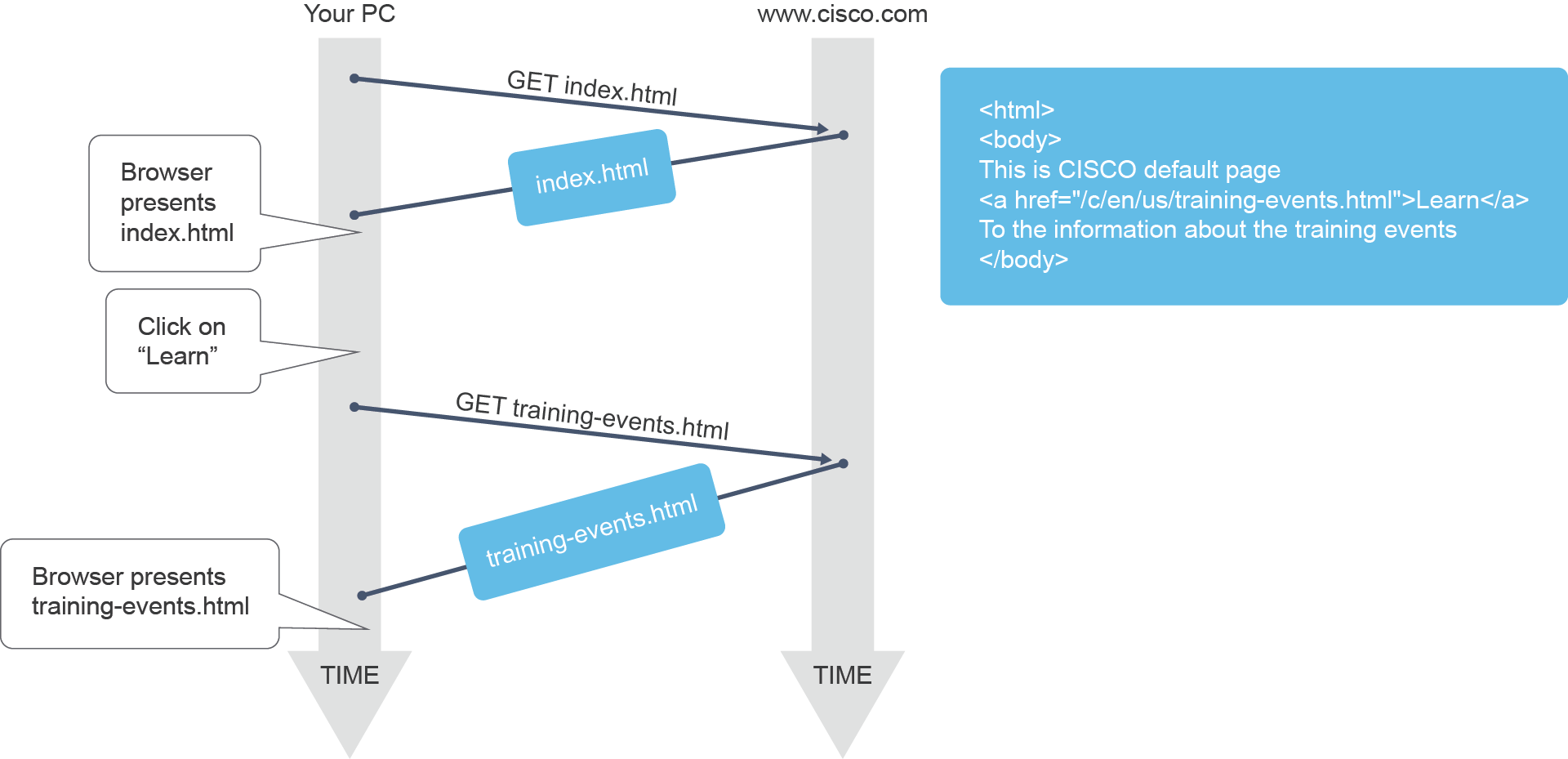
The web server logs the browser history by recording that it visited the site (browser's history) and it keeps a copy of the page in its cache. The browser cache shows traces that a user leaves behind while navigating the web.
網頁伺服器會記錄瀏覽紀錄,記下曾造訪該網站(瀏覽器歷史紀錄),並在其快取(cache)中保留一份該頁面的副本。瀏覽器快取會留下使用者上網瀏覽時留下的痕跡。