While static NAT provides a permanent mapping between a single local and a single global address, dynamic NAT maps multiple local to multiple global addresses. Therefore, you must define two sets of addresses: the set of local addresses and the set of global addresses. The sets usually do not have the same size. Since the set of global addresses usually contains public IPv4 addresses, it is smaller than the set of local addresses.
靜態 NAT 提供單一本地位址與單一全域位址之間的永久對映,動態 NAT 則是將多個本地位址對映到多個全域位址。因此,你必須定義兩組位址:本地位址集合與全域位址集合。這兩組位址的數量通常不相同。由於全域位址集合通常包含的是公有 IPv4 位址,因此其規模通常小於本地位址集合。
In Cisco IOS Software terminology, a group of addresses is called a pool of addresses. Address pools are named and are referenced by their name in commands and command outputs. IP addresses that belong to a pool are specified using a reference IP address and a subnet mask or prefix length.
在 Cisco IOS 軟體術語中,一組位址稱為位址集區(pool)。位址集區會有名稱,並在指令與指令輸出中以其名稱作為參照。屬於某個集區的 IP 位址,是以一個參考 IP 位址搭配子網路遮罩或前綴長度來指定的。
Dynamic NAT takes global addresses from a pool on a first-come, first-served basis. Each connection initiated from the inside will use one of the addresses from the pool of global addresses. Once the global pool is exhausted, new connections will not be translated and the communication with the outside networks will not be possible. Although the global pool is smaller, it usually suffices, since local devices do not connect to the outside at the same moment. Nevertheless, you should make sure to provide enough global addresses to satisfy the need for outbound communications.
動態 NAT 會以先到先得的方式從集區中取用全域位址。每個由內部發起的連線都會使用全域位址集區中的其中一個位址。一旦全域集區用盡,新的連線就無法被轉譯,也就無法與外部網路通訊。雖然全域集區的規模較小,但通常已經足夠,因為本地裝置不會同時連線到外部。儘管如此,你仍應確保有足夠的全域位址可滿足出向通訊的需求。
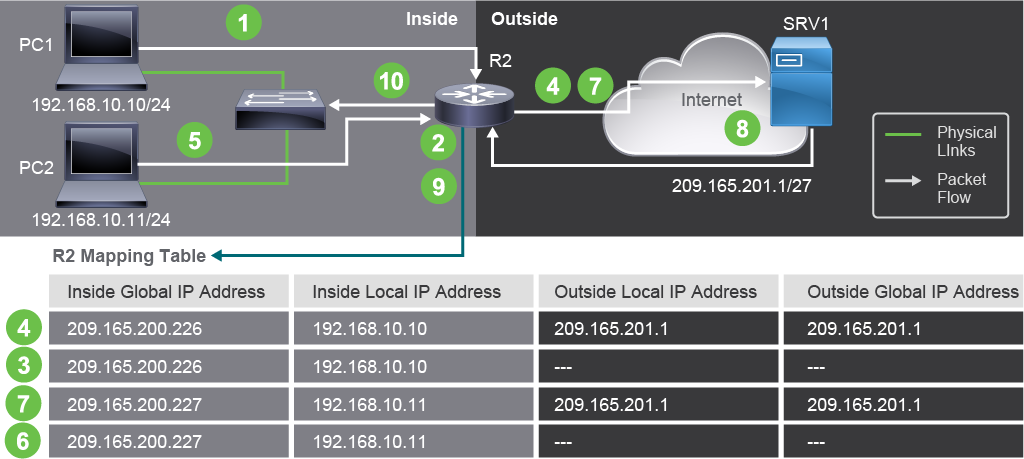
The figure illustrates an example of dynamic inside NAT implementation. The router is translating inside addresses:
此圖說明了動態內部 NAT 實作的範例,路由器正在轉譯內部位址:
- The users at PC1 and PC2 with IPv4 addresses 192.168.10.10 and 192.168.10.11 want to connect to SRV1 at IPv4 address 209.165.201.1.位於 PC1 與 PC2、IPv4 位址分別為 192.168.10.10 與 192.168.10.11 的使用者,想要連線到 IPv4 位址為 209.165.201.1 的 SRV1。
- PC1 initiates the connection first. When the router receives a packet from 192.168.10.10, it will check its NAT-mapping table. Because there are no static configurations, and the packet is the first one processed, the router finds no entries for the 192.168.10.10 address.PC1 先發起連線。當路由器收到來自 192.168.10.10 的封包時,會檢查其 NAT 對映表。由於沒有靜態設定,且此封包是第一個被處理的封包,路由器找不到 192.168.10.10 這個位址的任何項目。
- The router then selects an inside global address from the configured pool of addresses and creates a mapping in the table. This type of entry is called a simple entry. Based on the configuration, the router in the example selects 209.165.200.226 as the inside global address.路由器接著會從已設定的位址集區中選取一個內部全域位址,並在表中建立一筆對映,這種項目稱為簡單項目(simple entry)。在此範例中,路由器根據設定選取 209.165.200.226 作為內部全域位址。
- The router then swaps 192.168.10.10 source IPv4 address with 209.165.200.226, adds an entry for the translation into the table, and forwards the packet. The router also sets a timeout for the newly added translation.路由器接著將來源 IPv4 位址 192.168.10.10 替換為 209.165.200.226,在表中新增一筆轉譯項目,然後轉送封包。路由器也會為這筆新增的轉譯設定逾時值。
- When PC2 at 192.168.10.11 initiates connection to SRV1, the router performs similar lookup in the mapping table, this time for its address. There are no entries for 192.168.10.11 IPv4 address.當位於 192.168.10.11 的 PC2 對 SRV1 發起連線時,路由器會對其位址進行類似的查詢,此時對映表中沒有 192.168.10.11 這個 IPv4 位址的項目。
- The router selects the next available global address from the address pool and creates a second simple entry to map 192.168.10.11 to 209.165.200.227.路由器會從位址集區中選取下一個可用的全域位址,並建立第二筆簡單項目,將 192.168.10.11 對映到 209.165.200.227。
- The router swaps the 192.168.10.11 with 209.165.200.227, creates a translation entry in the mapping table, and forwards the packet out of its outside interface. Both specific mappings (next to numbers 4 and 7 in the figure) have a timeout set.路由器將 192.168.10.11 替換為 209.165.200.227,在對映表中建立一筆轉譯項目,並從其外部介面轉送封包。圖中編號 4 與 7 旁的兩筆特定對映都設有逾時值。
- When SRV1 receives the packet from 209.165.200.226, it sends the responses to that address. It does the same when it receives a packet from 209.165.200.227. SRV1 is not aware of the translations that happened. Packets from SRV1 to the inside hosts have the inside global addresses as their destination IPv4 addresses.當 SRV1 收到來自 209.165.200.226 的封包時,會將回應傳送至該位址;收到來自 209.165.200.227 的封包時也是如此。SRV1 並不知道發生過這些轉譯。從 SRV1 傳往內部主機的封包,其目的 IPv4 位址就是內部全域位址。
- When the router receives the packet with the inside global IPv4 address 209.165.200.226, the router performs a mapping table lookup. It searches the inside global addresses looking for the packet's destination address (in this case 209.165.200.226). The router finds an entry and translates the destination address to the inside local address 192.168.10.10 and forwards the packet out the inside interface. The router behaves the same for all the packets that it receives on its outside interface. When it receives a packet destined to IPv4 address 209.165.200.227, after searching the mapping table, the router translates the address back to the inside local address 192.168.10.11 and forwards the packet to the inside network.當路由器收到目的位址為內部全域 IPv4 位址 209.165.200.226 的封包時,會執行對映表查詢,在內部全域位址中搜尋該封包的目的位址(此例中為 209.165.200.226)。路由器找到該項目後,會將目的位址轉譯為內部本地位址 192.168.10.10,並從內部介面轉送封包。路由器對於在外部介面收到的所有封包都採取相同做法。當它收到目的 IPv4 位址為 209.165.200.227 的封包時,在查詢對映表後,會將位址轉譯回內部本地位址 192.168.10.11,並將封包轉送到內部網路。
- PC1 and PC2 receive the packets and continue the conversation. The router performs the previous steps for each packet.PC1 與 PC2 收到封包並繼續進行對話。路由器對每個封包都會重複執行前述步驟。