When a Cisco networking device boots, it performs a series of steps that include loading Cisco operating system software and the device configuration.
當 Cisco 網路裝置開機時,會執行一連串步驟,包括載入 Cisco 作業系統軟體與裝置設定。
The example shows a router power-on boot sequence, which consists of a series of steps that include loading Cisco IOS Software and the router configuration.
此範例顯示路由器開機啟動程序,其中包含載入 Cisco IOS 軟體與路由器設定的一連串步驟。
The following stages and router components are used in the router power-on boot sequence:
路由器開機啟動程序會使用以下階段與路由器元件:
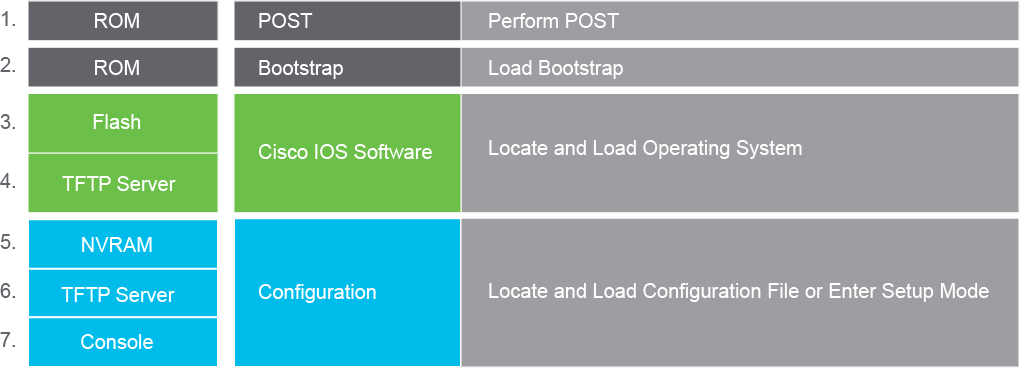
The sequence of events that occurs during the power-on (boot) of a router is explained in detail here. Understanding these events will help you accomplish operational tasks and troubleshoot router problems.
以下詳細說明路由器開機(boot)過程中發生的事件順序。了解這些事件有助於您完成操作工作,並疑難排解路由器的問題。
- Perform POST: This event is a series of hardware tests that verifies that all components of a Cisco router are functional. During this test, the router also determines which hardware is present. Power-on self-test (POST) executes from microcode that is resident in the system read-only memory (ROM).執行 POST:此事件為一連串硬體測試,用來確認 Cisco 路由器的所有元件都能正常運作。在此測試期間,路由器也會判斷目前存在哪些硬體。開機自我測試(POST)是由常駐於系統唯讀記憶體(ROM)中的微碼所執行。
- Load and run bootstrap code: Bootstrap code is used to perform subsequent events such as finding Cisco IOS Software at all possible locations, loading it into RAM, and running it. After Cisco IOS Software is loaded and running, the bootstrap code is not used until the next time the router is reloaded or power-cycled.載入並執行開機程式碼:開機程式碼(bootstrap code)用來執行後續事件,例如在所有可能的位置尋找 Cisco IOS 軟體、將其載入 RAM 並執行。Cisco IOS 軟體載入並執行後,開機程式碼便不會再被使用,直到路由器下次重新載入或重新開機為止。
- Locate Cisco IOS Software: The bootstrap code determines the location of Cisco IOS Software that will be run. Normally, the Cisco IOS Software image is located in the flash memory, but it can also be stored in other places such as a TFTP server. The configuration register and configuration file, which are located in NVRAM, determine where the Cisco IOS Software images are located and which image file to use. If a complete Cisco IOS image cannot be located, a scaled-down version of Cisco IOS Software is copied from ROM into RAM. This version of Cisco IOS Software is used to help diagnose any problems and can be used to load a complete version of Cisco IOS Software into RAM.找出 Cisco IOS 軟體:開機程式碼會判斷欲執行的 Cisco IOS 軟體所在位置。Cisco IOS 軟體映像檔通常位於快閃記憶體中,但也可能儲存在其他位置,例如 TFTP 伺服器。位於 NVRAM 中的設定暫存器與設定檔會決定 Cisco IOS 軟體映像檔的位置,以及要使用哪個映像檔。若找不到完整的 Cisco IOS 映像檔,則會從 ROM 將精簡版的 Cisco IOS 軟體複製到 RAM 中。此精簡版 Cisco IOS 軟體可協助診斷問題,也可用來將完整版本的 Cisco IOS 軟體載入 RAM。
- Load Cisco IOS Software: After the bootstrap code has found the correct image, it loads this image into RAM and starts Cisco IOS Software. Some older routers do not load the Cisco IOS Software image into RAM but execute it directly from flash memory instead.載入 Cisco IOS 軟體:開機程式碼找到正確的映像檔後,會將該映像檔載入 RAM 並啟動 Cisco IOS 軟體。部分較舊型號的路由器不會將 Cisco IOS 軟體映像檔載入 RAM,而是直接從快閃記憶體執行。
- Locate the configuration: After Cisco IOS Software is loaded, the bootstrap program searches for the startup configuration file in NVRAM.找出設定檔:Cisco IOS 軟體載入後,開機程式會在 NVRAM 中搜尋啟動設定檔。
- Load the configuration: If a startup configuration file is found in NVRAM, Cisco IOS Software loads it into RAM as the running configuration and executes the commands in the file one line at a time. The running configuration file contains interface addresses, starts routing processes, configures router passwords, and defines other characteristics of the router. If no configuration file exists in NVRAM, the router enters the setup utility or attempts an autoinstall to look for a configuration file from a TFTP server.載入設定檔:若在 NVRAM 中找到啟動設定檔,Cisco IOS 軟體會將其載入 RAM 作為執行中設定,並逐行執行檔案中的指令。執行中設定檔包含介面位址,會啟動路由處理程序、設定路由器密碼,並定義路由器的其他特性。若 NVRAM 中沒有設定檔,路由器會進入設定精靈(setup utility),或嘗試透過自動安裝(autoinstall)從 TFTP 伺服器尋找設定檔。
- Run the configured Cisco IOS Software: When the prompt is displayed, the router is running Cisco IOS Software with the current running configuration file. You can then begin using Cisco IOS commands on the router.執行已設定的 Cisco IOS 軟體:當提示字元顯示時,表示路由器正在使用目前的執行中設定檔執行 Cisco IOS 軟體。此時您即可開始在路由器上使用 Cisco IOS 指令。