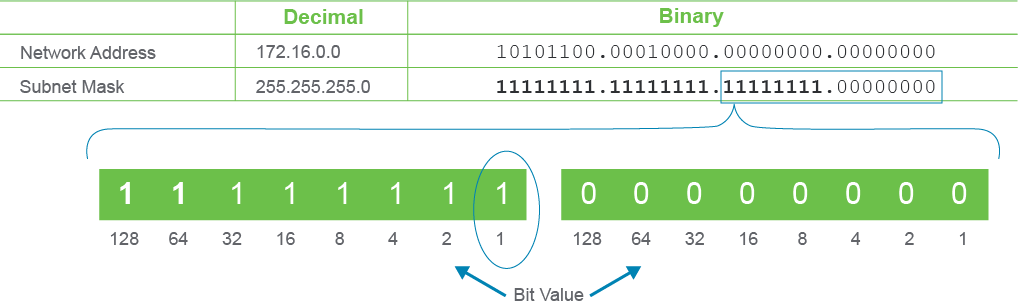
If a network address is subnetted, the first subnet that is obtained after subnetting the network address is called subnet zero, because all of the subnet bits are binary zero. To determine each subsequent subnet address, increase the subnet address by the bit value for the last bit that you borrowed.
若一個網路位址被劃分子網路,經過子網路劃分後得到的第一個子網路稱為子網路零(subnet zero),因為所有子網路位元都是二進位的 0。若要決定後續每個子網路位址,只要依照最後一個被借用位元的位元值來遞增子網路位址即可。
In the following example, 8 bits are borrowed for subnetting the network address, 172.16.0.0/16. The first subnet address is 172.16.0.0/24; this is subnet zero. The last bit borrowed is the bit with the value of 1 in the third octet, so the next subnet address is 172.16.1.0/24.
在下面的範例中,從網路位址 172.16.0.0/16 借用 8 個位元來劃分子網路。第一個子網路位址是 172.16.0.0/24,也就是子網路零。最後借用的位元是第三個八位元組中值為 1 的位元,所以下一個子網路位址是 172.16.1.0/24。
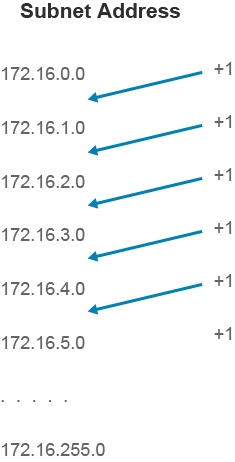
The following figure shows the first six subnets and the last subnet created by borrowing the 8 bits. There are a total of 28 = 256 subnets.
下圖顯示借用 8 個位元所建立的前六個子網路以及最後一個子網路。總共有 28 = 256 個子網路。
Notice that the address of a subnet has all of the host bits set to binary 0. This address is one of the reserved addresses on a subnet. The other reserved address is the subnet-directed broadcast address, in which all of the host bits are set to binary 1. All of the addresses between the subnet address and the subnet broadcast address are valid host addresses on that subnet. On these subnets, there are 28" 2 = 254 host addresses per subnet.
請注意,子網路的位址中所有主機位元都設為二進位 0。這個位址是該子網路上的保留位址之一。另一個保留位址是子網路導向廣播位址(subnet-directed broadcast address),其中所有主機位元都設為二進位 1。介於子網路位址與子網路廣播位址之間的所有位址都是該子網路上有效的主機位址。在這些子網路上,每個子網路有 28" 2 = 254 個主機位址。
Here are the host addresses and broadcast addresses for those subnets.
以下是這些子網路的主機位址與廣播位址。
Host Addresses and Broadcast Addresses
主機位址與廣播位址
Subnet Address 子網路位址 | Host Address Range 主機位址範圍 | Broadcast Address 廣播位址 |
172.16.0.0 172.16.0.0 | 172.16.0.1–172.16.0.254 172.16.0.1–172.16.0.254 | 172.16.0.255 172.16.0.255 |
172.16.1.0 172.16.1.0 | 172.16.1.1–172.16.1.254 172.16.1.1–172.16.1.254 | 172.16.1.255 172.16.1.255 |
172.16.2.0 172.16.2.0 | 172.16.2.1–172.16.2.254 172.16.2.1–172.16.2.254 | 172.16.2.255 172.16.2.255 |
172.16.3.0 172.16.3.0 | 172.16.3.1–172.16.3.254 172.16.3.1–172.16.3.254 | 172.16.3.255 172.16.3.255 |
172.16.4.0 172.16.4.0 | 172.16.4.1–172.16.4.254 172.16.4.1–172.16.4.254 | 172.16.4.255 172.16.4.255 |
172.16.5.0 172.16.5.0 | 172.16.5.1–172.16.5.254 172.16.5.1–172.16.5.254 | 172.16.5.255 172.16.5.255 |
... ... | ... ... | ... ... |
172.16.255.0 172.16.255.0 | 172.16.255.1–172.16.255.254 172.16.255.1–172.16.255.254 | 172.16.255.255 172.16.255.255 |
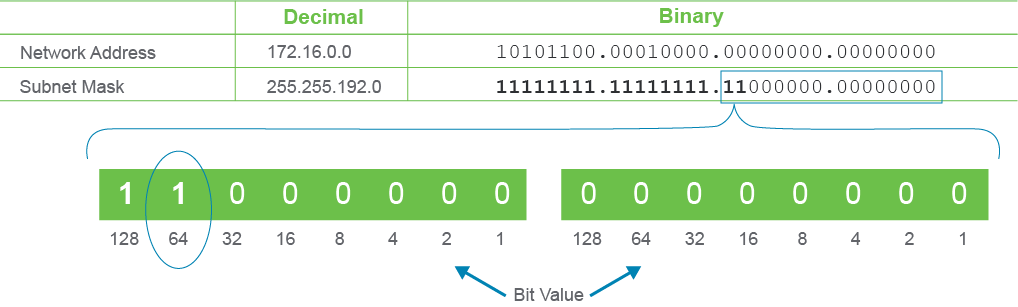
Class B's 172.16.0.0/16 network address has been subnetted by borrowing two host bits in the following figure. The first subnet address is 172.16.0.0/18, the zero subnet. The last bit borrowed is the bit with the value of 64, so the next subnet address is 172.16.64.0/18.
在下圖中,B 級網路位址 172.16.0.0/16 透過借用 2 個主機位元進行子網路劃分。第一個子網路位址是 172.16.0.0/18,也就是零子網路。最後借用的位元值為 64,所以下一個子網路位址是 172.16.64.0/18。
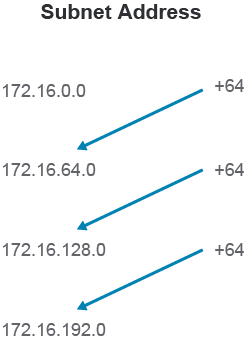
The following figure shows all the subnets that are created by borrowing the 2 bits. The subnet 172.16.192.0/18 is the last subnet because 192 + 64 = 256, and the highest possible value for any given octet is 255. However, if the subnet goes over the octet boundary, you have more subnets, as you will see in the next example.
下圖顯示借用 2 個位元所建立的所有子網路。子網路 172.16.192.0/18 是最後一個子網路,因為 192 + 64 = 256,而任一八位元組的最大可能值是 255。不過,若子網路跨越了八位元組邊界,就會產生更多子網路,這將在下一個範例中看到。
The following table shows the valid host addresses for each subnet that was created by borrowing 2 bits. The table shows the valid host IPv4 address range for each subnetwork. There are 22 = 4 subnets, and 214" 2 = 16,382 host addresses per subnet.
下表顯示借用 2 個位元所建立的每個子網路的有效主機位址。此表顯示每個子網路有效的 IPv4 主機位址範圍。共有 22 = 4 個子網路,每個子網路有 214" 2 = 16,382 個主機位址。
Valid Host Addresses for Each Subnet Created by Borrowing 2 Bits
借用 2 個位元所建立的每個子網路之有效主機位址
Subnet Address 子網路位址 | Valid Host Address Range 有效主機位址範圍 | Broadcast Address 廣播位址 |
172.16.0.0 172.16.0.0 | 172.16.0.1–172.16.63.254 172.16.0.1–172.16.63.254 | 172.16.63.255 172.16.63.255 |
172.16.64.0 172.16.64.0 | 172.16.64.1–172.16.127.254 172.16.64.1–172.16.127.254 | 172.16.127.255 172.16.127.255 |
172.16.128.0 172.16.128.0 | 172.16.128.1–172.16.191.254 172.16.128.1–172.16.191.254 | 172.16.191.255 172.16.191.255 |
172.16.192.0 172.16.192.0 | 172.16.192.1–172.16.255.254 172.16.192.1–172.16.255.254 | 172.16.255.255 172.16.255.255 |
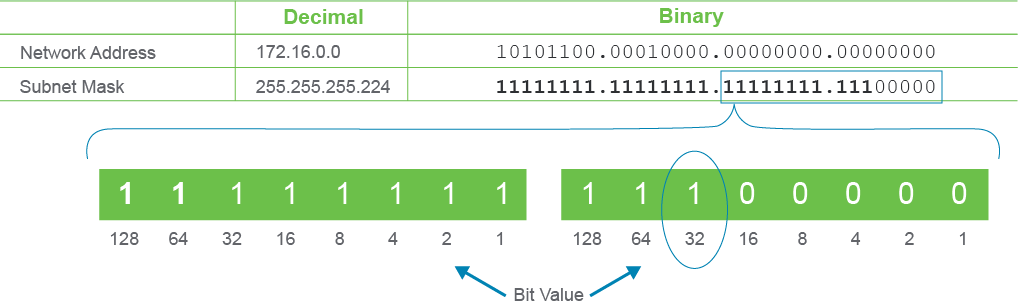
Here is one more example of subnetting the same /16 network address, this time borrowing 11 host bits for subnetting. The first subnet address is 172.16.0.0/27. The second subnet address is 172.16.0.32/27 because the last borrowed bit has a value of 32. Notice that this time, the last borrowed bit is in the fourth octet. Therefore, the increment of 32 (the value of the last borrowed bit) is first applied in the fourth octet.
以下再舉一個對同一個 /16 網路位址進行子網路劃分的例子,這次借用 11 個主機位元。第一個子網路位址是 172.16.0.0/27。第二個子網路位址是 172.16.0.32/27,因為最後借用位元的值為 32。請注意,這次最後借用的位元是在第四個八位元組。因此,最後借用位元的增量值 32 首先套用在第四個八位元組上。
Once all the possible subnet addresses in the fourth octet have been calculated in this manner, you move back into the third octet since you have borrowed bits from the third octet as well. You can use all the third octet values from 1 to 255 for your subnet addresses as well.
一旦以此方式計算完第四個八位元組中所有可能的子網路位址後,就要回到第三個八位元組,因為也從第三個八位元組借用了位元。你也可以使用第三個八位元組從 1 到 255 的所有數值作為子網路位址。
The following table shows the first 10 subnet addresses and the last subnet address (with the corresponding host addresses and broadcast addresses) that result from subnetting Class B network 172.16.0.0 by borrowing 11 host bits. There are 211 = 2048 subnets, and 25 " 2 = 30 host addresses per subnet.
下表顯示對 B 級網路 172.16.0.0 借用 11 個主機位元進行子網路劃分後,前 10 個子網路位址及最後一個子網路位址(以及對應的主機位址與廣播位址)。共有 211 = 2048 個子網路,每個子網路有 25 " 2 = 30 個主機位址。
Subnet Address 子網路位址 | Host Address Range 主機位址範圍 | Broadcast Address 廣播位址 |
172.16.0.0 172.16.0.0 | 172.16.0.1–172.16.0.30 172.16.0.1–172.16.0.30 | 172.16.0.31 172.16.0.31 |
172.16.0.32 172.16.0.32 | 172.16.0.33–172.16.0.62 172.16.0.33–172.16.0.62 | 172.16.0.63 172.16.0.63 |
172.16.0.64 172.16.0.64 | 172.16.0.65–172.16.0.94 172.16.0.65–172.16.0.94 | 172.16.0.95 172.16.0.95 |
172.16.0.96 172.16.0.96 | 172.16.0.97–172.16.0.126 172.16.0.97–172.16.0.126 | 172.16.0.127 172.16.0.127 |
172.16.0.128 172.16.0.128 | 172.16.0.129–172.16.0.158 172.16.0.129–172.16.0.158 | 172.16.0.159 172.16.0.159 |
172.16.0.160 172.16.0.160 | 172.16.0.161–172.16.0.190 172.16.0.161–172.16.0.190 | 172.16.0.191 172.16.0.191 |
172.16.0.192 172.16.0.192 | 172.16.0.193–172.16.0.222 172.16.0.193–172.16.0.222 | 172.16.0.223 172.16.0.223 |
172.16.0.224 172.16.0.224 | 172.16.0.225–172.16.0.254 172.16.0.225–172.16.0.254 | 172.16.0.255 172.16.0.255 |
172.16.1.0 172.16.1.0 | 172.16.1.1–172.16.1.30 172.16.1.1–172.16.1.30 | 172.16.1.31 172.16.1.31 |
172.16.1.32 172.16.1.32 | 172.16.1.33–172.16.1.62 172.16.1.33–172.16.1.62 | 172.16.1.63 172.16.1.63 |
... ... | ... ... | ... ... |
172.16.255.224 172.16.255.224 | 172.16.255.225–172.16.255.254 172.16.255.225–172.16.255.254 | 172.16.255.255 172.16.255.255 |