FASTLab 3: Implement IPv4 Static Routing
FASTLab 3:實作 IPv4 靜態路由
Introduction
簡介
The customer informed the CCS company that the ISP has provided the internet connection. You are asked to complete the implementation of the internet connection on the Branch router. The Ethernet 0/1 interface on the Branch router will be used for connecting the customer network to the ISP.
客戶已告知 CCS 公司,ISP 已提供網際網路連線。你的任務是完成 Branch 路由器上網際網路連線的實作。Branch 路由器上的 Ethernet 0/1 介面將用來將客戶網路連接至 ISP。
On the other hand, the customer has not yet decided the routing protocol that needs to be implemented for the network. Therefore, you must implement static routing as an interim solution.
另一方面,客戶尚未決定網路要採用哪一種路由協定。因此,你必須先實作靜態路由作為過渡方案。
Besides the implementation of internet connection, the customer is also adding a new router as part of a future expansion project. The new router is designated as "R1" and is connected to the Branch router. The new router will be connected to a switch and a server but these components are still under the procurement process and have not been delivered.
除了實作網際網路連線之外,客戶也正在進行未來擴充專案,準備新增一台路由器。這台新路由器命名為「R1」,並連接至 Branch 路由器。新路由器將連接一台交換器與一台伺服器,但這些元件目前仍在採購流程中,尚未送達。
The contract for this implementation requires from you to complete the following tasks:
此次實作合約要求你完成以下任務:
- Configure the new router with a hostname "R1".將新路由器的主機名稱設定為「R1」。
- Configure interface Ethernet0/0 on R1 with correct IPv4 address. Also, enable the interface.在 R1 上設定介面 Ethernet0/0,並指定正確的 IPv4 位址,同時啟用該介面。
- Configure Loopback0 interface on R1 with correct IPv4 address.在 R1 上設定 Loopback0 介面,並指定正確的 IPv4 位址。
- Configure interface Ethernet0/2 on branch router with correct IPv4 address. Ensure that you can ping the Ethernet0/0 interface on router R1.在 Branch 路由器上設定介面 Ethernet0/2,並指定正確的 IPv4 位址,確認可以 ping 通 R1 路由器上的 Ethernet0/0 介面。
- Enable interface Ethernet0/1 on the Branch router and configure it with IPv4 address 209.165.200.226/27, which is provided by the ISP.啟用 Branch 路由器上的介面 Ethernet0/1,並設定 ISP 提供的 IPv4 位址 209.165.200.226/27。
- Apply a default route on R1, which sends the traffic to the Branch router. Verify the validity of the default route by pinging the addresses of AdminPC, and the Fileserver, from the R1 router.在 R1 上套用一條預設路由,將流量送往 Branch 路由器。透過從 R1 路由器 ping AdminPC 與 Fileserver 的位址,驗證此預設路由是否有效。
- Configure the default route on the Branch router with a next-hop address (gateway) of 209.165.200.225. Ensure that you can ping the 209.165.201.1 internet test IPv4 address.在 Branch 路由器上設定預設路由,下一跳位址(閘道)為 209.165.200.225。確認可以 ping 通網際網路測試 IPv4 位址 209.165.201.1。
You must be able to ping from the Branch router to all other IPv4 addresses that are configured in the network and the internet test address (209.165.201.1). You should get successful ping responses from the Branch router to the internet because the Branch router uses a public IPv4 address (209.165.200.226).
你必須能夠從 Branch 路由器 ping 通網路中設定的所有其他 IPv4 位址,以及網際網路測試位址(209.165.201.1)。由於 Branch 路由器使用公有 IPv4 位址(209.165.200.226),因此從 Branch 路由器 ping 網際網路應能成功獲得回應。
Topology
拓樸
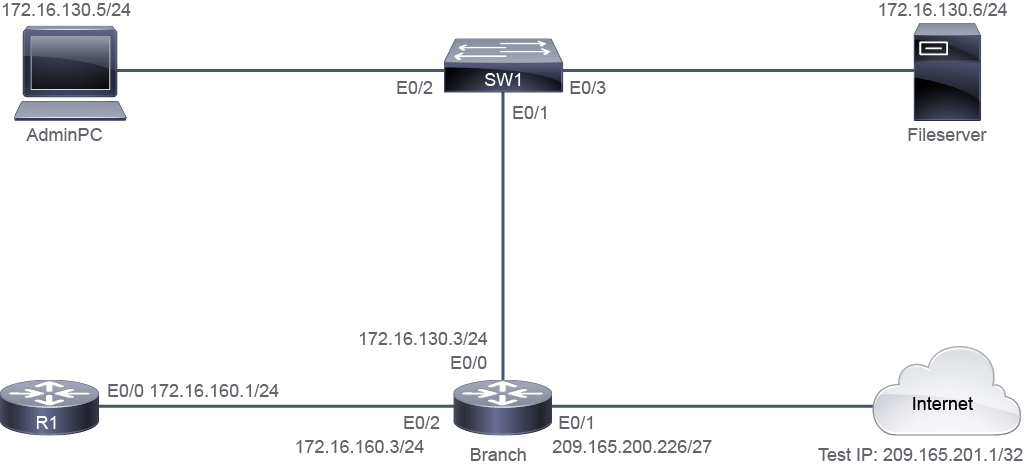
Job Aid
工作輔助資料
Device Information
裝置資訊
Device 裝置 | Interface 介面 | IPv4 Address IPv4 位址 | Remote 遠端 | Interface 介面 | IPv4 Address IPv4 位址 |
Branch Branch | E0/0 E0/0 | 172.16.130.3/24 172.16.130.3/24 | SW1 SW1 | E0/1 E0/1 | VLAN 1 VLAN 1 |
Branch Branch | E0/1 E0/1 | 209.165.200.226/27 209.165.200.226/27 | Internet Internet | E0/0 E0/0 | 209.165.200.225/27 209.165.200.225/27 |
Branch Branch | E0/2 E0/2 | 172.16.160.3/24 172.16.160.3/24 | R1 R1 | E0/0 E0/0 | 172.16.160.1/24 172.16.160.1/24 |
Branch Branch | Lo 0 Lo 0 | 172.16.2.2/32 172.16.2.2/32 | " " | " " | " " |
R1 R1 | E0/0 E0/0 | 172.16.160.1/24 172.16.160.1/24 | Branch Branch | E0/2 E0/2 | 172.16.160.3/24 172.16.160.3/24 |
R1 R1 | Lo 0 Lo 0 | 172.16.1.1/32 172.16.1.1/32 | " " | " " | " " |
AdminPC AdminPC | E0/0 E0/0 | 172.16.130.5/24 172.16.130.5/24 | SW1 SW1 | E0/2 E0/2 | " " |
Fileserver Fileserver | E0/0 E0/0 | 172.16.130.6/24 172.16.130.6/24 | SW1 SW1 | E0/3 E0/3 | " " |
Internet Internet | Lo 0 Lo 0 | 209.165.201.1/32 209.165.201.1/32 | " " | " " | " " |
Internet Internet | E0/0 E0/0 | 209.165.200.225/27 209.165.200.225/27 | Branch Branch | E0/1 E0/1 | 209.165.200.226/27 209.165.200.226/27 |
Configuration Tips
設定提示
- Configure a hostname on the R1 router, by using the
hostnameglobal configuration command.使用hostname全域設定指令,在 R1 路由器上設定主機名稱。 - Network interfaces need to be administratively enabled from "shutdown" using the
no shutdowncommand. Loopback interfaces are enabled by default.網路介面需要使用no shutdown指令,將其從「shutdown」狀態改為管理性啟用。Loopback 介面則預設為啟用狀態。 - Configure the correct IPv4 address on the interfaces, by using the
ip addressinterface configuration command.使用ip address介面設定指令,在介面上設定正確的 IPv4 位址。 - Apply a default route on the R1 router, specifying the Branch router as the default gateway. To apply a default route, use the
ip route0.0.0.0 0.0.0.0ip address of next hop neighbor command. Verify the validity of the default route by using thepingcommand from the R1 router to the AdminPC and Fileserver.在 R1 路由器上套用一條預設路由,指定 Branch 路由器作為預設閘道。若要套用預設路由,請使用ip route0.0.0.0 0.0.0.0下一跳鄰居 IP 位址 這個指令。並使用ping指令,從 R1 路由器 ping 通 AdminPC 與 Fileserver,以驗證預設路由是否有效。 - Apply a default route on the Branch router with the specified next hop address using the command listed above. Perform the verification by pinging the internet test IPv4 address.使用上述指令,在 Branch 路由器上套用指定下一跳位址的預設路由。透過 ping 網際網路測試 IPv4 位址來執行驗證。
- If the next hop in an
ip routecommand is not available, the route will not appear in the routing table.若ip route指令中的下一跳無法使用,該路由將不會出現在路由表中。
Answer Key
解答金鑰
You need to complete the following tasks:
你需要完成以下任務:
- Configure the new router with a hostname "R1".將新路由器的主機名稱設定為「R1」。
- Enter global configuration mode, and use the following command to configure a hostname as "R1" on the R1 router:進入全域設定模式,使用以下指令在 R1 路由器上將主機名稱設定為「R1」:
Router(config)# hostname R1 R1(config)# - Configure interface Ethernet0/0 on R1 with correct IPv4 address. Also, enable the interface.在 R1 上設定介面 Ethernet0/0,並指定正確的 IPv4 位址,同時啟用該介面。
- Begin the interface E0/0 configuration on R1 by issuing the
no shutdowncommand to enable it:在 R1 上,先執行no shutdown指令以啟用介面 E0/0,開始進行介面設定:
R1(config)# interface e0/0 R1(config-if)# no shutdown- Use the following command to assign the IPv4 address 172.16.160.1/24 along with the subnet mask:使用以下指令指派 IPv4 位址 172.16.160.1/24 及其子網路遮罩:
R1(config-if)# ip address 172.16.160.1 255.255.255.0 - Configure Loopback0 interface on R1 with correct IPv4 address.在 R1 上設定 Loopback0 介面,並指定正確的 IPv4 位址。
- Use the following commands to assign the IPv4 address 172.16.1.1/32 along with the subnet mask to Loopback 0 on R1:使用以下指令,在 R1 的 Loopback 0 上指派 IPv4 位址 172.16.1.1/32 及其子網路遮罩:
R1(config)# interface loopback 0 R1(config-if)# ip address 172.16.1.1 255.255.255.255 - Configure interface Ethernet0/2 on Branch router with correct IPv4 address. Ensure that you can ping the Ethernet0/0 interface on router R1.在 Branch 路由器上設定介面 Ethernet0/2,並指定正確的 IPv4 位址,確認可以 ping 通 R1 路由器上的 Ethernet0/0 介面。
- Issue the
no shutdowncommand on interface E0/2 on the Branch router to enable it:在 Branch 路由器上,對介面 E0/2 執行no shutdown指令以啟用該介面:
Branch(config)# interface e0/2 Branch(config-if)# no shutdown- Use the following commands to assign the IPv4 address 172.16.160.3/24 along with the subnet mask to interface E0/2:使用以下指令在介面 E0/2 上指派 IPv4 位址 172.16.160.3/24 及其子網路遮罩:
Branch(config-if)# ip address 172.16.160.3 255.255.255.0- Use the following command on the Branch router:在 Branch 路由器上使用以下指令:
Branch(config-if)# do ping 172.16.160.1 Type escape sequence to abort. Sending 5, 100-byte ICMP Echos to 172.16.160.1, timeout is 2 seconds: .!!!! Success rate is 80 percent (4/5), round-trip min/avg/max = 1/1/1 ms Branch(config-if)# - Enable interface Ethernet0/1 on the Branch router and configure it with IPv4 address 209.165.200.226/27, which is provided by the ISP.啟用 Branch 路由器上的介面 Ethernet0/1,並設定 ISP 提供的 IPv4 位址 209.165.200.226/27。
- Issue the
no shutdowncommand on interface E0/1 on the Branch router to enable it:在 Branch 路由器上,對介面 E0/1 執行no shutdown指令以啟用該介面:
Branch(config)# interface e0/1 Branch(config-if)# no shutdown- Use the following command to assign the IPv4 address 209.165.200.226/27 to the interface:使用以下指令,將 IPv4 位址 209.165.200.226/27 指派給該介面:
Branch(config-if)# ip address 209.165.200.226 255.255.255.224 - Apply a default route on the R1 router specifying the Branch router as the default gateway. Verify the validity of the default route by pinging the addresses of AdminPC and the Fileserver from the R1 router.在 R1 路由器上套用一條預設路由,指定 Branch 路由器作為預設閘道。透過從 R1 路由器 ping AdminPC 與 Fileserver 的位址,驗證此預設路由是否有效。
- Use the following command on R1:在 R1 上使用以下指令:
R1(config)# ip route 0.0.0.0 0.0.0.0 172.16.160.3- Check connectivity from R1 to the AdminPC:檢查從 R1 到 AdminPC 的連線:
R1# ping 172.16.130.5 Type escape sequence to abort. Sending 5, 100-byte ICMP Echos to 172.16.130.5, timeout is 2 seconds: !!!!! Success rate is 100 percent (5/5), round-trip min/avg/max = 1/1/1 ms- Check connectivity from R1 to the FileServer:檢查從 R1 到 FileServer 的連線:
R1# ping 172.16.130.6 Type escape sequence to abort. Sending 5, 100-byte ICMP Echos to 172.16.130.6, timeout is 2 seconds: !!!!! Success rate is 100 percent (5/5), round-trip min/avg/max = 1/1/1 ms - Configure the default route on Branch router with a next-hop address (gateway) of 209.165.200.225. Ensure that you can ping the 209.165.201.1 internet test IPv4 address from the Branch router.在 Branch 路由器上設定預設路由,下一跳位址(閘道)為 209.165.200.225。確認可以從 Branch 路由器 ping 通網際網路測試 IPv4 位址 209.165.201.1。
- Use the following command on Branch:在 Branch 上使用以下指令:
Branch(config)# ip route 0.0.0.0 0.0.0.0 209.165.200.225- Verify the default route on the Branch router by checking that the Branch router can ping the internet test IPv4 address:在 Branch 路由器上,透過檢查是否能 ping 通網際網路測試 IPv4 位址,驗證預設路由:
Branch# ping 209.165.201.1
Type escape sequence to abort.
Sending 5, 100-byte ICMP Echos to 209.165.201.1, timeout is 2 seconds:
!!!!!
Success rate is 100 percent (5/5), round-trip min/avg/max = 1/1/1 ms
If the command output does not show the desired result, then the default route that is configured on the Branch router is not correct.
若指令輸出未顯示預期結果,代表 Branch 路由器上設定的預設路由並不正確。
Implement IPv4 Static Routing Questions
實作 IPv4 靜態路由問題
Ethernet0/0 172.16.160.1 YES manual up up要驗證 R1 路由器上是否已設定 IPv4 位址且介面已啟用,出現以下輸出的指令是哪一個?Interface IP-Address OK? Method Status Protocol
Ethernet0/0 172.16.160.1 YES manual up up
show ip interface Lo0 command?在 R1 路由器上執行 show ip interface Lo0 指令,預期會得到什麼輸出?