FASTLab 2: Implement an Initial Router Configuration
FASTLab 2:實作初始路由器設定
Scenario
情境
A law firm contracted CCS to connect their existing network to the internet. The router that will be used for this implementation has arrived on site. However, the service provider has yet to provide the physical connection to the internet. The law firm has requested CCS to complete the router installation part of the implementation process. A previous network engineer has completed the physical installation. You must complete the router configuration.
一家律師事務所委託 CCS 將其現有網路連接至網際網路。此次實作所需的路由器已送達現場,但服務提供者尚未提供實體網際網路連線。律師事務所要求 CCS 完成實作流程中的路由器安裝部分。先前的網路工程師已完成實體安裝,你必須完成路由器的設定。
The contract for this implementation requires you to complete the following tasks:
此次實作的合約要求你完成以下任務:
- Configure the hostname of the router as "Branch."將路由器的主機名稱設定為「Branch」。
- Configure the router interface that is connected to the switch with a description of "Link to SW1."為連接到交換器的路由器介面設定描述為「Link to SW1」。
- Assign correct IPv4 address and subnet mask to interface Ethernet0/0 on the Branch router. Ensure that you can ping the IPv4 address of switch SW1 to verify the connectivity. If the connectivity test fails, make sure that you used the
no shutdowncommand on the interface.為 Branch 路由器上的 Ethernet0/0 介面指派正確的 IPv4 位址與子網路遮罩。請確認可以 ping 通交換器 SW1 的 IPv4 位址以驗證連線性。若連線測試失敗,請確認你已在該介面上使用no shutdown命令。 - Assign the correct IPv4 address to the Loopback 0 interface on the Branch router.為 Branch 路由器上的 Loopback 0 介面指派正確的 IPv4 位址。
- Configure the interface on SW1 that is connected to the router with the description "Link to Branch".為 SW1 上連接到路由器的介面設定描述為「Link to Branch」。
Topology
拓樸
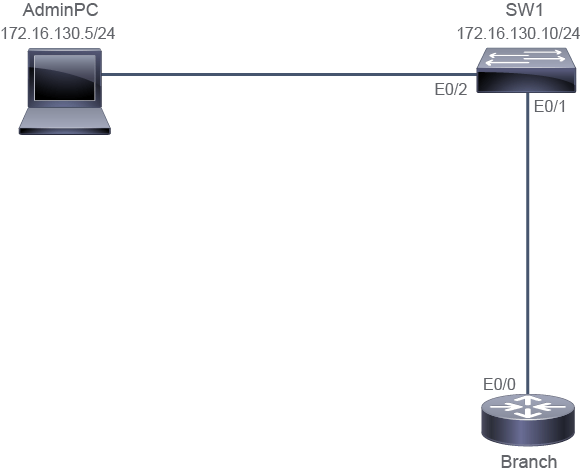
Job Aid
工作輔助資料
Device Information
裝置資訊
Device 裝置 | Interface 介面 | IPv4 Address IPv4 位址 | Connected Device 連接裝置 | Connected Device Interface 連接裝置介面 | Connected Device IPv4 Address 連接裝置 IPv4 位址 |
SW1 SW1 | VLAN 1 VLAN 1 | 172.16.130.10/24 172.16.130.10/24 | VLAN 1 VLAN 1 | " " | " " |
SW1 SW1 | E0/1 E0/1 | VLAN 1 VLAN 1 | Branch Branch | E0/0 E0/0 | 172.16.130.3/24 172.16.130.3/24 |
SW1 SW1 | E0/2 E0/2 | VLAN 1 VLAN 1 | AdminPC AdminPC | E0/0 E0/0 | 172.16.130.5/24 172.16.130.5/24 |
Branch Branch | Lo0 Lo0 | 172.16.2.2/32 172.16.2.2/32 | " " | " " | " " |
Configuration Tips
設定提示
- To configure the hostname on a router, enter the global configuration mode and enter the
hostnamehostname command.若要在路由器上設定主機名稱,請進入全域設定模式,並輸入hostname主機名稱命令。 - To configure an interface, you must enter the interface configuration mode. From the global configuration mode, enter the
interfaceinterface command.若要設定介面,你必須進入介面設定模式。從全域設定模式輸入interface介面命令。 - To configure a description for an interface, use the
descriptioncommand at the interface level.若要為介面設定描述,請在介面層級使用description命令。 - To assign an IPv4 address to an interface, use the
ip addressip address subnet mask interface configuration mode command.若要為介面指派 IPv4 位址,請在介面設定模式使用ip addressip 位址 子網路遮罩 命令。 - To test the connectivity between devices, use the
pingcommand. Use thesourcekeyword if you wish to specify the interface of the router to use as a source interface for the probes. The command syntax is as follows:pingip addresssourceinterface.若要測試裝置之間的連線性,請使用ping命令。若你想指定路由器上作為探測來源介面的介面,可使用source關鍵字。命令語法如下:pingip 位址source介面。 - Enable an interface using the
no shutdowncommand.使用no shutdown命令啟用介面。 - You can check which switch port is connected to the router using the Topology Diagram or use Cisco Discovery Protocol.你可以使用拓樸圖,或使用 Cisco Discovery Protocol,確認哪個交換器連接埠連接到路由器。
Answer Key
參考解答
You need to complete the following tasks:
你需要完成以下任務:
- Configure the hostname of the router as "Branch."將路由器的主機名稱設定為「Branch」。
- To assign the hostname of the router (identified as Branch in the lab), you may need to wait until the router has finished initializing and press Enter to get the Setup mode prompt, "Would you like to enter the initial configuration dialog? [yes/no]: ". Answer "no" to not enter setup mode. Enter router global configuration mode and configure the hostname as Branch.若要指派路由器的主機名稱(在此實驗中識別為 Branch),你可能需要等待路由器完成初始化,並按下 Enter 以取得 Setup 模式提示「Would you like to enter the initial configuration dialog? [yes/no]: 」。回答「no」以不進入 setup 模式。進入路由器全域設定模式,並將主機名稱設定為 Branch。
--- System Configuration Dialog --- Would you like to enter the initial configuration dialog? [yes/no]: n Router# configure terminal Router(config)# hostname Branch Branch(config)# - Configure the router interface that is connected to the switch with a description of "Link to SW1."為連接到交換器的路由器介面設定描述為「Link to SW1」。
- The contract requires that the link to the switch has a description of "Link to SW1." To configure a description for an interface, use the
descriptioncommand at the interface level.合約要求連接到交換器的鏈路描述為「Link to SW1」。若要為介面設定描述,請在介面層級使用description命令。
Branch(config)#interface Ethernet0/0 Branch(config-if)#description Link to SW1 - Assign correct IPv4 address and subnet mask to interface Ethernet0/0 on the Branch router. Ensure that you can ping the IPv4 address of switch SW1 to verify the connectivity. If the connectivity test fails, make sure that you used the
no shutdowncommand on the interface.為 Branch 路由器上的 Ethernet0/0 介面指派正確的 IPv4 位址與子網路遮罩。請確認可以 ping 通交換器 SW1 的 IPv4 位址以驗證連線性。若連線測試失敗,請確認你已在該介面上使用no shutdown命令。- To enable IPv4 connectivity between the E0/0 interface of the router and AdminPC (172.16.130.5), configure the E0/0 interface with the IPv4 address 172.16.130.3 and subnet mask 255.255.255.0, and enable the interface by configuring the
no shutdowncommand.若要在路由器的 E0/0 介面與 AdminPC(172.16.130.5)之間啟用 IPv4 連線,請將 E0/0 介面設定為 IPv4 位址 172.16.130.3、子網路遮罩 255.255.255.0,並透過設定no shutdown命令啟用該介面。
Branch(config)#interface Ethernet0/0 Branch(config-if)#ip address 172.16.130.3 255.255.255.0 Branch(config-if)#no shutdown- You can use the
show ip interface brieforshow ip interface e0/0commands to verify the status and IPv4 address that is configured for the Ethernet 0/0 interface on the Branch router.你可以使用show ip interface brief或show ip interface e0/0命令,驗證 Branch 路由器上 Ethernet 0/0 介面所設定的狀態與 IPv4 位址。
Branch# show ip interface ethernet 0/0 Ethernet 0/0 is up, line protocol is up, Internet address is 172.16.130.3/24- Verify that the Branch router can ping the IPv4 address of SW1 (172.16.130.10).驗證 Branch 路由器可以 ping 通 SW1 的 IPv4 位址(172.16.130.10)。
Branch# ping 172.16.130.10 Type escape sequence to abort. Sending 5, 100-byte ICMP Echos to 172.16.130.10, timeout is 2 seconds: Packet sent with a source address of 172.16.130.3 !!!!! Success rate is 100 percent (5/5), round-trip min/avg/max = 1/1/1 ms Branch# - Assign the correct IPv4 address to the Loopback 0 interface on the Branch router.為 Branch 路由器上的 Loopback 0 介面指派正確的 IPv4 位址。
- The contract requires the loopback interface to have an IPv4 address of 172.16.2.2/32. In order to configure the IPv4 address on an interface, use the following command:合約要求 loopback 介面的 IPv4 位址為 172.16.2.2/32。若要在介面上設定 IPv4 位址,請使用以下命令:
Branch(config)# interface Loopback0Branch(config-if)# ip address 172.16.2.2 255.255.255.255- To verify the status, you can use
show ip interface brief,show ip interface loopback 0, orshow interface loopback 0commands. To verify the connectivity, you can use the ping command between AdminPC and the Loopback 0 interface that is configured on the Branch router.若要驗證狀態,你可以使用show ip interface brief、show ip interface loopback 0,或show interface loopback 0命令。若要驗證連線性,你可以在 AdminPC 與 Branch 路由器上設定的 Loopback 0 介面之間使用 ping 命令。
Branch# show ip interface loopback 0 Loopback0 is up, line protocol is up Internet Address is 172.16.2.2/32 Branch# ping 172.16.130.5 source loopback0 Type escape sequence to abort. Sending 5, 100-byte ICMP Echos to 172.16.130.5, timeout is 2 seconds: Packet sent with a source address of 172.16.2.2 !!!!! Success rate is 100 percent (5/5), round-trip min/avg/max = 1/1/1 ms Branch# - Configure the interface on SW1 that is connected to the router with the description "Link to Branch".為 SW1 上連接到路由器的介面設定描述為「Link to Branch」。
- The contract requires that the link to the branch has a description of "Link to Branch." In order to configure a description for an interface, use the
descriptioncommand at the interface level.合約要求連接到 Branch 的鏈路描述為「Link to Branch」。若要為介面設定描述,請在介面層級使用description命令。
SW1(config)#interface Ethernet0/1 SW1(config-if)#description Link to Branch- Check the configuration of that specific port.檢查該特定連接埠的設定。
SW1# show running-configuration interface e0/1
Building configuration...

Current configuration : 70 bytes
!
interface Ethernet0/1
 description Link to Branch
 duplex auto
end

SW1#
Implement the Initial Router Configuration Questions
實作初始路由器設定問題
When using the
show run | include hostname command on the Branch router, what is the expected result?在 Branch 路由器上使用 show run | include hostname 命令時,預期的結果為何?Which command verifies that the description is configured on the Ethernet0/0 interface?哪個命令可以驗證 Ethernet0/0 介面上是否已設定描述?
Refer to the exhibit. It shows a successful connectivity check. The output in the exhibit shows the source address for the ping command, i.e., the address from which the ping messages were sent. Which device and interface was the ping sent from? Type escape sequence to abort.
Sending 5, 100-byte ICMP Echos to 172.16.130.5, timeout is 2 seconds:
Packet sent with a source address of 172.16.2.2
!!!!!
Success rate is 100 percent (5/5), round-trip min/avg/max = 1/1/1 ms請參閱範例。該範例顯示成功的連線檢測。範例中的輸出顯示 ping 命令的來源位址,也就是傳送 ping 訊息的位址。此 ping 是從哪個裝置與介面傳送的?Type escape sequence to abort.
Sending 5, 100-byte ICMP Echos to 172.16.130.5, timeout is 2 seconds:
Packet sent with a source address of 172.16.2.2
!!!!!
Success rate is 100 percent (5/5), round-trip min/avg/max = 1/1/1 ms
Sending 5, 100-byte ICMP Echos to 172.16.130.5, timeout is 2 seconds:
Packet sent with a source address of 172.16.2.2
!!!!!
Success rate is 100 percent (5/5), round-trip min/avg/max = 1/1/1 ms請參閱範例。該範例顯示成功的連線檢測。範例中的輸出顯示 ping 命令的來源位址,也就是傳送 ping 訊息的位址。此 ping 是從哪個裝置與介面傳送的?Type escape sequence to abort.
Sending 5, 100-byte ICMP Echos to 172.16.130.5, timeout is 2 seconds:
Packet sent with a source address of 172.16.2.2
!!!!!
Success rate is 100 percent (5/5), round-trip min/avg/max = 1/1/1 ms