Switches operate at multiple layers of the OSI model. At Layer 1 of the OSI model, switches provide an interface to the physical media. At Layer 2 of the OSI model, they provide switching of frames based on MAC addresses. Therefore, switch problems are generally seen as Layer 1 and Layer 2 issues. Layer 3 issues concerning IP connectivity to the switch for management purposes could also occur.
交換器在 OSI 模型的多個層運作。在 OSI 模型第 1 層,交換器提供連接實體媒介的介面;在第 2 層,交換器根據 MAC 位址交換框架。因此,交換器問題通常屬於第 1 層與第 2 層的問題。也可能發生與管理用途的 IP 連線有關的第 3 層問題。
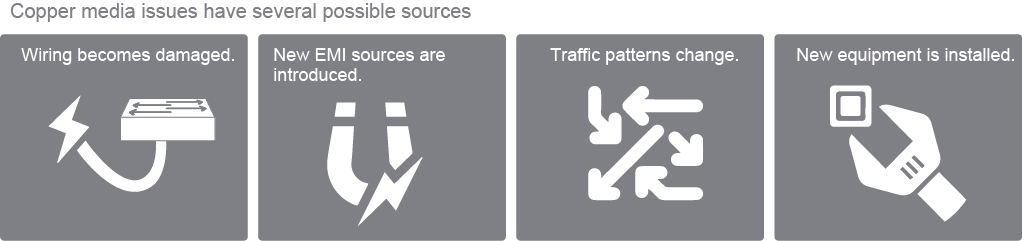
In laying out the troubleshooting methodology, some people start at Layer 1 and start looking at potential media issues like damage to wiring or interference by electromagnetic sources. The category of UTP wiring will be critical. Cables of the lower category will have more sensitivity to certain sources of EMI, such as air-conditioning systems. Category 5 will have better enclosures and plastic around the wiring to protect it from such sources. Poor cable management could, for example, put a strain on Registered Jack-45 (RJ-45) connectors, causing some cables to break.
在規劃疑難排解方法時,有些人會從第 1 層開始,尋找潛在的媒介問題,例如佈線損壞或電磁干擾。UTP 佈線的類別(category)非常關鍵:等級較低的纜線對某些干擾源(例如空調系統)較敏感;Category 5 纜線則有較好的外殼與塑膠包覆,能保護纜線免受此類干擾。佈線管理不良也可能對 RJ-45(Registered Jack-45)接頭造成壓力,導致部分纜線斷裂。
Physical security could also be a cause of media issues. If you allow people to connect hubs to your switches or connect unwanted sources of traffic to the switch. In that case, traffic patterns may change, which is not necessarily related to the media or physical layer, but collisions could increase if you install the hub and connect it to your switch. This problem is related to physical connectivity, and so it could be categorized as a physical layer or media issue.
實體安全性也可能是媒介問題的成因。若允許他人將集線器(hub)連接到你的交換器,或連接不必要的流量來源到交換器,流量模式可能會改變,這未必與媒介或實體層有關,但如果安裝集線器並連接到交換器,碰撞(collision)可能會增加。這類問題與實體連線有關,因此可歸類為實體層或媒介問題。
When new equipment is connected to a switch and the connection operates in the half-duplex mode, or a duplex mismatch occurs, this could lead to an excessive number of collisions (layer 2 issue).
當新設備連接到交換器且該連線以半雙工(half-duplex)模式運作,或發生雙工不匹配(duplex mismatch)時,可能導致過多的碰撞(第 2 層問題)。
A collision occurs when a transmitting Ethernet station detects another signal while transmitting a frame. A late collision is a special type of collision. If a collision occurs after the first 512 bits (64 octets or bytes) of data are transmitted by the transmitting station, then a late collision is said to have occurred. Most importantly, late collisions are not resent by the network interface card; in other words, they are not resent by Ethernet, unlike collisions occurring before the first 64 octets or bytes. It is left for the upper layers of the protocol stack to determine that there was a loss of data and retransmit.
當傳輸中的乙太網路站台在傳送框架時偵測到另一個訊號,就會發生碰撞。晚期碰撞(late collision)是一種特殊的碰撞類型:若碰撞發生在傳輸站台傳送完前 512 位元(64 位元組)資料之後,就稱為發生了晚期碰撞。最重要的是,晚期碰撞不會由網路介面卡(NIC)重新傳送,也就是說乙太網路不會重送這類碰撞,這與發生在前 64 位元組之內的碰撞不同。判定資料遺失並重新傳送的工作,則留給協定堆疊的上層來處理。
Late collisions should never occur in a properly designed Ethernet network. Possible causes are usually incorrect cabling or a non-compliant number of hubs in the network; perhaps a bad network interface card could also cause late collisions. If a late collision happens, they are typically detected using a protocol analyzer, verifying cabling distances and the physical layer requirements and limitations of Ethernet.
在設計良好的乙太網路中,不應該發生晚期碰撞。可能的原因通常是佈線錯誤或網路中集線器數量不符合規範,也可能是網路介面卡故障所致。若發生晚期碰撞,通常會使用通訊協定分析儀(protocol analyzer)來偵測,並驗證佈線距離以及乙太網路實體層的要求與限制。
A symptom of excessive noise could be several cyclic redundancy check (CRC) errors, or rather changes in the number of CRC errors not related to collisions. In other words, if the number of collisions is constant, consistent, and does not change or have peaks, then CRC errors could be caused by excessive noise and not related to actual collisions.
過度雜訊的症狀之一可能是出現多個循環冗餘檢查(CRC)錯誤,或者說 CRC 錯誤的數量出現與碰撞無關的變化。換句話說,如果碰撞數量保持恆定、一致,沒有變化或高峰,那麼 CRC 錯誤很可能是由過度雜訊造成的,而非實際碰撞所致。
When this issue happens, cable inspection is probably the first step. You can use the multitude of cable testers and tools available for that purpose. Poor design in using perhaps something other than Category 5 cabling for fast Ethernet and 100-Mbps networks could be the cause, and cable testing plus documentation could tell you how to fix this problem.
發生這類問題時,檢查纜線通常是第一步,你可以使用多種纜線測試器與工具來進行檢查。使用非 Category 5 等級的纜線來建置快速乙太網路與 100 Mbps 網路,可能是設計不良所致,纜線測試加上文件記錄可以告訴你如何修正此問題。
If the rate of collisions exceeds the baseline for your network, then there are other types of solutions to the problem. There are several guidelines regarding what that baseline should be, including that the number of collisions compared to the total number of output packets should be less than 0.1 percent.
如果碰撞率超過網路的基準值,就需要採取其他類型的解決方案。關於基準值應為多少,有幾項準則,其中一項是碰撞數量相對於輸出封包總數的比例應低於 0.1%。
If collisions are a problem, the cause could be a defective or ill-behaving device—for example, a network interface card-sending excessive garbage into the network. This situation typically happens when there are circuitry or logic failures or even physical failures on the device. This condition is typically known as jabbering and relates to network interface cards and other devices continuously sending random or garbage data into the network. A time-domain reflectometer (TDR) could be used to find unterminated Ethernet cabling, reflecting signals back into the network and causing collisions.
如果碰撞是個問題,可能的原因是設備故障或運作異常,例如網路介面卡向網路傳送過多垃圾資料。這種情況通常發生在設備出現電路或邏輯故障,甚至實體故障時。這種狀況通常稱為「亂發訊號(jabbering)」,是指網路介面卡與其他裝置持續向網路傳送隨機或垃圾資料。可以使用時域反射儀(TDR)來找出未接終端的乙太網路纜線,這種纜線會將訊號反射回網路中,造成碰撞。
Fiber media issues have these possible sources:
光纖媒介問題可能有以下幾種來源:
- Microbend and macrobend losses微彎與巨彎損耗
- Bending the fiber in too small of a radius causes light to escape.光纖彎曲半徑過小會導致光線逸散。
- Light strikes the core or cladding at less than the critical angle.光線以小於臨界角的角度射向纖芯或纖殼。
- Total internal reflection no longer occurs, and light leaks out.不再發生全內反射,光線因而洩漏。
- Splice losses熔接損耗
- Dirty connectors接頭髒污

There are several ways in which light can be lost from the fiber. Some are due to manufacturing problems (for example, microbends, macrobends, and splicing fibers that do not have their cores centered). In contrast, others are physics problems (back reflections or refractions) because light reflects whenever it encounters a change in the index of refraction, which defines how much the path of light is bent or refracted when entering a media. The index of refraction is calculated by dividing the speed of light in a vacuum by the speed of light in another medium, in this case, optical fiber.
光線可能以多種方式從光纖中損失。有些是製造問題所致(例如微彎、巨彎,以及纖芯未對齊的熔接),有些則是物理問題(背向反射或折射),因為光線每當遇到折射率變化時就會反射,折射率決定了光線進入媒介時路徑彎曲或折射的程度。折射率是以真空中光速除以光在另一種媒介(此處為光纖)中的速度所計算出來的。
Macrobends typically occur during fiber installation.
巨彎通常發生在光纖安裝過程中。
One cause of light leaking out at a macrobend is that part of the traveling wave, called the evanescent wave, travels inside the cladding. Around the bend, part of the evanescent wave would have to travel faster than the speed of light in the material, which is not possible, so this light instead radiates out of the fiber.
巨彎處光線洩漏的其中一個原因,是行進波中稱為「消逝波(evanescent wave)」的部分在纖殼內傳播。在彎曲處,部分消逝波必須以比該材質中光速更快的速度傳播,但這是不可能的,因此這部分光線便從光纖中輻射出去。
Bend losses can be reduced by designing a larger index difference between the core and the cladding. Core and the cladding have different refractive indexes. The refractive index of the core is always greater than the index of the cladding. Another approach is to operate at the shortest possible wavelength and perform good installations.
透過設計纖芯與纖殼之間更大的折射率差異,可以降低彎曲損耗。纖芯與纖殼具有不同的折射率,纖芯的折射率一律大於纖殼的折射率。另一種做法是在盡可能短的波長下運作,並確保安裝品質良好。
Splices are a way to connect two fibers by fusing their ends. The best way to align the fiber core is by using the outside diameter of the fiber as a guide. If the core is at the center of the fiber, a good splice can be achieved. If the core is off-center, then it is impossible to create a good splice. You would have to cut the fiber further upstream and test again.
熔接(splice)是一種透過熔合兩條光纖端面來連接的方式。對齊纖芯最好的方法是以光纖的外徑作為基準。若纖芯位於光纖中心,就能達成良好的熔接;若纖芯偏離中心,就無法產生良好的熔接,此時必須從更上游處切斷光纖並重新測試。
Another possibility is that the fibers to be spliced could have dirt on their ends. Dirt can cause many problems, particularly if the dirt intercepts some or all the light from the core. The core for single-mode fiber (SMF) is only 9 micrometers. Splicing fiber is a highly specialized skill in which trained technicians use fusion splicing equipment to connect two fiber runs.
另一種可能是待熔接的光纖端面上有髒污。髒污可能造成許多問題,尤其是當髒污阻擋了部分或全部來自纖芯的光線時。單模光纖(SMF)的纖芯僅有 9 微米,熔接光纖是一項高度專業的技能,需要受過訓練的技術人員使用熔接設備來連接兩段光纖。
Any contamination in the fiber connection can cause the failure of the component or failure of the whole system. Even microscopic dust particles can cause a variety of problems for optical connections. A particle that partially or completely blocks the core generates strong back reflections, which can cause instability in the laser system. Dust particles trapped between two fiber faces can scratch the glass surfaces. Even if a particle is only situated on the cladding or the edge of the endface, it can cause an air gap or misalignment between the fiber cores, which significantly degrades the optical signal. In addition to dust, other types of contamination, like oil, water, powdery coatings, must also be cleaned off the endface. These contaminants can be more difficult to remove than dust particles and can also cause damage to equipment if not removed.
光纖連接處的任何污染都可能導致元件或整個系統故障。即使是微小的灰塵顆粒,也可能對光學連接造成各種問題。部分或完全阻擋纖芯的顆粒會產生強烈的背向反射,可能導致雷射系統不穩定。卡在兩個光纖端面之間的灰塵顆粒可能刮傷玻璃表面。即使顆粒只位於纖殼或端面邊緣,也可能造成空氣間隙或光纖纖芯之間的偏移,大幅劣化光訊號品質。除了灰塵之外,其他類型的污染物,例如油污、水分、粉狀塗層,也都必須從端面清除乾淨。這些污染物可能比灰塵顆粒更難清除,若未清除也可能對設備造成損害。
When you clean fiber components, always complete the steps in the procedures carefully. The goal is to eliminate any dust or contamination and provide a clean environment for the fiber-optic connection. Remember that inspection, cleaning, and reinspection are critical steps that must be done before you make any fiber-optic connection. When cleaning optical connectors, the most important warning is always to turn off any laser sources before inspecting fiber connectors, optical components, or bulkheads.
清潔光纖元件時,務必謹慎完成程序中的每個步驟。目標是去除任何灰塵或污染物,為光纖連接提供潔淨的環境。請記住,檢查、清潔、再檢查是在進行任何光纖連接之前必須完成的關鍵步驟。清潔光學接頭時,最重要的注意事項是:在檢查光纖接頭、光學元件或穿艙板之前,務必先關閉所有雷射光源。
Troubleshooting Media Issues Workflow
疑難排解媒介問題的工作流程
You can use the show interfaces command to diagnose media issues.
你可以使用 show interfaces 指令來診斷媒介問題。
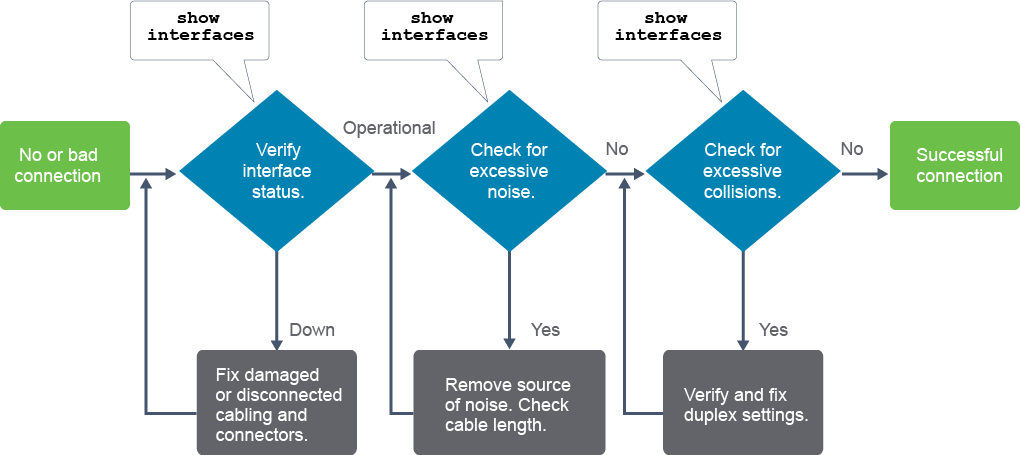
To troubleshoot media issues when you have no connection or a bad connection between a switch and another device, follow this process:
當交換器與另一裝置之間沒有連線或連線不良時,請依下列流程排解媒介問題:
- Use the
show interfacescommand to check the interface status. If the interface is not operational, check the cable and connectors for damage.使用show interfaces指令檢查介面狀態。若介面未正常運作,請檢查纜線與接頭是否有損壞。 - Use the
show interfacescommand to check for excessive noise. If there is excessive noise, you will see increased error counters in the output of the command. Then first, find and remove the source of the noise, if possible. Verify that the cable does not exceed the maximum cable length and check the type of cable used. For copper cable, it is recommended that you use at least Category 5.使用show interfaces指令檢查是否有過度雜訊。若有過度雜訊,你會在指令輸出中看到錯誤計數器增加。此時應先找出並移除雜訊來源(若可能的話),並確認纜線長度未超過最大長度限制,同時檢查所使用的纜線類型。銅纜建議至少使用 Category 5。 - Use the
show interfacescommand to check for excessive collisions. If there are collisions or late collisions, verify the duplex settings on both ends of the connection.使用show interfaces指令檢查是否有過多碰撞。若出現碰撞或晚期碰撞,請確認連線兩端的雙工設定。