JSON is a data exchange format and open standard. It is easy for humans to read and write and easy for machines to parse and generate.
JSON 是一種資料交換格式,也是一種開放標準。它容易讓人閱讀與撰寫,也容易讓機器解析與產生。
JSON is based on a subset of JavaScript and is a text format that is completely language-independent.
JSON 是以 JavaScript 的子集為基礎,是一種完全與語言無關的文字格式。
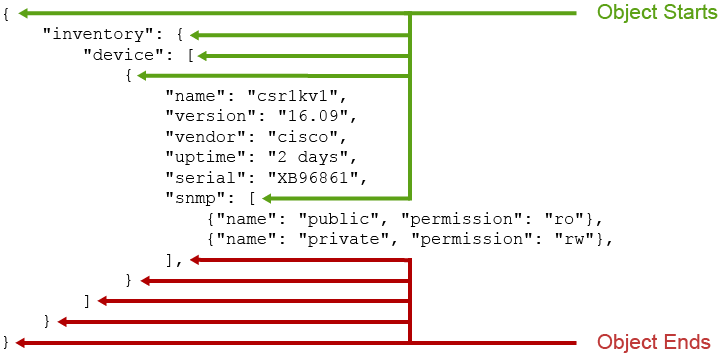
JSON is best known for the curly bracket ({}) syntax because JSON objects always begin and end with a curly bracket. JSON builds objects using name-value pairs similar to the key-value pairs in a Python dictionary. Values can be strings, lists, numbers, Booleans, and nested JSON objects.
JSON 最為人熟知的是大括號({})語法,因為 JSON 物件一律以大括號開頭與結尾。JSON 使用名稱值配對(name-value pair)來建立物件,類似於 Python 字典中的鍵值配對。值可以是字串、串列、數字、布林值,以及巢狀的 JSON 物件。
JSON supports two widely used data structures:
JSON 支援兩種廣泛使用的資料結構:
- A collection of key-value pairs: Let's use a Python dictionary data type for a visual analogy.鍵值配對的集合:讓我們用 Python 字典資料型態來做視覺化的類比。
Example:
範例:
'{ "inventory": { "device": [ { "name": "csr1kv1", "version": "16.09", "vendor": "cisco", "uptime": "2 days", "serial": "XB96861", "snmp": [ {"name": "public", "permission": "ro"}, {"name": "private", "permission": "rw"}, ], } ] } }' - If you enclose the previous example in square brackets, making it a list, it will still be considered a valid JSON data type.如果你把前面的範例用方括號括起來,使其成為一個串列,它仍然被視為有效的 JSON 資料型態。
Example:
範例:
'[
  {
    "inventory": {
      "device": [
        {
          "name": "csr1kv1",
          "version": "16.09",
          "vendor": "cisco",
          "uptime": "2 days",
          "serial": "XB96861",
          "snmp": [
            {
              "name": "public",
              "permission": "ro",
            },
            {
              "name": "private",
              "permission": "rw",
            }
          ]
        }
      ]
    }
  }
]'
Notice the single quotation marks at the beginning and at the end of the examples. These quotation marks emphasize that they are JSON strings, and within programming languages, JSON is not a native data type.
請注意範例開頭與結尾的單引號。這些引號用來強調它們是 JSON 字串,而在程式語言中,JSON 並不是原生資料型態。
JSON is extremely popular with Python programmers because it is easy to read and natively maps to a Python dictionary. So, if you understand Python dictionaries, you will understand JSON and vice versa.
JSON 在 Python 程式設計人員之間非常受歡迎,因為它容易閱讀,並且能自然對應到 Python 字典。因此,如果你了解 Python 字典,你就能理解 JSON,反之亦然。
Technically, a Python dictionary is not a JSON object. Although you can print a dictionary with the print statement in Python, you can dump it as a JSON formatted string using the json Python module using the dumps() function, for example, (json.dumps()).
嚴格來說,Python 字典並不是 JSON 物件。雖然你可以在 Python 中用 print 陳述式印出字典,但你可以使用 json 模組的 dumps() 函式(例如 json.dumps())將它轉存為 JSON 格式的字串。
Next, you will see the differences between Python dictionaries and JSON, and how to interact with JSON using the Python programming language.
接下來,你將了解 Python 字典與 JSON 之間的差異,以及如何使用 Python 程式語言與 JSON 互動。
JSON in Python
Python 中的 JSON

Devices that support JSON as an encoding type can accept or return data in JSON when queried via an API call. Although JSON is a string, Python provides modules to help you successfully interact with JSON. In the following example, you will see the use of a Python dictionary, which will help in your JSON discovery.
支援 JSON 作為編碼型態的裝置,在透過 API 呼叫查詢時,可以接受或回傳 JSON 格式的資料。雖然 JSON 是字串,Python 仍提供了模組來協助你順利與 JSON 互動。在以下範例中,你會看到使用 Python 字典的方式,這有助於你探索 JSON。
The example starts by creating a facts variable and assigning a data dictionary to it:
此範例首先建立一個 facts 變數,並將一個資料字典指派給它:
>>> facts =  {
...         "inventory": {
...             "device": [
...                 {
...                     "name": "csr1kv1",
...                     "version": "16.09",
...                     "vendor": "cisco",
...                     "uptime": "2 days",
...                     "serial": "XB96861",
...                     "snmp": [
...                         {"name": "public", "permission": "ro"},
...                         {"name": "private", "permission": "rw"}
...                     ]
...                 }
...             ]
...         }
...     }
>>>
At this point, if you check the type of facts variable, Python will tell you that it is a dictionary:
此時,如果你檢查 facts 變數的型態,Python 會告訴你它是一個字典:
>>> type(facts)Because it is a dictionary, you can interact with its data using acceptable methods. For example, you can print the value of the csr1kv1 uptime as follows:
因為它是一個字典,你可以使用可用的方法與其中的資料互動。例如,你可以像下面這樣印出 csr1kv1 uptime 的值:
>>> facts['inventory']['device'][0]['uptime']
'2 days'
You can convert the facts variable to a JSON object, for example, a JSON formatted string. To accomplish this task, you will need to import the json module. After the import, you can use all the functions that are defined in the module.
你可以將 facts 變數轉換成 JSON 物件,例如 JSON 格式的字串。要完成這項工作,你需要匯入 json 模組。匯入後,你就可以使用該模組中定義的所有函式。
>>> import jsonTo convert the Python dictionary to a JSON formatted string, you need to use the json module dumps() function and provide the dictionary as an argument as follows:
要將 Python 字典轉換成 JSON 格式的字串,你需要使用 json 模組的 dumps() 函式,並將字典作為引數提供,如下所示:
>>> json.dumps(facts)
'{"inventory": {"device": [{"name": "csr1kv1", "version": "16.09", "vendor": "cisco", "uptime": "2 days", "serial": "XB96861", "snmp": [{"name": "public", "permission": "ro"}, {"name": "private", "permission": "rw"}]}]}}'
The preceding and ending single quotation marks indicate that the returned data is a string. To confirm this fact, assign the returned data to the facts_str variable and then check its type:
開頭與結尾的單引號表示回傳的資料是字串。要確認這一點,將回傳的資料指派給 facts_str 變數,然後檢查它的型態:
>>> facts_str = json.dumps(facts)
>>> type(facts_str)
The Python json module's function dumps() has a very useful but optional parameter called indent. This parameter will take an argument that is a non-negative integer (e.g., indent=4) or string (e.g., indent="\n") and pretty prints the JSON formatted string. If you use a string as an argument for indent in dumps(), then you will generally want to use a special escape character to create a new line, such as "\n" for a new line or "\t" for tabs which are used to indent each level. On the other hand, if you use an integer as an argument for the indent parameter, then indent will indent that many spaces per level:
Python json 模組的 dumps() 函式有一個非常實用但可選的參數,稱為 indent。這個參數可以接受一個非負整數(例如 indent=4)或字串(例如 indent="\n")作為引數,並會美化列印 JSON 格式的字串。如果你在 dumps() 中使用字串作為 indent 的引數,通常會想使用特殊的跳脫字元來建立新行,例如用 "\n" 換行,或用 "\t" 表示 tab,用於每一層的縮排。另一方面,如果你使用整數作為 indent 參數的引數,則 indent 會依每層縮排該數量的空格:
>>> print(json.dumps(facts, indent=4))
{
    "inventory": {
        "device": [
            {
                "name": "csr1kv1",
                "version": "16.09",
                "vendor": "cisco",
                "uptime": "2 days",
                "serial": "XB96861",
                "snmp": [
                    {
                        "name": "public",
                        "permission": "ro"
                    },
                    {
                        "name": "private",
                        "permission": "rw"
                    }
                ]
            }
        ]
    }
}
The following example goes in the other direction and converts a JSON object to a native Python object (dictionary or a list). For this action, you will use two variables—vlan_ids and interfaces—creating a string containing a dictionary and list data types, respectively.
以下範例則反其道而行,將 JSON 物件轉換成原生 Python 物件(字典或串列)。針對此動作,你將使用兩個變數——vlan_ids 和 interfaces——分別建立包含字典與串列資料型態的字串。
>>> vlan_ids = '{"name":"HR", "id": 100}'
>>> interfaces = '["GigabitEthernet1", "GigabitEthernet2", "GigabitEthernet3", "GigabitEthernet4"]'
Before beginning, confirm that the variables are strings, as follows:
在開始之前,先確認這些變數是字串,如下所示:
>>> type(vlan_ids)
>>> type(interfaces)
>>> vlan_ids['id']
Traceback (most recent call last):
  File "", line 1, in TypeError: string indices must be integers
Using the json module loads() function, you can convert the vlan_ids and interfaces variables to a format that Python supports. You refer to the variable as an argument when calling the method to accomplish this task. Save the returned data to variables called vlans_nums and interface_names, respectively.
使用 json 模組的 loads() 函式,你可以將 vlan_ids 和 interfaces 變數轉換成 Python 支援的格式。呼叫此方法時,你將該變數作為引數傳入以完成此動作。將回傳的資料分別儲存到名為 vlans_nums 和 interface_names 的變數中。
>>> vlans_nums = json.loads(vlan_ids)
>>> interface_names = json.loads(interfaces)
To confirm that the conversion was successful, you can attempt to print any value from the two newly created variables.
要確認轉換是否成功,你可以嘗試印出這兩個新建立變數中的任何值。
>>> vlans_nums['id']
100
>>> interface_names[0]
'GigabitEthernet1'
Practice is a great way to learn this topic. If you search online, you will find many public APIs that can generate sample JSON data for you to consume and experiment with.
練習是學習這個主題的好方法。如果你上網搜尋,會找到許多公開的 API,可以產生範例 JSON 資料供你使用與實驗。
json.dumps() function?json.dumps() 函式的用途是什麼?json.dumps() function to pretty print a JSON object when converted from a Python dictionary?從 Python 字典轉換時,可以使用哪個關鍵字引數搭配 json.dumps() 函式來美化列印 JSON 物件?