A network can be as simple as two PCs connected by a wire or as complex as several thousand devices that are connected through different types of media. The elements that form a network can be roughly divided into three categories: devices, media, and services. Devices are interconnected by the media, which provides the channel over which the data travels from source to destination. Services are software and processes that support common networking applications in use today.
網路可以簡單到只有兩台以一條線連接的 PC,也可以複雜到有數千台透過不同類型傳輸媒介連接的裝置。構成網路的元素大致可分為三類:裝置、傳輸媒介與服務。裝置經由傳輸媒介互連,媒介提供資料從來源傳到目的地的通道。服務則是支援現今常見網路應用的軟體與程序。
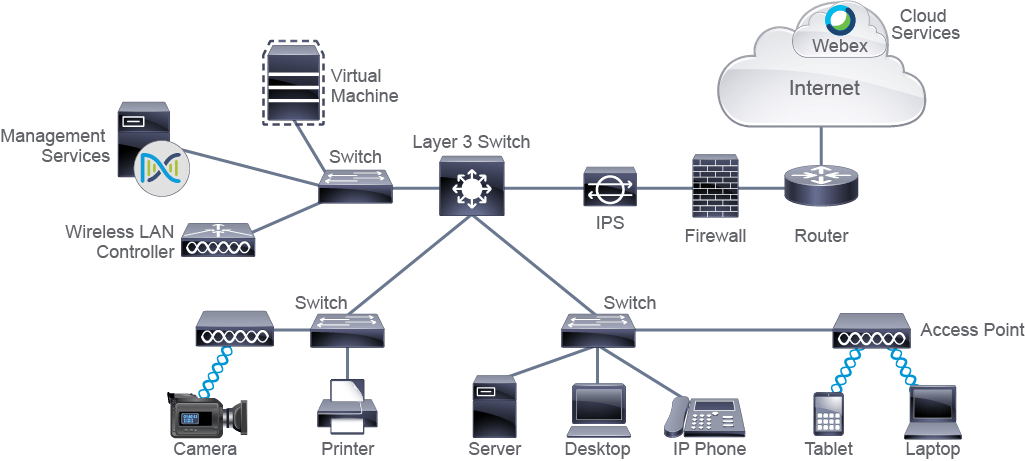
Network Devices
網路裝置
Devices can be further divided into endpoints and intermediary devices:
裝置可進一步分為端點與中介裝置:
- Endpoints: In the context of a network, endpoints are called end-user devices and include PCs, laptops, tablets, mobile phones, game consoles, and television sets. Endpoints are also file servers, printers, sensors, cameras, manufacturing robots, smart home components, and so on. All end devices were physical hardware units years ago. Today, many end devices are virtualized, meaning that they do not exist as separate hardware units anymore. In virtualization, one physical device is used to emulate multiple end devices—for example, all the hardware components that one end device would require. The emulated computer system operates as a separate physical unit and has its own operating system and other required software. In a way, it behaves like a tenant living inside a host physical device, using its resources (processor power, memory, and network interface capabilities) to perform its functions. Virtualization is commonly applied to servers to optimize resource utilization, because server resources are often underutilized when they are implemented as separate physical units.端點:在網路的脈絡下,端點又稱為終端使用者裝置,包括 PC、筆記型電腦、平板電腦、手機、遊戲主機與電視。端點也包括檔案伺服器、印表機、感測器、攝影機、製造機器人、智慧家庭元件等等。多年前,所有終端裝置都是實體硬體。如今,許多終端裝置都已虛擬化,也就是說它們不再以獨立的硬體單元存在。在虛擬化中,一台實體裝置用來模擬多台終端裝置,例如模擬一台終端裝置所需的全部硬體元件。被模擬出來的電腦系統如同獨立的實體單元一樣運作,擁有自己的作業系統與其他必要軟體。某種程度上,它就像住在宿主實體裝置裡的房客,使用宿主的資源(處理器效能、記憶體與網路介面能力)來執行其功能。虛擬化常應用於伺服器,以最佳化資源利用率,因為伺服器以獨立實體單元建置時,其資源往往未被充分利用。
- Intermediary devices:These devices interconnect end devices or interconnect networks. In doing so, they perform different functions, which include regenerating and retransmitting signals, choosing the best paths between networks, classifying and forwarding data according to priorities, filtering traffic to allow or deny it based on security settings, and so on. As endpoints can be virtualized, so can intermediary devices or even entire networks. The concept is the same as in the endpoint virtualization—the virtualized element uses a subset of resources available at the physical host system. Intermediary devices that are commonly found in enterprise networks are:中介裝置:這些裝置把終端裝置互連起來,或把網路互連起來。在此過程中,它們執行各種不同的功能,包括再生與重送訊號、在網路之間選擇最佳路徑、依優先權分類與轉送資料、依安全設定過濾流量以允許或拒絕等等。端點可以虛擬化,中介裝置甚至整個網路也同樣可以虛擬化。其概念與端點虛擬化相同:虛擬化的元素使用實體宿主系統上可用資源的一部分。企業網路中常見的中介裝置有:
- Switches: These devices enable multiple endpoints such as PCs, file servers, printers, sensors, cameras, and manufacturing robots to connect to the network. Switches are used to allow devices to communicate on the same network. In general, a switch or group of interconnected switches attempt to forward messages from the sender so it is only received by the destination device. Usually, all the devices that connect to a single switch or a group of interconnected switches belong to a common network and can therefore communicate directly with each other. If an end device wants to communicate with a device that is on a different network, then it requires "services" of a device that is known as a router, which connects different networks together.交換器:這些裝置讓 PC、檔案伺服器、印表機、感測器、攝影機與製造機器人等多個端點得以連上網路。交換器用來讓裝置在同一個網路上通訊。一般而言,一台交換器或一組互連的交換器會嘗試把來自傳送端的訊息,轉送到只有目的裝置才會收到的地方。通常,連接到同一台交換器或同一組互連交換器的所有裝置,都屬於同一個網路,因此可以直接彼此通訊。如果終端裝置想與位於不同網路的裝置通訊,就需要一種稱為路由器的裝置提供「服務」,路由器負責把不同的網路連接起來。
- Routers:These devices connect networks and intelligently choose the best paths between networks. Their main function is to route traffic from one network to another. For example, you need a router to connect your office network to the internet. An analogy that may help you understand the basic function of switches and routers is to imagine a network as a neighborhood. A switch is a street that connects the houses, and routers are the crossroads of those streets. The crossroads contain helpful information such as road signs to help you in finding a destination address. Sometimes, you might need the destination after just one crossroad, but other times you might need to cross several. The same is true in networking. Data sometimes "stops" at several routers before it is delivered to the final recipient. Certain switches combine functionalities of routers and switches, and they are called Layer 3 switches.路由器:這些裝置連接各個網路,並智慧地在網路之間選擇最佳路徑。其主要功能是把流量從一個網路路由到另一個網路。例如,你需要路由器才能把辦公室網路連上網際網路。有一個比喻可以幫助你理解交換器與路由器的基本功能:把網路想成一個社區。交換器是連接各戶住家的街道,路由器則是這些街道的十字路口。十字路口有路標等實用資訊,協助你找到目的地址。有時只經過一個十字路口就能到達目的地,有時則要穿越好幾個。網路也是如此。資料在送達最終接收者之前,有時會在數台路由器「停留」。某些交換器結合了路由器與交換器的功能,稱為第 3 層交換器(Layer 3 switch)。
- APs (access points): APs are nodes on a wireless network that allows other wireless devices to connect to a wired network. An AP usually connects to a switch as a standalone device, but it also can be an integral component of the router itself.AP(無線基地台):AP 是無線網路上的節點,讓其他無線裝置得以連接到有線網路。AP 通常以獨立裝置的形式連接到交換器,但也可以是路由器本身的內建元件。
- WLCs (Wireless LAN Controllers): These centralized network devices are used by network administrators or network operations centers to facilitate the management of many APs. The WLC automatically manages the configuration of wireless APs.WLC(無線 LAN 控制器):這些集中式網路裝置供網路管理員或網路營運中心使用,以便管理大量的 AP。WLC 會自動管理無線 AP 的設定。
- Cisco Secure Firewalls: Firewalls are network security systems that monitor and control the incoming and outgoing network traffic based on predetermined security rules. A firewall typically establishes a barrier between a trusted, secure internal network and another outside network, such as the internet, that is assumed not to be secure or trusted.Cisco Secure Firewall:防火牆是一種網路安全系統,依據預先設定的安全規則,監控並控制進出的網路流量。防火牆通常在受信任、安全的內部網路,與另一個被假定為不安全、不受信任的外部網路(例如網際網路)之間建立一道屏障。
- Intrusion Protection System (IPS): An IPS is a system that performs a deep analysis of network traffic while searching for signs that behavior is suspicious or malicious. If the IPS detects such behavior, it can take protective action immediately. An IPS and a firewall can work in conjunction to defend a network.入侵防護系統(IPS):IPS 是一種對網路流量進行深入分析的系統,用來尋找可疑或惡意行為的跡象。若 IPS 偵測到此類行為,可立即採取防護行動。IPS 與防火牆可以搭配運作,共同防禦網路。
- Management Services: A modern management service offers centralized management that facilitates designing, provisioning, and applying policies across a network. It includes features for discovery and management of network inventory, management of software images, device configuration automation, network diagnostics, and policy configuration. It provides end-to-end network visibility and uses network insights to optimize the network. An example of a centralized management service is Cisco Catalyst Center.管理服務:現代化的管理服務提供集中式管理,便於在整個網路上進行設計、佈建與套用政策。其功能包括網路設備清冊的探索與管理、軟體映像檔管理、裝置設定自動化、網路診斷與政策設定。它提供端對端的網路可視性,並運用網路洞察來最佳化網路。集中式管理服務的一個例子是 Cisco Catalyst Center。
In user homes, you can often find one device that provides connectivity for wired devices, connectivity for wireless devices, and provides access to the internet. You may be wondering which kind of device it is. This device has characteristics of a switch because it offers physical ports to plug local devices, a router, that enables users to access other networks and the internet, and a WLAN AP, allowing wireless devices to connect to it. It is all three of these devices in a single package. This device is often called a wireless router.
在一般家庭中,常可見到一台裝置同時提供有線裝置的連線、無線裝置的連線,以及網際網路的存取。你可能會想,這究竟是哪一種裝置。這台裝置具有交換器的特性,因為它提供實體連接埠供本地裝置插接;也具有路由器的特性,讓使用者能存取其他網路與網際網路;還具有 WLAN AP 的特性,讓無線裝置能連上它。它把這三種裝置整合在一個機盒中。這種裝置通常稱為無線路由器。
Another example of a network device is a file server, which is an end device. A file server runs software that implements standardized protocols to support file transfer from one device to another over a network. This service can be implemented by either FTP or TFTP. Having an FTP or TFTP server in a network allows uploads and downloads of files over the network. An FTP or TFTP server is often used to store backup copies of files that are important to network operation, such as operating system images and configuration files. Having those files in one place makes file management and maintenance easier.
網路裝置的另一個例子是檔案伺服器,它屬於終端裝置。檔案伺服器執行的軟體實作了標準化的通訊協定,以支援在網路上把檔案從一台裝置傳到另一台裝置。此服務可用 FTP 或 TFTP 實作。在網路中設置 FTP 或 TFTP 伺服器,就能透過網路上傳與下載檔案。FTP 或 TFTP 伺服器常用來存放對網路運作很重要的檔案備份,例如作業系統映像檔與設定檔。把這些檔案集中存放在一處,可讓檔案管理與維護更容易。
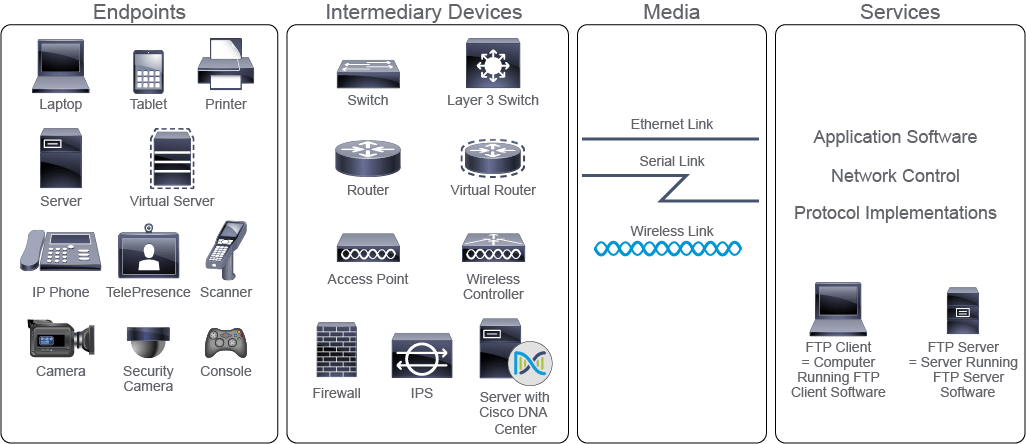
Media
傳輸媒介
Media are the physical elements that connect network devices. Media carry electromagnetic signals that represent data. Depending on the medium, electromagnetic signals can be guided in wires and fiber-optic cables or propagated through wireless transmissions, such as Wi-Fi, mobile, and satellite. Different media have different characteristics and selecting the most appropriate medium depends on the circumstances, such as the environment in which the media is used, distances that need to be covered, availability of financial resources, and so on. For instance, a satellite connection (air medium) might be the only available option for a filming crew working in a desert.
傳輸媒介是連接網路裝置的實體元素。媒介承載代表資料的電磁訊號。依媒介的不同,電磁訊號可以在導線與光纖纜線中被導引傳送,或透過 Wi-Fi、行動網路與衛星等無線傳輸方式傳播。不同的媒介有不同的特性,選擇最合適的媒介取決於各種條件,例如媒介所處的環境、需要涵蓋的距離、財務資源的多寡等等。舉例來說,對在沙漠中工作的拍攝團隊而言,衛星連線(以空氣為媒介)可能是唯一可用的選項。
Connecting wired media to network devices is considerably eased by the use of connectors. A connector is a plug, which is attached to each end of the cable. The most common type of connector on a LAN is the plug that looks like an analog phone connector. It is called an RJ-45 connector.
使用連接頭(connector)可大幅簡化有線媒介與網路裝置的連接。連接頭是裝在纜線兩端的插頭。LAN 上最常見的連接頭類型,外觀像類比電話的接頭,稱為 RJ-45 連接頭。
To connect the media, which connects a device to a network, devices use network interface cards (NICs). The media "plugs" directly into the NIC. NICs translate the data created by the device into a format that can be transmitted over the media. NICs used on LANs are also called LAN adapters. End devices used in LANs usually come with several types of NICs installed, such as wireless NICs and Ethernet NICs. NICs on a LAN are uniquely identified by a MAC address. The MAC address is hardcoded or "burned in" by the NIC manufacturer. NICs used to interface with WANs are called WAN interface cards (WICs), and they use serial links to connect to a WAN network.
裝置透過網路介面卡(NIC)來連接把裝置接上網路的媒介。媒介直接「插入」NIC。NIC 把裝置產生的資料轉換成可在媒介上傳輸的格式。用於 LAN 的 NIC 也稱為 LAN 介面卡(LAN adapter)。LAN 中使用的終端裝置通常內建數種 NIC,例如無線 NIC 與乙太網路 NIC。LAN 上的 NIC 以 MAC 位址作為唯一識別。MAC 位址由 NIC 製造商寫死或「燒錄」在卡上。用來連接 WAN 的 NIC 稱為 WAN 介面卡(WIC),它們使用序列鏈路連接到 WAN 網路。
Network Services
網路服務
Services in a network comprise software and processes that implement common network applications, such as email and web, including the less obvious processes implemented across the network. These generate data and determine how data is moved through the network.
網路中的服務包含實作常見網路應用(例如電子郵件與網頁)的軟體與程序,也包括在整個網路中實作、較不明顯的程序。這些服務會產生資料,並決定資料如何在網路中移動。
Companies typically centralize business-critical data and applications into central locations called data centers. These data centers can include routers, switches, firewalls, storage systems, servers, and application delivery controllers. Similar to data center centralization, computing resources can also be centralized off-premises in the form of a cloud. Clouds can be private, public, or hybrid, and they aggregate the computing, storage, network, and application resources in central locations. Cloud computing resources are configurable and shared among many end users. The resources are transparently available, regardless of the user's point of entry (a personal computer at home, an office computer at work, a smartphone or tablet, or a computer on a school campus). Data stored by the user is available whenever the user is connected to the cloud.
企業通常把關鍵業務資料與應用程式集中到稱為資料中心的中央地點。這些資料中心可能包含路由器、交換器、防火牆、儲存系統、伺服器與應用程式交付控制器。與資料中心的集中化類似,運算資源也可以集中到企業場所之外,以雲端的形式存在。雲端可以是私有、公有或混合雲,它們把運算、儲存、網路與應用程式資源彙整在中央地點。雲端運算資源可設定,並由許多終端使用者共用。不論使用者從哪裡進入(家中的個人電腦、公司的辦公電腦、智慧型手機或平板電腦,或校園裡的電腦),這些資源都能透明地取用。只要使用者連上雲端,其儲存的資料隨時可用。