Network diagrams are visual aids in understanding how a network is designed and to show how it operates. In essence, they are maps of the network. They illustrate physical and logical devices and their interconnections. Depending on the amount of information you wish to present, you can have multiple diagrams for a network. The most common diagrams are physical and logical diagrams. Other diagrams used in networking are sequence diagrams, which illustrate the chronological exchange of messages between two or more devices.
網路圖是幫助理解網路如何設計、並呈現其如何運作的視覺輔助工具。本質上,它們就是網路的地圖。網路圖描繪實體與邏輯裝置及其互連方式。依你想呈現的資訊量多寡,一個網路可以有多張圖。最常見的是實體圖與邏輯圖。網路領域中使用的其他圖還有順序圖(sequence diagram),用來說明兩台以上裝置之間依時間順序交換訊息的過程。
Both physical and logical diagrams use icons to represent devices and media. Usually, there is additional information about devices, such as device names and models.
實體圖與邏輯圖都使用圖示來代表裝置與傳輸媒介。通常還會附上裝置的額外資訊,例如裝置名稱與型號。
Physical diagrams focus on how physical interconnections are laid out and include device interface labels (to indicate the physical ports to which media is connected) and location identifiers (to indicate where devices can be found physically). Logical network diagrams also include encircling symbols (ovals, circles, and rectangles), which indicate how devices or cables are grouped. These symbols further include device and network logical identifiers, such as addresses. These symbols also indicate which networking processes are configured, such as routing protocols, and provide their basic parameters.
實體圖著重於實體互連的配置方式,並包含裝置介面標籤(用來指出媒介所連接的實體連接埠)與位置識別碼(用來指出裝置實際所在的位置)。邏輯網路圖則還包含圈選符號(橢圓、圓形與矩形),用來表示裝置或纜線如何分組。這些符號進一步包含裝置與網路的邏輯識別碼,例如位址。這些符號也會指出設定了哪些網路程序,例如路由協定,並提供其基本參數。
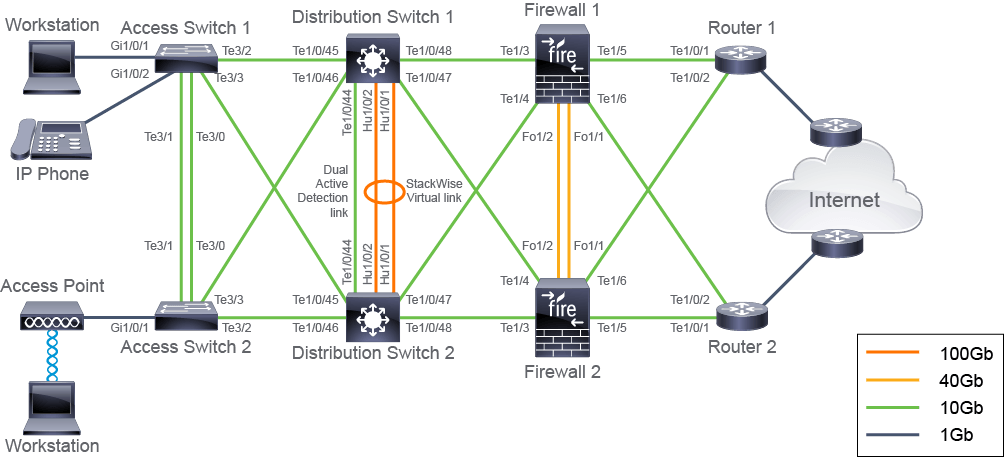
In the figure, you can see an example of a physical diagram. The example provides information about today's devices and links commonly used in enterprise networks. Interfaces range from 1Gbps for endpoint connections, such as workstations, to 10Gbps, 40Gbps, and 100Gbps for network device interconnectivity. Technologies that link multiple switches and establish a single switching unit, such as the Cisco StackWise, are displayed in the diagram.
下圖是一張實體圖的範例。這個範例提供了現今企業網路中常用裝置與鏈路的資訊。介面速率從端點連線(例如工作站)的 1 Gbps,到網路裝置互連的 10 Gbps、40 Gbps 與 100 Gbps 不等。將多台交換器連結並建立為單一交換單元的技術,例如 Cisco StackWise,也顯示在圖中。
The figure also shows a variety of port numbering options, for example Gi1/0/1 and Te1/4. What do these numbers mean?
圖中也顯示了多種連接埠編號方式,例如 Gi1/0/1 與 Te1/4。這些數字代表什麼意思?
Depending on the device type and device model, the numbering convention usually refers to the following:
依裝置類型與型號不同,編號慣例通常代表下列意義:
- slot# / port#插槽編號 / 連接埠編號(slot# / port#)
- for example, Te1/4. This is the fourth port in slot 1.例如 Te1/4。這是插槽 1 中的第 4 個連接埠。
- slot# / sub-slot# / port#插槽編號 / 子插槽編號 / 連接埠編號(slot# / sub-slot# / port#)
- for example, G1/2/1. This is the first port in slot 1, sub-slot 2.例如 G1/2/1。這是插槽 1、子插槽 2 中的第 1 個連接埠。
A slot is typically an opening in a router or switch that allows you to install a module for extra functionality. Some fixed-port switches don’t have modular slots. Instead, all ports are assigned to the built-in default slot, slot 0. Some modules can also include several smaller slots called sub-slots.
插槽(slot)通常是路由器或交換器上的一個開口,可讓你安裝模組以增加功能。有些固定連接埠的交換器沒有模組化插槽,此時所有連接埠都會歸屬於內建的預設插槽,即插槽 0。有些模組也可能包含數個較小的插槽,稱為子插槽(sub-slot)。
Cisco uses the following abbreviations for common port speeds:
Cisco 對常見連接埠速率使用下列縮寫:
Name 名稱 | Abbreviation 縮寫 | Example 範例 |
Ethernet Ethernet | E E | E0/0 E0/0 |
FastEthernet FastEthernet | Fa Fa | Fa0/1 Fa0/1 |
GigabitEthernet GigabitEthernet | Gi Gi | Gi1/0/1 Gi1/0/1 |
TenGigabitEthernet TenGigabitEthernet | Te Te | Te1/5 Te1/5 |
FortyGigabitEthernet FortyGigabitEthernet | Fo Fo | Fo1/0/1 Fo1/0/1 |
HundredGigabitEthernet HundredGigabitEthernet | Hu Hu | Hu1/0/2 Hu1/0/2 |
Although it is advanced for a CCNA learner, it is a realistic example of the topologies that you may encounter in an enterprise environment.
雖然對 CCNA 學習者來說這是較進階的內容,但它是你在企業環境中可能遇到的拓樸的真實範例。