Introduction
簡介
This discovery lab will help you explore TCP and UDP services that are enabled on a router. You will see the particular ports numbers for each active service and how clients connect to the services using their own IPv4 addresses and their own port numbers. The lab is prepared with the devices represented in the topology diagram with the IPv4 addresses depicted in the table.
本探索實驗將協助你探索路由器上啟用的 TCP 與 UDP 服務。你將看到每個作用中服務的特定連接埠號,以及用戶端如何用自己的 IPv4 位址及連接埠號連線到這些服務。此實驗環境依照拓樸圖中的裝置與表格中的 IPv4 位址設置。
Topology
拓樸
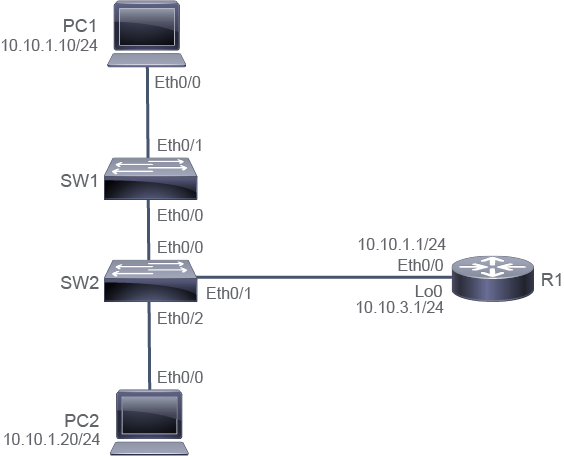
Job Aid
輔助資料
Device Information
裝置資訊
Device Information Table
裝置資訊表
Device 裝置 | Characteristic 特性 | Value 值 |
PC1 PC1 | IPv4 address IPv4 位址 | 10.10.1.10/24 10.10.1.10/24 |
PC1 PC1 | Default gateway 預設閘道 | 10.10.1.1 10.10.1.1 |
PC2 PC2 | IPv4 address IPv4 位址 | 10.10.1.20/24 10.10.1.20/24 |
PC2 PC2 | Default gateway 預設閘道 | 10.10.1.1 10.10.1.1 |
SW1 SW1 | VLAN 1 IPv4 address VLAN 1 IPv4 位址 | 10.10.1.2/24 10.10.1.2/24 |
SW1 SW1 | Default gateway 預設閘道 | 10.10.1.1 10.10.1.1 |
SW2 SW2 | VLAN 1 IPv4 address VLAN 1 IPv4 位址 | 10.10.1.3/24 10.10.1.3/24 |
SW2 SW2 | Default gateway 預設閘道 | 10.10.1.1 10.10.1.1 |
R1 R1 | Ethernet0/0 IPv4 address Ethernet0/0 IPv4 位址 | 10.10.1.1/24 10.10.1.1/24 |
R1 R1 | Loopback 0 IPv4 address Loopback 0 IPv4 位址 | 10.10.3.1/24 10.10.3.1/24 |
R1 R1 | Password 密碼 | Cisco123 Cisco123 |
Task 1: Inspect TCP/IP Applications
任務 1:檢視 TCP/IP 應用程式
Activity
活動
R1 has been configured to run several TCP services, including Telnet, SSH, HTTP, and HTTPS. It has also been configured to run an NTP service. How and why these services may be configured on a router is beyond the scope of this discovery. For now, verify the services that are running on R1 by viewing its open ports. Access the console of R1 and execute the show control-plane host open-ports command.
R1 已設定為執行多項 TCP 服務,包括 Telnet、SSH、HTTP 及 HTTPS,同時也設定了 NTP 服務。這些服務為何以及如何在路由器上設定,不在本探索實驗的討論範圍內。現在,請透過檢視 R1 的開啟連接埠來驗證其正在執行的服務。存取 R1 的主控台,並執行 show control-plane host open-ports 指令。
There are several open TCP ports: 22 for SSH, 23 for Telnet, 80 for HTTP, and 443 for HTTPS, as well as UDP port 123 for NTP.
有多個 TCP 連接埠處於開啟狀態:22 為 SSH、23 為 Telnet、80 為 HTTP、443 為 HTTPS,以及 UDP 連接埠 123 用於 NTP。
R1# show control-plane host open-ports
Active Internet connections (servers and established)
Prot     Local Address      Foreign Address             Service    State
 tcp              *:22                  *:0          SSH-Server   LISTEN
 tcp              *:23                  *:0              Telnet   LISTEN
 tcp              *:80                  *:0           HTTP CORE   LISTEN
 tcp              *:80                  *:0           HTTP CORE   LISTEN
 tcp             *:443                  *:0           HTTP CORE   LISTEN
 tcp             *:443                  *:0           HTTP CORE   LISTEN
 udp            *:123                   *:0                 NTP   LISTEN
These ports are in a listening state; no foreign addresses are connected to them, but they are ready for connections to ensue.
這些連接埠處於監聽狀態,目前沒有外部位址與其連線,但已準備好接受連線。
Access the console of PC1 and telnet to connect to R1. The password for R1 is Cisco123.
存取 PC1 的主控台,並使用 Telnet 連線到 R1。R1 的密碼為 Cisco123。
The prompt changes from PC1 to R1 because you are now connected to R1 via Telnet from PC1.
提示字元從 PC1 變成 R1,因為你目前已透過 Telnet 從 PC1 連線至 R1。
PC1# telnet 10.10.1.1
Trying 10.10.1.1 ... Open

User Access Verification

Password: Cisco123
R1#Return to the console of R1 and review the open ports. You may want to use the Cisco IOS command recall feature to re-enter the command.
回到 R1 的主控台並檢視開啟的連接埠。你可以使用 Cisco IOS 指令回溯功能重新輸入該指令。
There is an extra line in the output when compared with the last execution. It shows a second line that is associated with TCP port 23. In this case, the foreign address is populated. The IPv4 address is 10.10.1.10 (the address of PC1). The foreign port number might not be the same as what is shown in the example because it is an ephemeral port. An ephemeral port is allocated automatically for a short time from a predefined range by the IPv4 stack software.
與上次執行結果相比,輸出中多了一行。它顯示與 TCP 連接埠 23 相關的第二行,此時外部位址欄位已填入資料。IPv4 位址為 10.10.1.10(即 PC1 的位址)。外部連接埠號可能與範例所示不同,因為那是暫時性連接埠。暫時性連接埠是由 IPv4 通訊協定堆疊軟體從預先定義的範圍內自動分配的短期連接埠。
R1# show control-plane host open-ports
Active Internet connections (servers and established)
Prot     Local Address      Foreign Address            Service    State
 tcp              *:22                  *:0         SSH-Server   LISTEN
 tcp              *:23                  *:0             Telnet   LISTEN
 tcp              *:80                  *:0          HTTP CORE   LISTEN
 tcp              *:80                  *:0          HTTP CORE   LISTEN
 tcp             *:443                  *:0          HTTP CORE   LISTEN
 tcp             *:443                  *:0          HTTP CORE   LISTEN
 tcp              *:23     10.10.1.10:14044             Telnet ESTABLIS
udp *:123 *:0 NTP LISTENAccess the console of PC2 and telnet to connect to R1. The password for R1 is Cisco123.
存取 PC2 的主控台,並使用 Telnet 連線到 R1。R1 的密碼為 Cisco123。
The prompt changes from PC2 to R1 because you are now connected to R1 via Telnet from PC2.
提示字元從 PC2 變成 R1,因為你目前已透過 Telnet 從 PC2 連線至 R1。
PC2# telnet 10.10.1.1
Trying 10.10.1.1 ... Open

User Access Verification

Password: Cisco123
R1#Return to the console of R1 and review the open ports. You may want to use the Cisco IOS command recall feature to re-enter the command.
回到 R1 的主控台並檢視開啟的連接埠。你可以使用 Cisco IOS 指令回溯功能重新輸入該指令。
An extra line in the output shows an additional connection to TCP port 23, while the foreign address is populated with the IPv4 address of 10.10.1.20 (the address of PC2). The foreign port number for this connection might not be the same as what is shown in the example because it will be an ephemeral port. The existing connection from PC1 is retained.
輸出中多出的一行顯示了另一個與 TCP 連接埠 23 的連線,其外部位址欄位填入了 IPv4 位址 10.10.1.20(即 PC2 的位址)。此連線的外部連接埠號可能與範例所示不同,因為那將是暫時性連接埠。來自 PC1 的既有連線仍會保留。
R1# show control-plane host open-ports
Active Internet connections (servers and established)
Prot     Local Address      Foreign Address        Service    State
 tcp              *:22                  *:0     SSH-Server   LISTEN
 tcp              *:23                  *:0         Telnet   LISTEN
 tcp              *:80                  *:0      HTTP CORE   LISTEN
 tcp              *:80                  *:0      HTTP CORE   LISTEN
 tcp             *:443                  *:0      HTTP CORE   LISTEN
 tcp             *:443                  *:0      HTTP CORE   LISTEN
 tcp              *:23     10.10.1.20:15026         Telnet ESTABLIS
 tcp              *:23     10.10.1.10:14044         Telnet ESTABLIS
udp *:123 *:0 NTP LISTENReturn to the console of PC1 and use the exit command to disconnect the Telnet session to R1.
回到 PC1 的主控台,使用 exit 指令中斷與 R1 的 Telnet 連線。
The prompt returns to PC1 because you are no longer connected to R1.
提示字元恢復為 PC1,因為你已不再連線至 R1。
R1# exit

[Connection to 10.10.1.1 closed by foreign host]
PC1#
Alternatively, you could have used thelogout command to disconnect from R1.
你也可以改用logout 指令來中斷與 R1 的連線。
Return to the console of PC2 and use the exit command to disconnect the Telnet session to R1.
回到 PC2 的主控台,使用 exit 指令中斷與 R1 的 Telnet 連線。
The prompt returns to PC2 because you are no longer connected to R1.
提示字元恢復為 PC2,因為你已不再連線至 R1。
R1# exit

[Connection to 10.10.1.1 closed by foreign host]
PC2#
Alternatively, you could have used thelogout command to disconnect from R1.
你也可以改用logout 指令來中斷與 R1 的連線。
Return to the console of R1 and review the open ports again.
回到 R1 的主控台,再次檢視開啟的連接埠。
All ports are in a listening state.
所有連接埠皆處於監聽狀態。
R1# show control-plane host open-ports
Active Internet connections (servers and established)
Prot      Local Address      Foreign Address       Service    State
 tcp               *:22                  *:0    SSH-Server   LISTEN
 tcp               *:23                  *:0        Telnet   LISTEN
 tcp               *:80                  *:0     HTTP CORE   LISTEN
 tcp               *:80                  *:0     HTTP CORE   LISTEN
 tcp              *:443                  *:0     HTTP CORE   LISTEN
 tcp              *:443                  *:0     HTTP CORE   LISTEN
udp *:123 *:0 NTP LISTENIn the console of R1, disable the HTTP service using the no ip http server command in global configuration mode. The web configuration service and related commands are beyond the scope of this discovery, so for now, disable the HTTP service.
在 R1 的主控台,於全域設定模式下使用 no ip http server 指令停用 HTTP 服務。網頁設定服務及相關指令不在本探索實驗的討論範圍內,因此現在只需停用 HTTP 服務。
The TCP port 80 for HTTP is no longer opened.
用於 HTTP 的 TCP 連接埠 80 已不再開啟。
R1# configure terminalEnter configuration commands, one per line.  End with CNTL/Z.R1(config)# no ip http serverR1(config)# exit
R1# In the console of R1, review the open ports again.
在 R1 的主控台,再次檢視開啟的連接埠。
The TCP port 80 for HTTP is no longer shown in the output.
輸出中已不再顯示用於 HTTP 的 TCP 連接埠 80。
R1# show control-plane host open-ports
Active Internet connections (servers and established)
Prot    Local Address    Foreign Address       Service    State
 tcp             *:22                *:0    SSH-Server   LISTEN
 tcp             *:23                *:0        Telnet   LISTEN
 tcp            *:443                *:0     HTTP CORE   LISTEN
 tcp            *:443                *:0     HTTP CORE   LISTEN
 udp            *:123                *:0           NTP   LISTEN