FASTLab 7: Improve Redundant Switched Topologies with EtherChannel
FASTLab 7:以 EtherChannel 改善冗餘交換拓樸
Scenario
情境
Ana is testing the EtherChannel configuration for a new LAN implementation. She has completed the physical setup and IPv4 addressing. She has also created the VLANs. She needs your help with configuring an EtherChannel to bundle the Ethernet interfaces (E0/0, E0/1, E0/2, and E0/3) connecting the two switches. The switches are intended to operate with devices of other vendors, therefore, Ana chooses to implement only standardized protocols. PC1 and PC2 are in VLAN 11.
Ana 正在測試新 LAN 部署的 EtherChannel 設定。她已完成實體佈線與 IPv4 定址,也已建立好各 VLAN。她需要你協助設定 EtherChannel,將連接兩台交換器的 Ethernet 介面(E0/0、E0/1、E0/2 與 E0/3)綁定在一起。這些交換器將與其他廠商的裝置搭配運作,因此 Ana 選擇只採用標準化協定。PC1 與 PC2 位於 VLAN 11。
Here are the requirements for the lab:
以下是本實驗室的需求:
- You need to group the existing four links into a single channel group using port channel identifier 12. Switch SW1 needs to initiate the EtherChannel while switch SW2 should only respond to it.你需要使用 port channel 識別碼 12,將現有的四條連結分組為單一通道群組。SW1 交換器需要主動發起 EtherChannel,而 SW2 交換器只需回應即可。
- You need to make sure that the port channel trunk encapsulation is dot1q and then enable trunking on the port channel.你需要確保 port channel 的中繼封裝方式為 dot1q,然後在 port channel 上啟用中繼。
- Once you have completed the configuration, perform a connectivity check between PC1 and PC2 using ping
ping. Thepingtest should be successful.完成設定後,使用ping在 PC1 與 PC2 之間執行連線測試。ping測試應該要成功。
Topology
拓樸
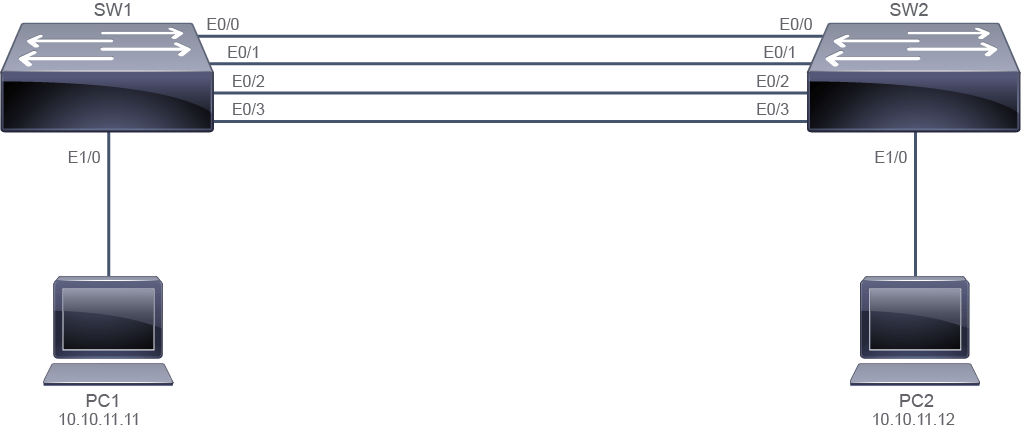
Job Aid
工作輔助資料
Device Information
裝置資訊
Device 裝置 | Remote Device Connection 遠端裝置連線 |
SW1 (Ethernet 0/0) SW1(Ethernet 0/0) | SW2 (Ethernet 0/0) SW2(Ethernet 0/0) |
SW1 (Ethernet 0/1) SW1(Ethernet 0/1) | SW2 (Ethernet 0/1) SW2(Ethernet 0/1) |
SW1 (Ethernet 0/2) SW1(Ethernet 0/2) | SW2 (Ethernet 0/2) SW2(Ethernet 0/2) |
SW1 (Ethernet 0/3) SW1(Ethernet 0/3) | SW2 (Ethernet 0/3) SW2(Ethernet 0/3) |
SW1 (Ethernet 1/0) SW1(Ethernet 1/0) | PC1 (10.10.11.11) PC1(10.10.11.11) |
SW2 (Ethernet 1/0) SW2(Ethernet 1/0) | PC2 (10.10.11.12) PC2(10.10.11.12) |
Configuration Tips
設定提示
Use the interface range command to configure multiple interfaces at the same time.
使用 interface range 指令可以同時設定多個介面。
Use the channel-group command to bundle interfaces and to specify the aggregation method.
使用 channel-group 指令可以將介面綁定並指定聚合方法。
After the aggregated link is established, configure trunking parameters on the port channel, by first using the interface port-channel command.
在聚合連結建立之後,先使用 interface port-channel 指令,再設定 port channel 上的中繼參數。
Answer Key
參考解答
- You need to group the existing four links into a single channel group using port channel identifier 12. Switch SW1 needs to initiate the EtherChannel while switch SW2 should only respond to it.你需要使用 port channel 識別碼 12,將現有的四條連結分組為單一通道群組。SW1 交換器需要主動發起 EtherChannel,而 SW2 交換器只需回應即可。
First disable the interfaces on each switch and then configure the port channel:
先停用每台交換器上的介面,然後設定 port channel:
SW1>enable
SW1#configure terminal
Enter configuration commands, one per line.  End with CNTL/Z.

SW1(config)#
SW1(config)# interface range ethernet 0/0-3
SW1(config-if-range)# shutdown
SW1(config-if-range)# channel-group 12 mode active
Creating a port-channel interface Port-channel 12

SW1(config-if-range)#
SW2> enableSW2# configure terminal Enter configuration commands, one per line. End with CNTL/Z. SW2(config)# SW2(config)# interface range ethernet 0/0-3 SW2(config-if-range)# shutdown SW2(config-if-range)# channel-group 12 mode passive Creating a port-channel interface Port-channel 12 SW2(config-if-range)# - You need to make sure that the port channel trunk encapsulation is dot1q and then enable trunking on the port channel.你需要確保 port channel 的中繼封裝方式為 dot1q,然後在 port channel 上啟用中繼。
Configure the port channel on each switch:
在每台交換器上設定 port channel:
SW1(config)# interface port-channel 12
SW1(config-if)# switchport trunk encapsulation dot1q
SW1(config-if)# switchport mode trunk

SW1(config-if-range)# exit

SW2(config)# interface port-channel 12
SW2(config-if)# switchport trunk encapsulation dot1q
SW2(config-if)# switchport mode trunk

SW2(config-if-range)# exit
After the port channel is configured on both switches, then enable the interfaces on both switches (if you enable one side before the other side is configured, you will get errors and the EtherChannel will not come up). Note that you may get error messages as you enable each switch; wait a few seconds for the port channel to come up fully before you verify your configuration.
在兩台交換器都設定好 port channel 之後,再啟用兩台交換器上的介面(如果你在另一側完成設定之前先啟用一側,將會出現錯誤,EtherChannel 也無法建立)。請注意,在啟用每台交換器時,你可能會看到錯誤訊息;請稍待幾秒,讓 port channel 完全啟動後再驗證你的設定。
SW1(config)# interface range Ethernet0/0-3 SW1(config-if-range)# no shutdown SW2(config)# interface range Ethernet0/0-3 SW2(config-if-range)# no shutdown - Once you have completed the configuration, perform a connectivity check between PC1 and PC2 using
ping. The test should be successful.完成設定後,使用ping在 PC1 與 PC2 之間執行連線測試,測試應該要成功。PC1> enable PC1# ping 10.10.11.12 Type escape sequence to abort. Sending 5, 100-byte ICMP Echos to 10.10.11.12, timeout is 2 seconds: .!!!! Success rate is 80 percent (4/5), round-trip min/avg/max = 1/1/2 ms PC1#PC2> enable PC2# ping 10.10.11.11 Type escape sequence to abort. Sending 5, 100-byte ICMP Echos to 10.10.11.11, timeout is 2 seconds: !!!!! Success rate is 100 percent (5/5), round-trip min/avg/max = 1/1/2 ms PC2> - Execute the
show interfaces trunkcommand on SW1 to verify the configuration.在 SW1 上執行show interfaces trunk指令以驗證設定。SW1#show interfaces trunk Port Mode Encapsulation Status Native vlan Po12 on 802.1q trunking 1 Port Vlans allowed on trunk Po12 1-4094 Port Vlans allowed and active in management domain Po12 1-4094 Port Vlans in spanning tree forwarding state and not pruned Po12 1-4094 SW1#Execute the show etherchannel summarycommand on SW2 to verify the configuration.
在 SW2 上執行 show etherchannel summary 指令以驗證設定。
SW2#show etherchannel summary
Flags:  D - down        P - bundled in port-channel
        I - stand-alone s - suspended
        H - Hot-standby (LACP only)
        R - Layer3      S - Layer2
        U - in use      f - failed to allocate aggregator

        M - not in use, minimum links not met
        u - unsuitable for bundling
        w - waiting to be aggregated
        d - default port


Number of channel-groups in use: 1
Number of aggregators:           1

Group  Port-channel  Protocol    Ports
------+-------------+-----------+-----------------------------------------------
12     Po12(SU)        LACP      Et0/0(P)    Et0/1(P)    Et0/2(P)
                                 Et0/3(P)

SW2#
Improve Redundant Switched Topologies with EtherChannel Questions
以 EtherChannel 改善冗餘交換拓樸問題
show interfaces trunk command. Which port is indicated as the trunking port in the output?在 SW1 交換器上執行 show interfaces trunk 指令。輸出中哪一個連接埠被標示為中繼埠?show etherchannel summary command. Which letters indicate the status of the aggregated link?在 SW2 上執行 show etherchannel summary 指令。哪些字母表示聚合連結的狀態?