Wireless networks usually consist of these components:
無線網路通常由以下元件組成:
- Clients with wireless adapters.配備無線網卡的用戶端。
- APs, which are Layer 2 devices whose primary function is to bridge 802.11 WLAN traffic to 802.3 Ethernet traffic. APs can have internal (integrated) or external antennas to radiate the wireless signal and provide coverage with the wireless network.無線基地台(AP),這是第 2 層裝置,主要功能是將 802.11 WLAN 流量橋接到 802.3 乙太網路流量。AP 可以有內建(整合式)或外接天線,用以發射無線訊號並提供無線網路涵蓋範圍。
APs can be standalone or centralized:
AP 可以是獨立式或集中式:
- Standalone (autonomous) APs, managed individually獨立(自主)AP,個別管理
- Centralized APs, managed by a Cisco WLC集中式 AP,由 Cisco WLC 管理
- (Optional) A Cisco WLC that presents a central point for AP management, configuration of APs, and user traffic termination for centralized APs.(選用)Cisco WLC,提供集中管理 AP、設定 AP 及集中終結使用者流量的功能,適用於集中式 AP。
The most common wireless network is the centralized APs, or lightweight architecture.
最常見的無線網路是集中式 AP,或稱輕量式架構。
Ad Hoc Networks
隨意(Ad Hoc)網路
Ad hoc wireless networks are used among a small group of hosts.
隨意無線網路用於一小群主機之間。
Characteristics of an ad hoc network include the following:
隨意網路的特性包括:
- It creates an Independent Basic Service Set (IBSS).它會建立獨立基本服務組(IBSS)。
- It exists when two wireless devices communicate.當兩台無線裝置通訊時就會存在。
- It contains a limited number of devices because of collision and organization issues.由於碰撞與組織上的問題,能容納的裝置數量有限。
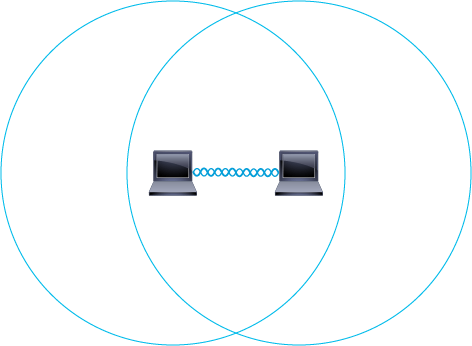
To create a Wi-Fi network, users need to have wireless-capable devices. When two wireless-capable devices are in range of each other, they need only share a common set of basic parameters (frequency, and so on) to be able to communicate. Surprisingly, this set of parameters is all it takes to create a personal area Wi-Fi network. The first station defines the radio parameters and group name; the other station only needs to detect the group name. The other station then adjusts its parameters to the parameters that the first station defined, and a group is formed that is known as an ad hoc network. Most operating systems are designed to make this type of network easy to set up.
要建立 Wi-Fi 網路,使用者需要具備支援無線功能的裝置。當兩台具無線功能的裝置彼此在範圍內時,只需共用一組基本參數(頻率等)即可通訊。令人意外的是,僅憑這組參數就足以建立一個個人區域 Wi-Fi 網路。第一台站台定義無線電參數與群組名稱,另一台站台只需偵測該群組名稱即可。接著,另一台站台會將自己的參數調整為第一台站台所定義的參數,形成所謂的隨意網路。大多數作業系統都設計成可輕鬆建立這種網路。
A Basic Service Set (BSS) is the area within which a computer can be reached through its wireless connection. Because the computers in an ad hoc network communicate without other devices (AP, switch, and so on), the BSS in an ad hoc network is called an IBSS. Computer-to-computer wireless communication is most commonly referred to as an ad hoc network, IBSS, or peer-to-peer (wireless) network.
基本服務組(BSS)是指電腦可透過其無線連線被連接到的區域。因為隨意網路中的電腦彼此通訊時不經過其他裝置(AP、交換器等),所以隨意網路中的 BSS 稱為 IBSS。電腦對電腦的無線通訊最常被稱為隨意網路、IBSS,或對等式(無線)網路。
Wi-Fi Direct
Wi-Fi Direct
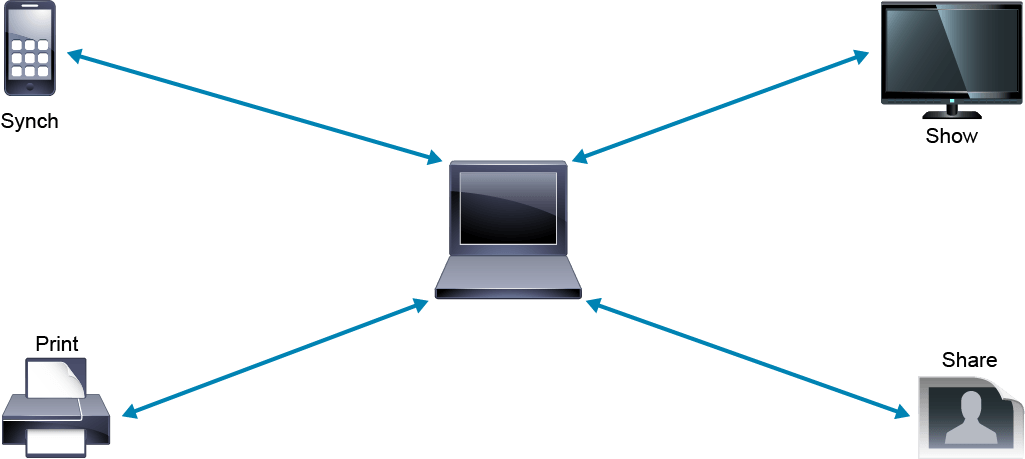
Wi-Fi Direct is used to connect wireless devices for printing, sharing, syncing, and display.
Wi-Fi Direct 用於連接無線裝置以進行列印、分享、同步與顯示。
Wi-Fi Direct in the Enterprise
企業中的 Wi-Fi Direct
Not everyone has (or wants) access to a Wi-Fi AP or hotspot. However, users often carry content and applications that they want to share, print, display, or synchronize. Wi-Fi Direct is a certification by the Wi-Fi Alliance. The intent is the creation of peer-to-peer Wi-Fi connections between devices, without the need for an AP. It is another example of a WPAN.
並非每個人都有(或想要)連上 Wi-Fi AP 或熱點的機會。然而,使用者常常隨身攜帶想要分享、列印、顯示或同步的內容與應用程式。Wi-Fi Direct 是 Wi-Fi 聯盟的一項認證,目的是在裝置之間建立對等式 Wi-Fi 連線,而不需要 AP。這是 WPAN 的另一個例子。
This connection, which can operate without a dedicated AP, does not operate in IBSS mode. Wi-Fi Direct is an innovation that operates as an extension to the infrastructure mode of operation. With the technology that underlies Wi-Fi Direct, a device can maintain a peer-to-peer connection to another device inside an infrastructure network—an impossible task in ad hoc mode.
這種連線可在沒有專用 AP 的情況下運作,但並非以 IBSS 模式運作。Wi-Fi Direct 是一項創新技術,是基礎架構模式運作的延伸。憑藉 Wi-Fi Direct 背後的技術,裝置可以在基礎架構網路內與另一台裝置維持對等式連線,這在隨意模式下是不可能做到的。
Wi-Fi Direct devices include Wi-Fi Protected Setup (WPS), which makes it easy to set up a connection and enable security protections. Often, these processes are as simple as pushing a button on each device.
支援 Wi-Fi Direct 的裝置包含 Wi-Fi 保護設定(WPS),可輕鬆建立連線並啟用安全防護。通常這些程序簡單到只需在每台裝置上按一個按鈕即可完成。
Devices can operate one-to-one or one-to-many for connectivity.
裝置可以一對一或一對多方式運作以建立連線。
Wi-Fi Direct Predefined Services
Wi-Fi Direct 預先定義的服務
Here are the predefined services that Wi-Fi Direct brings:
以下是 Wi-Fi Direct 提供的預先定義服務:
- Miracast connections over Wi-Fi Direct allow a device to display photos, files, and videos on an external monitor or television.透過 Wi-Fi Direct 的 Miracast 連線,可讓裝置在外接螢幕或電視上顯示相片、檔案與影片。
- Wi-Fi Direct for Digital Living Network Alliance (DLNA) lets devices stream music and video between each other.適用於數位生活網路聯盟(DLNA)的 Wi-Fi Direct,可讓裝置之間串流音樂與影片。
- Wi-Fi Direct Print gives users the ability to print documents directly from a smart phone, tablet, or PC.Wi-Fi Direct Print 讓使用者能夠直接從智慧型手機、平板電腦或 PC 列印文件。
Infrastructure Mode
基礎架構模式
In the infrastructure mode design, an AP is dedicated to centralizing the communication between clients. This AP defines the frequency and wireless workgroup values. The clients need to connect to the AP in order to communicate with the other clients in the group and to access other network devices and resources.
在基礎架構模式的設計中,會有一台專用 AP 來集中處理用戶端之間的通訊。此 AP 定義頻率與無線工作群組值。用戶端必須連線到 AP,才能與群組中的其他用戶端通訊,並存取其他網路裝置與資源。
The following are characteristics of the infrastructure mode:
以下是基礎架構模式的特性:
- The AP functions as a translational bridge between 802.3 wired media and 802.11 wireless media.AP 在 802.3 有線媒介與 802.11 無線媒介之間扮演轉譯橋接器的角色。
- Wireless is a half-duplex environment.無線是半雙工環境。
- A basic service area (BSA) is also called a wireless cell.基本服務區(BSA)也稱為無線胞(wireless cell)。
- A BSS is the service that the AP provides.BSS 是 AP 所提供的服務。
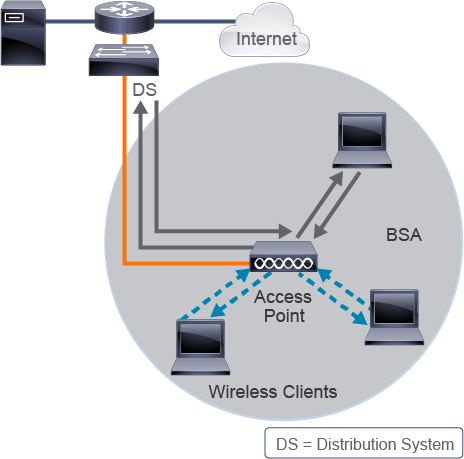
The central device in the BSA or wireless cell is an AP, which is close in concept to an Ethernet hub in relaying communication. But, as in an ad hoc network, all devices share the same frequency. Only one device can communicate at a given time, sending its frame to the AP, which then relays the frame to its final destination—this is half-duplex communication.
BSA 或無線胞中的中心裝置是 AP,其概念類似於中繼通訊的乙太網路集線器。但如同隨意網路一樣,所有裝置共用相同頻率。同一時間只能有一台裝置通訊,將其訊框傳送到 AP,再由 AP 轉送到最終目的地,這就是半雙工通訊。
Although the system might be more complex than a simple peer-to-peer network, an AP is usually better equipped to manage congestion. An AP can also connect one client to another in the same Wi-Fi space or to the wired network—a crucial capability.
雖然系統可能比簡單的對等式網路更複雜,但 AP 通常更擅長處理壅塞。AP 也能將一台用戶端連接到同一 Wi-Fi 空間中的另一台用戶端,或連接到有線網路,這是一項關鍵能力。
The comparison to a hub is made because of the half-duplex aspect of the WLAN client communication. However, APs have some functions that a wired hub simply does not possess. For example, an AP can address and direct Wi-Fi traffic. Managed switches maintain dynamic MAC address tables that can direct packets to ports that are based on the destination MAC address of the frame. Similarly, an AP directs traffic to the network backbone or back into the wireless medium, based on MAC addresses. The IEEE 802.11 header of a wireless frame typically has three MAC addresses but can have as many as four in certain situations. The receiver is identified by MAC Address 1, and the transmitter is identified by MAC Address 2. The receiver uses MAC Address 3 for filtering purposes, and MAC Address 4 is only present in specific designs in a mesh network. The AP uses the specific Layer 2 addressing scheme of the wireless frames to forward the upper-layer information to the network backbone or back to the wireless space toward another wireless client.
之所以拿它與集線器相比,是因為 WLAN 用戶端通訊的半雙工特性。然而,AP 具有一些有線集線器不具備的功能。舉例來說,AP 能夠定址並導向 Wi-Fi 流量。受管理交換器會維護動態 MAC 位址表,能根據訊框的目的地 MAC 位址將封包導向對應連接埠。同樣地,AP 也會根據 MAC 位址,將流量導向網路骨幹或送回無線媒介。IEEE 802.11 無線訊框的標頭通常有三個 MAC 位址,但在某些情況下最多可有四個。接收端由 MAC 位址 1 識別,傳送端由 MAC 位址 2 識別。接收端使用 MAC 位址 3 進行過濾,而 MAC 位址 4 僅出現在網狀網路的特定設計中。AP 利用無線訊框特有的第 2 層定址方式,將上層資訊轉送到網路骨幹,或送回無線空間中的另一台無線用戶端。
In a network, all wireless-capable devices are called stations. End devices are often called client stations, whereas the AP is often referred to as an infrastructure device.
在網路中,所有具備無線功能的裝置都稱為站台(station)。終端裝置通常稱為用戶端站台,而 AP 則常被稱為基礎架構裝置。
Like a PC in an ad hoc network, an AP offers a BSS. An AP does not offer an IBSS because the AP is a dedicated device. The area that the AP radio covers is called a BSA or cell. Because the client stations connect to a central device, this type of network is said to use an infrastructure mode as opposed to an ad hoc mode.
如同隨意網路中的 PC 一樣,AP 提供 BSS。AP 不提供 IBSS,因為 AP 是專用裝置。AP 無線電所涵蓋的區域稱為 BSA 或胞(cell)。由於用戶端站台是連接到一台中心裝置,這種類型的網路被稱為採用基礎架構模式,而非隨意模式。
If necessary, the AP converts 802.11 frames to IEEE 802.3 frames and forwards them to the distribution system, which receives these packets and distributes them wherever they need to be sent, even to another AP.
如有需要,AP 會將 802.11 訊框轉換為 IEEE 802.3 訊框,並轉送至分散系統,由分散系統接收這些封包並將其分送到需要送達的地方,甚至可以送到另一台 AP。
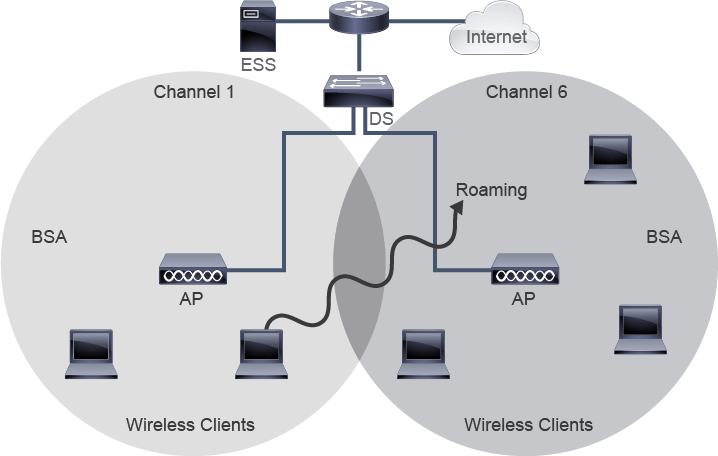
When the distribution system links two APs, or two cells, the group is called an Extended Service Set (ESS). This scenario is common in most Wi-Fi networks because it allows Wi-Fi stations in two separate areas of the network to communicate and, with the proper design, also permits roaming.
當分散系統連結兩台 AP(或兩個胞)時,這個群組稱為擴展服務組(ESS)。這種情境在大多數 Wi-Fi 網路中很常見,因為它讓網路兩個獨立區域中的 Wi-Fi 站台能夠通訊,若設計得當,也能支援漫遊。
In a Wi-Fi network, roaming occurs when a station moves. It leaves the coverage area of the AP to which it was originally connected and arrives at the BSA of another AP. In a proper design scenario, a station detects the signal of the second AP and jumps to it before losing the signal of the first AP.
在 Wi-Fi 網路中,漫遊發生於站台移動時。它離開原先連接的 AP 涵蓋範圍,進入另一台 AP 的 BSA。在設計良好的情境中,站台會偵測到第二台 AP 的訊號,並在失去第一台 AP 訊號之前跳轉過去。
For the user, the experience is a seamless movement from connection to connection. For the infrastructure, the designer must make sure that an overlapping area exists between the two cells to avoid loss of connection. If an authentication mechanism exists, credentials can be sent from one AP to another fast enough for the connection to remain intact. Modern networks often use Cisco WLCs (not shown in the above figure)—central devices that contain the parameters of all the APs and the credentials of connected users.
對使用者而言,這種體驗是從一個連線無縫轉換到另一個連線。就基礎架構而言,設計者必須確保兩個胞之間存在重疊區域,以避免連線中斷。若有驗證機制,憑證能夠夠快地從一台 AP 傳送到另一台,使連線得以保持不中斷。現代網路通常使用 Cisco WLC(上圖未顯示)——這是一種中心裝置,保存所有 AP 的參數以及已連線使用者的憑證。
Because an overlap exists between the cells, it is better to ensure that the APs do not work on the same frequency (also called a channel). Otherwise, any client that stays in the overlapping area affects the communication of both cells. This problem occurs because Wi-Fi is half duplex. The problem is called co-channel interference and must be avoided by making sure that neighbor APs are set on frequencies that do not overlap.
由於胞之間存在重疊,最好確保各 AP 不使用相同頻率(也稱為通道)。否則,任何停留在重疊區域的用戶端都會影響兩個胞的通訊。這個問題之所以發生,是因為 Wi-Fi 是半雙工的。這種問題稱為同通道干擾(co-channel interference),必須透過確保相鄰 AP 設定在不重疊的頻率上來避免。
Service Set Identifiers
服務組識別碼
To roam between different APs within a network, the APs must share the same network name. This network name is called the Service Set Identifier (SSID), which has as many as 32 ASCII characters and is configured on both the AP and the client stations that wish to join (associate) with this AP. However, the SSID may also require some type of authorization to determine which station has the right to connect. The term WLAN is often used to define both the SSID and the associated parameters (VLAN, security, quality of service [QoS], and so on).
若要在網路內不同 AP 之間漫遊,這些 AP 必須共用相同的網路名稱。此網路名稱稱為服務組識別碼(SSID),最多可有 32 個 ASCII 字元,並須在 AP 與想要加入(關聯)該 AP 的用戶端站台上都進行設定。不過,SSID 也可能需要某種授權機制,以判定哪個站台有權連線。WLAN 一詞常用來同時指稱 SSID 及其相關參數(VLAN、安全性、服務品質[QoS]等)。
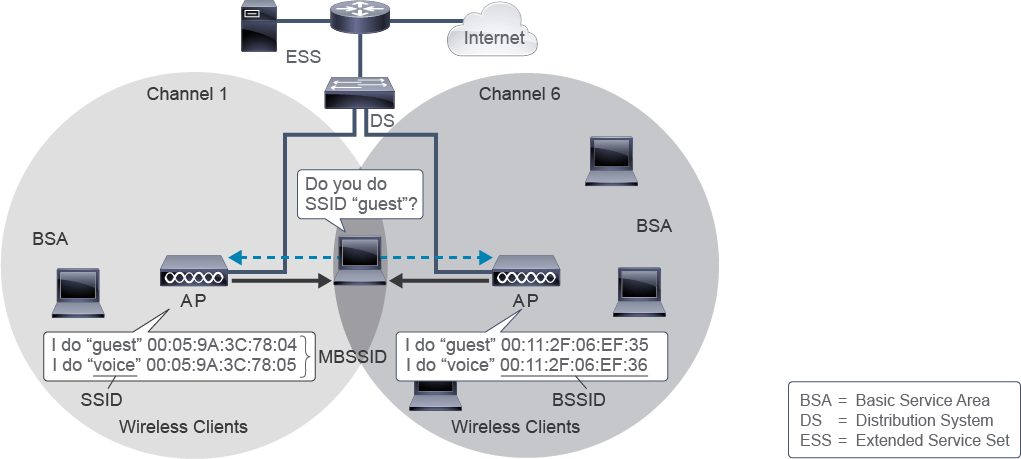
When a profile is configured on a client station, the SSID is a name that identifies which WLAN the client station may connect to. The AP associates a MAC address to this SSID. This MAC address can be the MAC address of the radio interface if the AP supports only one SSID, or it can be derived from the MAC address of the radio interface if the AP supports several SSIDs. Because each AP has a different radio MAC address, the derived MAC address is different on each AP for the same SSID name. This configuration allows a station that stays in the overlapping area to hear one SSID name and still understand that the SSID is offered by two APs.
當用戶端站台設定了設定檔(profile)時,SSID 就是用來識別該用戶端站台可連線的 WLAN 名稱。AP 會將一個 MAC 位址與這個 SSID 建立關聯。如果 AP 只支援一個 SSID,這個 MAC 位址可以是無線電介面本身的 MAC 位址;如果 AP 支援多個 SSID,則可以是由無線電介面 MAC 位址衍生而來。由於每台 AP 的無線電 MAC 位址不同,因此即使是同一個 SSID 名稱,在每台 AP 上衍生出的 MAC 位址也不同。這種設定方式讓停留在重疊區域的站台,能夠只聽到一個 SSID 名稱,同時仍能理解該 SSID 是由兩台 AP 提供的。
The MAC address, usually derived from the radio MAC address and associated with an SSID, is the Basic Service Set Identifier (BSSID). The BSSID identifies the BSS that is determined by the AP coverage area.
通常由無線電 MAC 位址衍生、並與 SSID 建立關聯的 MAC 位址,稱為基本服務組識別碼(BSSID)。BSSID 用於識別由 AP 涵蓋範圍所決定的 BSS。
Because this BSSID is a MAC address that is derived from the radio MAC address, APs can often generate several values. This ability allows the AP to support several SSIDs in a single cell.
由於此 BSSID 是由無線電 MAC 位址衍生而來的 MAC 位址,AP 通常能夠產生多個數值。這項能力使 AP 能在單一胞中支援多個 SSID。
An administrator can create several SSIDs on the same AP (for example, a guest SSID and an internal SSID). The criteria by which a station is allowed on one or the other SSID will be different, but the AP will be the same. This configuration is an example of Multiple Basic SSIDs (MBSSIDs).
管理員可以在同一台 AP 上建立多個 SSID(例如訪客 SSID 與內部 SSID)。允許站台使用其中一個或另一個 SSID 的條件會不同,但 AP 是同一台。這種設定方式即為多重基本 SSID(MBSSID)的範例。
MBSSIDs are basically virtual APs. All of the configured SSIDs share the same physical device, which has a half-duplex radio. As a result, if two users of two SSIDs on the same AP try to send a frame at the same time, the frames will collide. Even if the SSIDs are different, the Wi-Fi space is the same. Using MBSSIDs is only a way of differentiating the traffic that reaches the AP, not a way to increase the capacity of the AP.
MBSSID 基本上是虛擬 AP。所有設定的 SSID 共用同一個實體裝置,而該裝置的無線電是半雙工的。因此,如果同一台 AP 上兩個 SSID 的兩位使用者同時嘗試傳送訊框,這些訊框就會發生碰撞。即使 SSID 不同,Wi-Fi 空間仍然相同。使用 MBSSID 只是區分抵達 AP 之流量的一種方式,並非提升 AP 容量的方法。
Broadcast Versus Hidden SSID
廣播與隱藏 SSID 比較
SSIDs can be either broadcast (or advertised) or not broadcast (or hidden) by the APs. A hidden network is still detectable. APs periodically send out special frames called "beacon frames" over the air. These frames contain information about the network, including the SSID. Also, when a device wants to connect to a Wi-Fi network, it sends out a "probe request" looking for networks with a specific SSID. Access Points that have the requested SSID respond with a "probe response," providing details about the network and inviting the device to connect.
SSID 可以由 AP 廣播(宣告),也可以不廣播(隱藏)。隱藏的網路仍然是可被偵測到的。AP 會定期在空中發送一種稱為「信標訊框(beacon frame)」的特殊訊框,這些訊框內含有關該網路的資訊,包括 SSID。此外,當裝置想要連線到 Wi-Fi 網路時,會發出「探測請求(probe request)」,尋找具有特定 SSID 的網路。具有該 SSID 的無線基地台會回覆「探測回應(probe response)」,提供有關該網路的詳細資訊,並邀請裝置連線。
Client devices that are configured to connect to nonbroadcasting networks will send a Wi-Fi packet with the network (SSID) that they wish to connect to. This is considered a security risk because the client may advertise networks that it connects to from home and/or work. This SSID can then be broadcasted by a hacker to entice the client to join the hacker network and then exploit the client (connect to the client device or get the user to provide security credentials).
設定為連線至未廣播網路的用戶端裝置,會發送含有其想連線之網路(SSID)的 Wi-Fi 封包。這被視為一種安全風險,因為用戶端可能會洩露自己在家中或工作場所所連線的網路。駭客隨後可以廣播這個 SSID,誘使用戶端加入駭客的網路,進而利用該用戶端(連線至該用戶端裝置,或誘騙使用者提供安全憑證)。
Centralized Wireless Architecture
集中式無線架構
The centralized, or lightweight, architecture allows the splitting of 802.11 functions between the controller-based AP, which processes real-time portions of the protocol, and the WLC, which manages items that are not time-sensitive. This model is also called split MAC. Split MAC is an architecture for the Control and Provisioning of Wireless Access Points (CAPWAP) protocol defined in RFC 5415.
集中式(或稱輕量式)架構讓 802.11 功能可以在以控制器為基礎的 AP(處理協定中即時的部分)與 WLC(管理非即時性項目)之間拆分。此模型也稱為拆分式 MAC(split MAC)。拆分式 MAC 是無線基地台控制與佈建協定(CAPWAP,於 RFC 5415 中定義)所採用的架構。
Alternatively, an AP can function as a standalone element, without a Cisco WLC, which is called autonomous mode. In that case, there is no WLC and the AP supports all the functionalities.
另一種方式是,AP 可以作為獨立元件運作,不需要 Cisco WLC,這稱為自主模式。在這種情況下沒有 WLC,AP 支援所有功能。
The following are features of Split MAC:
以下是拆分式 MAC 的功能:
- Centralized tunneling of user traffic to the WLC (data plane and control plane)將使用者流量集中通道傳輸(tunneling)到 WLC(資料平面與控制平面)
- Systemwide coordination for wireless channel and power assignment, rogue AP detection, security attacks, interference, and roaming針對無線通道與功率指派、流氓 AP 偵測、安全攻擊、干擾與漫遊的全系統協調
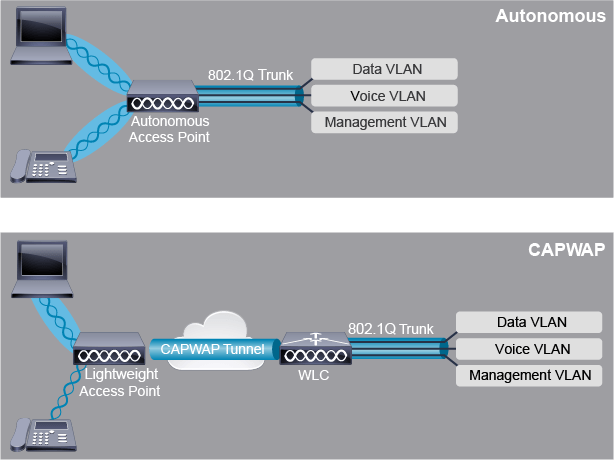
All MAC functionality that is not real time is processed by the Cisco WLC. The APs handle only real-time MAC functionality, which includes the following:
所有非即時的 MAC 功能都由 Cisco WLC 處理。AP 僅處理即時性的 MAC 功能,包括以下項目:
- Frame exchange handshake between client and AP when connecting to a wireless network用戶端與 AP 在連線至無線網路時的訊框交換交握
- Frame exchange handshake between client and AP when transferring a frame用戶端與 AP 在傳輸訊框時的訊框交換交握
- Transmission of beacon frames, which advertise all the nonhidden SSIDs宣告所有未隱藏 SSID 的信標訊框傳輸
- Buffering and transmission of frames for clients in a power-save operation處於省電運作模式之用戶端的訊框緩衝與傳輸
- Providing real-time signal quality information to WLC with every received frame隨每個接收到的訊框,向 WLC 提供即時訊號品質資訊
- Monitoring all radio channels for noise, interference, and other WLANs, and monitoring for the presence of other APs監控所有無線通道的雜訊、干擾與其他 WLAN,並監控其他 AP 的存在
- Wireless encryption and decryption of 802.11 frames802.11 訊框的無線加密與解密
All remaining functionality is managed in Cisco WLC, where time sensitivity is not a concern and WLC-wide visibility is required. Some of the MAC functions that are provided in the Cisco WLC are as follows:
其餘所有功能都在 Cisco WLC 中管理,因為在此不需考慮時效性,但需要 WLC 層級的整體可見性。Cisco WLC 提供的部分 MAC 功能如下:
- 802.11 authentication802.11 驗證
- 802.11 association and reassociation (roaming)802.11 關聯與重新關聯(漫遊)
- 802.11 frame translation and bridging to non-802.11 networks, such as 802.3802.11 訊框轉譯,並橋接至非 802.11 網路(例如 802.3)
- Radio frequency (RF) management無線電頻率(RF)管理
- Security management安全性管理
- QoS managementQoS 管理
APs in a centralized architecture can have different modes of operation:
集中式架構中的 AP 可以有不同的運作模式:
- Local mode, which is the default operational mode of APs when connected to the Cisco WLC. When an AP is operating in local mode, all user traffic is tunneled to the WLC, where VLANs are defined.本地模式(Local mode),這是 AP 連線到 Cisco WLC 時的預設運作模式。當 AP 以本地模式運作時,所有使用者流量都會通道傳輸到 WLC,並在該處定義 VLAN。
- FlexConnect mode, which is a Cisco wireless solution for branch and remote office deployments, to eliminate the need for WLC on each location. In FlexConnect mode, client traffic may be switched locally on the AP instead of tunneled to the WLC.FlexConnect 模式,這是 Cisco 針對分支機構與遠端辦公室部署的無線解決方案,可省去每個據點都需要 WLC 的需求。在 FlexConnect 模式下,用戶端流量可以在 AP 本地端交換,而不必通道傳輸到 WLC。
Control and Provisioning of Wireless Access Points
無線基地台控制與佈建協定
CAPWAP is the current industry-standard protocol for managing APs. CAPWAP functions for both IPv4 and IPv6.
CAPWAP 是目前業界用於管理 AP 的標準通訊協定。CAPWAP 同時支援 IPv4 與 IPv6。
- A CAPWAP tunnel uses the following UDP port numbers:CAPWAP 通道使用以下 UDP 連接埠號碼:
- Control plane uses UDP port number 5246控制平面使用 UDP 連接埠號碼 5246
- Data plane uses UDP port number 5247資料平面使用 UDP 連接埠號碼 5247
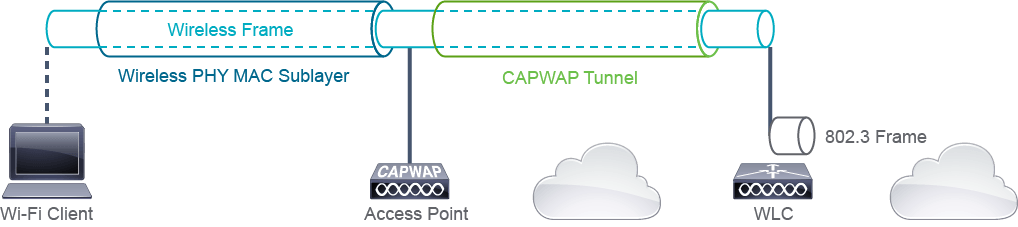
CAPWAP is an open protocol that enables a WLC to manage a collection of wireless APs. CAPWAP control messages are exchanged between the WLC and AP across an encrypted tunnel. CAPWAP includes the WLC discovery and join process, AP configuration and firmware push from the WLC, and statistics gathering and wireless security enforcement.
CAPWAP 是一種開放式協定,可讓 WLC 管理一群無線 AP。CAPWAP 控制訊息會透過加密通道在 WLC 與 AP 之間交換。CAPWAP 包含 WLC 探索與加入程序、由 WLC 推送的 AP 設定與韌體,以及統計資料蒐集與無線安全性執行。
After the AP discovers the WLC, a CAPWAP tunnel is formed between the WLC and AP. This CAPWAP tunnel can be IPv4 or IPv6. CAPWAP supports only Layer 3 WLC discovery.
AP 探索到 WLC 之後,會在 WLC 與 AP 之間建立 CAPWAP 通道。此 CAPWAP 通道可以是 IPv4 或 IPv6。CAPWAP 僅支援第 3 層 WLC 探索。
Once an AP joins a WLC, the APs will download any new software or configuration changes. For CAPWAP operations, any firewalls should allow the control plane (UDP port 5246) and the data plane (UDP port 5247).
一旦 AP 加入 WLC,AP 便會下載任何新的軟體或設定變更。針對 CAPWAP 運作,任何防火牆都應允許控制平面(UDP 連接埠 5246)與資料平面(UDP 連接埠 5247)通過。
Mapping SSIDs to VLANs
將 SSID 對應至 VLAN
VLANs provide an ideal way of separating users on different WLAN SSIDs when they access the wired side of the network. By associating each SSID to a different VLAN, you can group users on the Ethernet segment the same way that they were grouped in the WLAN. You can also isolate groups from each other, in the same way that they were isolated on the WLAN.
VLAN 提供了一種理想方式,能在不同 WLAN SSID 上的使用者存取網路有線端時將其區隔開來。透過將每個 SSID 對應到不同的 VLAN,你可以在乙太網路區段上以與 WLAN 相同的方式對使用者進行分組。你也可以將各群組彼此隔離,方式與在 WLAN 上隔離相同。
In the example illustrated in the figure, two SSIDs are associated with different VLANs. The "Internal" SSID is intended for internal users in the company, while the "Guest" SSID is for guests visiting the company. Hence, the internal traffic is separated from the guest traffic in the wired and wireless environment.
在圖中所示的範例裡,兩個 SSID 對應到不同的 VLAN。「Internal」SSID 供公司內部使用者使用,而「Guest」SSID 則供拜訪公司的訪客使用。因此,內部流量在有線與無線環境中都與訪客流量分開。
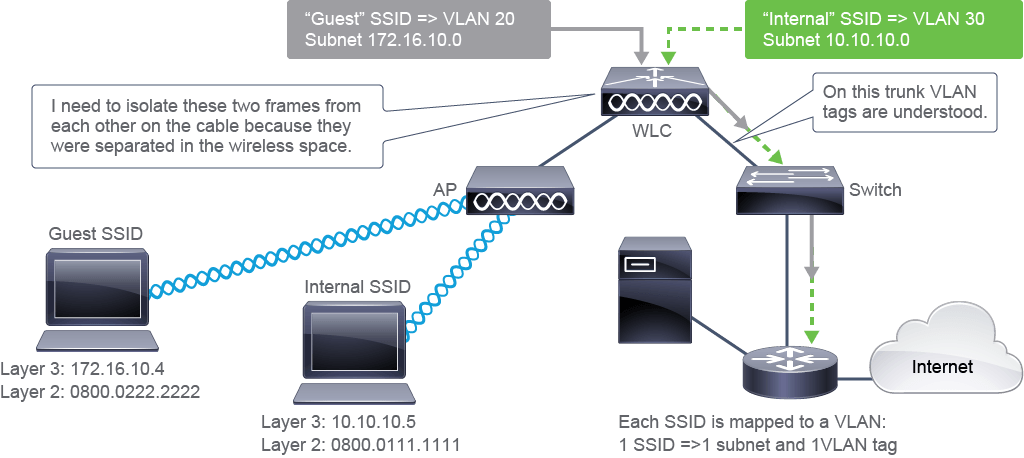
When the frames are in different SSIDs in the wireless space, they are isolated from each other. Different authentication and encryption mechanisms per SSID and subnet isolate them, even though they share the same wireless space.
當訊框位於無線空間中不同的 SSID 時,彼此是隔離的。每個 SSID 與子網路各自使用不同的驗證與加密機制,即使共用相同的無線空間也能將其彼此隔離。
When frames come from the wireless space and reach the Cisco WLC, they contain the SSID information in the 802.11 encapsulated header. The Cisco WLC uses the information to determine which SSID the client was on.
當訊框從無線空間送達 Cisco WLC 時,訊框中的 802.11 封裝標頭會含有 SSID 資訊。Cisco WLC 會利用此資訊判斷該用戶端當時所在的 SSID。
When configuring the Cisco WLC, the administrator associates each SSID to a VLAN ID. As a result, the Cisco WLC changes the 802.11 header into an 802.3 header, and adds the VLAN ID that is associated with the SSID. The frame is then sent on the wired trunk link with that VLAN ID.
在設定 Cisco WLC 時,管理員會將每個 SSID 對應到一個 VLAN ID。因此,Cisco WLC 會將 802.11 標頭轉換為 802.3 標頭,並加上與該 SSID 對應的 VLAN ID。接著該訊框會以該 VLAN ID 在有線主幹鏈路上傳送。
Switch Configuration to Support WLANs
支援 WLAN 的交換器設定
WLCs and APs are usually connected to switches. The switch interfaces must be configured appropriately, and the switch must be configured with the appropriate VLANs. The configuration on switches regarding the VLANs is the same as usual. The configuration differs on interfaces though, depending on if the deployment is centralized (using a WLC) or autonomous (without a WLC).
WLC 與 AP 通常都連接到交換器。交換器介面必須適當地設定,且交換器必須設定適當的 VLAN。有關 VLAN 的交換器設定方式與平常相同。不過,介面的設定會因部署方式是集中式(使用 WLC)還是自主式(不使用 WLC)而有所不同。
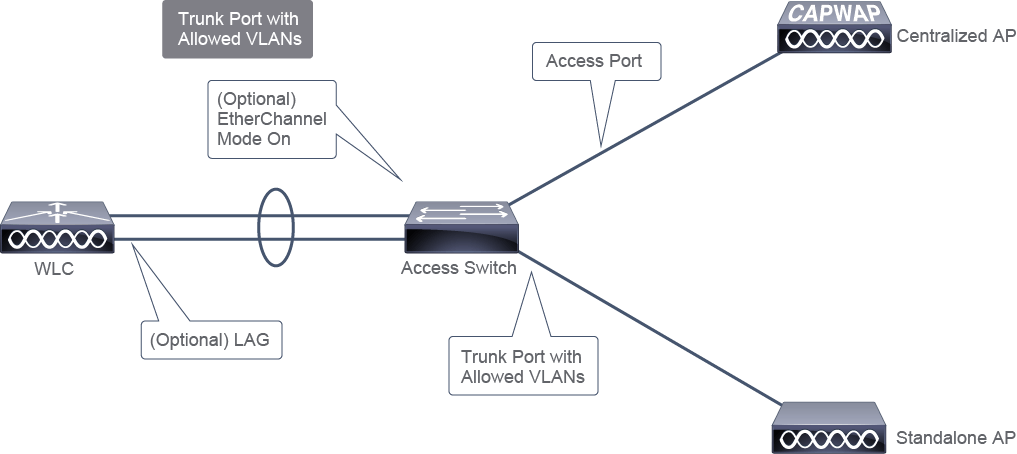
Switch VLAN Configuration to Support WLANs
支援 WLAN 的交換器 VLAN 設定
The management VLAN is for the WLC management interface configured on the WLC. The APs that register to the WLC can use the same VLAN as the WLC management VLAN, or they can use a separate VLAN. The APs can use this VLAN to obtain IP addresses through DHCP and send their discovery request to the WLC management interface using those IP addresses. To support wireless clients, you will need a VLAN (or VLANs) with which to map the client SSIDs to the WLC. You may also want to use the DHCP server for the clients.
管理 VLAN 用於在 WLC 上設定的 WLC 管理介面。註冊到 WLC 的 AP 可以使用與 WLC 管理 VLAN 相同的 VLAN,也可以使用個別的 VLAN。AP 可利用此 VLAN 透過 DHCP 取得 IP 位址,並使用這些 IP 位址將探索請求傳送到 WLC 管理介面。為了支援無線用戶端,你需要一個(或多個)VLAN,用以將用戶端 SSID 對應到 WLC。你可能也會想為用戶端使用 DHCP 伺服器。
On the switch, the VLANs must first be created to support the WLAN management, APs, and wireless clients, as shown in the following example:
在交換器上,必須先建立 VLAN,以支援 WLAN 管理、AP 與無線用戶端,如以下範例所示:
Switch# configure terminal
Switch(config)# vlan 11
Switch(config-vlan)# name WLC_MANAGEMENTSwitch(config-vlan)# vlan 12Switch(config-vlan)# name AP
Switch(config-vlan)# vlan 14
Switch(config-vlan)# name CORPSecond, you will need either the Layer 3 switch or a router to perform inter-VLAN routing. Usually, inter-VLAN routing is configured along with the VLAN creation. For this example, assume that inter-VLAN routing is already configured.
其次,你需要第 3 層交換器或路由器來執行 VLAN 間路由。通常,VLAN 間路由會與 VLAN 的建立一併設定。在本範例中,假設 VLAN 間路由已經設定完成。
Switch Port Connected to WLC Configuration
連接至 WLC 之交換器連接埠設定
The following example shows the configuration of the switch interface that is connected to the Cisco WLC. The WLC and the switch are as usual connected through a trunk port. Allowed VLANs, as per security recommendations, should only be the ones that are needed, therefore only WLC management, AP, and data VLANs are allowed.
以下範例顯示連接至 Cisco WLC 之交換器介面的設定。WLC 與交換器通常透過主幹連接埠連接。依據安全性建議,允許的 VLAN 應僅限於所需的 VLAN,因此僅允許 WLC 管理、AP 與資料 VLAN。

The following are the steps for configuration of the switch port connected to the WLC:
以下是設定連接至 WLC 之交換器連接埠的步驟:
- Enter global configuration mode.進入全域設定模式。
- Choose the physical port that the WLC is connected to on the switch.選擇交換器上連接 WLC 的實體連接埠。
- Enter a description (for example, WLC hostname).輸入描述(例如 WLC 主機名稱)。
- Set the port to trunk mode.將連接埠設為主幹模式。
- Set the allowed VLANs and, optionally, a native VLAN.設定允許的 VLAN,並可選擇性設定原生 VLAN。
Switch# configure terminal
Switch(config)# interface GigabitEthernet1/0/4
Switch(config-if)# description WLC
Switch(config-if)# switchport mode trunk
Switch(config-if)# switchport trunk allowed vlan 11,12,14
In this example, VLAN 11 represents the WLC management VLAN, and VLAN 14 represents the wireless client VLAN (associated to an SSID). The AP VLAN 12 must be allowed on this trunk, since the connectivity between the AP and the WLC is over Layer 3 connection.
在此範例中,VLAN 11 代表 WLC 管理 VLAN,VLAN 14 代表無線用戶端 VLAN(與某個 SSID 相關聯)。由於 AP 與 WLC 之間是透過第 3 層連線連接,因此這條主幹上必須允許 AP VLAN 12。
Optionally, you can use link aggregation (LAG) to bundle multiple ports on the WLC, providing port redundancy and load balancing. Note that a WLC can still connect to only one neighboring switch. In this case:
你可以選擇性地使用鏈路聚合(LAG),將 WLC 上的多個連接埠捆綁起來,以提供連接埠備援與負載平衡。請注意,一台 WLC 仍然只能連接到一台相鄰的交換器。在此情況下:
- The switch needs to bundle ports towards the WLC into an EtherChannel with mode "on" configured.交換器需要將朝向 WLC 的連接埠捆綁成一個 EtherChannel,並設定模式為「on」。
- The switch port channel interface must be configured as trunk port, with all data VLANs and the AP and management VLANs allowed.交換器的埠通道介面必須設定為主幹連接埠,並允許所有資料 VLAN 以及 AP 與管理 VLAN。
Switch Port Connected to WLC-Based AP Configuration
連接至以 WLC 為基礎之 AP 的交換器連接埠設定
The WLC-based AP in local mode usually connects to an access port (nontrunking). The access VLAN is used for traffic to and from the WLC. In a typical configuration, no traffic from or to a wireless client can transit directly through the AP without going to the WLC.
以本地模式運作、以 WLC 為基礎的 AP 通常連接到存取連接埠(非主幹)。此存取 VLAN 用於往返 WLC 的流量。在典型設定中,來自或前往無線用戶端的流量都不能不經過 WLC 而直接透過 AP 傳遞。

The following are the steps for configuration of the switch port connected to the AP:
以下是設定連接至 AP 之交換器連接埠的步驟:
- Enter global configuration mode.進入全域設定模式。
- Choose the physical port that the AP is connected to on the switch.選擇交換器上連接 AP 的實體連接埠。
- Enter a description (for example, AP hostname).輸入描述(例如 AP 主機名稱)。
- Set the access VLAN (AP VLAN).設定存取 VLAN(AP VLAN)。
- Set the port to access mode.將連接埠設為存取模式。
Switch# configure terminal
Switch(config)# interface GigabitEthernet1/0/2
Switch(config-if)# description AP1
Switch(config-if)# switchport access vlan 12
Switch(config-if)# switchport mode access
In this example, VLAN 12 represents the AP VLAN, which allows the AP to access its DHCP server. As indicated, it should have Layer 3 connectivity with the WLC management.
在此範例中,VLAN 12 代表 AP VLAN,可讓 AP 存取其 DHCP 伺服器。如前所述,它應與 WLC 管理端具有第 3 層連線。
CAPWAP Communication
CAPWAP 通訊
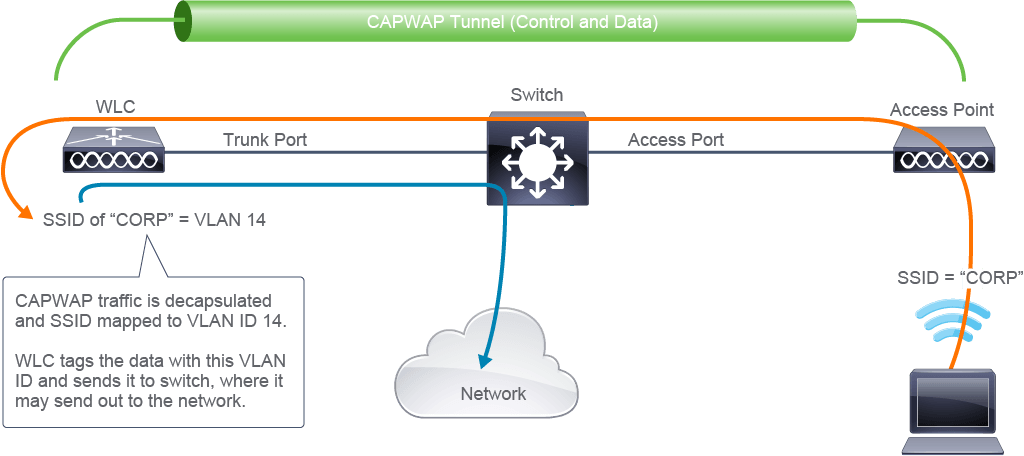
The figure and the following steps illustrate how CAPWAP communication works:
下圖與以下步驟說明 CAPWAP 通訊的運作方式:
- Based on the switch port configuration, the AP is connected to the switch on an access port (the VLAN for AP to get DHCP). The WLC is connected to the switch on a trunk port, allowing VLANs for WLC management (VLAN 11), AP (VLAN 12), and the wireless clients (VLAN 14).根據交換器連接埠設定,AP 連接到交換器的存取連接埠上(該 VLAN 供 AP 取得 DHCP 使用)。WLC 連接到交換器的主幹連接埠上,允許 WLC 管理(VLAN 11)、AP(VLAN 12)與無線用戶端(VLAN 14)的 VLAN 通過。
- The AP and WLC create a CAPWAP tunnel.AP 與 WLC 建立 CAPWAP 通道。
- The client associates to the AP with an SSID of "CORP."用戶端以 SSID「CORP」關聯到 AP。
- The AP sends the client data that is marked with SSID "CORP" through the CAPWAP tunnel to the WLC.AP 透過 CAPWAP 通道,將標記為 SSID「CORP」的用戶端資料傳送到 WLC。
- The WLC decapsulates the CAPWAP traffic.WLC 解封裝 CAPWAP 流量。
- The SSID of "CORP" is mapped in the WLC to VLAN ID 14.SSID「CORP」在 WLC 中對應到 VLAN ID 14。
- The WLC tags the data with VLAN 14 before sending it back on the trunk port (where VLAN 14 is allowed) to the switch.WLC 在將資料送回主幹連接埠(允許 VLAN 14 通過)之前,會先為資料加上 VLAN 14 標籤,再送往交換器。
- The switch sends it on to the network (based on the destination in the packet).交換器再將其送往網路(依據封包中的目的地)。
Switch Port Connected to Autonomous AP Configuration
連接至自主 AP 的交換器連接埠設定
An autonomous AP connects to a trunk port. On the trunk, a native (untagged) VLAN is required for management of the AP. By default, all VLANs are allowed over the trunk link. To enhance security, you should specify which VLANs are permitted over the trunk link, which should include the AP management VLAN.
自主 AP 連接到主幹連接埠。在該主幹上,需要一個原生(未標記)VLAN 來管理該 AP。預設情況下,主幹鏈路上允許所有 VLAN 通過。為提升安全性,你應指定哪些 VLAN 可通過主幹鏈路,其中應包含 AP 管理 VLAN。

The configuration of the switch port in this case is very similar to the configuration of a port connected to a WLC, as shown in the following example.
在這種情況下,交換器連接埠的設定與連接到 WLC 之連接埠的設定非常類似,如以下範例所示。
Switch# configure terminal
Switch(config)# interface GigabitEthernet1/0/3
Switch(config-if)# description AP2
Switch(config-if)# switchport mode trunk
Switch(config-if)# switchport trunk native vlan 12
Switch(config-if)# switchport trunk allowed vlan 12,14
Autonomous AP Communication: Locally Switched
自主 AP 通訊:本地交換
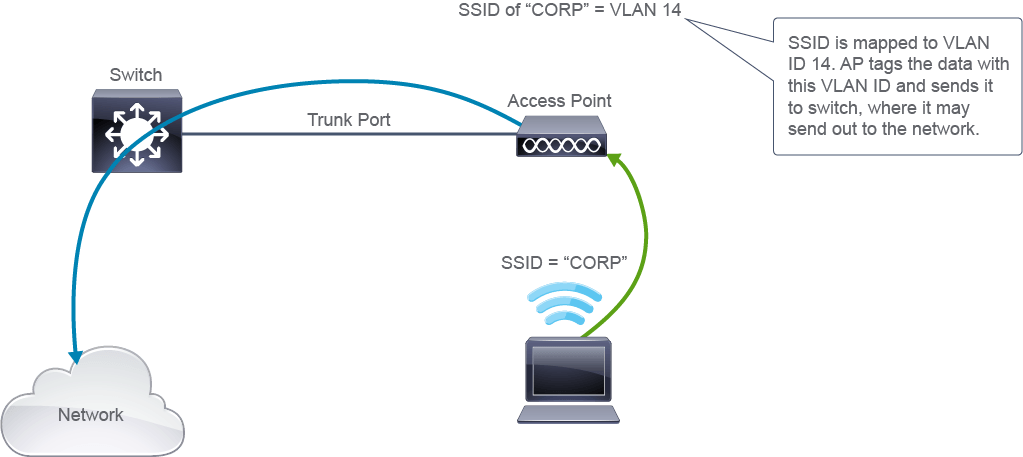
The figure and the following steps illustrate how communication works with an autonomous AP:
下圖與以下步驟說明自主 AP 的通訊運作方式:
- Based on the switch port configuration, the AP is connected to the switch as a trunk port, allowing VLANs for AP management (VLAN 12) and the wireless clients (VLAN 14).根據交換器連接埠設定,AP 以主幹連接埠連接到交換器,允許 AP 管理(VLAN 12)與無線用戶端(VLAN 14)的 VLAN 通過。
- The client associates to the AP with an SSID of "CORP."用戶端以 SSID「CORP」關聯到 AP。
- The SSID of "CORP" is mapped in the AP to VLAN ID 14.SSID「CORP」在 AP 中對應到 VLAN ID 14。
- The AP tags the data with VLAN 14 before sending it on the trunk port (where VLAN 14 is allowed) to the switch.AP 在將資料送到主幹連接埠(允許 VLAN 14 通過)之前,會先為資料加上 VLAN 14 標籤,再送往交換器。
- The switch may send it on to the network (based on the destination in packet).交換器可能會將其送往網路(依據封包中的目的地)。
Workgroup Bridges
工作群組橋接器
Devices can be located in places where inserting an Ethernet cable is not feasible because the devices are supposed to be movable, or because of the environment (for example, a warehouse where the distance to the switch could exceed 100 m). A wireless setup in such cases is a natural way to provide access to the network, but devices might only have an Ethernet connection, not a slot for a Wi-Fi card.
有些裝置所在的位置無法接上乙太網路線,因為這些裝置需要可移動,或是受限於環境(例如,倉庫中到交換器的距離可能超過 100 公尺)。在這類情況下,無線設定是提供網路存取的自然方式,但這些裝置可能只有乙太網路連線,沒有可插入 Wi-Fi 卡的插槽。
A workgroup bridge (WGB) is an AP that is configured to bridge between its Ethernet and wireless interfaces.
工作群組橋接器(WGB)是一種設定為在其乙太網路介面與無線介面之間進行橋接的 AP。
A WGB provides a wireless connection to devices connected to its Ethernet port.
WGB 會為連接到其乙太網路連接埠的裝置提供無線連線。
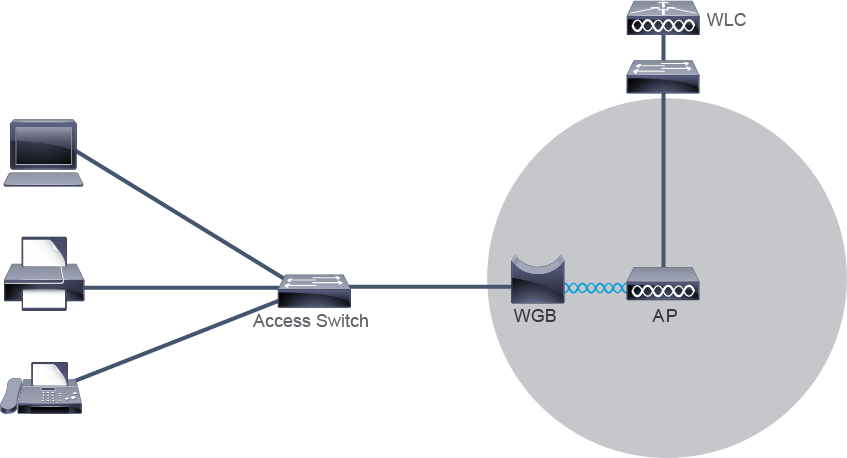
You can use a WGB with multiple clients, but the WGB in that case must be connected to a hub or a switch.
你可以搭配多個用戶端使用 WGB,但此時 WGB 必須連接到集線器或交換器。
Mesh Networks
網狀網路
Providing full wireless coverage is a challenge in various environments. To provide pervasive network connectivity, enterprises must be able to deploy wireless APs wherever necessary. Typical APs must connect to Ethernet cables that extend up to 100 meters (328 feet) from the Ethernet port. Running Ethernet cables to every AP to provide full coverage is often too difficult in hard-to-wire environments.
在各種環境中,提供完整的無線涵蓋範圍都是一項挑戰。為了提供無所不在的網路連線,企業必須能夠在需要的任何地方部署無線 AP。一般的 AP 必須連接距其乙太網路連接埠最遠可達 100 公尺(328 英尺)的乙太網路線。在難以佈線的環境中,為每台 AP 都拉一條乙太網路線以提供完整涵蓋範圍,通常過於困難。
The Cisco wireless mesh networking solution provides wireless connectivity to areas that, until now, have been difficult or impossible to wire. These mesh APs deliver mobile connectivity to users located in previously inaccessible areas, while backhauling wireless traffic to traditional APs connected to Ethernet ports.
Cisco 無線網狀網路解決方案,可為迄今難以佈線甚至無法佈線的區域提供無線連線。這些網狀 AP 能為先前難以觸及的區域中的使用者提供行動連線,同時將無線流量回程傳輸(backhaul)到連接乙太網路連接埠的傳統 AP。
Mesh APs connect to the network using wireless.
網狀 AP 使用無線方式連接到網路。
- One AP radio is used to serve clients.其中一根 AP 天線用於服務用戶端。
- The second AP radio is used to backhaul traffic.第二根 AP 天線用於回程傳輸流量。
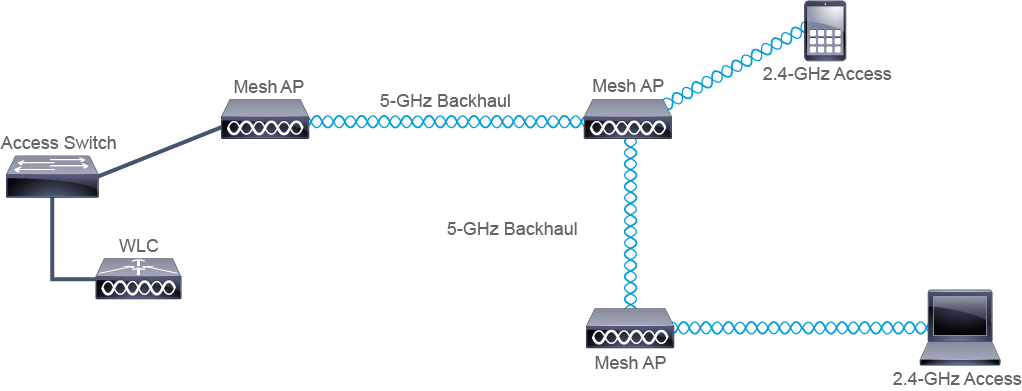
Using one radio, each mesh AP can provide wireless coverage for client devices within its area, while backhauling traffic through the second radio. Usually, network access to users is delivered over the 2.4-GHz frequency and the 5-GHz band is used to backhaul traffic.
每台網狀 AP 可利用一根天線,為其區域內的用戶端裝置提供無線涵蓋範圍,同時透過第二根天線回程傳輸流量。通常,提供給使用者的網路存取採用 2.4 GHz 頻率,而 5 GHz 頻段則用於回程傳輸流量。