You can use several verification tools to verify end-to-end IPv6 connectivity:
你可以使用下列幾種驗證工具來驗證端到端的 IPv6 連線:
- ping: A successful ping means that the device endpoints can communicate. This result does not mean that there are no problems. It simply proves that the basic IPv6 connectivity is working.ping:ping 成功表示裝置端點之間可以通訊。這個結果不代表沒有任何問題,只能證明基本的 IPv6 連線是正常的。
- traceroute: The traceroute results can help you determine how far along the path data can successfully travel. Knowing at what point the data fails can help you determine the location of the issue. Cisco devices use the UDP protocol when running
traceroute. The Windows operating system uses ICMP when running the similar commandtracert.traceroute:traceroute 的結果可以幫助你判斷資料能成功傳送到路徑上的哪個位置。知道資料在哪一點失敗,有助於判斷問題所在。Cisco 裝置執行traceroute時使用 UDP 協定;Windows 作業系統執行類似的tracert指令時則使用 ICMP。 - Telnet: Used to test the transport layer connectivity for any TCP port over IPv6.Telnet:用於測試 IPv6 上任何 TCP 連接埠的傳輸層連線。
In the following scenario, PC1 wants to access applications on the server. The figure shows the desirable path.
在下列情境中,PC1 想要存取伺服器上的應用程式。圖中顯示的是理想路徑。
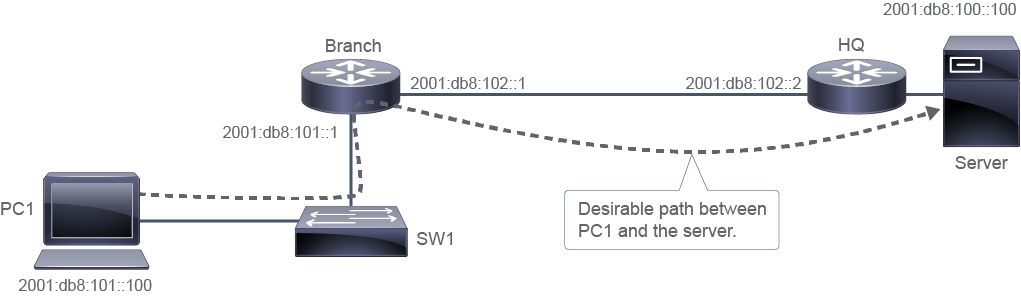
You can use the ping utility to test end-to-end IPv6 connectivity by providing the IPv6 address as the destination address. The utility recognizes the IPv6 address when one is provided and uses IPv6 as a protocol to test connectivity.
你可以使用 ping 工具,將 IPv6 位址作為目的位址,來測試端到端的 IPv6 連線。當提供 IPv6 位址時,該工具會辨識出這是 IPv6 位址,並使用 IPv6 作為測試連線的協定。
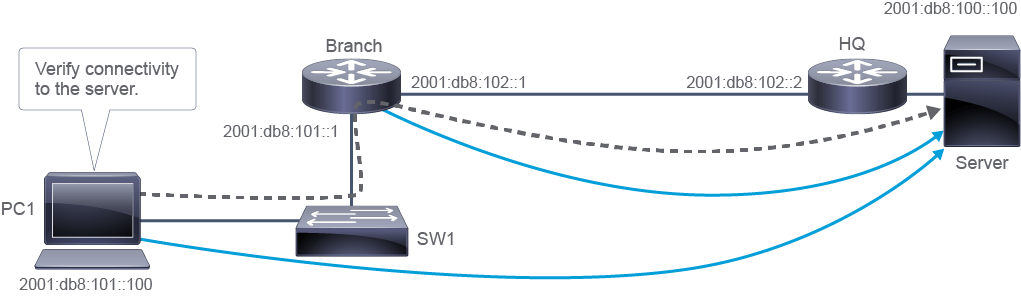
Use the ping utility on the Windows PC to test IPv6 connectivity:
在 Windows PC 上使用 ping 工具測試 IPv6 連線:
C:\Windows\system32> ping 2001:db8:100::100

Pinging 2001:db8:100::100 with 32 bytes of data:
Reply from 2001:db8:100::100: timems
Reply from 2001:db8:100::100: time=1ms
Reply from 2001:db8:100::100: time=1ms
Reply from 2001:db8:100::100: time=1ms

Ping statistics for 2001:db8:100::100:
    Packets: Sent = 4, Received = 4, Lost = 0 (0% loss),
Approximate round trip times in milli-seconds:
    Minimum = 1ms, Maximum = 19ms, Average = 5ms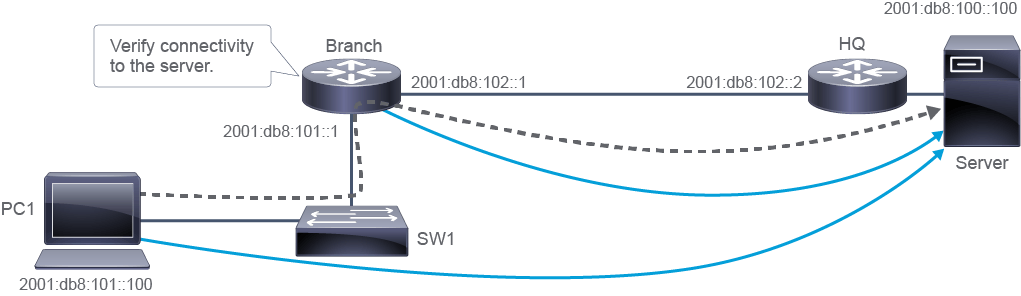
You can also use the ping utility on the router to test IPv6 connectivity:
你也可以在路由器上使用 ping 工具測試 IPv6 連線:
Branch# ping 2001:db8:100::100
Type escape sequence to abort.
Sending 5, 100-byte ICMP Echos to 2001:db8:100::100, timeout is 2 seconds:
!!!!!
Success rate is 100 percent (5/5), round-trip min/avg/max = 0/0/4 ms
Traceroute is a utility that allows observation of the path between two hosts and supports IPv6. Use the traceroute Cisco IOS command or tracert Windows command, followed by the IPv6 destination address, to observe the path between two hosts. The trace generates a list of IPv6 hops that are successfully reached along the path. This list provides important verification and troubleshooting information.
Traceroute 是一種可觀察兩台主機之間路徑並支援 IPv6 的工具。使用 Cisco IOS 的 traceroute 指令或 Windows 的 tracert 指令,後面加上 IPv6 目的位址,即可觀察兩台主機之間的路徑。追蹤結果會產生一份沿路徑成功抵達的 IPv6 節點清單,這份清單提供了重要的驗證與疑難排解資訊。
The tracert utility on the Windows PC allows you to observe the IPv6 path:
在 Windows PC 上使用 tracert 工具可以觀察 IPv6 路徑:
C:\Windows\system32> tracert 2001:db8:100::100

Tracing route to 2001:db8:100::100 over a maximum of 30 hops

  1     1 ms     1 ms    <1 ms  2001:db8:101::1
  2    10 ms    1 ms      1 ms  2001:db8:102::2
  3    10 ms     1 ms     1 ms  2001:db8:100::100

Trace complete.
You can also use the traceroute utility on the router to observe the IPv6 path:
你也可以在路由器上使用 traceroute 工具觀察 IPv6 路徑:
Branch# traceroute 2001:db8:100::100
Type escape sequence to abort.
Tracing the route to 2001:db8:100::100

  1 2001:db8:102::2 0 msec 0 msec 0 msec
  2 2001:db8:100::100 0 msec 0 msec 0 msec
Similar to IPv4, you can use Telnet to test end-to-end transport layer connectivity over IPv6 using the Telnet command from a PC, router, or a switch. When you provide the IPv6 destination address, the protocol stack determines that the IPv6 protocol has to be used. If you omit the port number, the client will connect to port 23. You can specify a specific port number on the client and connect to any TCP port that you want to test.
與 IPv4 類似,你可以從 PC、路由器或交換器使用 Telnet 指令,來測試 IPv6 上的端到端傳輸層連線。當你提供 IPv6 目的位址時,協定堆疊會判定必須使用 IPv6 協定。若省略連接埠號,用戶端會連線到連接埠 23;你也可以在用戶端指定特定連接埠號,連線到任何想測試的 TCP 連接埠。
Although Telnet can be used as a troubleshooting tool to check transport layer functionality, it should not be used in a production environment to administer network devices. Nowadays, a secure access method is used for that purpose using Secure Shell Protocol (SSH).
雖然 Telnet 可作為檢查傳輸層功能的疑難排解工具,但不應在正式環境中用於管理網路裝置。現今會改用安全殼層協定(SSH)作為安全的存取方式。
In the example, you can see two connections from a PC to the Server. The first one connects to port 23 and tests Telnet over IPv6. The second connects to port 80 and tests HTTP over IPv6.
在此範例中,你可以看到從 PC 到伺服器的兩個連線:第一個連線到連接埠 23,測試 IPv6 上的 Telnet;第二個連線到連接埠 80,測試 IPv6 上的 HTTP。
The telnet command in the output tests if HTTP, which listens on TCP port 80, is open.
輸出中的 telnet 指令用於測試監聽 TCP 連接埠 80 的 HTTP 是否已開放。
The telnet command can also be used from a Cisco router. In this case, to exit the established connection, you must enter a control+C hotkey. The hotkey that closes the connection on a Cisco device is "ctrl+shift+6 and x."
telnet 指令也可以在 Cisco 路由器上使用。在此情況下,若要離開已建立的連線,必須輸入 control+C 快捷鍵。在 Cisco 裝置上關閉連線的快捷鍵是「ctrl+shift+6 再按 x」。
When troubleshooting end-to-end connectivity, verifying mappings between destination IP addresses and MAC addresses on individual segments is useful. In IPv4, ARP provides this functionality. In IPv6, the neighbor discovery process and ICMPv6 replace the ARP functionality. The neighbor discovery table caches IPv6 addresses and their resolved MAC addresses. As shown in the figure, the netsh interface ipv6 show neighbors Windows command lists all devices that are currently in the IPv6 neighbor discovery table cache. The information that is displayed for each device includes the IPv6 address, physical (MAC) address, and the neighbor cache state, similar to an ARP table in IPv4. By examining the neighbor discovery table, you can verify that the destination IPv6 addresses map to the correct Ethernet addresses
在疑難排解端到端連線時,驗證各個網段上目的 IP 位址與 MAC 位址之間的對應關係非常有用。在 IPv4 中,ARP 提供了這項功能;在 IPv6 中,鄰居探索程序與 ICMPv6 取代了 ARP 的功能。鄰居探索表會快取 IPv6 位址及其解析出的 MAC 位址。如圖所示,Windows 的 netsh interface ipv6 show neighbors 指令會列出目前 IPv6 鄰居探索表快取中所有的裝置。每個裝置顯示的資訊包括 IPv6 位址、實體(MAC)位址,以及鄰居快取狀態,類似於 IPv4 中的 ARP 表。透過檢視鄰居探索表,你可以驗證目的 IPv6 位址是否對應到正確的乙太網路位址
The figure also shows an example of the neighbor discovery table on the Cisco IOS router, using the show ipv6 neighbors command. The table includes the IPv6 address of the neighbor, age in minutes, the MAC address, the state, and the interface through which the neighbor is reachable. The states are explained in the table:
圖中也展示了在 Cisco IOS 路由器上使用 show ipv6 neighbors 指令顯示的鄰居探索表範例。此表包含鄰居的 IPv6 位址、存在時間(分鐘)、MAC 位址、狀態,以及可到達該鄰居的介面。下表說明各種狀態:
State 狀態 | Description 說明 |
INCMP (Incomplete) INCMP(未完成) | Address resolution is being performed on the entry. The source has sent a neighbor solicitation message to the solicited-node multicast address of the target, but it has not received the corresponding neighbor advertisement message. 正在對此項目執行位址解析。來源已將鄰居請求訊息傳送到目標的請求節點群播位址,但尚未收到對應的鄰居通告訊息。 |
REACH (Reachable) REACH(可到達) | The source has received positive confirmation within the last ReachableTime milliseconds that the forward path to the neighbor was functioning correctly, since the packets have been recently received. While in the REACH state, the device takes no special action because it is sending packets. 由於最近收到過封包,來源在過去 ReachableTime 毫秒內已收到正向確認,證實通往該鄰居的轉送路徑運作正常。處於 REACH 狀態時,裝置不會採取特殊動作,因為它正在傳送封包。 |
STALE STALE(過期) | More than ReachableTime milliseconds have elapsed since the device received the last positive confirmation that the forward path was functioning properly. While in the STALE state, the device takes no action until a packet is sent. STALE state is the normal state of the neighbor. 自裝置收到最後一次確認轉送路徑運作正常的正向確認以來,已超過 ReachableTime 毫秒。處於 STALE 狀態時,裝置在有封包要傳送之前不會採取任何動作。STALE 狀態是鄰居的正常狀態。 |
DELAY DELAY(延遲) | More than ReachableTime milliseconds have elapsed since the device received the last positive confirmation that the forward path was functioning properly. A packet was sent within the last DELAY_FIRST_PROBE_TIME seconds. If the device receives no reachability confirmation within DELAY_FIRST_PROBE_TIME seconds of entering the DELAY state, send a neighbor solicitation message and change the state to PROBE. 自裝置收到最後一次確認轉送路徑運作正常的正向確認以來,已超過 ReachableTime 毫秒,並且在過去 DELAY_FIRST_PROBE_TIME 秒內已傳送過封包。若裝置在進入 DELAY 狀態後的 DELAY_FIRST_PROBE_TIME 秒內未收到可到達性確認,則會傳送鄰居請求訊息,並將狀態改為 PROBE。 |
PROBE PROBE(探測) | The device actively seeks a reachability confirmation by resending neighbor solicitation messages in RetransTimer milliseconds until a reachability confirmation is received. 裝置會主動重新傳送鄰居請求訊息,每隔 RetransTimer 毫秒重試一次,直到收到可到達性確認為止。 |