FASTLab 12: Implement Device Hardening
FASTLab 12:實作裝置強化
Scenario
情境
You have successfully added basic security to the network, however, you have now been tasked with applying additional security measures.
你已成功為網路加入基本安全防護,但現在被指派要套用額外的安全措施。
Your mentor tells you that you will need to perform these tasks:
你的導師告訴你,你需要執行以下任務:
- Configure SW1 as follows:依下列方式設定 SW1:
- Disable all unused interfaces on the switch.停用交換器上所有未使用的介面。
- Create a VLAN 99 that is named "VLAN99," and assign all unused ports to VLAN 99. Disable VLAN99.建立名稱為「VLAN99」的 VLAN 99,並將所有未使用的連接埠指派給 VLAN 99。停用 VLAN99。
- Configure port security on SW1 on the port that is connected to the Inventory server to allow the MAC address of the inventory server only. If any other device is connected to this port, then the port must drop all the packets and increment the security-violation count.在 SW1 上連接到 Inventory 伺服器的連接埠設定連接埠安全性,只允許該伺服器的 MAC 位址。若有其他裝置連接到此連接埠,則該連接埠必須丟棄所有封包並累計安全違規計數。
- Configure port security on SW1 on the port that is connected to PC1 to allow the MAC address of PC1 only. If any other device is connected to this port, then the port must drop all the packets, but it must not increment the security-violation count.在 SW1 上連接到 PC1 的連接埠設定連接埠安全性,只允許 PC1 的 MAC 位址。若有其他裝置連接到此連接埠,則該連接埠必須丟棄所有封包,但不得累計安全違規計數。
- Configure port security on SW1, on the port that is connected to PC2 to allow the MAC address of PC2 only. If any other device is connected to this port, then the port must drop all the packets and place the port in an error-disabled state immediately.在 SW1 上連接到 PC2 的連接埠設定連接埠安全性,只允許 PC2 的 MAC 位址。若有其他裝置連接到此連接埠,則該連接埠必須丟棄所有封包,並立即將連接埠置於錯誤停用狀態。
- Disable Cisco Discovery Protocol on ports that are currently connected to all the endpoints " PCs and servers.在目前連接所有終端裝置(PC 與伺服器)的連接埠上停用 Cisco Discovery Protocol。
- Configure the Border router as follows:依下列方式設定 Border 路由器:
- Disable HTTP service on the router.在路由器上停用 HTTP 服務。
Topology
拓樸
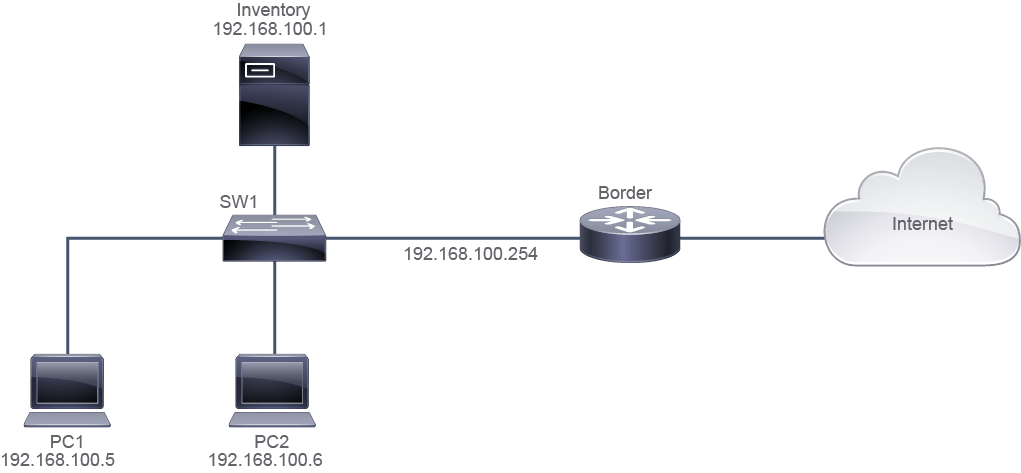
Job Aid
工作輔助資料
Device Information
裝置資訊
Device 裝置 | Interface 介面 | IPv4 Address IPv4 位址 | Remote 遠端 | Interface 介面 | IPv4 Address IPv4 位址 |
SW1 SW1 | Ethernet0/0 Ethernet0/0 | VLAN 1 VLAN 1 | Border Border | Ethernet0/0 Ethernet0/0 | 192.168.100.254/24 192.168.100.254/24 |
SW1 SW1 | Ethernet0/1 Ethernet0/1 | VLAN 1 VLAN 1 | PC1 PC1 | Ethernet0/0 Ethernet0/0 | 192.168.100.5/24 192.168.100.5/24 |
SW1 SW1 | Ethernet0/2 Ethernet0/2 | VLAN 1 VLAN 1 | PC2 PC2 | Ethernet0/0 Ethernet0/0 | 192.168.100.6/24 192.168.100.6/24 |
SW1 SW1 | Ethernet0/3 Ethernet0/3 | VLAN 1 VLAN 1 | Inventory Inventory | Ethernet0/0 Ethernet0/0 | 192.168.100.1/24 192.168.100.1/24 |
SW1 SW1 | VLAN 1 VLAN 1 | 192.168.100.10/24 192.168.100.10/24 | _ _ | _ _ | _ _ |
Inventory Inventory | Ethernet0/0 Ethernet0/0 | 192.168.100.1/24 192.168.100.1/24 | SW1 SW1 | Ethernet0/3 Ethernet0/3 | VLAN 1 VLAN 1 |
Border Border | Ethernet0/0 Ethernet0/0 | 192.168.100.254/24 192.168.100.254/24 | SW1 SW1 | Ethernet0/0 Ethernet0/0 | VLAN 1 VLAN 1 |
Configuration Tips
設定提示
- To disable an interface on a switch, use the
shutdowncommand in the interface configuration mode. Alternatively, you can use theshutdowncommand in the interface range mode to disable multiple interfaces with one command.若要在交換器上停用某個介面,請在介面設定模式下使用shutdown命令。你也可以在介面範圍模式下使用shutdown命令,一次停用多個介面。 - To create a VLAN, use the
vlanvlan number command in the global configuration mode. You specify the VLAN name in the VLAN configuration mode, using thenamevlan name command. To disable the VLAN, use theshutdowncommand in the VLAN configuration mode.若要建立 VLAN,請在全域設定模式下使用vlanvlan number 命令。你可以在 VLAN 設定模式下使用namevlan name 命令指定 VLAN 名稱。若要停用該 VLAN,請在 VLAN 設定模式下使用shutdown命令。 - To configure static secure MAC address learning, first use the
switchport port-security command in the interface configuration mode, to enable port-security feature on the port, and then use theswitchport port-security mac-addressmac-address to specify the secure MAC address.若要設定靜態安全 MAC 位址學習,請先在介面設定模式下使用switchport port-security 命令,在該連接埠上啟用連接埠安全性功能,接著使用switchport port-security mac-addressmac-address 指定安全 MAC 位址。 - To configure a port to drop all packets from unsecure MAC addresses, and to increment the security-violation count use the
port-security violation restrictcommand in the interface configuration mode. To configure a port to drop all packets from unsecure MAC addresses, but not to increment the security-violation count use the commandport-security violation protectin the interface configuration mode. To configure a port to drop all packets from unsecure MAC addresses, but not to increment the security-violation count, and disable the interface, use theport-security violation shutdowncommand in the interface configuration mode. Shutdown is the default violation mode.若要設定連接埠丟棄所有來自不安全 MAC 位址的封包,並累計安全違規計數,請在介面設定模式下使用port-security violation restrict命令。若要設定連接埠丟棄所有來自不安全 MAC 位址的封包,但不累計安全違規計數,請在介面設定模式下使用port-security violation protect命令。若要設定連接埠丟棄所有來自不安全 MAC 位址的封包,且不累計安全違規計數並停用該介面,請在介面設定模式下使用port-security violation shutdown命令。Shutdown 是預設的違規模式。 - To disable CDP, use the
no cdp enablecommand in the interface range mode.若要停用 CDP,請在介面範圍模式下使用no cdp enable命令。
Answer Key
參考解答
- Configure SW1 as follows:依下列方式設定 SW1:
- Disable all unused interfaces on the switch.停用交換器上所有未使用的介面。
Execute
show interface | include Ethernetcommand to find out which interfaces exist on the switch.執行
show interface | include Ethernet命令,以找出交換器上存在哪些介面。SW1#show interface | include Ethernet Ethernet0/0 is up, line protocol is up (connected) Ethernet0/1 is up, line protocol is up (connected) Ethernet0/2 is up, line protocol is up (connected) Ethernet0/3 is up, line protocol is up (connected) Ethernet1/0 is up, line protocol is up (connected) Ethernet1/1 is up, line protocol is up (connected) Ethernet1/2 is up, line protocol is up (connected) Ethernet1/3 is up, line protocol is up (connected) Hardware is Ethernet SVI, address is aabb.cc81.1500 (bia aabb.cc81.1500)From the Job Aids you can see that Etherent0/0-3 are used. Ethernet1/0-3 are not used in our topology, so these are unused interfaces; disable them by executing following commands on SW1.
從工作輔助資料可以看出 Etherent0/0-3 正在使用中。Ethernet1/0-3 在我們的拓樸中未使用,因此屬於未使用介面;請在 SW1 上執行以下命令將它們停用。
SW1#configure terminal Enter configuration commands, one per line. End with CNTL/Z. SW1(config)#interface range ethernet 1/0-3 SW1(config-if-range)#shutdown - Create a VLAN 99 that is named "VLAN99," and assign all unused ports to VLAN 99. Disable VLAN99.建立名稱為「VLAN99」的 VLAN 99,並將所有未使用的連接埠指派給 VLAN 99。停用 VLAN99。
SW1(config-if-range)#exit SW1(config)#vlan 99 SW1(config-vlan)#name VLAN99 SW1(config-vlan)#shutdown SW1(config-vlan)#exit SW1(config)# interface range ethernet 1/0-3 SW1(config-if-range)#switchport access vlan 99 - Configure port security on SW1 on the port that is connected to the Inventory server to allow the MAC address of the inventory server only. If any other device is connected to this port, then the port must drop all the packets and increment the security-violation count.在 SW1 上連接到 Inventory 伺服器的連接埠設定連接埠安全性,只允許該伺服器的 MAC 位址。若有其他裝置連接到此連接埠,則該連接埠必須丟棄所有封包並累計安全違規計數。
Execute the
show mac address-tablecommand on SW1 to find out the MAC addresses of the connected devices. Note down the MAC addresses for endpoints for further configuration.在 SW1 上執行
show mac address-table命令,以找出已連接裝置的 MAC 位址。請記下各終端裝置的 MAC 位址以供後續設定使用。SW1#show mac address-table Mac Address Table ------------------------------------------- Vlan Mac Address Type Ports ---- ----------- -------- ----- 1 aabb.cc01.1c00 DYNAMIC Et0/1 1 aabb.cc01.1d00 DYNAMIC Et0/2 1 aabb.cc01.1e00 DYNAMIC Et0/3 1 aabb.cc01.1f00 DYNAMIC Et0/0 Total Mac Addresses for this criterion: 4 SW1#In this example output, MAC addresses of interest are as follows:
在此範例輸出中,需要注意的 MAC 位址如下:
- Inventory server: aabb.cc01.1e00Inventory 伺服器:aabb.cc01.1e00
- PC1: aabb.cc01.1c00PC1:aabb.cc01.1c00
- PC2: aabb.cc01.1d00PC2:aabb.cc01.1d00
SW1(config)#interface ethernet 0/3 SW1(config-if)#switchport mode access SW1(config-if)#switchport port-security mac-address aabb.cc01.1e00 SW1(config-if)#switchport port-security maximum 1 SW1(config-if)#switchport port-security violation restrict SW1(config-if)#switchport port-security - Configure port security on SW1 on the port that is connected to PC1 to allow the MAC address of PC1 only. If any other device is connected to this port, then the port must drop all the packets, but it must not increment the security-violation count.在 SW1 上連接到 PC1 的連接埠設定連接埠安全性,只允許 PC1 的 MAC 位址。若有其他裝置連接到此連接埠,則該連接埠必須丟棄所有封包,但不得累計安全違規計數。
SW1(config)#interface ethernet 0/1 SW1(config-if)#switchport mode access SW1(config-if)#switchport port-security mac-address aabb.cc01.1c00 SW1(config-if)#switchport port-security maximum 1 SW1(config-if)#switchport port-security violation protect SW1(config-if)#switchport port-security - Configure port security on SW1, on the port that is connected to PC2 to allow the MAC address of PC2 only. If any other device is connected to this port, then the port must drop all the packets and place the port in an error-disabled state immediately.在 SW1 上連接到 PC2 的連接埠設定連接埠安全性,只允許 PC2 的 MAC 位址。若有其他裝置連接到此連接埠,則該連接埠必須丟棄所有封包,並立即將連接埠置於錯誤停用狀態。
SW1(config)#interface ethernet 0/2 SW1(config-if)#switchport mode access SW1(config-if)#switchport port-security mac-address aabb.cc01.1d00 SW1(config-if)#switchport port-security maximum 1 SW1(config-if)#switchport port-security violation shutdown SW1(config-if)#switchport port-security - Disable Cisco Discovery Protocol on ports that are currently connected to all the endpoints " PCs and servers.在目前連接所有終端裝置(PC 與伺服器)的連接埠上停用 Cisco Discovery Protocol。
SW1(config)#interface range ethernet 0/1-3
SW1(config-if-range)#no cdp enable
- Configure the Border router as follows:依下列方式設定 Border 路由器:
- Disable HTTP service on the router.在路由器上停用 HTTP 服務。
Border>enable
Border#configure terminal
Enter configuration commands, one per line.  End with CNTL/Z.
Border(config)#no ip http server
Implement Device Hardening Questions (Filtered for ILT)
實作裝置強化問題(為 ILT 篩選)
show cdp neighbors command on SW1?在 SW1 上執行 show cdp neighbors 命令時,預期的輸出結果為何?show vlan id 99 command on SW1?在 SW1 上執行 show vlan id 99 命令時,預期的輸出結果為何?