YAML is a human-friendly data serialization standard. YAML uses Python-style indentation to indicate nesting and a special format to indicate lists and dictionaries. YAML files are commonly used as configuration files and are used in many other applications. YAML syntax is simple but needs attention on the indentation, or the consuming program will fail to read the data. It is common to standardize on either two or four-space indentation, although two-space indentation is more widely used.
YAML 是一種對人類友善的資料序列化標準。YAML 使用類似 Python 的縮排方式來表示巢狀結構,並用特殊格式來表示串列與字典。YAML 檔案常被用作設定檔,也用於許多其他應用程式中。YAML 語法雖然簡單,但需要特別注意縮排,否則讀取資料的程式會無法正確解析。通常會統一使用兩個或四個空格的縮排,其中兩個空格的縮排更為常見。
Fun fact: YAML stands for "yet another markup language" and has grown in popularity in recent years.
小知識:YAML 代表 “yet another markup language”(又一種標記語言),近年來越來越受歡迎。
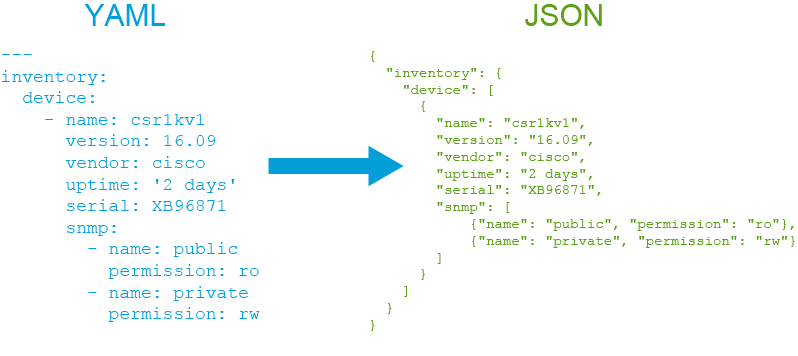
Several examples of YAML and JSON will be examined here to demonstrate the YAML syntax and explain it.
這裡將檢視幾個 YAML 與 JSON 的範例,說明並解釋 YAML 語法。
All YAML files begin with three hyphens (---), which is called a document separator. A file can have one or many document separators.
所有 YAML 檔案都以三個連字號(---)開頭,這稱為文件分隔符(document separator)。一個檔案可以有一個或多個文件分隔符。
Simple dictionary:
簡單字典:
#YAML
---
inventory: csr1kv1

#JSON
{
    "inventory": "csr1kv1"
}
As you can see, in YAML, there is no need to enclose the keys or their values in quotation marks, but when converted to JSON, they are surrounded by quotation marks.
如你所見,在 YAML 中,鍵或其值不需要用引號括起來,但轉換成 JSON 時,它們會被引號括起來。
Simple list:
簡單串列:
#YAML
---
- GigabitEthernet1
- GigabitEthernet2
- GigabitEthernet3

#JSON
[
    "GigabitEthernet1",
    "GigabitEthernet2",
    "GigabitEthernet3"
]
Here, each dash (") indicates an item in a list.
在這裡,每個破折號(“-”)代表串列中的一個項目。
Nested dictionary 1:
巢狀字典 1:
#YAML
---
inventory:
  device:
    csr1kv1:
      vendor: cisco

#JSON
{
    "inventory" :  {
        "device" : {
            "csr1kv1":  {
                "vendor": "cisco"
            }
        }
    }
}
Nested dictionary 2:
巢狀字典 2:
#YAML
---
inventory:
  device:
    - name: csr1kv1
      version: 16.09
      vendor: cisco
      uptime: '2 days'
      serial: XB96871
      snmp:
        - name: public
          permission: ro
        - name: private
          permission: rw

#JSON
{
  "inventory": {
    "device": [
      {
        "name": "csr1kv1",
        "version": "16.09",
        "vendor": "cisco",
        "uptime": "2 days",
        "serial": "XB96871",
        "snmp": [
            {"name": "public", "permission": "ro"},
            {"name": "private", "permission": "rw"}
        ]
      }
    ]
  }
}
Notice the indentation, which is the most crucial part when creating a nested dictionary.
請注意縮排,這是建立巢狀字典時最關鍵的部分。
From all these examples, it can be concluded that YAML is a superset of JSON, which means that JSON is also a valid YAML.
從這些範例可以得出結論:YAML 是 JSON 的超集,也就是說,任何有效的 JSON 也是有效的 YAML。
Now you will see how to convert YAML data into JSON using Python.
接下來你將了解如何使用 Python 將 YAML 資料轉換為 JSON。
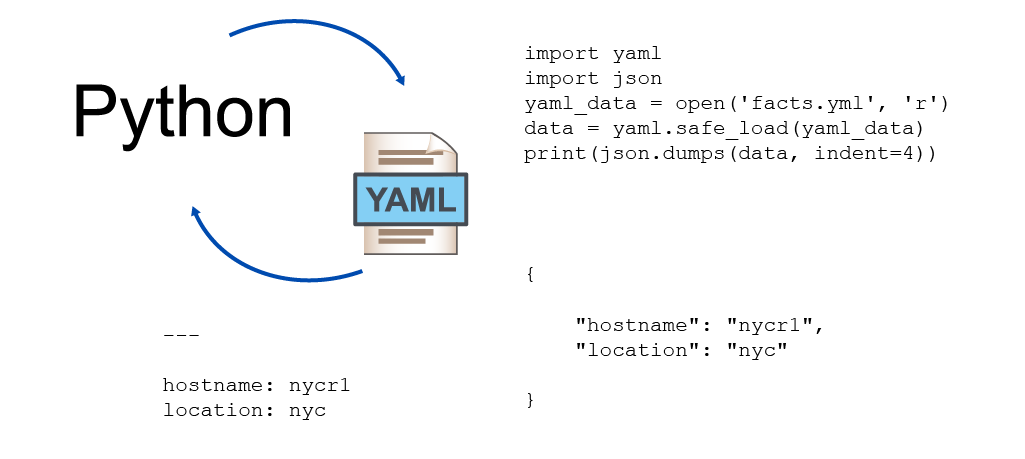
This demonstration uses the same YAML data and saved it in inventory.yml file.
此示範使用相同的 YAML 資料,並將其儲存在 inventory.yml 檔案中。
The contents of the file are as follows:
檔案內容如下:
student@student-vm:~/section07/sg/$ cat inventory.yml
---
inventory:
  device:
    - name: csr1kv1
      version: 16.09
      vendor: cisco
      uptime: '2 days'
      serial: XB96871
      snmp:
        - name: public
          permission: ro
        - name: private
          permission: rw
The rest of the interaction will happen in the Python interpreter.
其餘的操作將在 Python 直譯器中進行。
As always, you need to import the YAML module, which will help you properly interact with the data. The module name is yaml.
與往常一樣,你需要匯入 YAML 模組,才能正確地與資料互動。此模組名稱為 yaml。
>>> import yamlYou can load the contents of the file into a variable using the open() built-in method as follows:
你可以使用內建的 open() 方法,將檔案內容載入變數,如下所示:
>>> yaml_data = open('inventory.yml', 'r')Next, you can use the yaml module safe_load() method to load the contents of the file and assign the output to a new variable named data:
接著,你可以使用 yaml 模組的 safe_load() 方法載入檔案內容,並將輸出指派給一個名為 data 的新變數:
>>> data = yaml.safe_load(yaml_data)To check the type of data, use the built-in type() method. It should report that the type is a dictionary.
要檢查 data 的型態,可以使用內建的 type() 方法。它應該會回報該型態為字典。
>>> type(data)If needed, you can print the data, and even interact with its values:
如有需要,你可以印出 data,甚至可以與其值互動:
>>> print(data)
{'inventory': {'csr1kv1': {'osversion': 16.09, 'vendor': 'cisco', 'uptime': '2 days', 'serial': 'XB96871', 'snmp': [{'name': 'public', 'permission': 'ro'}, {'name': 'private', 'permission': 'rw'}]}}}
>>> print(data['inventory']['csr1kv1']['uptime'])
2 days
However, the goal is to convert YAML to JSON. The json module needs to be imported and the dumps function will be used to perform the final conversion:
然而,目標是要將 YAML 轉換為 JSON。這需要匯入 json 模組,並使用 dumps 函式來完成最後的轉換:
>>> import json
>>> print(json.dumps(data, indent=4))
{
    "inventory": {
        "csr1kv1": {
            "osversion": 16.09,
            "vendor": "cisco",
            "uptime": "2 days",
            "serial": "XB96871",
            "snmp": [
                {
                    "name": "public",
                    "permission": "ro"
                },
                {
                    "name": "private",
                    "permission": "rw"
                }
            ]
        }
    }
}