Usually, the Cisco networking devices operating system software image is located in the flash memory, but it can also be stored in other places, such as a TFTP server. In the example of Cisco IOS, the configuration register and configuration file determine where the Cisco IOS Software images are located and which image file to use.
Cisco 網路裝置的作業系統軟體映像檔通常位於快閃記憶體中,但也可能儲存在其他位置,例如 TFTP 伺服器。以 Cisco IOS 為例,設定暫存器與設定檔會決定 Cisco IOS 軟體映像檔的位置,以及要使用哪個映像檔。
Locating Cisco IOS Image Files
尋找 Cisco IOS 映像檔
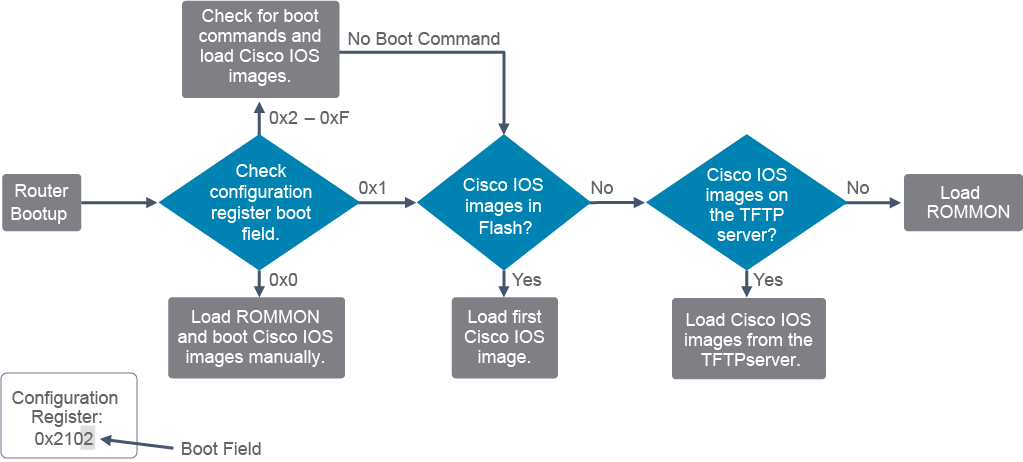
When a Cisco networking device boots, one of the steps is searching for Cisco IOS Software. For example, when a Cisco router boots, it searches for the Cisco IOS image in a specific sequence, as shown in the figure.
當 Cisco 網路裝置開機時,其中一個步驟就是搜尋 Cisco IOS 軟體。舉例來說,當 Cisco 路由器開機時,會依照如圖所示的特定順序搜尋 Cisco IOS 映像檔。
Note: ROMMON = ROM monitor.
註:ROMMON=ROM 監控程式(ROM monitor)。
The bootstrap code is responsible for locating Cisco IOS Software. It searches for the Cisco IOS image in this sequence:
開機程式碼負責找出 Cisco IOS 軟體,並依以下順序搜尋 Cisco IOS 映像檔:
- The bootstrap code checks the boot field of the configuration register. The configuration register is a 16-bit value; the lower 4 bits are the boot field. The boot field tells the router how to boot up. The boot field can indicate that the router looks for the Cisco IOS image in flash memory, or looks in the startup configuration file (if one exists) for commands that tell the router how to boot, or looks on a remote TFTP server. Alternatively, the boot field can specify that no Cisco IOS image will be loaded, and the router should start a Cisco ROM monitor (ROMMON) session.開機程式碼會檢查設定暫存器的開機欄位(boot field)。設定暫存器是一個 16 位元的數值,其中最低的 4 個位元即為開機欄位。開機欄位會告訴路由器該如何開機。開機欄位可以指示路由器在快閃記憶體中尋找 Cisco IOS 映像檔,或在啟動設定檔(若存在)中尋找告訴路由器如何開機的指令,或在遠端 TFTP 伺服器上尋找。此外,開機欄位也可以指定不載入任何 Cisco IOS 映像檔,讓路由器改為啟動 Cisco ROM 監控程式(ROMMON)工作階段。
- The bootstrap code evaluates the configuration register boot field value as described in the following list. In a configuration register value, the "0x" indicates that the digits that follow are in hexadecimal notation. A configuration register value of 0x2102, which is also a default factory setting, has a boot field value of 0x2"the far right digit in the register value is 2 and represents the lowest 4 bits of the register.開機程式碼會依照以下清單所述的方式,評估設定暫存器開機欄位的數值。在設定暫存器值中,「0x」表示接下來的數字是十六進位表示法。設定暫存器值 0x2102(同時也是出廠預設值)的開機欄位值為 0x2,也就是暫存器值中最右邊的數字 2,代表暫存器最低的 4 個位元。
- If the boot field value is 0x0, the router boots to the ROMMON session.若開機欄位值為 0x0,路由器會開機進入 ROMMON 工作階段。
- If the boot field value is 0x1, the router searches flash memory for Cisco IOS images.若開機欄位值為 0x1,路由器會在快閃記憶體中搜尋 Cisco IOS 映像檔。
- If the boot field value is 0x2 to 0xF, the bootstrap code parses the startup configuration file in NVRAM for
boot systemcommands that specify the name and location of the Cisco IOS Software image to load. (Examples ofboot systemcommands will follow.) Ifboot systemcommands are found, the router sequentially processes eachboot systemcommand in the configuration, until a valid image is found. If there are noboot systemcommands in the configuration, the router searches the flash memory for a Cisco IOS image.若開機欄位值為 0x2 到 0xF,開機程式碼會剖析 NVRAM 中的啟動設定檔,尋找boot system指令,該指令指定了要載入的 Cisco IOS 軟體映像檔名稱與位置(後面將提供boot system指令的範例)。若找到boot system指令,路由器會依序處理設定中的每一個boot system指令,直到找到有效的映像檔為止。若設定中沒有任何boot system指令,路由器會在快閃記憶體中搜尋 Cisco IOS 映像檔。
- If the router searches for and finds valid Cisco IOS images in flash memory, it loads the first valid image and runs it.若路由器搜尋後在快閃記憶體中找到有效的 Cisco IOS 映像檔,會載入第一個有效的映像檔並執行。
- If it does not find a valid Cisco IOS image in flash memory, the router attempts to boot from a network TFTP server using the boot field value as part of the Cisco IOS image filename.若在快閃記憶體中找不到有效的 Cisco IOS 映像檔,路由器會嘗試從網路上的 TFTP 伺服器開機,並使用開機欄位值作為 Cisco IOS 映像檔檔名的一部分。
- After six unsuccessful attempts at locating a TFTP server, the router starts a ROMMON session.在六次尋找 TFTP 伺服器失敗後,路由器會啟動 ROMMON 工作階段。
Configuration Register
設定暫存器
If you set the configuration register boot field value to 0x0, you must have console port access to boot the operating system manually from the ROMMON session. If you set the boot field to a value of 0x2 to 0xF, and there is a valid boot system command that is stored in the configuration file, the router software processes each boot system command in sequence until the process is successful or the end of the list is reached. If there are no boot system commands in the configuration file, the router attempts to boot the first file in the flash memory.
若您將設定暫存器的開機欄位值設為 0x0,則必須透過主控台埠存取,才能從 ROMMON 工作階段手動開機作業系統。若您將開機欄位設為 0x2 到 0xF 之間的值,且設定檔中已儲存有效的 boot system 指令,路由器軟體會依序處理每一個 boot system 指令,直到成功或到達清單結尾為止。若設定檔中沒有任何 boot system 指令,路由器會嘗試開機快閃記憶體中的第一個檔案。
Entering boot system commands in sequence in a router configuration can create a fault-tolerant boot plan. The boot system command is a global configuration command that allows you to specify the source for the Cisco IOS Software image to load. For example, the following command boots the system boot image file that is named c2900-universalk9-mz.SPA.152-4.M1.bin from the flash memory device:
在路由器設定中依序輸入 boot system 指令,可以建立容錯的開機計畫。boot system 指令是一個全域設定指令,讓您可以指定要載入的 Cisco IOS 軟體映像檔來源。例如,以下指令會從快閃記憶體裝置開機名為 c2900-universalk9-mz.SPA.152-4.M1.bin 的系統開機映像檔:
Branch(config)# boot system flash:/c2900-universalk9-mz.SPA.152-4.M1.binThis next example specifies a TFTP server as a source of a Cisco IOS image, with a ROMMON session as the backup:
以下範例則指定 TFTP 伺服器作為 Cisco IOS 映像檔的來源,並以 ROMMON 工作階段作為備援:
Branch(config)# boot system tftp://c2900-universalk9-mz.SPA.152-4.M1.bin
Branch(config)# boot system rom
Loading Cisco IOS Image Files
載入 Cisco IOS 映像檔
When a Cisco router locates a valid Cisco operating system image file in the flash memory, the Cisco operating system image is normally loaded into RAM to run. Image files are typically compressed, so the file must first be decompressed. After the file is decompressed into RAM, it is started.
當 Cisco 路由器在快閃記憶體中找到有效的 Cisco 作業系統映像檔時,通常會將該映像檔載入 RAM 以執行。映像檔通常是經過壓縮的,因此必須先進行解壓縮。檔案解壓縮到 RAM 之後,即會啟動。
For example, when Cisco IOS Software begins to load, you may see a string of hash signs (#), as shown in the figure, while the image decompresses.
舉例來說,當 Cisco IOS 軟體開始載入時,如圖所示,您可能會在映像檔解壓縮期間看到一連串的井字符號(#)。
Use the show version command to help verify and troubleshoot some of the basic hardware and software components of the router. The show version command displays information about the version of Cisco IOS Software that is currently running on the router, the version of the bootstrap program, and information about the hardware configuration, including the amount of system memory.
使用 show version 指令,可協助驗證與疑難排解路由器一些基本的硬體與軟體元件。show version 指令會顯示路由器目前執行的 Cisco IOS 軟體版本、開機程式(bootstrap program)的版本,以及硬體設定資訊,包括系統記憶體的容量。
Branch# show version
Cisco IOS Software, C2900 Software (C2900-UNIVERSALK9-M), Version 15.2(4)M1, RELEASE SOFTWARE (fc1)
Technical Support: http://www.cisco.com/techsupport
Copyright (c) 1986-2012 by Cisco Systems, Inc.
Compiled Thu 26-Jul-12 20:54 by prod_rel_team
ROM: System Bootstrap, Version 15.0(1r)M15, RELEASE SOFTWARE (fc1)
Branch uptime is 39 minutes
System returned to ROM by reload at 11:39:24 UTC Tue Nov 20 2012
System image file is "flash0:c2900-universalk9-mz.SPA.152-4.M1.bin"
Last reload type: Normal Reload
Last reload reason: Reload Command
Cisco CISCO2901/K9 (revision 1.0) with 483328K/40960K bytes of memory.
Processor board ID FCZ1642C5XJ
2 Gigabit Ethernet interfaces
1 Serial(sync/async) interface
1 terminal line
DRAM configuration is 64 bits wide with parity enabled.
255K bytes of non-volatile configuration memory.
250880K bytes of ATA System CompactFlash 0 (Read/Write)
<... output omitted ...>
Configuration register is 0x2102
Output from the show version command includes the following:
show version 指令的輸出包含以下內容:
- Cisco IOS versionCisco IOS 版本
Cisco IOS Software, C2900 Software (C2900-UNIVERSALK9-M), Version 15.2(4)M1, RELEASE SOFTWARE (fc1)This line from the example output shows the version of Cisco IOS Software in RAM that the router is using.
範例輸出中的這一行顯示路由器目前使用、位於 RAM 中的 Cisco IOS 軟體版本。
- ROM bootstrap programROM 開機程式
ROM: System Bootstrap, Version 15.0(1r)M15, RELEASE SOFTWARE (fc1)This line from the example output shows the version of the system bootstrap software that is stored in ROM and was initially used to boot up the router.
範例輸出中的這一行顯示儲存在 ROM 中、最初用來啟動路由器的系統開機軟體版本。
- Location of Cisco IOS imageCisco IOS 映像檔位置
System image file is "flash0:c2900-universalk9-mz.SPA.152-4.M1.bin"This line from the example output shows where the Cisco IOS image is located and loaded as well as its complete filename.
範例輸出中的這一行顯示 Cisco IOS 映像檔所在的位置與載入方式,以及其完整檔名。
- Interfaces介面
2 Gigabit Ethernet interfaces
1 Serial (sync/async) interface
This section of the output displays the physical interfaces on the router. In this example, the Cisco 2901 router has two Gigabit Ethernet interfaces and one serial interface.
輸出中的這一部分顯示路由器上的實體介面。在此範例中,Cisco 2901 路由器有兩個 Gigabit Ethernet 介面與一個序列介面。
- Amount of NVRAMNVRAM 容量
255 KB of NVRAMThis line from the example output shows the amount of NVRAM on the router.
範例輸出中的這一行顯示路由器上的 NVRAM 容量。
- Amount of Flash快閃記憶體容量
250880 KB of ATA System CompactFlash 0 (Read/Write)This line from the example output shows the amount of flash memory on the router.
範例輸出中的這一行顯示路由器上的快閃記憶體容量。
- Configuration register設定暫存器
Configuration register is 0x2102The last line of the
show versioncommand displays the current configured value of the software configuration register in hexadecimal format. This value indicates that the router will attempt to load a Cisco IOS Software image from flash memory and load the startup configuration file from NVRAM. 0x2102 is the factory-setting default.show version指令輸出的最後一行,會以十六進位格式顯示軟體設定暫存器目前設定的數值。此數值表示路由器會嘗試從快閃記憶體載入 Cisco IOS 軟體映像檔,並從 NVRAM 載入啟動設定檔。0x2102 為出廠預設值。You can change the value of the configuration register setting from Cisco IOS CLI or as previously mentioned, also from ROMMON session.
您可以從 Cisco IOS CLI 更改設定暫存器的設定值,如先前所述,也可以從 ROMMON 工作階段更改。
Here is how you would enter the new value from the Cisco IOS CLI:
以下說明如何從 Cisco IOS CLI 輸入新的數值:
Router(config)# config-register 0x2142After changing the value, you should exit the global configuration mode and save the configuration changes to NVRAM:
變更數值後,您應退出全域設定模式,並將設定變更儲存到 NVRAM:
Router(config)# end
Router# copy running-config startup-config
The new configuration register settings are saved to NVRAM but they will take effect only after the next router reload or power cycle.
新的設定暫存器設定會儲存到 NVRAM,但只有在路由器下次重新載入或重新開機後才會生效。
You can also verify the configuration register by using the show commands.
您也可以使用 show 指令來驗證設定暫存器。
Router#show bootvar
BOOT variable =
CONFIG_FILE variable does not exist
BOOTLDR variable does not exist
Configuration register is 0x2102 (will be 0x2142 at next reload)

Standby not ready to show bootvar
boot system commands during the Cisco router boot process?在 Cisco 路由器開機過程中,哪些設定暫存器開機欄位值會使路由器檢查啟動設定檔中的 boot system 指令?