When a device sends a packet to a destination, it encapsulates the packet into a frame. The packet contains IPv4 addresses, and the frame contains MAC addresses. Therefore, there must be a way to map an IPv4 address to a MAC address. For example, if you enter the ping 10.1.1.3 command, the MAC address of 10.1.1.3 must be included in the destination MAC address field of the frame that is sent. To determine the MAC address of the device with an IPv4 address 10.1.1.3, a process is performed by a Layer 2 protocol called ARP.
當裝置要將封包傳送到目的地時,會將封包封裝到框架中。封包內含 IPv4 位址,而框架內含 MAC 位址。因此,必須要有一種方式,將 IPv4 位址對應到 MAC 位址。舉例來說,若你輸入 ping 10.1.1.3 命令,10.1.1.3 的 MAC 位址就必須包含在所傳送框架的目的 MAC 位址欄位中。為判斷 IPv4 位址為 10.1.1.3 的裝置的 MAC 位址,會由一個稱為 ARP 的第 2 層協定執行此流程。
ARP provides two essential services:
ARP 提供兩項重要服務:
- Address resolution: Mapping IPv4 addresses to MAC addresses on a network位址解析:在網路上將 IPv4 位址對應到 MAC 位址
- Caching: Locally storing MAC addresses that are learned via ARP快取:在本地儲存透過 ARP 學到的 MAC 位址
The term address resolution in ARP refers to the process of binding or mapping the IPv4 address of a remote device to its MAC address. ARP sends a broadcast message to all devices on the local network. This message includes its own IPv4 address and the destination IPv4 address. The message asks the device on which the destination IPv4 address resides to respond with its MAC address. The address resolution procedure is completed when the originator receives the reply frame, which contains the required MAC address, and updates its table containing all the current bindings.
ARP 中的位址解析一詞,是指將遠端裝置的 IPv4 位址與其 MAC 位址進行綁定或對應的流程。ARP 會向本地網路上的所有裝置傳送廣播訊息,此訊息包含自己的 IPv4 位址與目的 IPv4 位址,並要求擁有該目的 IPv4 位址的裝置以其 MAC 位址回應。當發起端收到含有所需 MAC 位址的回覆框架,並更新其包含所有目前綁定關係的表格後,位址解析程序即告完成。
Using ARP to Resolve the MAC of a Local IPv4 Address
使用 ARP 解析本地 IPv4 位址的 MAC
Because ARP is a Layer 2 protocol, its scope is limited to the LAN. If the source and destination devices are on the same subnet, then the source can use ARP to determine the destination’s MAC address.
由於 ARP 是第 2 層協定,其作用範圍僅限於 LAN。若來源與目的裝置位於同一子網路,來源便可使用 ARP 判斷目的裝置的 MAC 位址。
For example, an IPv4 host 10.10.1.241/24 is on the 10.10.1.0/24 subnet. The host wants to communicate with another device with the IP address 10.10.1.175. The host determines that the destination device is also on the local 10.10.1.0/24 subnet, and it can use ARP to determine its MAC address to establish communication.
舉例來說,IPv4 主機 10.10.1.241/24 位於 10.10.1.0/24 子網路。此主機想要與 IP 位址為 10.10.1.175 的另一裝置通訊。該主機判斷目的裝置也位於本地的 10.10.1.0/24 子網路,因此可使用 ARP 判斷其 MAC 位址以建立通訊。
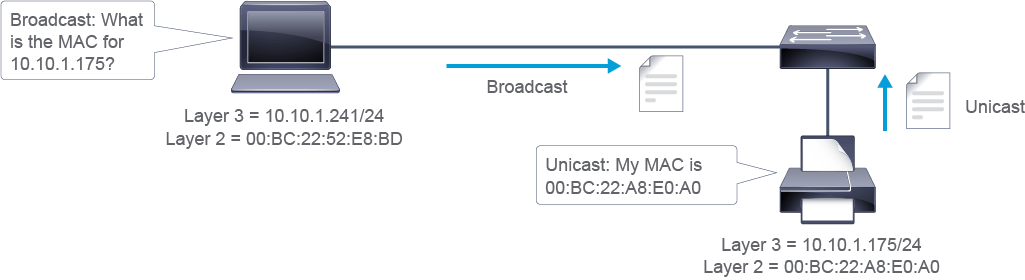
The following output shows the Wireshark analysis of the ARP messages. In the first example, you can see an ARP request sent as a broadcast to find out the MAC address of IPv4 host 10.10.1.175. In the second ARP message, you can see the ARP reply including the MAC address of the host, which is 00:bc:22:a8:e0:a0.
以下輸出顯示 ARP 訊息的 Wireshark 分析。在第一個範例中,你可以看到一個以廣播方式傳送的 ARP 請求,用於查詢 IPv4 主機 10.10.1.175 的 MAC 位址。在第二個 ARP 訊息中,你可以看到 ARP 回覆,其中包含該主機的 MAC 位址 00:bc:22:a8:e0:a0。
Source             Destination       Prot Info
00:bc:22:52:e8:bd   Broadcast         ARP  Who has 10.10.1.175?  Tell 10.10.1.241

Source             Destination       Prot Info
00:bc:22:a8:e0:a0  00:bc:22:52:e8:bd ARP  10.10.1.175 is at 00:bc:22:a8:e0:a0
A more detailed output of the ARP request contents is shown below. Notice that the host’s MAC address 00:bc:22:52:e8:bd appears twice. Once in the Ethernet frame as a source and once in the payload field (Info). It appears in the source field because the request message is a broadcast sourced from the host. However, the destination cannot learn the MAC address from the frame field because it is discarded during the decapsulation process. Therefore, the MAC address of the host is also put in the ARP payload, so the ARP protocol on the destination device can retrieve the MAC address and store it in its ARP cache.
以下是 ARP 請求內容更詳細的輸出。請注意,該主機的 MAC 位址 00:bc:22:52:e8:bd 出現了兩次:一次在 Ethernet 框架中作為來源,另一次則在承載資料欄位(Info)中。它出現在來源欄位,是因為此請求訊息是由該主機發出的廣播訊息。然而,目的裝置無法從框架欄位得知 MAC 位址,因為該欄位會在解封裝過程中被捨棄。因此,該主機的 MAC 位址也會放入 ARP 承載資料中,讓目的裝置上的 ARP 協定能夠擷取該 MAC 位址並儲存於其 ARP 快取中。
Ethernet II, Src: PC_52:e8:bd (00:bc:22:52:e8:bd), Dst: Broadcast (ff:ff:ff:ff:ff:ff)
    Destination: Broadcast (ff:ff:ff:ff:ff:ff)
    Source: Apple_7e:2c:f7 (00:bc:22:52:e8:bd)
    Type: ARP (0x0806)

Address Resolution Protocol (request)
    Hardware type: Ethernet (1)
    Protocol type: IPv4 (0x0800)
    Hardware size: 6
    Protocol size: 4
    Opcode: request (1)
    Sender MAC address: PC_52:e8:bd (00:bc:22:52:e8:bd)
    Sender IP address: 10.10.1.241
    Target MAC address: 00:00:00_00:00:00 (00:00:00:00:00:00)
    Target IP address: 10.10.1.175
Using ARP to Resolve the MAC of a Remote IPv4 Address
使用 ARP 解析遠端 IPv4 位址的 MAC
If the source and destination devices are not on the same subnet, then the source uses ARP to determine the default gateway’s MAC address.
若來源與目的裝置不在同一子網路,來源會使用 ARP 判斷預設閘道的 MAC 位址。
For example, when the source host 10.10.1.241 wants to communicate with the destination host 10.10.2.55, it compares this IPv4 address against its subnet mask and discovers that the host is on a different IPv4 subnet (10.10.2.0/24). When a host wants to send data to a device that is on another network or subnet, it encapsulates the packet in a frame addressed to its default gateway. So, the destination MAC address in the frame needs to be the MAC address of the default gateway. In this situation, the source must send an ARP request to find the MAC address of the default gateway. In the example, host 10.10.1.241 sends a broadcast with an ARP Request for the MAC address of 10.10.1.1.
舉例來說,當來源主機 10.10.1.241 想要與目的主機 10.10.2.55 通訊時,它會將此 IPv4 位址與其子網路遮罩進行比對,並發現該主機位於不同的 IPv4 子網路(10.10.2.0/24)。當主機想要將資料傳送給位於另一個網路或子網路的裝置時,會將封包封裝在定址至其預設閘道的框架中。因此,框架中的目的 MAC 位址必須是預設閘道的 MAC 位址。在這種情況下,來源必須傳送 ARP 請求以查詢預設閘道的 MAC 位址。在範例中,主機 10.10.1.241 傳送了一個廣播,內含查詢 10.10.1.1 的 MAC 位址的 ARP 請求。
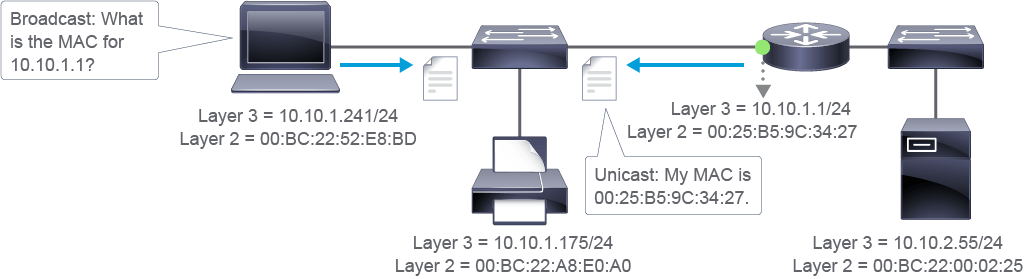
The following output shows the Wireshark analysis of ARP messages. In the first example, you can see an ARP request sent as a broadcast to find out the MAC address of IPv4 host 10.10.1.1. In the second ARP message, you can see the ARP reply showing that the MAC address of the default gateway is 00:25:b5:9c:34:27.
以下輸出顯示 ARP 訊息的 Wireshark 分析。在第一個範例中,你可以看到一個以廣播方式傳送的 ARP 請求,用於查詢 IPv4 主機 10.10.1.1 的 MAC 位址。在第二個 ARP 訊息中,你可以看到 ARP 回覆顯示預設閘道的 MAC 位址為 00:25:b5:9c:34:27。
Understanding the ARP Cache
了解 ARP 快取
Each IPv4 device on a network segment maintains a table in memory—the ARP table or ARP cache. The purpose of this table is to cache recent IPv4 addresses to MAC address bindings. When a host wants to transmit data to another host on the same subnet, it searches the ARP table to see if there is an entry. If there is an entry, the host uses it. If there is no entry, the IPv4 host sends an ARP broadcast requesting resolution.
網路區段上的每個 IPv4 裝置都會在記憶體中維護一個表格,即 ARP 表或 ARP 快取。此表格的用途是快取最近的 IPv4 位址與 MAC 位址綁定關係。當主機想要將資料傳輸給同一子網路上的另一台主機時,會先搜尋 ARP 表以確認是否已有相關項目。若有該項目,主機便會使用它;若沒有,該 IPv4 主機便會傳送 ARP 廣播以要求解析。
Each entry, or row, of the ARP table, has a pair of values—an IPv4 address and a MAC address. The relationship between the two values is a map, which simply means that you can locate an IPv4 address in the table and discover the corresponding MAC address. The ARP table caches the mapping for the devices on the local LAN, including the default gateway.
ARP 表中的每個項目(或稱列)都包含一對數值,即 IPv4 位址與 MAC 位址。這兩個值之間的關係是一種對應,意思是你可以在表格中找到某個 IPv4 位址,並得知對應的 MAC 位址。ARP 表會快取本地 LAN 上裝置(包括預設閘道)的對應關係。
The device creates and maintains the ARP table dynamically, adding and changing address relationships as they are used on the local host. The entries in an ARP table expire after a while; the default expiry time for Cisco devices is 4 hours. Other operating systems (Windows, macOS) might have a different value; Windows uses a random value between 15 and 45 seconds. This timeout ensures that the table does not contain information for systems that may be switched off or moved. When the local host wants to transmit data again, the entry in the ARP table is regenerated through the ARP process.
裝置會動態建立並維護 ARP 表,隨著本地主機使用位址關係而新增或變更。ARP 表中的項目會在一段時間後過期;Cisco 裝置的預設過期時間為 4 小時。其他作業系統(Windows、macOS)可能有不同的數值;Windows 使用介於 15 到 45 秒之間的隨機值。此逾時機制可確保表格中不會保留可能已關機或已移動之系統的資訊。當本地主機再次想要傳輸資料時,ARP 表中的項目會透過 ARP 流程重新產生。
If no device responds to the ARP request, then the original packet is dropped because a frame to put the packet in cannot be created without the destination MAC address.
若沒有裝置回應 ARP 請求,原始封包便會被捨棄,因為若沒有目的 MAC 位址,就無法建立用來承載該封包的框架。
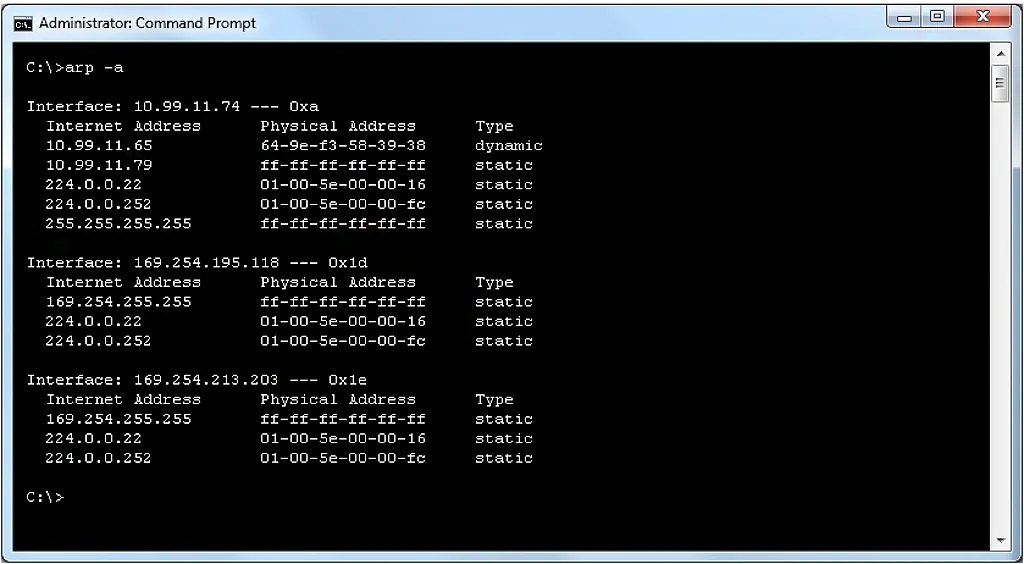
On a Microsoft Windows PC, the arp -a command displays the current ARP table for all interfaces on the PC.
在 Microsoft Windows 電腦上,arp -a 命令會顯示該電腦所有介面目前的 ARP 表。
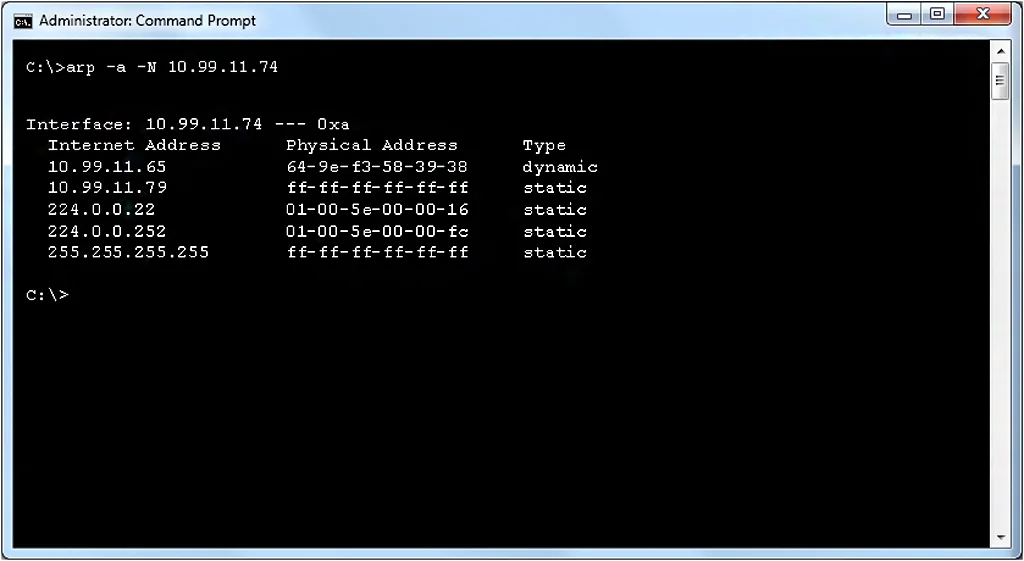
To limit the output of the arp command to a single interface, use the arp -a -Nip_address command.
若要將 arp 命令的輸出限制在單一介面,請使用 arp -a -Nip_address 命令。
The proper syntax to display the ARP table is show ip arp [ip-address] [host-name] [mac-address] [interface type number].
顯示 ARP 表的正確語法為 show ip arp [ip-address] [host-name] [mac-address] [interface type number]。
Syntax Description
語法說明
Parameter 參數 | Description 說明 |
ip-address ip-address | (Optional) Displays ARP entries matching this IPv4 address (選用)顯示符合此 IPv4 位址的 ARP 項目 |
host-name host-name | (Optional) Hostname (選用)主機名稱 |
mac-address mac-address | (Optional) 48-bit MAC address (選用)48 位元 MAC 位址 |
interface type number interface type number | (Optional) Displays ARP entries that are learned via this interface type and number (選用)顯示透過此介面類型與編號學到的 ARP 項目 |