Unlike a computer host, Cisco switches do not have a keyboard, monitor, or mouse device to allow direct user interaction. Upon initial installation, you can configure the switch from a PC that is connected directly through the console port on the switch.
與電腦主機不同,Cisco 交換器沒有鍵盤、螢幕或滑鼠可供使用者直接操作。初次安裝時,你可以透過 PC 直接連接交換器的主控台(console)連接埠來進行設定。
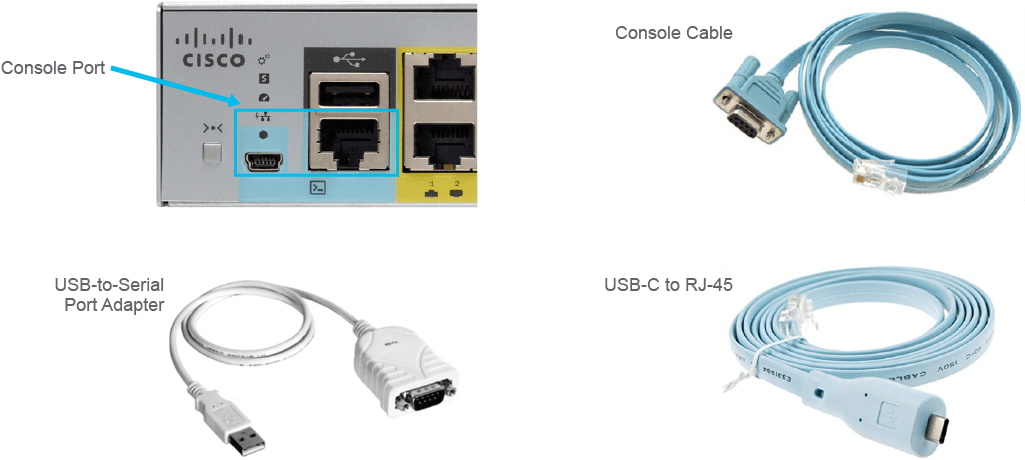
Cisco devices traditionally have an RJ-45 connector on their serial console port. On newer Cisco network devices, a USB serial console connection is also supported. An appropriate console cable is typically included with the Cisco device. Since modern computers and notebooks rarely include built-in serial ports, you may also need an adapter.
傳統上,Cisco 裝置的序列主控台連接埠使用 RJ-45 接頭。在較新的 Cisco 網路裝置上,也支援 USB 序列主控台連線。Cisco 裝置通常會隨附適用的主控台線纜。由於現今的電腦與筆記型電腦很少內建序列埠,你可能還需要一個轉接器。
You need the following equipment to access a Cisco device through its console port:
透過主控台連接埠存取 Cisco 裝置需要以下設備:
- The appropriate cable and adapters, depending on the console port you use and the connectors on your PC (such as an RJ-45-to-DB-9 console cable, a USB-to-DB-9 adapter, a USB Type A-to-5-pin, mini-Type B, or USB-C to RJ-45 console cable).依你所使用的主控台連接埠及 PC 上的接頭而定,適當的線纜與轉接器(例如 RJ-45 轉 DB-9 主控台線、USB 轉 DB-9 轉接器、USB Type A 轉 5-pin mini-Type B,或 USB-C 轉 RJ-45 主控台線)。
- PC or equivalent with a serial or USB port, an operating system device driver, and terminal emulator software, such as HyperTerminal or Tera Term, configured with these settings, as required by the switch or router:具備序列埠或 USB 埠的 PC 或同等裝置、作業系統裝置驅動程式,以及終端機模擬軟體(如 HyperTerminal 或 Tera Term),並依交換器或路由器所需,設定以下參數:
- Speed: 9600 bps速度:9600 bps
- Data bits: 8資料位元:8
- Parity: None同位檢查:無
- Stop bit: 1停止位元:1
- Flow control: None流量控制:無
When a console connection is established, you gain access to user EXEC mode by default.
建立主控台連線後,預設會進入使用者 EXEC 模式。