The following commands are used in global configuration mode to configure extended numbered IPv4 ACLs:
下列指令用於全域設定模式,以設定編號式延伸 IPv4 ACL:
Router(config)# access-list access-list-number permit|deny protocol source_matching_criteria destination_matching_criteriaSpecifying an ACL number from 100 to 199 or 2000 to 2699 instructs the router to accept numbered extended IPv4 ACL statements. The CLI allows only the syntax applicable for extended ACL statements.
指定 100 到 199 或 2000 到 2699 之間的 ACL 編號,會指示路由器接受編號式延伸 IPv4 ACL 陳述式。CLI 只允許適用於延伸 ACL 陳述式的語法。
The following commands are used to configure extended named IPv4 ACLs:
下列指令用於設定具名延伸 IPv4 ACL:
Router(config)# ip access-list extended access-list-name
Router(config-ext-nacl)# [sequence-number] permit | deny protocol source_matching_criteria destination_matching_criteria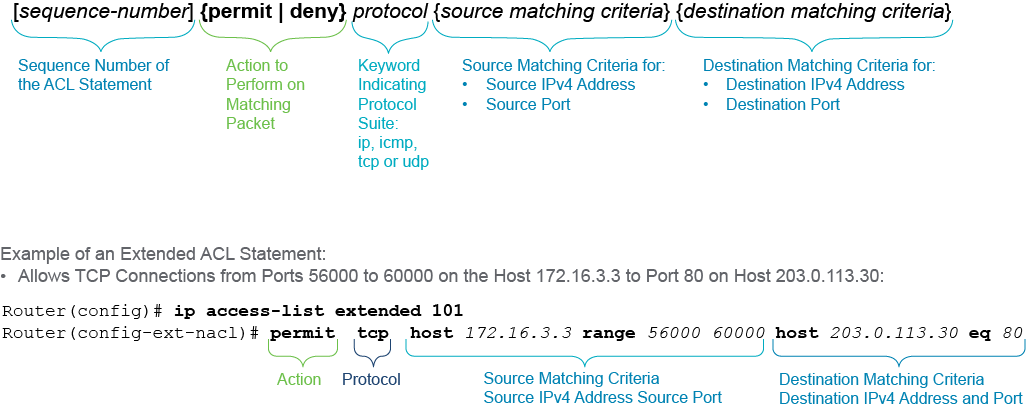
The figure shows the anatomy of a numbered extended ACL statement. An extended ACL statement has more elements than a standard ACL statement.
圖中顯示編號式延伸 ACL 陳述式的組成。延伸 ACL 陳述式比標準 ACL 陳述式包含更多元素。
In addition to the ACL number and action keyword, the extended ACL statement contains:
除了 ACL 編號與動作關鍵字之外,延伸 ACL 陳述式還包含:
- A keyword indicating a protocol suite, such as
ip,icmp,tcp, orudp. Keywordipmatches all protocols. Since it matches all protocols, it works similarly to "any" for the protocol section of the ACL.表示協定套組的關鍵字,例如ip、icmp、tcp或udp。關鍵字ip符合所有協定,由於它符合所有協定,在 ACL 的協定部分作用類似於「any」。 - Matching criteria for the source IPv4 address and optionally port來源 IPv4 位址(及選擇性連接埠)的比對條件
- Matching criteria for the destination IPv4 address and optionally port目的 IPv4 位址(及選擇性連接埠)的比對條件
The syntax for specifying matching criteria allows the following:
指定比對條件的語法允許以下方式:
- Specifying IPv4 address using syntax source [source-wildcard] |
host{address | name} |any使用語法 source [source-wildcard] |host{address | name} |any指定 IPv4 位址- Option 1:Reference IPv4 address and a wildcard mask選項 1:參照 IPv4 位址與萬用字元遮罩
- Option 2:Keyword
hostand a reference IPv4 address or host name選項 2:關鍵字host及參照 IPv4 位址或主機名稱 - Option 3: Keyword
any選項 3:關鍵字any
- Optionally specifying either the source port or the destination port, or both ports, using the syntax operator port選擇性地使用語法 operator port 指定來源連接埠或目的連接埠,或兩者皆指定
- Port matching criteria uses operators to specify a single port number or range of port numbers連接埠比對條件使用運算子來指定單一連接埠號碼或連接埠號碼範圍
- Specify a single port using syntax operand eq (equal), lt (less than), gt (greater than), or neq (not equal), followed by port number (for instance 80), or the protocol name (for well-known protocols, such as www).使用語法 operand eq(等於)、lt(小於)、gt(大於)或 neq(不等於),後接連接埠號碼(例如 80)或協定名稱(適用於公認協定,例如 www),指定單一連接埠
- Specify a range of ports using syntax: operand range (inclusive range) with the first and the last port number of the range使用語法:operand range(含頭尾的範圍)搭配範圍的第一個與最後一個連接埠號碼,指定連接埠範圍
In an extended access list, you must specify matching criteria both for the source and for the destination header parameters. The previous figure shows a sample configuration which includes a statement permitting only TCP connections from client port numbers in the range of 56000 to 60000 on the host 172.16.3.3 to establish connection to port 80 on host 203.0.113.30. Note that matching criteria is first fully specified for the source information and only then matching criteria for the destination is given. If you are specifying both IPv4 address and a port, specify both for the source part before you specify the destination criteria.
在延伸存取清單中,你必須同時為來源與目的標頭參數指定比對條件。上圖顯示了一個範例設定,其中包含一條陳述式,只允許來自主機 172.16.3.3 上用戶端連接埠 56000 到 60000 範圍的 TCP 連線,建立至主機 203.0.113.30 上連接埠 80 的連線。請注意,比對條件會先完整指定來源資訊,之後才指定目的的比對條件。若你同時指定 IPv4 位址與連接埠,須先在來源部分兩者都指定完畢,才能指定目的的比對條件。
An example of a numbered extended ACL configuration on RouterX, denying remote access via Telnet or SSH from the devices in the 172.16.3.0/24 subnet and permitting other traffic, is below:
以下是在 RouterX 上設定編號式延伸 ACL 的範例,此設定拒絕來自 172.16.3.0/24 子網路裝置透過 Telnet 或 SSH 的遠端存取,並允許其他流量:
RouterX(config)# access-list 101 deny tcp 172.16.3.0 0.0.0.255 any eq 22
RouterX(config)# access-list 101 deny tcp 172.16.3.0 0.0.0.255 any eq telnet
RouterX(config)# access-list 101 permit ip 172.16.3.0 0.0.0.255 any
It is very important to note that in this example the port numbers are destination port numbers because they come after the destination address (which in this case is represented by the keyword any). Port numbers that appear after the source address are source port numbers.
很重要的一點是,在此範例中,這些連接埠號碼是目的連接埠號碼,因為它們出現在目的位址(此處以關鍵字 any 表示)之後。出現在來源位址之後的連接埠號碼,則是來源連接埠號碼。
The ip access-list extended command is used for the named extended IPv4 access lists. Note the ip keyword added at the beginning of the command. You must specify the keyword extended.
ip access-list extended 指令用於具名延伸 IPv4 存取清單。請注意指令開頭加上的 ip 關鍵字,你必須指定關鍵字 extended。
Using the ip access-list extended command takes you to the Named Access List configuration mode, which is indicated by the Router(config-ext-nacl)# prompt. Note the abbreviation ext in the prompt, standing for extended.
使用 ip access-list extended 指令會進入具名存取清單設定模式,以 Router(config-ext-nacl)# 提示字元表示。請注意提示字元中的縮寫 ext,代表 extended。
Named configuration mode allows you to specify numbers as names, as long as you use the numbers assigned for the type of the access list you are configuring.
具名設定模式允許你以編號作為名稱,只要使用該類型存取清單所分配的編號即可。
An example of a named configuration of the same extended ACL from the previous example is:
以下是使用具名設定方式,重新設定上例中同一個延伸 ACL 的範例:
RouterX(config)# ip access-list extended 101
RouterX(config-ext-nacl)# deny tcp 172.16.3.0 0.0.0.255 any eq 22
RouterX(config-ext-nacl)# deny tcp 172.16.3.0 0.0.0.255 any eq 23
RouterX(config-ext-nacl)# permit ip 172.16.3.0 0.0.0.255 any
Notice that in the named configuration of the same extended ACL the port number 23 was used instead of keyword telnet.
請注意,在該延伸 ACL 的具名設定中,使用了連接埠號碼 23,而不是關鍵字 telnet。
The order of the ACL statements is important also for the extended ACLs. The ACL processing is sequential. For example, ACL processing starts with the first ACL statement and continues top down until the first match is encountered. The matching ACL statement is executed and the processing stops. Remaining statements are not evaluated. Therefore, more specific ACL statements, such as those permitting and denying particular hosts, should be placed before the statements matching on wider range of addresses.
ACL 陳述式的順序對延伸 ACL 同樣重要。ACL 的處理是循序的,例如,ACL 處理會從第一條 ACL 陳述式開始,由上而下持續進行,直到遇到第一個相符項目為止。相符的 ACL 陳述式會被執行,處理隨即停止,其餘陳述式不會再被評估。因此,較具體的 ACL 陳述式(例如允許或拒絕特定主機的陳述式)應放在比對較廣範圍位址的陳述式之前。
An implicit deny any any statement is added to the end of each extended IPv4 access list, denying all traffic that did not match ACL statements.
每個延伸 IPv4 存取清單的結尾都會加上一條隱含的 deny any any 陳述式,拒絕所有未符合 ACL 陳述式的流量。