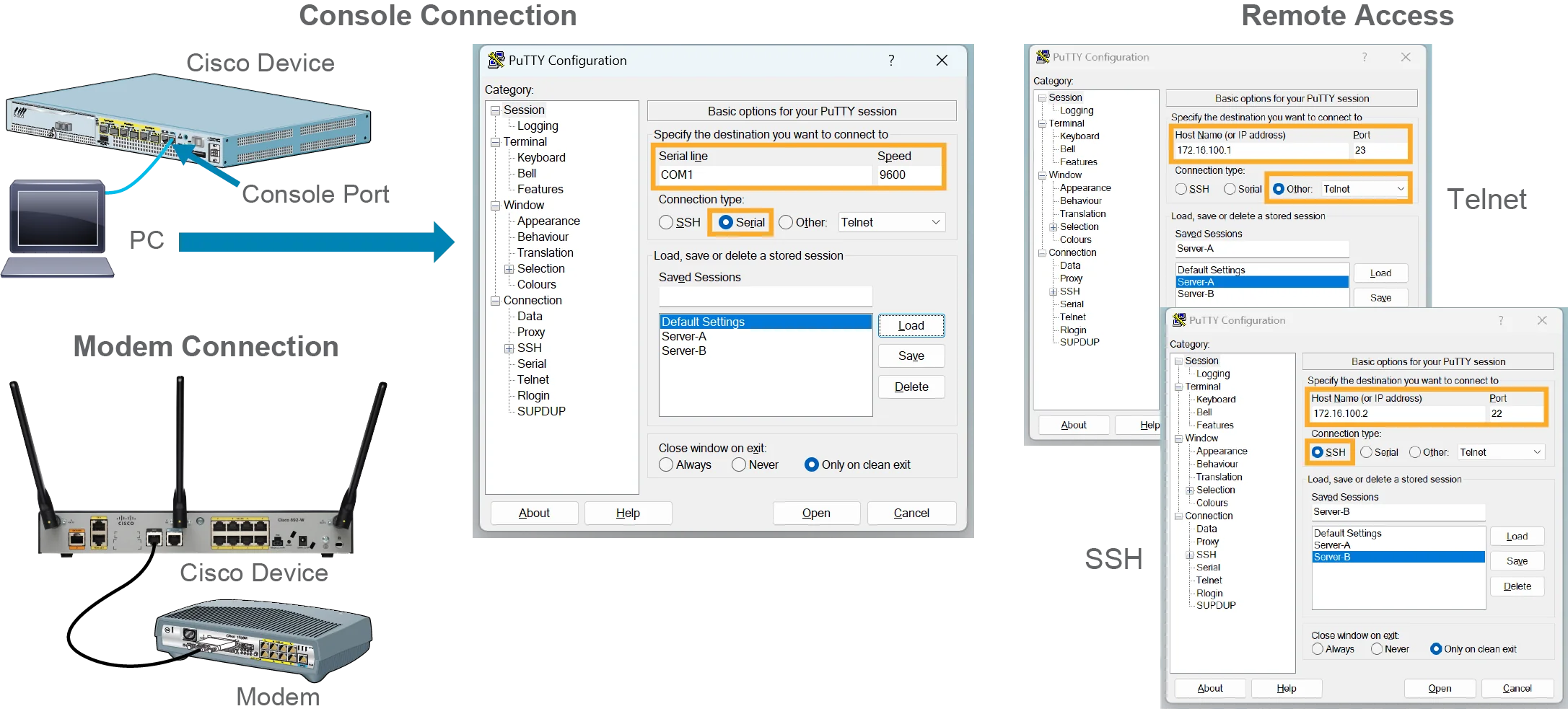
One way that you can access the CLI is through a direct, cabled connection that is called the console connection. To access the CLI directly using a console connection, you must be physically present at the location of the device. Accessing a device CLI through a console connection is also called out-of-band (OOB) access, emphasizing that no network bandwidth is consumed in the process.
您可以透過一種稱為主控台連線的直接纜線連線方式來存取 CLI。若要透過主控台連線直接存取 CLI,您必須親自到裝置所在的位置。透過主控台連線存取裝置 CLI 也稱為頻外(OOB)存取,強調此過程不會佔用任何網路頻寬。
Another way to access the CLI is through the network using protocols that are designed to provide remote access to the CLI, such as Secure Shell (SSH) and Telnet. SSH is a secure method to remotely access the CLI. Telnet is an unsecured method of establishing a CLI session. Unlike a console connection, SSH and Telnet connections require an active networking service running on the device. Because these CLI connections consume network bandwidth, they are also called in-band access. Network-based access to the CLI lets you be somewhere other than the location of the accessed device. Remote CLI access is convenient for network engineers, but it is subject to security risks inherently present in the networks used in remote access.
另一種存取 CLI 的方式,是透過網路使用專門設計用來提供 CLI 遠端存取的通訊協定,例如安全殼層(SSH)與 Telnet。SSH 是一種安全的 CLI 遠端存取方式,Telnet 則是一種不安全的建立 CLI 工作階段的方式。與主控台連線不同,SSH 與 Telnet 連線需要裝置上執行中的網路服務。由於這類 CLI 連線會佔用網路頻寬,因此也稱為頻內存取。以網路為基礎的 CLI 存取方式,讓您不必親自前往受存取裝置的所在位置。遠端 CLI 存取對網路工程師而言相當方便,但也會受到遠端存取所使用網路中固有的安全風險影響。
Regardless of which connection method you use, access to the Cisco IOS CLI is generally referred to as an executive or EXEC session. The features that you can access via the CLI vary according to the version of Cisco IOS Software installed and the type of device.
無論您使用哪一種連線方式,存取 Cisco IOS CLI 通常都稱為執行(executive)或 EXEC 工作階段。您能透過 CLI 存取的功能,會因所安裝的 Cisco IOS Software 版本與裝置類型而有所不同。
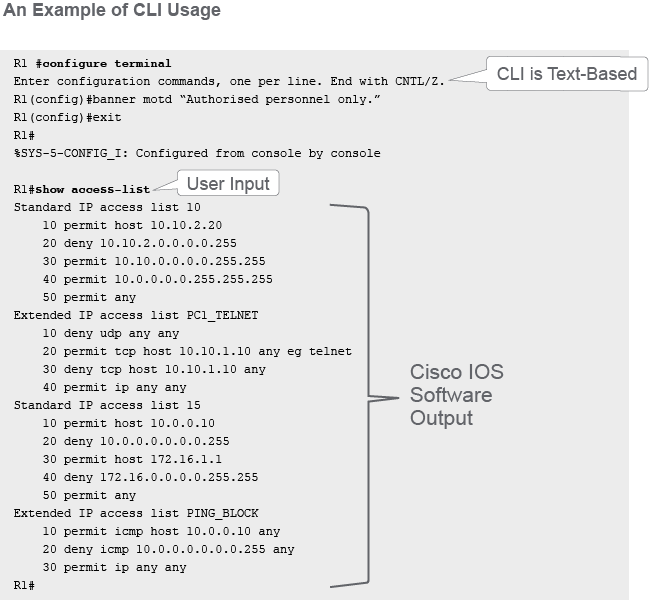
The services that are provided by Cisco IOS Software are generally accessed using a CLI. The CLI is a text-based interface that is similar to the old Microsoft operating system that is called MS-DOS.
Cisco IOS Software 所提供的服務,通常是透過 CLI 存取。CLI 是一種文字模式介面,類似舊版 Microsoft 作業系統 MS-DOS。
Once you access the shell via the CLI or GUI, you can enter different commands. Commands are used to configure, monitor, and manage the device and are executed by the device operating system. While Cisco IOS Software provides core software that extends across many products, the details of its operation and also the available services may vary across different devices. Therefore, different devices will have different commands available for execution.
透過 CLI 或 GUI 存取外殼之後,您就可以輸入不同的指令。指令用於設定、監控及管理裝置,並由裝置的作業系統執行。雖然 Cisco IOS Software 提供跨多種產品共用的核心軟體,但其實際運作細節與可用服務會因裝置而異,因此不同裝置可執行的指令也會有所不同。
Cisco IOS software CLI functions
Cisco IOS Software 的 CLI 功能
- The CLI is used to enter commands.CLI 用於輸入指令。
- Operations vary on different internetworking devices.不同互連網路裝置的操作方式各異。
- Users type in or copy and paste entries in the console command modes.使用者在主控台指令模式中輸入或複製貼上項目。
- Command modes have distinctive prompts.各指令模式都有各自獨特的提示字元。
- Pressing Enter instructs the device to parse (translate) and execute the command.按下 Enter 鍵會指示裝置剖析(轉譯)並執行該指令。
- The two primary EXEC modes are user mode and privileged mode.兩種主要的 EXEC 模式為使用者模式與特權模式。
Cisco IOS Software is designed as a modal operating system. The term modal describes a system that has various modes of operation. Each mode has its own set of commands and command history and is intended for usage for a specific group of tasks. The CLI uses a hierarchical structure for the modes. This hierarchy starts with the least specific command mode or higher-level mode and proceeds with more specific or lower-level command modes. A more specific command mode can be entered from the less specific mode, which precedes it in the hierarchy.
Cisco IOS Software 設計為一種模態作業系統。模態一詞用來描述具有多種操作模式的系統。每種模式都有其專屬的指令集與指令歷史記錄,並專供執行特定一組工作之用。CLI 的各模式採用階層結構。此階層由較不特定或較高層級的指令模式開始,逐步進入較特定或較低層級的指令模式。從階層中位於較不特定模式之前的模式,可進入更特定的指令模式。
To enter commands into the CLI, type in or copy and paste the entries within one of the several console command modes. Each command mode is indicated with a distinctive visual prompt. The term prompt is used because the system is prompting you to make an entry. Pressing enter instructs the device to parse and execute the command.
若要在 CLI 中輸入指令,可在多種主控台指令模式之一中輸入或複製貼上項目。每種指令模式都以獨特的視覺提示字元表示。之所以稱為「提示」,是因為系統正在提示您進行輸入。按下 Enter 鍵會指示裝置剖析並執行該指令。
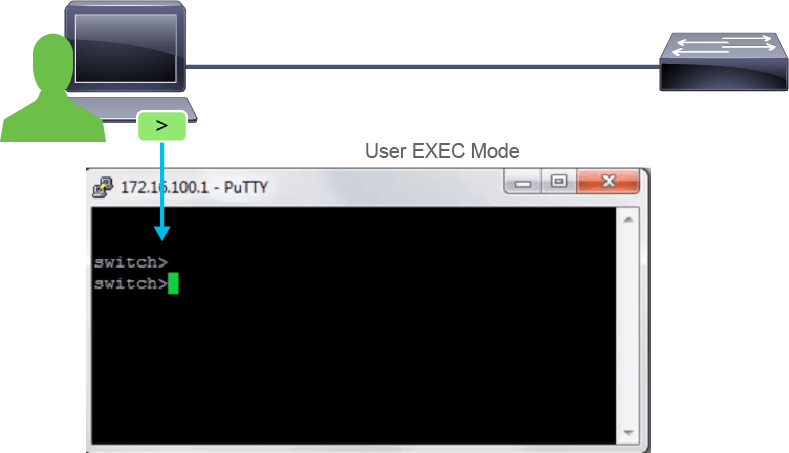
Each command mode has a name and a distinctive visual prompt by which it can be recognized. By default, every prompt begins with the device name. Following the device name, the remainder of the prompt uses special characters and words to indicate the mode. As you use commands and change the operation mode, the prompt changes to reflect the current context. To enter a command, you can either type them in or copy and paste the entries. Once you are done, press Enter and the device will parse and execute the command if the command was entered correctly.
每種指令模式都有各自的名稱與可供辨識的獨特視覺提示字元。根據預設,每個提示字元都以裝置名稱開頭。在裝置名稱之後,提示字元的其餘部分會使用特殊字元與文字來表示該模式。當您使用指令並切換操作模式時,提示字元也會隨之改變,以反映目前的情境。若要輸入指令,您可以自行輸入,也可以複製貼上項目。完成後,按下Enter鍵,若指令輸入正確,裝置便會剖析並執行該指令。
The example in the figure shows a CLI prompt switch>. The device in the example is named switch, and the operating CLI mode is indicated by the greater-than sign (>).
圖中的範例顯示 CLI 提示字元 switch>。範例中的裝置名稱為 switch,且大於符號(>)表示目前所處的 CLI 操作模式。
As a security feature, to limit the commands that a user can view and execute, Cisco IOS Software separates CLI sessions into two primary access levels:
為了限制使用者可檢視與執行的指令,作為一項安全功能,Cisco IOS Software 將 CLI 工作階段區分為兩個主要存取層級:
- User EXEC: Allows a person to execute only a limited number of basic monitoring commands.使用者執行模式:只允許使用者執行少數基本的監控指令。
- Privileged EXEC: Allows a person to execute all device commands, for example, all configuration and management commands. This level can be password protected to allow only authorized users to execute the privileged set of commands.特權執行模式:允許使用者執行所有裝置指令,例如所有設定與管理指令。此層級可設定密碼保護,僅允許經授權的使用者執行特權指令集。