Wi-Fi-compatible devices can connect to a network or the internet via a WLAN and an AP. Coverage can be as small as a single room, or as large as many square kilometers achieved by using multiple overlapping APs. Wi-Fi works best in line of sight. Many construction materials and other obstacles absorb or reflect Wi-Fi, which restricts Wi-Fi's range below its 100-meter maximum distance.
支援 Wi-Fi 的裝置可透過 WLAN 與 AP 連上網路或網際網路。涵蓋範圍可以小到單一房間,也可以透過多個重疊的 AP 達到數平方公里之大。Wi-Fi 在視線範圍內運作效果最佳。許多建材與其他障礙物會吸收或反射 Wi-Fi 訊號,使 Wi-Fi 的實際範圍低於其 100 公尺的最大距離。
Wi-Fi networks are based on the IEEE 802.11 standard and operate in the 2.4-GHz and 5-GHz spectrum, which is allocated for unlicensed industrial, scientific, and medical (ISM) usage.
Wi-Fi 網路以 IEEE 802.11 標準為基礎,運作於 2.4 GHz 與 5 GHz 頻譜,這些頻譜是分配給非授權的工業、科學及醫療(ISM)用途。
IEEE 802.11 amendments evolved through time. The original standard was created in 1997. Then, wireless was designed to operate in 2.4-GHz frequency bands and enabled low data rates (1 and 2 Mbps), resulting in slow connectivity.
IEEE 802.11 修訂版本隨時間演進。最初的標準訂於 1997 年。當時無線網路設計運作於 2.4 GHz 頻帶,資料速率僅有 1 與 2 Mbps,連線速度緩慢。
It was quickly realized that those data rates were too slow, so the first amendment to the standard was developed"802.11b. 802.11b also operates in 2.4-GHz frequency band, but it offers higher data rates (1, 2, 5.5, and 11 Mbps). At the same time, a new amendment was developed, 802.11a, that extended wireless operation also in the 5-GHz frequency band. This development was necessary, because the 2.4 GHz was becoming crowded, causing interference. Since 802.11a operated in a different frequency band, another type of modulation was used that changed (increased) the data rates up to 54 Mbps (6, 9, 12, 18, 24, 36, 48, and 54 Mbps).
很快就發現這些資料速率太慢,因此開發出標準的第一個修訂版——802.11b。802.11b 同樣運作於 2.4 GHz 頻帶,但提供更高的資料速率(1、2、5.5 及 11 Mbps)。同一時期也開發出另一個修訂版 802.11a,將無線運作延伸至 5 GHz 頻帶。這項發展有其必要性,因為 2.4 GHz 頻帶已日益擁擠,造成干擾。由於 802.11a 運作於不同頻帶,因此採用另一種調變方式,將資料速率提升至最高 54 Mbps(6、9、12、18、24、36、48 及 54 Mbps)。
What was achieved in the 5-GHz frequency band was also needed in the 2.4-GHz band. For this reason, the 802.11g amendment was developed, offering the same data rates, up to 54 Mbps in the 2.4-GHz frequency band. For backward compatibility with 802.11b, data rates of 1, 2, 5.5, and 11 are still supported in 802.11g.
5 GHz 頻帶所達成的效果,在 2.4 GHz 頻帶也同樣需要。因此開發出 802.11g 修訂版,在 2.4 GHz 頻帶提供相同的資料速率,最高可達 54 Mbps。為與 802.11b 向下相容,802.11g 仍支援 1、2、5.5 及 11 的資料速率。
In 2009, a new amendment was ratified, 802.11n, which tried to address the negative aspects of previous amendments. Using different techniques (modulation, beamforming, and so on), it improved the performance of the wireless significantly, also increasing the data rates up to 600 Mbps. 802.11n is the first amendment that supports both frequency bands, 2.4 GHz and 5 GHz, and is, therefore, backward compatible with all the existing amendments"802.11a, b, and g.
2009 年通過了新的修訂版 802.11n,試圖解決先前修訂版的缺點。透過不同技術(調變、波束成形等),大幅提升無線效能,並將資料速率提升至最高 600 Mbps。802.11n 是第一個同時支援 2.4 GHz 與 5 GHz 兩個頻帶的修訂版,因此能向下相容所有既有修訂版——802.11a、b 及 g。
802.11ac further improved those data rates that 802.11n brought and can, in theory, achieve up to almost 3500 Mbps. However, 802.11ac operates only in the 5-GHz frequency band and is, therefore, backward compatible only with 802.11a and n.
802.11ac 進一步提升了 802.11n 帶來的資料速率,理論上最高可達近 3500 Mbps。然而,802.11ac 僅運作於 5 GHz 頻帶,因此只能向下相容 802.11a 及 n。
802.11ax, or Wi-Fi 6, introduced in 2019, is the successor to 802.11ac, offering enhanced efficiency and performance on the 2.4 GHz and 5 GHz bands. Building on these improvements, Wi-Fi 6E was introduced in 2020, expanding into the 6 GHz band to provide wider channels and reduced interference, using technologies such as OFDMA and MU-MIMO for improved wireless connectivity.
802.11ax,即 Wi-Fi 6,於 2019 年推出,是 802.11ac 的後繼者,在 2.4 GHz 與 5 GHz 頻帶上提供更高的效率與效能。在此基礎上,Wi-Fi 6E 於 2020 年推出,擴展至 6 GHz 頻帶,提供更寬的頻道及更少的干擾,並使用 OFDMA 與 MU-MIMO 等技術以改善無線連線品質。
Each amendment is backward compatible with the other amendments that operate at the same frequency. This compatibility enables you to, for example, replace the APs but still keep older client devices.
每個修訂版都與運作於相同頻率的其他修訂版向下相容。這種相容性讓你可以,例如,更換 AP 但仍保留較舊的用戶端裝置。
Each AP operates in one channel. The goal is that neighboring APs do not use the same channel, so you need multiple non-overlapping channels. Using overlapping channels could lead to:
每個 AP 運作於一個頻道。目標是讓相鄰的 AP 不使用相同頻道,因此需要多個不重疊的頻道。使用重疊頻道可能導致:
- Co-channel interference: APs use the same channel.同頻道干擾:多個 AP 使用相同頻道。
- Adjacent channel interference: APs use channels that are too close to each other (for example, channel 1 and 3)鄰頻道干擾:AP 使用彼此過於接近的頻道(例如頻道 1 與 3)
The difference between co-channel and adjacent channel interference is that co-channel interference just slows down the wireless operation, while adjacent channel interference leads to collisions and, therefore, disrupts wireless operation.
同頻道干擾與鄰頻道干擾的差異在於:同頻道干擾只會減慢無線運作速度,而鄰頻道干擾則會導致碰撞,進而中斷無線運作。
2.4 GHz
2.4 GHz

The ISM band (2.4-GHz spectrum) was planned with channels that are 22-MHz wide. The channels also require 5 MHz of separation from each other. There are 11 channels available in the United States, 13 in Europe, and 14 in Japan.
ISM 頻帶(2.4 GHz 頻譜)的規劃是每個頻道寬 22 MHz。頻道之間也需要 5 MHz 的間隔。美國有 11 個可用頻道,歐洲 13 個,日本 14 個。
But if a device uses a channel that is 22-MHz wide (11 MHz on each side of the peak channel), then this channel will encroach on the neighboring channels. As a result, there are only three nonoverlapping channels in the United States and in Europe: 1, 6, and 11. Any attempt to use channels that are closer to each other will result in interference issues. Nonoverlapping channels need to be separated by 25 MHz at center frequency or by five channel bands. In Japan, four channels (1, 6, 11, and 14) can be used because channel 14 is far apart from the other channels. Channel 14 can only be used in 802.11b networks (not IEEE 802.11g/n).
但若裝置使用寬度為 22 MHz 的頻道(峰值頻道兩側各 11 MHz),此頻道會侵入相鄰頻道的範圍。因此,美國與歐洲實際上只有三個不重疊的頻道:1、6 及 11。任何嘗試使用彼此更接近的頻道都會造成干擾問題。不重疊頻道的中心頻率須相隔 25 MHz,或相隔五個頻道頻寬。在日本,可使用四個頻道(1、6、11 及 14),因為頻道 14 與其他頻道相距甚遠。頻道 14 僅能用於 802.11b 網路(不適用於 IEEE 802.11g/n)。
5.0 GHz
5.0 GHz
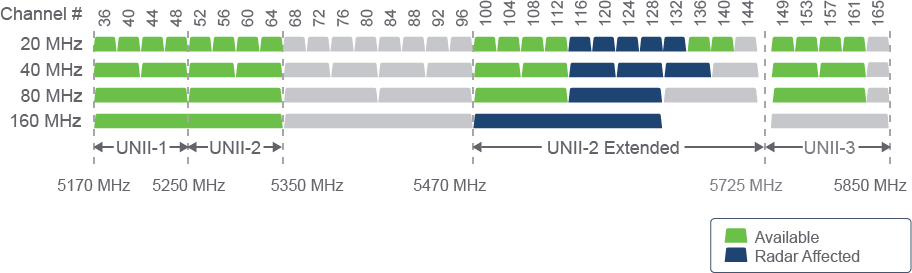
The 5-GHz band is divided into several sections: four UNII bands and one ISM band. Channels in the sections are spaced at 20-MHz intervals and are considered noninterfering, however, they do have a slight overlap in frequency spectrum. Consecutive channels can be used in neighboring cell coverage, but neighboring cell channels should be separated by at least one channel when possible.
5 GHz 頻帶劃分為多個區段:四個 UNII 頻帶及一個 ISM 頻帶。各區段內的頻道以 20 MHz 為間隔,被視為互不干擾,不過在頻譜上仍有些微重疊。相鄰的細胞涵蓋範圍可使用連續頻道,但相鄰細胞的頻道應盡可能至少間隔一個頻道。
Since there are more non-overlapping channels in 5 GHz, you can use so-called "channel bonding," where you can merge two adjacent channels together and achieve wider channels (40-MHz, 80-MHz, or 160-MHz wide instead of 20 MHz), which in practice means multiplied data rates by 2, 4, or 8.
由於 5 GHz 有更多不重疊的頻道,你可以使用所謂的「頻道結合」,將兩個相鄰頻道合併,取得更寬的頻道(40 MHz、80 MHz 或 160 MHz,而非 20 MHz),實務上等於將資料速率提升 2 倍、4 倍或 8 倍。
Many regulatory domains enforce different laws for each of these bands, so even though they may all be considered 5-GHz bands, operation in each set of channels may be different. Also, some of the channels might not be available in all regulatory domains (United States, Europe, Japan).
許多法規領域對這些頻帶各自訂有不同的規範,因此即使都被視為 5 GHz 頻帶,各組頻道的運作方式可能有所不同。此外,某些頻道在所有法規領域(美國、歐洲、日本)中不一定都可使用。
2.4-GHz and 5-GHz Comparison
2.4 GHz 與 5 GHz 比較
Signals in the 2.4-GHz frequency have greater range and better propagation through obstacles. On the other hand, many devices are using the 2.4-GHz frequency band and, therefore, producing interference. It is not only Wi-Fi devices, but also many nonwireless devices exist, so the spectrum is really crowded. There are also a limited number of channels that do not overlap.
2.4 GHz 頻率的訊號傳輸範圍較大,穿透障礙物的能力也較佳。但另一方面,由於許多裝置使用 2.4 GHz 頻帶,因此會產生干擾。不只是 Wi-Fi 裝置,還有許多非無線裝置也使用此頻帶,使頻譜相當擁擠。此外,不重疊的頻道數量也有限。
The 5-GHz spectrum is less crowded with many more non-overlapping channels, but it still has some drawbacks. Older devices do not support it, so you might still need 2.4 GHz in your network. The signal is weaker and therefore the propagation is worse. Also, it is not completely non-Wi-Fi interference-free because weather radars can operate in this frequency.
5 GHz 頻譜較不擁擠,擁有更多不重疊的頻道,但仍有一些缺點。較舊的裝置不支援此頻帶,因此網路中可能仍需要 2.4 GHz。訊號較弱,傳輸範圍也較差。此外,此頻帶也並非完全不受非 Wi-Fi 干擾,因為氣象雷達也可能在此頻率運作。
Other Non-802.11 Radio Interferers
其他非 802.11 無線電干擾源
Because the 2.4-GHz ISM band is unlicensed, the band is crowded by transmissions from many devices, such as RF video cameras, baby monitors, and microwave ovens. Most of these devices are high-powered, and they do not send IEEE 802.11 frames but can still cause interference for Wi-Fi networks.
由於 2.4 GHz ISM 頻帶為非授權頻帶,因此該頻帶會因許多裝置的傳輸而擁擠,例如射頻視訊攝影機、嬰兒監視器及微波爐。這些裝置大多功率較高,雖然不會傳送 IEEE 802.11 框架,但仍可能對 Wi-Fi 網路造成干擾。
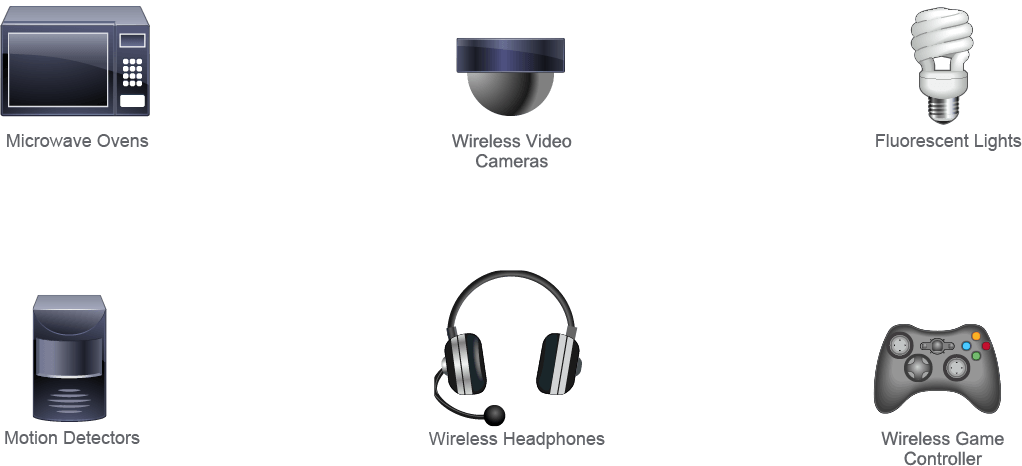
For example, RF video cameras operate by exchanging information (the image stream) between a transmitter (the camera) and the receiver (linking to a video display). These cameras usually use 100 milliwatt (mW) and a channel that is narrower than Wi-Fi. The stream of information is continuous and severely affects any Wi-Fi network in the neighboring channels. These cameras and Wi-Fi are incompatible—an AP cannot natively receive and understand a camera video stream.
舉例來說,射頻視訊攝影機透過在發射器(攝影機)與接收器(連結至視訊顯示器)之間交換資訊(影像串流)來運作。這類攝影機通常使用 100 毫瓦(mW)的功率,且頻道比 Wi-Fi 更窄。資訊串流是持續性的,會嚴重影響鄰近頻道上的任何 Wi-Fi 網路。這些攝影機與 Wi-Fi 不相容——AP 無法原生接收並解讀攝影機的視訊串流。
As another example, baby monitors are found more in home environments than in industrial or office networks (although they can be found in hospitals, nurseries, and many other social service or education-related environments). The exchanged keepalive information between the monitoring stations can be single-way or double-way and half duplex. Some of these monitors can use several channels for one monitor station to control two devices. The monitors can use 100 mW of power. They are not 802.11 technologies but work in the same frequency and power as 802.11 devices.
另一個例子是嬰兒監視器,較常見於家庭環境而非工業或辦公網路(雖然在醫院、育嬰室及許多社福或教育相關環境中也可見到)。監視站之間交換的保持連線資訊可以是單向或雙向且為半雙工。部分監視器可使用多個頻道,讓一台監視站控制兩台裝置。這類監視器可使用 100 mW 的功率。它們並非 802.11 技術,但與 802.11 裝置在相同的頻率與功率下運作。
Microwave ovens provide a pulse form of interference in the middle of the Wi-Fi, 2.4-GHz band at a much higher power. Wi-Fi AP transmitters are measured in milliwatts, while microwave ovens use a power level of over 1000 W.
微波爐會在 Wi-Fi 的 2.4 GHz 頻帶中間,以高得多的功率產生脈衝形式的干擾。Wi-Fi AP 發射器以毫瓦為單位計量,而微波爐使用的功率則超過 1000 瓦。
Fluorescent lights also can interact with Wi-Fi systems but not as interference. The form of the interaction is that the lamps are driven with alternating current (AC) power, so they switch on and off many times each second. When the lights are on, the gas in the tube is ionized and conductive. Because the gas is conductive, it reflects RF. When the tube is off, the gas does not reflect RF. The net effect is a potential source of interference that comes and goes many times per second.
螢光燈也可能與 Wi-Fi 系統互相影響,但不是以干擾的形式。其互動方式是燈管以交流電(AC)驅動,因此每秒會開關多次。燈亮時,燈管內的氣體被離子化並具導電性。由於氣體具導電性,會反射射頻。燈熄時,氣體不會反射射頻。最終效果是每秒多次時有時無的潛在干擾來源。
Generally speaking, any device that uses a radio should be checked to determine whether it works in one of the Wi-Fi spectrums.
一般而言,任何使用無線電的裝置都應檢查,確認是否運作於 Wi-Fi 頻譜之一。
| 11 channels11 個頻道 | Europe歐洲 |
| 13 channels13 個頻道 | United States美國 |
| 14 channels14 個頻道 | Japan日本 |