Most network devices, by definition, do not work in isolation. A Cisco device frequently has other Cisco devices as neighbors on the network. If you can obtain information about those other devices, it can help you with any network design decisions, troubleshooting, and completing equipment changes.
大多數網路裝置就其定義而言並非孤立運作。Cisco 裝置常常在網路上有其他 Cisco 裝置作為鄰居。若您能取得這些鄰近裝置的資訊,將有助於網路設計決策、疑難排解,以及完成設備變更。
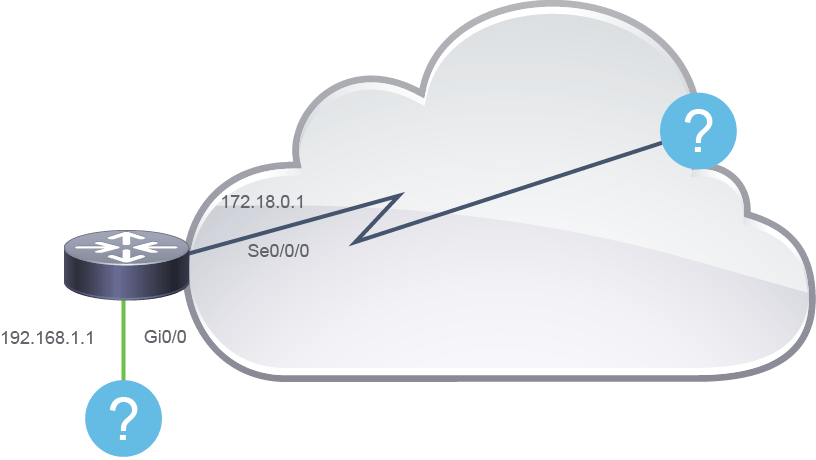
If you do not have any documentation about the network topology or if the existing documentation is not up to date, you may find yourself in a position of needing to discover the neighboring devices of a router. You can sometimes manually inspect the physical wiring if the devices are installed next to each other. If you are not local to the devices or neighboring devices are in other buildings or cities, you must use a different method.
若您沒有網路拓樸的相關文件,或現有文件已過時,您可能需要探索路由器的鄰近裝置。若裝置彼此相鄰安裝,有時您可以手動檢查實體佈線;但若您不在裝置現場,或鄰近裝置位於其他建築物或城市,就必須使用不同的方法。
One possibility is to use a dynamic discovery protocol that gathers information about directly connected devices. Cisco devices support Cisco Discovery Protocol, which provides information about connected Cisco devices and their functions and capabilities.
其中一種方法是使用動態探索協定,蒐集直接連接裝置的資訊。Cisco 裝置支援 Cisco 探索協定(CDP),可提供已連接 Cisco 裝置及其功能與能力的資訊。
Cisco Discovery Protocol is a Cisco proprietary protocol that discovers basic information about neighboring Cisco devices without knowing the passwords for the neighboring devices. To discover information, routers and switches send Cisco Discovery Protocol messages out each of their interfaces. Devices that support Cisco Discovery Protocol learn information about other devices by listening to the advertisements of these devices.
Cisco 探索協定(CDP)是 Cisco 專屬協定,能在不知道鄰近裝置密碼的情況下,探索鄰近 Cisco 裝置的基本資訊。為了探索資訊,路由器與交換器會從每個介面送出 CDP 訊息。支援 CDP 的裝置透過監聽其他裝置的通告,來得知這些裝置的資訊。
From a troubleshooting perspective, you can use Cisco Discovery Protocol to confirm or fix the information that a network diagram shows or even discover the devices and interfaces that a network uses. Confirming that the network is cabled to match the network diagram is a good step before predicting the normal flow of data in a network.
從疑難排解的角度來看,您可以使用 CDP 來確認或修正網路圖所顯示的資訊,甚至探索網路所使用的裝置與介面。在預測網路中資料的正常流向之前,先確認網路佈線與網路圖相符是很好的步驟。
On media that support multicasts at the data link layer, Cisco Discovery Protocol uses multicast frames; on other media, Cisco Discovery Protocol sends a copy of the Cisco Discovery Protocol update to any known data link addresses. So, any Cisco Discovery Protocol-supporting device that shares a physical medium with another Cisco Discovery Protocol-supporting device can learn about the other device. It is common for network administrators to disable the Cisco Discovery Protocol for security reasons.
在資料鏈結層支援群播的傳輸媒介上,CDP 使用群播框架;在其他媒介上,CDP 則會將 CDP 更新複製一份,送往任何已知的資料鏈結位址。因此,任何與另一台支援 CDP 的裝置共用實體媒介的裝置,都可以得知該裝置的資訊。基於安全考量,網路管理員停用 CDP 的情況很常見。
Another dynamic discovery protocol is Link Layer Discovery Protocol (LLDP), which is a standardized, vendor-independent discovery protocol that discovers neighboring devices from different vendors. The IEEE standardized this protocol as the 802.1AB standard. LLDP performs functions that are similar to Cisco Discovery Protocol.
另一種動態探索協定是鏈路層探索協定(LLDP),這是一種標準化、與廠商無關的探索協定,可用來探索不同廠商的鄰近裝置。IEEE 將此協定標準化為 802.1AB 標準。LLDP 執行的功能與 CDP 類似。
Information Obtained with Cisco Discovery Protocol
透過 Cisco 探索協定取得的資訊
The figure displays an example of how the Cisco Discovery Protocol exchanges information with its directly connected neighbors. You can display this information exchange result on a console connected to a network device configured to run Cisco Discovery Protocol on its interfaces.
此圖顯示 CDP 如何與其直接連接的鄰居交換資訊的範例。您可以在連接到設定為在其介面上執行 CDP 的網路裝置的主控台上,顯示此資訊交換結果。
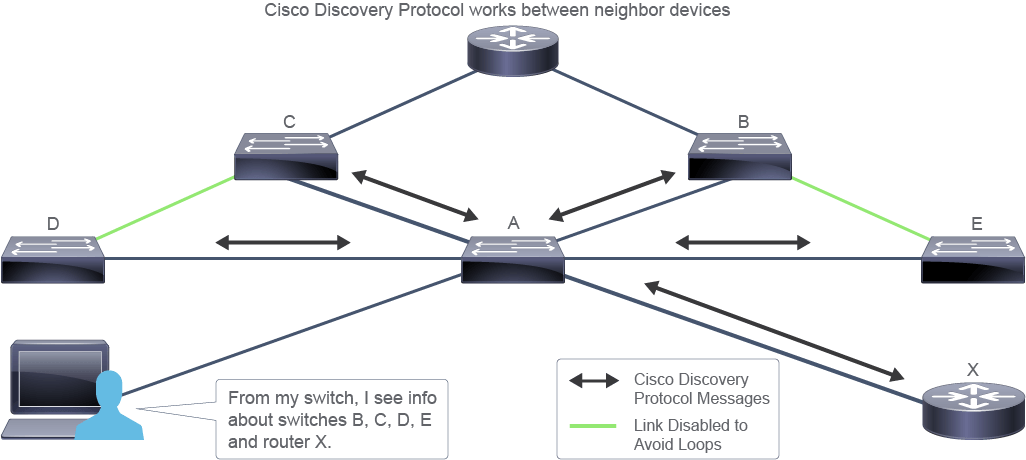
Information provided by the Cisco Discovery Protocol about each neighboring device:
CDP 對每個鄰近裝置提供以下資訊:
- Device identifiers: For example, the configured hostname of the device裝置識別碼:例如,裝置已設定的主機名稱
- Address list: Up to one network layer address for each protocol that is supported位址清單:每種支援的通訊協定最多一個網路層位址
- Port identifier: The identifier of the local port (on the receiving device) and the connected remote port (on the sending device)連接埠識別碼:本地連接埠(接收裝置端)與所連接的遠端連接埠(傳送裝置端)的識別碼
- Capabilities list: Supported features—for example, the device acting as a source-route bridge and also as a router能力清單:支援的功能,例如該裝置同時作為來源路由橋接器與路由器
- Platform: The hardware platform of the device—for example, Cisco 4000 Series Routers平台:裝置的硬體平台,例如 Cisco 4000 系列路由器
Notice that the upper router in the figure is not connected directly to switch A (the switch that the administrator is connected to). To obtain Cisco Discovery Protocol information about this upper router from switch A console, the administrator could use Telnet or SSH to connect to a connected switch to this router.
請注意,圖中上方的路由器並未直接連接到交換器 A(管理員所連接的交換器)。若要從交換器 A 的主控台取得這台上方路由器的 CDP 資訊,管理員可以使用 Telnet 或 SSH 連線到與此路由器相連的交換器。