A troubleshooting method is a guiding principle that determines how you move through the phases of the troubleshooting process.
疑難排解方法是一項指導原則,決定你在疑難排解流程各階段中如何進行。
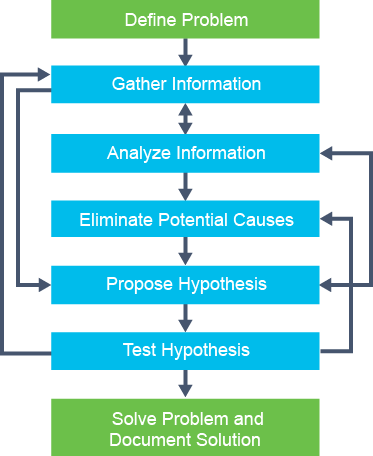
All troubleshooting processes include the elements of gathering and analyzing information, eliminating possible causes, and formulating and testing hypotheses. However, the time one spends on each of these phases and how one moves from phase to phase can be significantly different from person to person. It is a key differentiator between novice and expert troubleshooters.
所有疑難排解流程都包含蒐集與分析資訊、排除可能原因,以及提出並驗證假設等要素。然而,每個人花在各階段的時間,以及如何在各階段之間移動,可能因人而異,差異相當大。這正是新手與專家疑難排解人員之間的關鍵差異。
In a typical troubleshooting process, for a complex problem, you would continually move between the different processes: gather some information, analyze it, eliminate some possibilities, gather more information, analyze again, formulate a hypothesis, test it, reject it, eliminate some more possibilities, gather more information, and so on.
在典型的疑難排解流程中,面對複雜問題時,你會不斷在各個流程之間來回移動:蒐集一些資訊、分析它、排除一些可能性、蒐集更多資訊、再次分析、提出假設、驗證假設、否決假設、再排除一些可能性、蒐集更多資訊,如此反覆進行。
If you do not use a structured approach but move between the phases randomly, you might eventually find the solution, but the process will be very inefficient. In addition, if your approach has no structure, it is practically impossible to hand it over to someone else without losing all progress that was made up to this point. You may also need to stop and resume your troubleshooting process.
如果你不採用結構化的方法,而是在各階段之間隨機移動,或許最終還是能找到解決方案,但這個過程會非常沒有效率。此外,如果你的方法沒有結構,實際上幾乎不可能將工作交接給其他人,而不遺失目前為止的所有進度。你也可能需要中途暫停並在之後繼續疑難排解流程。
A structured approach to troubleshooting (no matter what the exact method is) will yield more predictable results in the end and will make it easier to pick up the process where you left off in a later stage or to hand it over to someone else.
採用結構化的疑難排解方法(無論確切的方法為何),最終都能產生更可預測的結果,也更容易在稍後階段接續先前中斷的進度,或是交接給其他人。
Quickly formulating a first hypothesis that is based on common problem causes and corresponding solutions can be very effective in the short run.
根據常見問題原因與相對應的解決方案,快速提出第一個假設,短期內可能會非常有效。
A troubleshooting method commonly deployed by experienced and inexperienced troubleshooters is the "shoot-from-the-hip" method. After a very short period of gathering information, the troubleshooter quickly changes to see if it solves the problem. This action might seem like random troubleshooting, but usually, the guiding principle for this method is knowing common symptoms and their corresponding causes.
無論是經驗豐富或缺乏經驗的疑難排解人員,常用的一種疑難排解方法是「直覺猜測法」(shoot-from-the-hip)。在花費很短的時間蒐集資訊後,疑難排解人員會迅速進行變更,看看是否能解決問題。這個動作看起來像是隨機亂試,但通常這個方法的指導原則,其實是熟悉常見徵兆及其對應的原因。
Look at the following example: A user reports a LAN performance problem to you. In 90 percent of similar problems in the past in this environment, the problem was caused by a duplex mismatch, and the solution was to configure the switch port for 100 Mbps full duplex. An obvious thing to do is to quickly verify the duplex setting of the switch port to which the user connects and, if not correct, to change it to 100-Mbps full duplex to see if this action fixes the problem.
來看以下範例:使用者向你回報區域網路(LAN)效能問題。在這個環境中,過去發生類似問題時,有九成是雙工模式不符所導致,解決方法是將交換器連接埠設定為 100 Mbps 全雙工。此時明顯該做的事,就是快速確認使用者所連接的交換器連接埠的雙工設定,若設定不正確,就將其變更為 100 Mbps 全雙工,看看這樣做是否能解決問題。
This method can be very effective when it works because very little time is spent on gathering data, analyzing, and eliminating possible causes. However, the downside is that if it does not work, you have not come any closer to a possible solution.
這個方法一旦奏效就會非常有效,因為只需花費極少時間在蒐集資料、分析與排除可能原因上。然而,缺點是如果沒有奏效,你並沒有更接近可能的解決方案。
Experienced troubleshooters can use this method effectively, and it can also be a useful tool for inexperienced troubleshooters. However, the main factor in using this method effectively is knowing when to stop and then switch to a more methodical approach.
經驗豐富的疑難排解人員可以有效運用這個方法,對缺乏經驗的人員來說,這也可以是一項實用的工具。然而,有效運用這個方法的關鍵因素,在於知道何時該停止,並改用更有條理的方法。
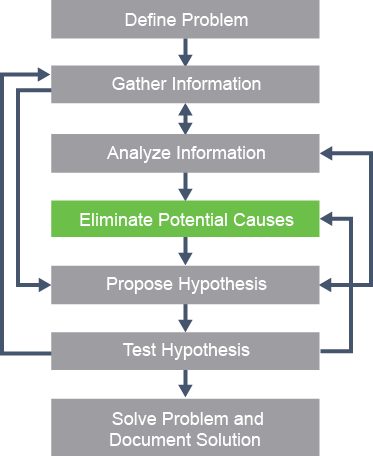
A structured troubleshooting method is a guideline that helps you move through the different phases of the troubleshooting process. The key to all structured troubleshooting methods is the elimination of the causes of the issue.
結構化疑難排解方法是一套指引,協助你在疑難排解流程的各個階段之間前進。所有結構化疑難排解方法的關鍵,都在於排除問題的成因。
By systematically eliminating possible problem causes, you can reduce the scope of the problem until you manage to isolate and solve the problem. If it turns out that you lack the knowledge or experience to solve the problem yourself, you can hand it over as a better-defined problem. So, even if you do not manage to solve the problem, you will increase the chances that someone else can find the cause of the problem and resolve it quickly and efficiently.
透過系統性地排除可能的問題成因,你可以縮小問題範圍,直到成功隔離並解決問題。如果發現自己缺乏知識或經驗來親自解決問題,你可以將問題交接出去,且問題已被更清楚地定義。因此,即使你未能親自解決問題,也能提高其他人找出問題原因並快速有效解決問題的機會。
Several different, structured troubleshooting approaches exist, and the approach to use may be chosen depending on the problem.
目前存在多種不同的結構化疑難排解方法,可依問題性質選擇合適的方法使用。
The following troubleshooting methods are the most common:
以下是最常見的疑難排解方法:
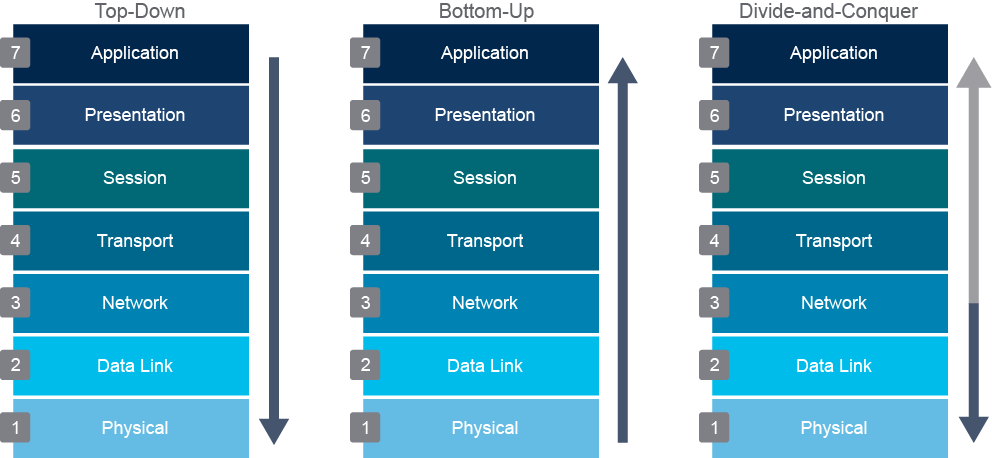
- Top-down method: Work from the application layer in the Open Systems Interconnection (OSI) model down to the physical layer. The top-down method uses the OSI model as a guiding principle. One of the most important characteristics of the OSI model is that each layer depends on the underlying layers for its operation. This structure implies that if you find a layer to be operational, you can safely assume that all underlying layers are fully operational. For example, suppose you are researching a user who cannot browse a particular website and find that you can establish a TCP connection on port 80 from this host to the server and get a response from the server. In that case, you can typically conclude that the transport layer and all layers below must be fully functional between the client and the server. It is most likely a client or server problem and not a network problem.由上-而下法:從開放式系統互連(OSI)模型的應用層開始,逐層往下處理到實體層。由上而下法以 OSI 模型作為指導原則。OSI 模型最重要的特性之一,就是每一層的運作都依賴其下方的各層。這代表若你發現某一層可正常運作,就可以合理假設其下方所有層級也都完全正常運作。舉例來說,假設你正在調查某位使用者無法瀏覽特定網站的問題,並發現可以從此主機在連接埠 80 建立與伺服器的 TCP 連線,且能取得伺服器的回應。在這種情況下,你通常可以判斷用戶端與伺服器之間的傳輸層及其下方所有層級都必定運作正常。這極可能是用戶端或伺服器端的問題,而非網路問題。
Be aware that, in the example above, it is reasonable to conclude that Layers 1 through 4 must be fully operational, but this idea is not definitively proved. For example, unfragmented packets might be routed correctly, while fragmented packets are dropped. The TCP connection to port 80 might not uncover such a problem. Therefore, the goal of this method is to find the highest OSI layer that is still working. All devices and processes that work on that layer or the layers below it are then eliminated from the scope of your problem. It might be clear that this method is most effective if the problem is on one of the higher OSI layers.
請注意,在上述範例中,合理推斷第 1 到第 4 層必定完全正常運作,但這個推論並未獲得確切證實。舉例來說,未分段的封包可能被正確路由,而分段後的封包卻被丟棄。連到連接埠 80 的 TCP 連線測試可能無法揭露這類問題。因此,這個方法的目標,是找出仍能正常運作的最高 OSI 層。在該層或其以下各層運作的所有裝置與流程,就會被排除在問題範圍之外。由此可見,若問題出在較高的 OSI 層,這個方法最為有效。
The top-down method is one of the most straightforward troubleshooting methods because problems reported by users are typically defined as application layer problems, so starting the troubleshooting process at that layer is the obvious thing to do. A drawback or impediment to this method is that you need to access the application layer software on the machine of the client to initiate the troubleshooting process. If the software is installed only on few machines, it might be hard to test it properly.
由上而下法是最直觀的疑難排解方法之一,因為使用者回報的問題通常會被定義為應用層問題,因此從該層開始進行疑難排解是很自然的做法。這個方法的缺點或限制,是你需要存取用戶端機器上的應用層軟體,才能開始疑難排解流程。如果該軟體只安裝在少數機器上,可能會難以妥善測試。
Consider a scenario in which your organization has deployed a Webex application for its employees. An employee reports that they are unable to connect when the application starts. By using the top-down troubleshooting method, you begin by examining the application settings, ensuring that the application is properly configured. You then check the network connectivity for the employee’s PC and the Webex application. If network connectivity is unavailable, you check the employee’s PC IP address configuration. Afterward, you check network connectivity, hop by hop, from the employee’s PC to the Webex application server. You then check that network connectivity fails at a specific hop in the network. Verify security policy configurations, such as an Access Control List (ACL) or a routing issue. Finally, you check interface settings to verify network device and physical connectivity.
假設你的組織已為員工部署 Webex 應用程式。有一位員工回報,應用程式啟動時無法連線。使用由上而下疑難排解法時,你會先檢查應用程式設定,確認應用程式已正確設定。接著檢查該員工個人電腦與 Webex 應用程式之間的網路連線。若沒有網路連線,就檢查該員工個人電腦的 IP 位址設定。之後,你會逐跳(hop by hop)檢查從該員工個人電腦到 Webex 應用程式伺服器之間的網路連線狀況,找出網路連線在哪一個跳點失敗,並驗證安全性原則設定,例如存取控制清單(ACL)或路由問題。最後,檢查介面設定,以確認網路裝置與實體連線是否正常。
- Bottom-up method: Work from the physical layer in the OSI model up to the application layer. The bottom-up approach also uses the OSI model as the guiding principle, but this time you start on the physical layer and work your way up to the application layer. By verifying layer by layer that the network is operating correctly, you steadily eliminate more potential problem causes and narrow the scope of the potential problems.由下-而上法:從 OSI 模型的實體層開始,逐層往上處理到應用層。由下而上法同樣以 OSI 模型作為指導原則,但這次你會從實體層開始,逐步往上處理到應用層。藉由逐層驗證網路運作是否正常,你會持續排除更多潛在問題原因,並縮小潛在問題的範圍。
For example, if you are researching a user who cannot browse a particular website, you would first verify physical connectivity. You would log in to the switch and verify the port status. After each test or verification step, you would move up through the layers of the OSI model. A benefit of this method is that all the initial troubleshooting takes place on the network, so access to clients, servers, or applications is not necessary until later in the troubleshooting process.
舉例來說,如果你正在調查某位使用者無法瀏覽特定網站的問題,你會先驗證實體連線。你會登入交換器並確認連接埠狀態。每完成一項測試或驗證步驟後,你就會往上移動到 OSI 模型的下一層。這個方法的好處是,所有初期的疑難排解都在網路端進行,因此在疑難排解流程後段之前,不需要存取用戶端、伺服器或應用程式。
Also, the thoroughness and steady progress of this method will give you a relatively high probability of eventual success or, at the very least, a decent reduction of the problem scope. A disadvantage of this method is that, in large networks, it can be a very time-consuming process because a lot of efforts will be spent on gathering and analyzing data. Therefore, the best use of this method is to first reduce the problem scope by using a different strategy and then switching to this method for clearly bounded parts of the network topology.
此外,這個方法的徹底性與穩健的進展,讓你最終成功的機率相對較高,即使無法完全解決問題,至少也能大幅縮小問題範圍。這個方法的缺點是,在大型網路中,這可能是一個非常耗時的過程,因為需要投入大量心力蒐集與分析資料。因此,最好的運用方式,是先使用其他策略縮小問題範圍,再針對網路拓樸中範圍明確的部分,改用這個方法。
Consider a scenario in which an employee in your organization reports that they are unable to use an installed application to access a tool used by their department that is hosted in the data center. By using the bottom-up troubleshooting method, you first start by checking the physical connectivity of the employee’s PC to the network. You then check the network configuration on the device to confirm that network connectivity is available and that the PC has the correct IP address. You then check the reachability from the employee’s PC to the data center. Afterward, you check that there is no security policy blocking the employee’s access to the server in the data center. Finally, you check the configuration of the application settings.
假設你的組織中有一位員工回報,無法使用已安裝的應用程式存取部門所使用、託管於資料中心的工具。使用由下而上疑難排解法時,你會先檢查該員工個人電腦與網路之間的實體連線。接著檢查裝置上的網路設定,確認網路連線是否可用,以及該電腦是否具有正確的 IP 位址。之後,檢查從該員工個人電腦到資料中心的可達性(reachability)。接下來,檢查是否有安全性原則阻擋該員工存取資料中心內的伺服器。最後,檢查應用程式設定。
- Divide-and-conquer method: Start in the middle of the OSI layers (usually the network layer) and then go up or down, depending on the results. If it is not clear whether the top-down or the bottom-up approach would be most effective, it can be helpful to start in the middle (typically the network layer) and run an end-to-end test, such as a ping. If the ping succeeds, you can assume that all the lower layers are good, and you can start bottom-up troubleshooting from the network layer.折半-法(divide-and-conquer):從 OSI 各層的中間(通常是網路層)開始,再依結果往上或往下處理。若不確定由上而下或由下而上哪一種方法較有效,從中間(通常是網路層)開始並執行端對端測試(例如 ping)會很有幫助。如果 ping 成功,就可以假設所有較低層都運作正常,並可從網路層開始進行由下而上的疑難排解。
Alternatively, you can start a top-down troubleshooting process from the network layer if the test fails. Whether the result of the initial test is positive or negative, this method usually results in faster elimination of potential problems than what you would achieve by implementing a full top-down or bottom-up approach, making the divide-and-conquer method a very effective strategy.
反之,如果測試失敗,你也可以從網路層開始進行由上而下的疑難排解流程。無論初步測試結果是正還是負,這個方法通常都能比完整實施由上而下或由下而上的方法更快排除潛在問題,因此折半法是非常有效的策略。
Consider a scenario in which an employee in your organization reports that they are unable to access a shared file server from their PC. By using the divide-and-conquer troubleshooting method, you will start by pinging the file server that the employee is trying to reach. If the server is reachable, which indicates that there are no issues in the Network layer and below in the OSI layers. In that case, you should check if ports to access the server are open from the user’s PC and if the user has privileges to access the shared file server. If the server is not reachable, try to ping the default gateway of the employee’s machine. If the default gateway is not reachable, which indicates that the issue is in the Network layer or below in the OSI layers. Check the IP address configuration for the employee’s PC, if it is correctly configured, then check the physical connectivity along the path to the default gateway.
假設你的組織中有一位員工回報,無法從個人電腦存取共用檔案伺服器。使用折半疑難排解法時,你會先 ping 該員工嘗試存取的檔案伺服器。如果伺服器可連通,代表 OSI 模型中網路層及其以下各層沒有問題。在這種情況下,你應該檢查使用者個人電腦是否可開啟存取該伺服器所需的連接埠,以及使用者是否具備存取共用檔案伺服器的權限。如果伺服器無法連通,就嘗試 ping 該員工電腦的預設閘道。如果預設閘道無法連通,代表問題出在 OSI 模型的網路層或其以下各層。檢查該員工個人電腦的 IP 位址設定,若設定正確,再檢查通往預設閘道路徑上的實體連線。
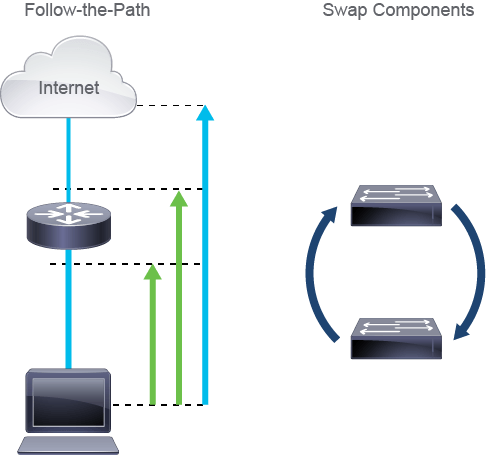
- Follow-the-path method: Determine the path that packets follow through the network from the source to the destination and track the packets along the path. Tracing the path of packets through the network eliminates irrelevant links and devices from the troubleshooting process. The objective of a troubleshooting method is to isolate the problem by eliminating potential problem areas from the scope of the troubleshooting process. By analyzing and verifying the path that packets and frames take through the network as they travel from the source to the destination, you can reduce the scope of your troubleshooting to just those links and devices that are in the forwarding path.路徑追蹤法:判斷封包從來源到目的地在網路中所經過的路徑,並沿著該路徑追蹤封包。追蹤封包在網路中的路徑,可將無關的連結與裝置排除在疑難排解流程之外。疑難排解方法的目標,是透過將潛在問題區域排除在疑難排解範圍之外,藉此隔離問題。透過分析並驗證封包與框架從來源傳送到目的地時在網路中所經過的路徑,你可以將疑難排解範圍縮小到僅限於轉送路徑上的連結與裝置。
Consider a scenario in which an employee in your organization reports that they are unable to access a website on the internet. By using the follow-the-path troubleshooting method, you use the traceroute tool to check the reachability along the path to the web server hosting the website. Traceroute checks the reachability of every hop in the path to the web server, which allows you to analyze the hop at which the traffic issue occurs. By using this information, you investigate the specific hop at which traffic stops, such as checking the routing table for the correct route to the destination server.
假設你的組織中有一位員工回報,無法存取網際網路上的某個網站。使用路徑追蹤疑難排解法時,你會使用 traceroute 工具,沿著通往託管該網站的網頁伺服器的路徑檢查可達性。Traceroute 會檢查通往網頁伺服器路徑上每一個跳點的可達性,讓你能分析流量問題發生在哪一個跳點。利用這項資訊,你可以進一步調查流量中斷的特定跳點,例如檢查路由表中是否有正確的目的地伺服器路由。
- Swap components method: Move components physically and observe if the problem moves with the components or not. A common way to isolate the problem is to start swapping the components like cables, switches, switch ports, or network interface cards NICs on the PC to confirm that the problem moves with the specific component. This method allows you to isolate the problem, even if the information you can gather is minimal, just by methodically executing simple tests. Even if you do not solve the problem, you have scoped it to a single element, and further troubleshooting can now be focused on that element. The drawbacks of this method are as follows:元件替換法:實際移動元件,並觀察問題是否隨元件一起移動。隔離問題的常見方法,是開始替換線纜、交換器、交換器連接埠,或個人電腦上的網路介面卡(NIC)等元件,以確認問題是否隨著特定元件移動。這個方法即使你能蒐集到的資訊極少,也能透過有條理地執行簡單測試來隔離問題。即使你沒有解決問題,也已經將範圍縮小到單一元件,後續的疑難排解就能聚焦在該元件上。這個方法的缺點如下:
- You are isolating the problem to only a limited set of physical elements. You cannot gain any real insight into what is happening because you are gathering only very limited, indirect information.你只將問題隔離到有限的一組實體元件。由於你蒐集到的資訊非常有限且間接,因此無法真正深入了解問題發生的原因。
- This method assumes that the problem is with a single component. If the problem is with a particular combination of elements, you might not isolate the problem correctly. Be sure to document everything that you change.這個方法假設問題出在單一元件上。如果問題是由特定元件組合所造成,你可能無法正確隔離問題。務必記錄你所變更的每一項內容。
Consider a scenario in which an employee in your organization reports a network connectivity problem. By using swap components troubleshooting method, you first change the NIC that the ethernet cable is connected to on the PC. If changing NIC does not solve the issue, then you change the Ethernet cable connecting the employee’s PC to the network. If this does not solve the issue, then you change the connected switch port.
假設你的組織中有一位員工回報網路連線問題。使用元件替換疑難排解法時,你會先更換個人電腦上連接乙太網路線的網路介面卡(NIC)。如果更換 NIC 無法解決問題,接著更換連接該員工個人電腦與網路的乙太網路線。如果這樣仍無法解決問題,就更換所連接的交換器連接埠。
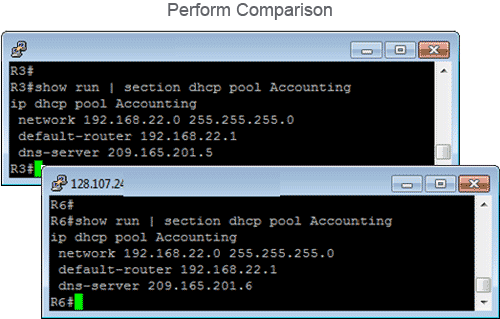
- Perform comparison method: Compare devices or processes of the network that are operating correctly to devices or processes that are not operating as expected. Gather clues by spotting significant differences. By comparing configurations, software versions, hardware or other device properties, links, or processes between working and nonworking situations and then seeing differences between them, you might be able to resolve the problem by changing the nonoperational situation to be consistent with the working situation.執行 比較分析法:將網路中運作正常的裝置或流程,與未如預期運作的裝置或流程進行比較,找出明顯差異作為線索。透過比較正常與異常情況下的設定、軟體版本、硬體或其他裝置屬性、連結或流程,並找出兩者之間的差異,你或許就能將異常情況調整為與正常情況一致,藉此解決問題。
The biggest disadvantage of this method is that it can lead to a working situation but not an understanding of the root cause of the problem. Sometimes, you cannot even be sure if you have implemented a real solution or only a workaround. Here is an example. You are troubleshooting a connectivity problem with a branch office router. You have managed to narrow down the problem to some issue with the default routing, but you cannot seem to find the cause. You notice that this router is an older type phased out in most of the other branch offices. You have one of the newer types of routers in the trunk of your car because you plan to install that in another branch office next week. You decide to copy the configuration of the existing branch router to the newer router and replace it. Now everything starts to work as expected.
這個方法最大的缺點,是可能只是讓情況恢復正常,卻無法真正了解問題的根本原因。有時候,你甚至無法確定自己實施的究竟是真正的解決方案,還是只是權宜之計。舉例來說:你正在排解某分公司路由器的連線問題。你已將問題範圍縮小到預設路由的某個問題,但一直找不出原因。你注意到這台路由器是舊型號,在大多數其他分公司都已淘汰。你的車上剛好有一台新型路由器,因為你計畫下週要安裝到另一間分公司。你決定將現有分公司路由器的設定複製到新路由器上並替換掉舊路由器。結果一切恢復正常運作。
So, what do you do? Do you consider the problem fixed? What was the root cause? What should you do with the old and new routers now? As you can see, this method has several drawbacks, but it is still a useful technique because you can use it even when you lack the background to troubleshoot based on knowledge of the technology. The effectiveness of this method depends on how easy it is to compare the working and the nonworking devices, situations, or processes. Having a good baseline of what constitutes normal behavior on the network makes it easier to notice abnormal behavior. Also, consistent configuration templates make it easier to see the significant differences between functioning and malfunctioning devices. Therefore, the effectiveness of this method depends on the quality of the overall network maintenance process.
那麼,接下來該怎麼辦?你會認為問題已經解決了嗎?根本原因究竟是什麼?現在新舊路由器該如何處理?由此可見,這個方法有幾項缺點,但它仍然是一項實用的技巧,因為即使你缺乏該項技術的背景知識,也能運用這個方法進行疑難排解。這個方法的成效,取決於比較正常與異常裝置、情況或流程的難易程度。若能建立良好的正常行為基準,就更容易察覺異常行為。此外,一致的設定範本也能讓你更容易看出正常與異常裝置之間的明顯差異。因此,這個方法的成效取決於整體網路維運流程的品質。
- Shoot from the hip method: If you are an expert and you already know the network topology and the network environment, you can try this method to solve the issue. This method does not require any information gathering or analysis. The shoot from the hip method is trying the first thing you think of that could solve the problem without any structured approach. For example, if you know that every Monday morning a user always runs into the same issue, you can try to solve it how you do every Monday morning. This approach does not take much time and it is often based on your previous experience, it is not a try to guess approach. It is often the first method that you use during your daily work routine. If it does not work, you can always go with the classic structured approach to gather the information, make an analysis, and test your hypothesis.直覺猜測法:如果你是專家,且已熟悉網路拓樸與網路環境,就可以嘗試用這個方法來解決問題。這個方法不需要任何資訊蒐集或分析。直覺猜測法就是不採用任何結構化方法,直接嘗試你認為可能解決問題的第一個方法。舉例來說,如果你知道每週一早上使用者總是遇到相同的問題,你可以嘗試用你每週一早上慣用的方式來解決它。這個做法不會花太多時間,通常是根據你過去的經驗,而不是隨意猜測。這通常是你日常工作中最先採用的方法。如果沒有奏效,你隨時可以改用傳統的結構化方法,蒐集資訊、進行分析並驗證假設。
Consider the scenario in which an employee in your organization moved to a different location in the office and connected their PC through an ethernet cable to a new ethernet port. The employee reports that after connecting their PC to the network, they do not have network access. By using the shoot from the hip troubleshooting method, you rely on your experience with your network environment. Because you have configured the access switches before, you know that they are configured with Port Security. Based on your experience, you know that connecting to a different port likely caused the switchport issue due to Port Security. You then check the Port Security configuration and port status on the switch to confirm and address the issue.
假設你的組織中有一位員工搬到辦公室的另一個位置,並透過乙太網路線將個人電腦連接到新的乙太網路連接埠。該員工回報,將電腦連接到網路後就無法存取網路。使用直覺猜測疑難排解法時,你會依靠自己對網路環境的經驗。由於你先前曾設定過這些存取層交換器,你知道它們已設定連接埠安全性(Port Security)。根據你的經驗,你判斷連接到不同連接埠很可能因連接埠安全性而導致交換器連接埠問題。接著你檢查交換器上的連接埠安全性設定與連接埠狀態,以確認並解決問題。