The Cisco IOS on Cisco devices is packaged in system images. Your device typically already has an image on it when you receive it. However, you may want to load a different image onto a device at some point. For example, you may want to upgrade your software to the latest release, or use the same version of the software for all the routers in a network.
Cisco 裝置上的 Cisco IOS 是以系統映像檔(system image)的形式封裝。您的裝置在收到時通常已內建映像檔。不過,您可能在某個時間點想要在裝置上載入不同的映像檔,例如升級軟體到最新版本,或讓網路中所有路由器使用相同版本的軟體。
Also, creating, loading, and maintaining configuration files enables you to generate a set of user-configured commands to customize the functionality of your Cisco networking device.
此外,建立、載入並維護設定檔,可讓您產生一組使用者自訂的指令,以自訂 Cisco 網路裝置的功能。
Managing Cisco IOS Images
管理 Cisco IOS 映像檔
As a network grows, keeping track of all of the Cisco IOS Software images and configuration files running on your devices is key.
隨著網路成長,追蹤裝置上執行的所有 Cisco IOS 軟體映像檔與設定檔至關重要。
Production internetworks usually span wide areas and contain multiple routers. For any network, it is important to retain a backup copy of the Cisco IOS Software image in case the system image in the router becomes corrupted or is accidentally erased.
正式的網際互連網路通常橫跨廣大範圍並包含多台路由器。對任何網路而言,保留 Cisco IOS 軟體映像檔的備份都很重要,以防路由器中的系統映像檔損毀或被意外清除。
Widely distributed routers need a source or backup location for Cisco IOS Software images. Using a network TFTP server allows image (and configuration) uploads and downloads over the network. Storing Cisco IOS Software images and configuration files on a central TFTP server enables you to control the number and revision level of the files that must be maintained. The network TFTP server can be another router, a workstation, or a host system.
廣泛分布的路由器需要一個來源或備份位置來存放 Cisco IOS 軟體映像檔。使用網路 TFTP 伺服器可讓映像檔(以及設定檔)透過網路上傳和下載。將 Cisco IOS 軟體映像檔與設定檔存放在中央 TFTP 伺服器上,可讓您控管必須維護的檔案數量與修訂版本。網路 TFTP 伺服器可以是另一台路由器、工作站,或主機系統。
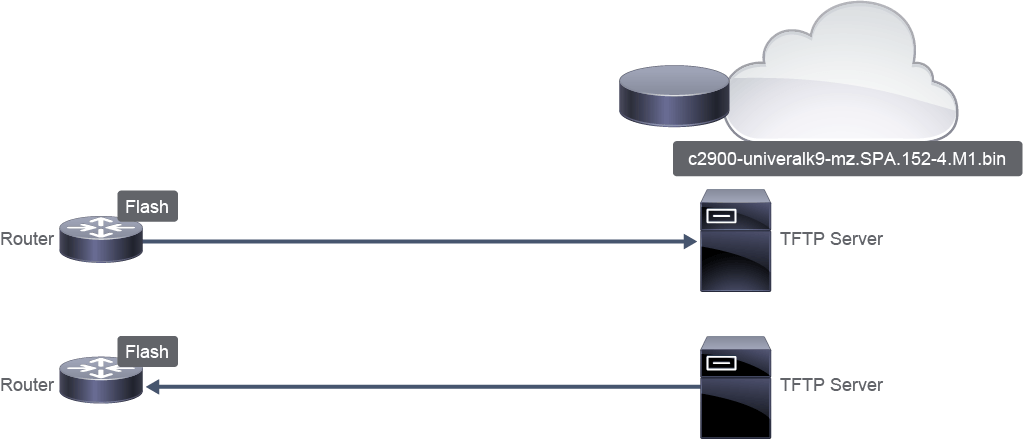
You can copy Cisco IOS image files from a TFTP, RCP, FTP, or SCP server to the flash memory of a networking device. You may want to perform this function to upgrade the Cisco IOS image, or to use the same image as on other devices in your network.
您可以將 Cisco IOS 映像檔從 TFTP、RCP、FTP 或 SCP 伺服器複製到網路裝置的快閃記憶體。您可能想執行此操作以升級 Cisco IOS 映像檔,或使用與網路中其他裝置相同的映像檔。
You can also copy (upload) Cisco IOS image files from a networking device to a file server by using TFTP, FTP, RCP, or SCP protocols, so that you have a backup of the current IOS image file on the server.
您也可以使用 TFTP、FTP、RCP 或 SCP 通訊協定,將 Cisco IOS 映像檔從網路裝置複製(上傳)到檔案伺服器,以便在伺服器上保留目前 IOS 映像檔的備份。
The protocol you use depends on which type of server you are using. The FTP and RCP transport mechanisms provide faster performance and more reliable delivery of data than TFTP. These improvements are possible because the FTP and RCP transport mechanisms are built on and use the TCP/IP stack, which is connection-oriented.
您使用的通訊協定取決於所用的伺服器類型。FTP 與 RCP 傳輸機制提供比 TFTP 更快的效能與更可靠的資料傳遞,這是因為 FTP 與 RCP 傳輸機制建構於連線導向的 TCP/IP 協定堆疊之上並加以運用。
Managing Device Configuration Files
管理裝置設定檔
Device configuration files contain a set of user-defined configuration commands that customize the functionality of a Cisco device.
裝置設定檔包含一組使用者定義的設定指令,用以自訂 Cisco 裝置的功能。
Device configurations can be loaded from the following components:
裝置設定可從下列元件載入:
- NVRAMNVRAM
- Terminal終端機
- Network file server (for example, TFTP, SCP, and others)網路檔案伺服器(例如 TFTP、SCP 等)
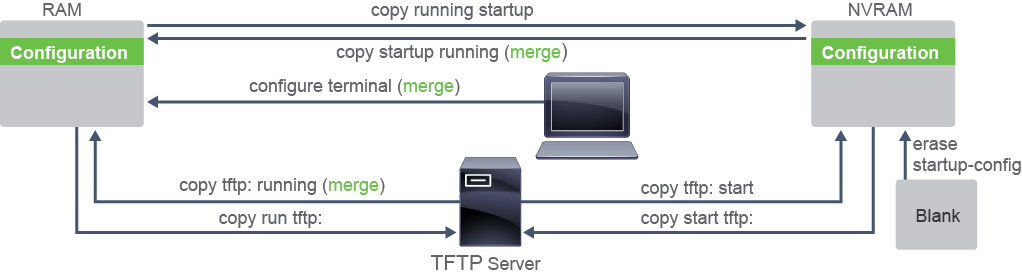
Cisco router configuration files are stored in these locations:
Cisco 路由器的設定檔儲存於以下位置:
- The running configuration is stored in RAM.執行中設定(running configuration)儲存於 RAM。
- The startup configuration is stored in NVRAM.啟動設定(startup configuration)儲存於 NVRAM。
Similar to Cisco IOS images, you can copy configuration files from a TFTP, RCP, FTP, or SCP server to the running configuration or startup configuration of the networking device. You may want to perform this function for one of the following reasons:
與 Cisco IOS 映像檔類似,您可以將設定檔從 TFTP、RCP、FTP 或 SCP 伺服器複製到網路裝置的執行中設定或啟動設定。您可能基於以下原因執行此操作:
- To restore a backed-up configuration file.還原已備份的設定檔。
- To use the configuration file for another networking device. For example, you may add another router to your network and want it to have a similar configuration to the original router. After copying the file to the new router, you can then change the relevant parts, rather than re-creating the whole file.將設定檔用於另一台網路裝置。例如,您可能在網路中新增另一台路由器,並希望它擁有與原始路由器相似的設定。將檔案複製到新路由器後,您可以再修改相關部分,而不必重新建立整份檔案。
- To load the same configuration commands on all the routers in your network so that all the routers have similar configurations.在網路中所有路由器上載入相同的設定指令,使所有路由器擁有相似的設定。
You can also copy (upload) configuration files from a networking device to a file server by using TFTP, FTP, RCP, or SCP protocols. You might perform this task to back up a current configuration file to a server before changing its contents, so that you can later restore the original configuration file from the server.
您也可以使用 TFTP、FTP、RCP 或 SCP 通訊協定,將設定檔從網路裝置複製(上傳)到檔案伺服器。您可能在變更設定內容前執行此工作,以備份目前的設定檔,如此一來,日後即可從伺服器還原原始設定檔。
For example, in the copy running-config tftp: command, the running configuration in RAM is copied to a TFTP server.
例如,在 copy running-config tftp: 指令中,RAM 中的執行中設定會被複製到 TFTP 伺服器。
Use the copy running-config startup-config command after a configuration change is made in RAM to save the updated configuration to the startup configuration file in NVRAM.
在 RAM 中完成設定變更後,使用 copy running-config startup-config 指令,將更新後的設定儲存到 NVRAM 中的啟動設定檔。
You can copy the startup configuration file in NVRAM back into RAM with the copy startup-config running-config command (but be careful because this is a merge, not a copy, as described in the following note).
您可以使用 copy startup-config running-config 指令,將 NVRAM 中的啟動設定檔複製回 RAM(但請小心,這是合併而非複製,詳見以下說明)。
Similar commands exist for copying between a TFTP server and either NVRAM or RAM.
在 TFTP 伺服器與 NVRAM 或 RAM 之間複製也有類似的指令。
The following examples show common copy command usage. The examples list two methods to accomplish the same tasks. The first example is simple syntax, and the second example provides more explicit syntax.
以下範例顯示常見的 copy 指令用法。範例列出達成相同任務的兩種方法:第一個範例是簡易語法,第二個範例則提供更明確的語法。
- Copy the running configuration from RAM to the startup configuration in NVRAM, overwriting the existing file:將執行中設定從 RAM 複製到 NVRAM 中的啟動設定,覆寫既有檔案:
R2# copy running-config startup-config
R2# copy system:running-config nvram:startup-config- Copy the running configuration from RAM to a remote TFTP server location, overwriting the existing file:將執行中設定從 RAM 複製到遠端 TFTP 伺服器位置,覆寫既有檔案:
R2# copy running-config tftp:
R2# copy system:running-config tftp:- Copy a configuration from a remote source to the running configuration, merging the new content with the existing content:將設定從遠端來源複製到執行中設定,將新內容與既有內容合併:
R2# copy tftp: running-config
R2# copy tftp: system:running-config- Copy a configuration from a remote source to the startup configuration, overwriting the existing file:將設定從遠端來源複製到啟動設定,覆寫既有檔案:
R2# copy tftp: startup-config
R2# copy tftp: nvram:startup-config
Use the configure terminal command to interactively create configurations in RAM from the console or remote terminal.
使用 configure terminal 指令,透過主控台或遠端終端機互動式地在 RAM 中建立設定。
Use the erase startup-config command to delete the saved startup configuration file in NVRAM. (Note that this command cannot be abbreviated.)
使用 erase startup-config 指令刪除 NVRAM 中儲存的啟動設定檔。(請注意,此指令不能縮寫。)
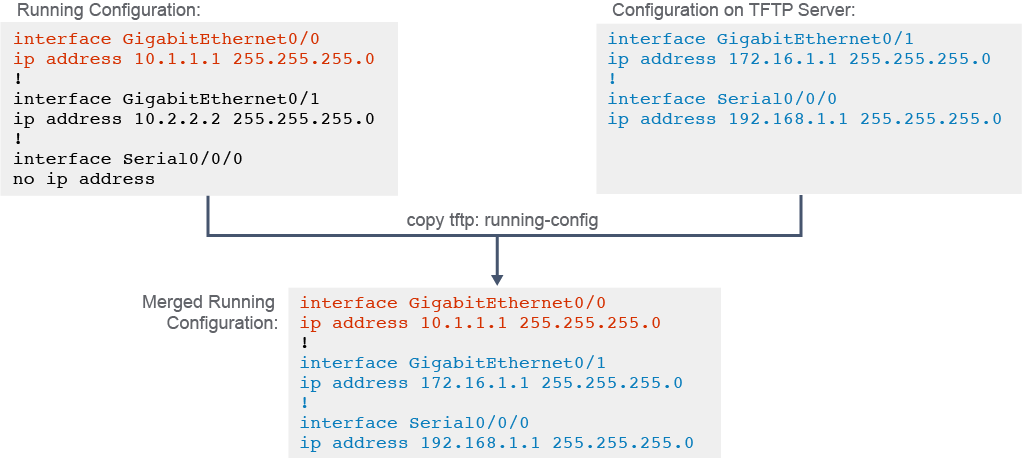
This figure shows an example of how to use the copy tftp: running-configcommand to merge the running configuration in RAM with a saved configuration file on a TFTP server.
此圖顯示如何使用 copy tftp: running-config指令,將 RAM 中的執行中設定與 TFTP 伺服器上儲存的設定檔合併。
You can use the TFTP servers to store configurations in a central place, allowing centralized management and updating. Regardless of the size of the network, there should always be a copy of the current running configuration online as a backup.
您可以使用 TFTP 伺服器將設定集中存放於一處,以便集中管理與更新。無論網路規模大小,都應該隨時在線上保留一份目前執行中設定的備份副本。
The copy running-config tftp: command allows the current configuration to be uploaded and saved to a TFTP server. The IP address or name of the TFTP server and the destination filename must be supplied. A series of exclamation marks in the display shows the progress of the upload.
copy running-config tftp: 指令可將目前的設定上傳並儲存到 TFTP 伺服器。您必須提供 TFTP 伺服器的 IP 位址或名稱,以及目的檔名。畫面上出現的一連串驚嘆號會顯示上傳進度。
The copy tftp: running-config command downloads a configuration file from the TFTP server to the running configuration of the RAM. Again, the address or name of the TFTP server and the source and destination filename must be supplied. In the example, IPv4 is used as a transport protocol. In this case, because you are copying the file to the running configuration, the destination filename should be running-config. This process is a merge process, not an overwrite process.
copy tftp: running-config 指令會從 TFTP 伺服器下載設定檔到 RAM 的執行中設定。同樣地,您必須提供 TFTP 伺服器的位址或名稱,以及來源與目的檔名。在此範例中,使用 IPv4 作為傳輸協定。由於您是要將檔案複製到執行中設定,目的檔名應為 running-config。此過程是合併,而非覆寫。