Introduction
簡介
Cisco constantly releases new Cisco IOS Software versions to resolve caveats (software defects) and provide new features. In this discovery, you will perform the steps needed to upgrade the IOS image on a Cisco router.
Cisco 不斷發布新的 Cisco IOS 軟體版本,以解決已知問題(軟體缺陷)並提供新功能。在此探索活動中,您將執行升級 Cisco 路由器 IOS 映像檔所需的步驟。
Topology
拓樸
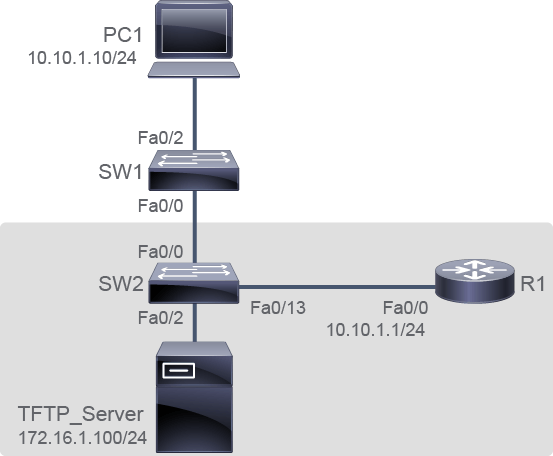
Job Aid
工作輔助資料
Device Information
裝置資訊
Device Information Table
裝置資訊表
Device 裝置 | Characteristic 特性 | Value 數值 |
PC1 PC1 | IPv4 address IPv4 位址 | 10.10.1.10/24 10.10.1.10/24 |
TFTP_Server TFTP_Server | IPv4 address IPv4 位址 | 172.16.1.100/24 172.16.1.100/24 |
SW1 SW1 | VLAN 1 IPv4 address VLAN 1 IPv4 位址 | 10.10.1.2/24 10.10.1.2/24 |
SW1 SW1 | FastEthernet0/0 description FastEthernet0/0 描述 | Link to SW2 連接到 SW2 |
SW1 SW1 | FastEthernet0/2 description FastEthernet0/2 描述 | Link to PC1 連接到 PC1 |
SW2 SW2 | Hostname 主機名稱 | SW2 SW2 |
SW2 SW2 | VLAN 1 IPv4 address VLAN 1 IPv4 位址 | 10.10.1.3/24 10.10.1.3/24 |
SW2 SW2 | FastEthernet0/0 description FastEthernet0/0 描述 | Link to SW1 連接到 SW1 |
SW2 SW2 | FastEthernet0/2 description FastEthernet0/2 描述 | Link to PC2 連接到 PC2 |
SW2 SW2 | FastEthernet0/13 description FastEthernet0/13 描述 | Link to R1 連接到 R1 |
R1 R1 | FastEthernet0/0 description FastEthernet0/0 描述 | Link to SW2 連接到 SW2 |
R1 R1 | FastEthernet0/0 IPv4 address FastEthernet0/0 IPv4 位址 | 10.10.1.1/24 10.10.1.1/24 |
Task 1: Upgrade Cisco IOS Image
任務 1:升級 Cisco IOS 映像檔
Activity
活動
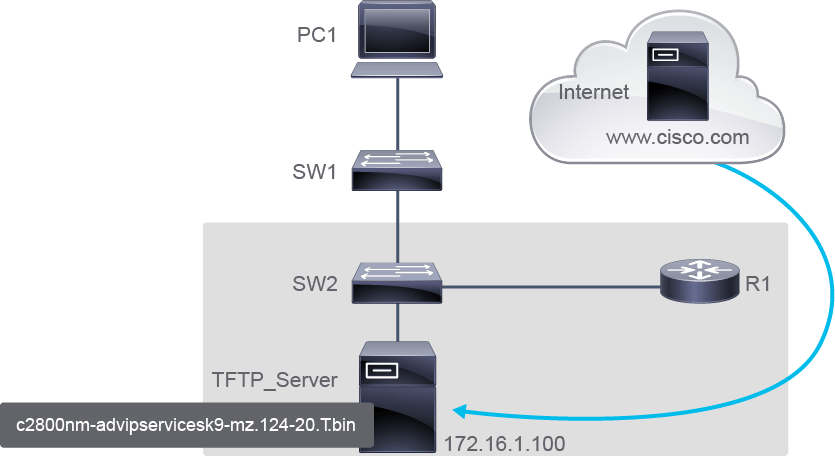
Suppose you have chosen a Cisco IOS image file that meets your requirements in terms of platform, features, and software defects. In a real environment, you would download the file from http://www.cisco.com and transfer it to the TFTP server. In this activity, the image has been prepared for you in advance. Click on the R1 tab.
假設您已選定一個符合平台、功能與軟體缺陷需求的 Cisco IOS 映像檔案。在實際環境中,您會從 http://www.cisco.com 下載該檔案並傳輸到 TFTP 伺服器。在此活動中,映像檔已預先為您準備妥當。按一下 R1 分頁。
Make sure that the R1 router can access the TFTP server.
確認 R1 路由器可以存取 TFTP 伺服器。
From R1, ping the TFTP server to test connectivity.
在 R1 上,ping TFTP 伺服器以測試連線。
R1# ping 172.16.1.100

Type escape sequence to abort.
Sending 5, 100-byte ICMP Echos to 172.16.1.100, timeout is 2 seconds:
!!!!!
Success rate is 100 percent (5/5), round-trip min/avg/max = 1/2/4 ms
R1#Click the Next button.
按一下下一步按鈕。
In a real environment, the device prompt would appear at the bottom of the last command's output. You would proceed typing the next command without using a Next button.
在實際環境中,裝置提示字元會出現在上一個指令輸出的最下方,您會直接繼續輸入下一個指令,而不需要按下一步按鈕。
Make sure that there is sufficient flash memory space on the router that is being upgraded.
確認正在升級的路由器上有足夠的快閃記憶體空間。
You can verify the amount of free flash space by using the show flash: command.
您可以使用 show flash: 指令確認可用的快閃記憶體空間大小。
R1# show flash:
-#- --length-- -----date/time------ path
2         1823 Oct 24 2013 14:10:58 +00:00 sdmconfig-2811.cfg
3         1826 Oct 24 2013 14:11:02 +00:00 sdmconfig-28xx.cfg
4       527849 Oct 24 2013 14:11:08 +00:00 128MB.sdf
5         1038 Oct 24 2013 14:11:14 +00:00 home.shtml
6      6036480 Oct 24 2013 14:11:42 +00:00 sdm.tar
8       861696 Oct 24 2013 14:11:54 +00:00 es.tar
9       113152 Oct 24 2013 14:12:00 +00:00 home.tar
10     1164288 Oct 24 2013 14:12:08 +00:00 common.tar
12      793739 Oct 24 2013 14:12:22 +00:00 256MB.sdf
54464512 bytes available (9519104 bytes used)
Free flash space in the example is 54,464,512 B. The new image file size is 50,933,220 B. Comparing the free flash space with the new image file size, you determine that you have sufficient space on the router to accommodate the new Cisco IOS Software image. Notice that you are asked if there is sufficient space on the router. Click Yes or No to indicate your response.
範例中可用的快閃記憶體空間為 54,464,512 位元組,新映像檔案大小為 50,933,220 位元組。將可用快閃記憶體空間與新映像檔案大小比較後,可判斷路由器有足夠空間容納這個新的 Cisco IOS 軟體映像檔。系統會詢問您路由器上是否有足夠空間,請按一下是或否來回答。
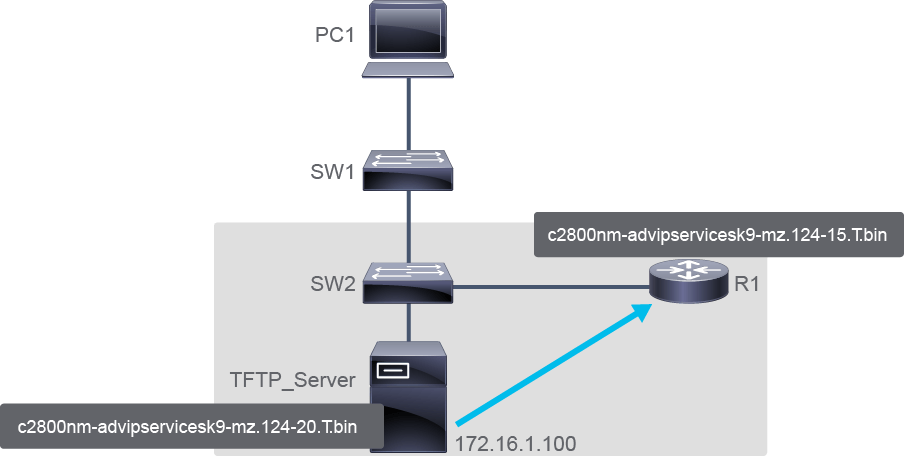
Copy the Cisco IOS image file from the TFTP server to the router using the copy command.
使用 copy 指令,將 Cisco IOS 映像檔從 TFTP 伺服器複製到路由器。
After you issue the command with specified source and destination URLs, you will be prompted for the IP address of the remote host, source filename, and destination filename. After you enter all the required information, the transfer of the file will begin.
輸入指令並指定來源與目的 URL 後,系統會提示您輸入遠端主機的 IP 位址、來源檔名,以及目的檔名。輸入完所有必要資訊後,檔案傳輸即會開始。
R1# copy tftp: flash:
Address or name of remote host []? 172.16.1.100
Source filename []? c2800nm-advipservicesk9-mz.124-20.T.bin
Destination filename []? c2800nm-advipservicesk9-mz.124-20.T.bin
Accessing tftp://172.16.1.100/c2800nm-advipservicesk9-mz.124-20.T.bin...
Loading c2800nm-advipservicesk9-mz.124-20.T.bin from 172.16.1.100 (via FastEthernet0/0): !!!!!!!!!!!!!!!!!!!!!!!!!!!!!!!!!!!!!!!!!!!!!!!!!!!!!!!!!!!!!!!!!!!!!!!!!!!!!!!!!!!!!!!!!!!!!!!!!!!!!!!!!!!!!!!!!!!!!!!!!!!!!!!!!!!!!!!!!!!!!!!!!!!!!!!!!!!!!!!!!!!!!!!!!!!!!!!!!!!!!!!!!!!!!!!!!!!!!!!
[OK - 50933220 bytes]

50933220 bytes copied in 287.540 secs (177134 bytes/sec)
This last line in the output indicates that the file has been copied successfully.
輸出中的最後一行表示檔案已複製成功。
Click the Next button.
按一下下一步按鈕。
In a real environment, the device prompt would appear at the bottom of the last command's output. You would proceed typing the next command without using a Next button.
在實際環境中,裝置提示字元會出現在上一個指令輸出的最下方,您會直接繼續輸入下一個指令,而不需要按下一步按鈕。
When the image is saved on the router flash memory, enter configuration mode and instruct the router to load the new image during the boot.
當映像檔已儲存在路由器快閃記憶體後,進入設定模式,並指示路由器在開機時載入新的映像檔。
On R1, enter the configuration mode and configure the boot system command.
在 R1 上,進入設定模式並設定 boot system 指令。
R1# configure terminal
Enter configuration commands, one per line.  End with CNTL/Z.
R1(config)# boot system flash c2800nm-advipservicesk9-mz.124-20.T.binOn R1, exit the configuration mode.
在 R1 上,退出設定模式。
R1(config)# exit
R1#
Nov 26 10:20:43.598: %SYS-5-CONFIG_I: Configured from console by console
R1#Use the show version command to determine the current configuration register.
使用 show version 指令,判斷目前的設定暫存器數值。
Recall that the boot field in the configuration register has to be set to 0x2 to 0xF in order for the router to check the boot commands.
請記得,設定暫存器中的開機欄位必須設為 0x2 到 0xF,路由器才會檢查 boot 指令。
If you set the boot field to a value of 2 to F, and there is a valid boot system command that is stored in the configuration file, the router software processes each boot command in sequence until the process is successful or the end of the list is reached. If there are no boot commands in the configuration file, the router attempts to boot the first file in flash memory.
若您將開機欄位設為 2 到 F 之間的值,且設定檔中存有有效的 boot system 指令,路由器軟體會依序處理各個 boot 指令,直到成功或到達清單結尾為止。若設定檔中沒有任何 boot 指令,路由器會嘗試啟動快閃記憶體中的第一個檔案。
R1# show versionCisco IOS Software, 2800 Software (C2800NM-ADVIPSERVICESK9-M), Version 12.4(15)T, RELEASE SOFTWARE (fc3)
Technical Support: http://www.cisco.com/techsupport
Copyright (c) 1986-2007 by Cisco Systems, Inc.
Compiled Mon 25-Jun-07 22:11 by prod_rel_team

<...output omitted ...>

Configuration register is 0x2102
As you can see, the boot field value in the configuration register is suitable so that you can proceed with the reload. Notice the current Cisco IOS version is 12.4(15)T.
如您所見,設定暫存器中的開機欄位數值適合,因此您可以繼續進行重新載入。請注意,目前的 Cisco IOS 版本為 12.4(15)T。
Click Next then save the configuration.
按一下下一步,然後儲存設定。
R1# copy running-config startup-config
Destination filename [startup-config]? <Enter>
Building configuration...

[OK]
R1#Finally, reload the router to boot the new image.
最後,重新載入路由器以啟動新的映像檔。
On R1, enter the reload command and then press Enter.
在 R1 上,輸入 reload 指令,然後按Enter。
In a real environment, the reload proceeds without user interaction. Since this is a simulation, you will need to click Next to progress through all the reload phases. At one point, you will see the router prompt you to press Return to get started; press Enter or Next to continue.
在實際環境中,重新載入會在沒有使用者互動的情況下進行。由於這是模擬環境,您需要按一下下一步以逐步瀏覽所有重新載入階段。在某個時間點,您會看到路由器提示您按 Return 鍵開始,請按Enter或下一步繼續。
R1# reload

Proceed with reload? [confirm] <enter>

*Nov 26 11:02:27.815: %SYS-5-RELOAD: Reload requested by console. Reload Reason: Reload Command.

System Bootstrap, Version 12.4(13r)T11, RELEASE SOFTWARE (fc1)
Technical Support: http://www.cisco.com/techsupport
Copyright (c) 2009 by cisco Systems, Inc.

Initializing memory for ECC
..
c2811 platform with 524288 Kbytes of main memory
Main memory is configured to 64 bit mode with ECC enabled


Upgrade ROMMON initialized
program load complete, entry point: 0x8000f000, size: 0xcb80

program load complete, entry point: 0x8000f000, size: 0x3092c44
Self decompressing the image : ######################################################################################################################################################################################################################################################################################### [OK]

Smart Init is enabled
smart init is sizing iomem
  ID            MEMORY_REQ                 TYPE
0003E7          0X003DA000 C2811 Mainboard
                0X00264050 Onboard VPN
                0X000021B8 Onboard USB
                0X002C29F0 public buffer pools
                0X00211000 public particle pools
TOTAL:          0X00B13BF8

If any of the above Memory Requirements are
"UNKNOWN", you may be using an unsupported
configuration or there is a software problem and
system operation may be compromised.
Rounded IOMEM up to: 12Mb.
Using 2 percent iomem. [12Mb/512Mb]

              Restricted Rights Legend

Use, duplication, or disclosure by the Government is
subject to restrictions as set forth in subparagraph
(c) of the Commercial Computer Software - Restricted
Rights clause at FAR sec. 52.227-19 and subparagraph
(c) (1) (ii) of the Rights in Technical Data and Computer
Software clause at DFARS sec. 252.227-7013.

           cisco Systems, Inc.
           170 West Tasman Drive
           San Jose, California 95134-1706


Cisco IOS Software, 2800 Software (C2800NM-ADVIPSERVICESK9-M), Version 12.4(15)T, RELEASE SOFTWARE (fc3)
Technical Support: http://www.cisco.com/techsupport
Copyright (c) 1986-2007 by Cisco Systems, Inc.
Compiled Mon 25-Jun-07 22:11 by prod_rel_team
Image text-base: 0x400A925C, data-base: 0x4372FE40


This product contains cryptographic features and is subject to United
States and local country laws governing import, export, transfer and
use. Delivery of Cisco cryptographic products does not imply
third-party authority to import, export, distribute or use encryption.
Importers, exporters, distributors and users are responsible for
compliance with U.S. and local country laws. By using this product you
agree to comply with applicable laws and regulations. If you are unable
to comply with U.S. and local laws, return this product immediately.

A summary of U.S. laws governing Cisco cryptographic products may be found at:
http://www.cisco.com/wwl/export/crypto/tool/stqrg.html

If you require further assistance please contact us by sending email to
export@cisco.com.

Installed image archive
Cisco 2811 (revision 49.46) with 512000K/12288K bytes of memory.
Processor board ID FCZ115172P5
2 FastEthernet interfaces
2 Serial(sync/async) interfaces
1 Virtual Private Network (VPN) Module
DRAM configuration is 64 bits wide with parity enabled.
239K bytes of non-volatile configuration memory.
1956401K bytes of USB Flash usbflash0 (Read/Write)
62720K bytes of ATA CompactFlash (Read/Write)

Press RETURN to get started!
<Enter>

*Nov 26 11:04:28.903: %VPN_HW-6-INFO_LOC: Crypto engine: onboard 0  State changed to: Initialized
*Nov 26 11:04:28.907: %VPN_HW-6-INFO_LOC: Crypto engine: onboard 0  State changed to: Enabled
*Nov 26 11:04:30.551: %USB_HOST_STACK-6-USB_DEVICE_CONNECTED: A Full speed USB device has been inserted in port 0.
*Nov 26 11:04:30.927: %LINEPROTO-5-UPDOWN: Line protocol on Interface VoIP-Null0, changed state to up
*Nov 26 11:04:30.927: %LINK-3-UPDOWN: Interface FastEthernet0/0, changed state to up
*Nov 26 11:04:30.927: %LINK-3-UPDOWN: Interface FastEthernet0/1, changed state to up
*Nov 26 11:04:30.927: %LINK-3-UPDOWN: Interface Serial0/0/0, changed state to up
*Nov 26 11:04:30.927: %LINK-3-UPDOWN: Interface Serial0/0/1, changed state to down
*Nov 26 11:04:30.927: %LINEPROTO-5-UPDOWN: Line protocol on Interface IPv6-mpls, changed state to up
*Nov 26 11:04:31.375: %USBFLASH-5-CHANGE: usbflash0 has been inserted!
*Nov 26 11:04:31.927: %LINEPROTO-5-UPDOWN: Line protocol on Interface FastEthernet0/0, changed state to up
*Nov 26 11:04:31.927: %LINEPROTO-5-UPDOWN: Line protocol on Interface FastEthernet0/1, changed state to up
*Nov 26 11:04:31.927: %LINEPROTO-5-UPDOWN: Line protocol on Interface Serial0/0/0, changed state to up
*Nov 26 11:04:31.927: %LINEPROTO-5-UPDOWN: Line protocol on Interface Serial0/0/1, changed state to down
*Nov 26 11:04:33.623: %SYS-4-CONFIG_NEWER: Configuration from version 15.1 may not be correctly understood
*Nov 26 11:04:34.203: %SYS-5-CONFIG_I: Configured from memory by console
*Nov 26 11:04:34.695: %SYS-5-RESTART: System restarted --
Cisco IOS Software, 2800 Software (C2800NM-ADVIPSERVICESK9-M), Version 12.4(15)T, RELEASE SOFTWARE (fc3)
Technical Support: http://www.cisco.com/techsupport
Copyright (c) 1986-2007 by Cisco Systems, Inc.
Compiled Mon 25-Jun-07 22:11 by prod_rel_team
*Nov 26 11:04:34.699: %SNMP-5-COLDSTART: SNMP agent on host R1 is undergoing a cold start
*Nov 26 11:04:34.931: %CRYPTO-6-ISAKMP_ON_OFF: ISAKMP is OFF
*Nov 26 11:04:34.931: %CRYPTO-6-ISAKMP_ON_OFF: ISAKMP is OFF
*Nov 26 11:04:36.023: %LINK-5-CHANGED: Interface FastEthernet0/1, changed state to administratively down
*Nov 26 11:04:36.139: %LINK-5-CHANGED: Interface Serial0/0/0, changed state to administratively down
*Nov 26 11:04:36.139: %LINK-5-CHANGED: Interface Serial0/0/1, changed state to administratively down
*Nov 26 11:04:37.223: %LINEPROTO-5-UPDOWN: Line protocol on Interface FastEthernet0/1, changed state to down
*Nov 26 11:04:37.223: %LINEPROTO-5-UPDOWN: Line protocol on Interface Serial0/0/0, changed state to down
*Nov 26 11:04:38.459: %SYS-6-BOOTTIME: Time taken to reboot after reload =  128 seconds
R1#When the router has booted, you can verify if the new image has loaded using the show version command.
路由器開機完成後,您可以使用 show version 指令,驗證新的映像檔是否已載入。
R1# show version
Cisco IOS Software, 2800 Software (C2800NM-ADVIPSERVICESK9-M), Version 12.4(20)T, RELEASE SOFTWARE (fc3)
Technical Support: http://www.cisco.com/techsupport
Copyright (c) 1986-2007 by Cisco Systems, Inc.
Compiled Mon 25-Jun-07 22:11 by prod_rel_team

ROM: System Bootstrap, Version 12.4(13r)T11, RELEASE SOFTWARE (fc1)

R1 uptime is 5 minutes
System returned to ROM by reload at 11:02:27 UTC Thu Nov 26 2015
System image file is "flash:c2800nm-advipservicesk9-mz.124-20.T.bin"


This product contains cryptographic features and is subject to United
States and local country laws governing import, export, transfer and
use. Delivery of Cisco cryptographic products does not imply
third-party authority to import, export, distribute or use encryption.
Importers, exporters, distributors and users are responsible for
compliance with U.S. and local country laws. By using this product you
agree to comply with applicable laws and regulations. If you are unable
to comply with U.S. and local laws, return this product immediately.

A summary of U.S. laws governing Cisco cryptographic products may be found at:
http://www.cisco.com/wwl/export/crypto/tool/stqrg.html

If you require further assistance please contact us by sending email to
export@cisco.com.

Cisco 2811 (revision 53.50) with 512000K/12288K bytes of memory.
Processor board ID FCZ115172P5
2 FastEthernet interfaces
2 Serial(sync/async) interfaces
1 Virtual Private Network (VPN) Module
DRAM configuration is 64 bits wide with parity enabled.
239K bytes of non-volatile configuration memory.
1956401K bytes of USB Flash usbflash0 (Read/Write)
62720K bytes of ATA CompactFlash (Read/Write)

Configuration register is 0x2102
You should see that there is a new version of the image that is loaded into the router RAM. Previously, there was version 12.4(15)T, and now it is version 12.4(20)T.
您應該可以看到路由器 RAM 中載入的映像檔已是新版本。先前的版本是 12.4(15)T,現在則是 12.4(20)T。