FASTLab 8: Implement Numbered and Named IPv4 ACLs
FASTLab 8:實作編號與具名 IPv4 存取控制清單
Scenario
情境
Your mentor, Bob, tells you that you are doing great and the company wants you to start handling more complicated implementations. He explains that you must have a thorough understanding of ACLs (including the various types of ACLs) and you should be able to configure standard and extended ACLs before going on these deployments. To gauge your level of preparedness, Bob has set up a Proof of Concept (PoC) lab to test your knowledge and skills. The lab consists of three routers: PoC1, PoC2, and PoC3. PoC1 and PoC3 are already configured. You have access to these routers for testing purposes; however, you must not make any changes to these routers.
你的導師 Bob 告訴你,你的表現很好,公司希望你開始處理更複雜的部署工作。他解釋說,你必須充分了解 ACL(包括各種 ACL 類型),並且要能在進行這些部署前設定標準與延伸 ACL。為了評估你的準備程度,Bob 建立了一個概念驗證(PoC)實驗環境,來測試你的知識與技能。此實驗環境由三台路由器組成:PoC1、PoC2 與 PoC3。PoC1 與 PoC3 已完成設定。你可以存取這些路由器以進行測試,但不得對這些路由器做任何變更。
Some of the configurations on PoC2 are already done. The correct interface addressing and static routing have been configured.
PoC2 上的部分設定已經完成,正確的介面定址與靜態路由已經設定完成。
To verify ACL operation, you can use ping and telnet. The syntax you should use for ping tests is ping destination source source, where destination is the destination IPv4 address and source is the source IPv4 address you choose to test from. When testing remote connections using the telnet command, you can specify the port number you wish to access, when not using the default Telnet port number. The syntax of the command is telnet destination port.
若要驗證 ACL 的運作,你可以使用 ping 與 telnet。ping 測試應使用的語法為 ping destination source source,其中 destination 是目的 IPv4 位址,source 是你選擇用來測試的來源 IPv4 位址。使用 telnet 指令測試遠端連線時,若不使用預設 Telnet 連接埠號,可以指定你想存取的連接埠號。該指令的語法為 telnet destination port。
You need to complete the following tasks:
你需要完成以下任務:
- Create a numbered access-list using number 1 on router PoC2, to filter traffic that goes from PoC3 to PoC1. Ensure the following:在路由器 PoC2 上,使用編號 1 建立編號存取清單,過濾從 PoC3 流向 PoC1 的流量。請確保:
- With one ACL statement, block all traffic from the host 172.16.1.1.以一筆 ACL 敘述,封鎖來自主機 172.16.1.1 的所有流量。
- Ensure that access-list 1 allows traffic from rest of the hosts in the 172.16.1.0/24 range.確保存取清單 1 允許來自 172.16.1.0/24 範圍中其餘主機的流量。
- Ensure that access-list 1 blocks traffic from the subnet range 172.16.2.0/24.確保存取清單 1 封鎖來自子網路範圍 172.16.2.0/24 的流量。
- Ensure that access-list 1 allows rest of the traffic.確保存取清單 1 允許其餘的流量。
- Apply the access list on PoC2 on the appropriate interface and in the appropriate direction, so that only traffic from the loopback network segments of PoC3 to loopback network segments of PoC1 is blocked. Traffic to PoC2 should not be blocked.在 PoC2 上,將存取清單套用到適當的介面與方向,使其只封鎖從 PoC3 的迴路網段流向 PoC1 迴路網段的流量。前往 PoC2 的流量不應被封鎖。
- On router PoC2, create a named standard access-list with the name NAMED_ACL. The access list NAMED_ACL should:在路由器 PoC2 上,建立名為 NAMED_ACL 的具名標準存取清單。存取清單 NAMED_ACL 應該:
- Allow traffic from hosts 10.1.1.1, 10.1.1.2, and 10.1.1.3. You need to use a single ACL statement to allow traffic from the specified IPv4 addresses.允許來自主機 10.1.1.1、10.1.1.2 與 10.1.1.3 的流量。你需要使用單一 ACL 敘述來允許來自這些指定 IPv4 位址的流量。
- Should have one entry that allows traffic from 10.1.2.0/24 and 10.1.3.0/24 subnets.應有一筆項目允許來自 10.1.2.0/24 與 10.1.3.0/24 子網路的流量。
- Should also allow traffic with a source address of interface E0/0 on router PoC1.也應允許來源位址為路由器 PoC1 上 E0/0 介面的流量。
- Apply the access list NAMED_ACL so that it filters traffic ingressing from PoC1.套用存取清單 NAMED_ACL,以過濾從 PoC1 進入的流量。
- Create a named extended access-list with the name PING_31.建立名為 PING_31 的具名延伸存取清單。
- The access list PING_31 should allow ICMP connectivity tests only from PoC3 Ethernet interface.存取清單 PING_31 應只允許來自 PoC3 乙太網路介面的 ICMP 連線測試。
- Make sure that ICMP tests from other PoC3 interfaces fail.確保來自 PoC3 其他介面的 ICMP 測試會失敗。
- The access list PING_31 should not introduce other restriction—it should not block other traffic that is allowed by the standard access list 1.存取清單 PING_31 不應引入其他限制,不應封鎖標準存取清單 1 所允許的其他流量。
- Apply the access list PING_31 to the PoC2 to the appropriate interface and direction.將存取清單 PING_31 套用到 PoC2 上適當的介面與方向。
Topology
拓樸
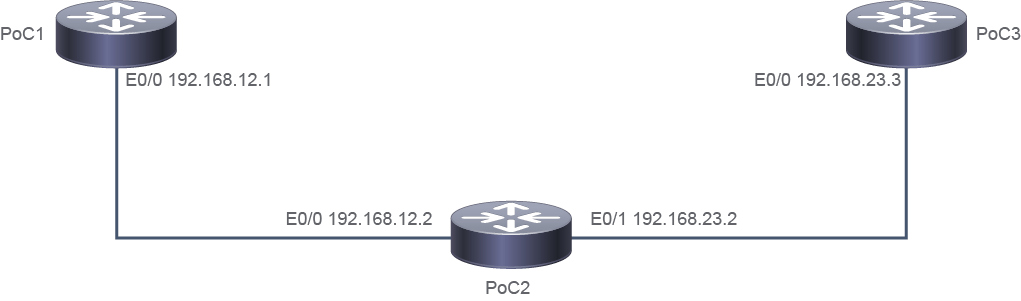
Job Aid
工作輔助資料
Device 裝置 | Interface 介面 | IPv4 Address IPv4 位址 | Remote 遠端 | Interface 介面 | IPv4 Address IPv4 位址 |
PoC1 PoC1 | E0/0 E0/0 | 192.168.12.1/24 192.168.12.1/24 | PoC2 PoC2 | E0/0 E0/0 | 192.168.12.2/24 192.168.12.2/24 |
PoC2 PoC2 | E0/1 E0/1 | 192.168.23.2/24 192.168.23.2/24 | PoC3 PoC3 | E0/0 E0/0 | 192.168.23.3/24 192.168.23.3/24 |
PoC1 PoC1 | Loo 0 Loo 0 | 10.1.1.1/24 10.1.1.1/24 | " " | " " | " " |
PoC1 PoC1 | Loo 1 Loo 1 | 10.1.1.2/24 10.1.1.2/24 | " " | " " | " " |
PoC1 PoC1 | Loo 2 Loo 2 | 10.1.1.3/24 10.1.1.3/24 | " " | " " | " " |
PoC1 PoC1 | Loo 3 Loo 3 | 10.1.2.1/24 10.1.2.1/24 | " " | " " | " " |
PoC1 PoC1 | Loo 4 Loo 4 | 10.1.3.1/24 10.1.3.1/24 | " " | " " | " " |
PoC3 PoC3 | Loo 1 Loo 1 | 172.16.1.1/24 172.16.1.1/24 | " " | " " | " " |
PoC3 PoC3 | Loo 2 Loo 2 | 172.16.1.10/24 172.16.1.10/24 | " " | " " | " " |
PoC3 PoC3 | Loo 3 Loo 3 | 172.16.2.1/24 172.16.2.1/24 | " " | " " | " " |
PoC3 PoC3 | Loo 4 Loo 4 | 172.16.3.1/24 172.16.3.1/24 | " " | " " | " " |
Configuration Tips
設定提示
- Before you start entering and executing commands, prepare the list of ACL statements in a text editor file. Be careful how you sequence permit and deny statements. Start with more specific entries.在開始輸入並執行指令之前,請先在文字編輯器中準備好 ACL 敘述清單。請小心排列 permit 與 deny 敘述的順序,先從最明確的項目開始。
- To define an IP access list by name or number use the
ip access-list {standard | extended}{access-list-name | access-list-number} command. For numbered ACLs you can also use theaccess-listaccess-list-number{permit | deny}command.若要以名稱或編號定義 IP 存取清單,請使用ip access-list {standard | extended}{access-list-name | access-list-number} 指令。對於編號 ACL,你也可以使用access-listaccess-list-number{permit | deny}指令。 - Use the
ip access-groupaccess-list-numberdirectioncommand to apply access list for traffic filtering on an interface.使用ip access-groupaccess-list-numberdirection指令,將存取清單套用到介面以過濾流量。 - Use the
ping{hostname | destination-address}[sourcesource-address]command to diagnose basic network connectivity.使用ping{hostname | destination-address}[sourcesource-address]指令診斷基本網路連線能力。 - Use
show access-listaccess-list-number command to view access list statistics. You can clear counters using theclear access-list counterscommand.使用show access-listaccess-list-number 指令檢視存取清單統計資料。你可以使用clear access-list counters指令清除計數器。
Answer Key
參考解答
You need to complete the following tasks:
你需要完成以下任務:
- Create a numbered access-list using number 1 on router PoC2, to filter traffic that goes from PoC3 to PoC1. Ensure the following:在路由器 PoC2 上,使用編號 1 建立編號存取清單,過濾從 PoC3 流向 PoC1 的流量。請確保:
- With one ACL statement, block all traffic from the host 172.16.1.1.以一筆 ACL 敘述,封鎖來自主機 172.16.1.1 的所有流量。
- Ensure that access-list 1 allows traffic from rest of the hosts in the 172.16.1.0/24 range.確保存取清單 1 允許來自 172.16.1.0/24 範圍中其餘主機的流量。
- Ensure that access-list 1 blocks traffic from the subnet range 172.16.2.0/24.確保存取清單 1 封鎖來自子網路範圍 172.16.2.0/24 的流量。
- Ensure that access-list 1 allows rest of the traffic.確保存取清單 1 允許其餘的流量。
On PoC2, configure the following commands:
在 PoC2 上,設定以下指令:
PoC2> enable PoC2# configure terminal PoC2(config)# access-list 1 deny 172.16.1.1 PoC2(config)# access-list 1 permit 172.16.1.0 0.0.0.255 PoC2(config)# access-list 1 deny 172.16.2.0 0.0.0.255 PoC2(config)# access-list 1 permit any - Apply the access list on PoC2 on the appropriate interface and in the appropriate direction, so that only traffic from the loopback network segments of PoC3 to loopback network segments of PoC1 is blocked. Traffic to PoC2 should not be blocked.在 PoC2 上,將存取清單套用到適當的介面與方向,使其只封鎖從 PoC3 的迴路網段流向 PoC1 迴路網段的流量。前往 PoC2 的流量不應被封鎖。
On PoC2, configure the following commands:
在 PoC2 上,設定以下指令:
PoC2(config)# interface Ethernet0/0 Poc2(config-if)# ip access-group 1 out Poc2(config-if)# exit - On router PoC2, create a named standard access-list with the name NAMED_ACL. The access list NAMED_ACL should:在路由器 PoC2 上,建立名為 NAMED_ACL 的具名標準存取清單。存取清單 NAMED_ACL 應該:
- Allow traffic from hosts 10.1.1.1, 10.1.1.2, and 10.1.1.3. You need to use a single ACL statement to allow traffic from the specified IPv4 addresses.允許來自主機 10.1.1.1、10.1.1.2 與 10.1.1.3 的流量。你需要使用單一 ACL 敘述來允許來自這些指定 IPv4 位址的流量。
- Should have one entry that allows traffic from 10.1.2.0/24 and 10.1.3.0/24 subnets.應有一筆項目允許來自 10.1.2.0/24 與 10.1.3.0/24 子網路的流量。
- Should also allow traffic with a source address of interface E0/0 on router PoC1.也應允許來源位址為路由器 PoC1 上 E0/0 介面的流量。
On PoC2, configure the following commands; note that the most specific statements are configured first:
在 PoC2 上,設定以下指令;請注意最明確的敘述會排在最前面:
PoC2(Config)# ip access-list standard NAMED_ACL PoC2(Config-std-nacl)# permit host 192.168.12.1 PoC2(Config-std-nacl)# permit 10.1.1.0 0.0.0.3 PoC2(Config-std-nacl)# permit 10.1.2.0 0.0.1.255PoC2(Config-std-nacl)# exit - Apply the access list NAMED_ACL so that it filters traffic ingressing from PoC1.套用存取清單 NAMED_ACL,以過濾從 PoC1 進入的流量。
On PoC2, configure the following commands.
在 PoC2 上,設定以下指令。
PoC2(config)# interface Ethernet0/0 Poc2(config-if)# ip access-group NAMED_ACL in Poc2(config-if)# exit - Create a named extended access-list with the name PING_31.建立名為 PING_31 的具名延伸存取清單。
- The access list PING_31 should allow ICMP connectivity tests only from PoC3 Ethernet 0/0 interface.存取清單 PING_31 應只允許來自 PoC3 Ethernet 0/0 介面的 ICMP 連線測試。
- Make sure that ICMP tests from other PoC3 interfaces fail.確保來自 PoC3 其他介面的 ICMP 測試會失敗。
- The access list PING_31 should not introduce other restriction—it should not block other traffic that is allowed by the standard access list 1.存取清單 PING_31 不應引入其他限制,不應封鎖標準存取清單 1 所允許的其他流量。
On PoC2, configure the following commands:
在 PoC2 上,設定以下指令:
PoC2(config)# ip access-list extended PING_31 PoC2(config-ext-nacl)# permit icmp host 192.168.23.3 any PoC2(config-ext-nacl)# deny icmp any any PoC2(config-ext-nacl)# permit ip any any PoC2(config-ext-nacl)# exit - Apply the access list PING_31 to the PoC2 to the appropriate interface and direction.將存取清單 PING_31 套用到 PoC2 上適當的介面與方向。
On PoC2, configure the following commands:
在 PoC2 上,設定以下指令:
PoC2(config)# interface Ethernet0/1
Poc2(config-if)# ip access-group PING_31 in
Implement Numbered and Named IPv4 ACLs Questions
實作編號與具名 IPv4 存取控制清單問題
ping 192.168.12.1 source 192.168.23.3 command. What result do you see?從路由器 PoC3,透過執行 ping 192.168.12.1 source 192.168.23.3 指令驗證與 PoC1 的連線能力。你會看到什麼結果?ping 192.168.12.1 source 172.16.1.1 command. The test should not succeed. What statement is true about the unsuccessful test?在路由器 PoC3 上,使用 ping 192.168.12.1 source 172.16.1.1 指令執行到 PoC1 的連線測試,該測試應不會成功。關於這次測試失敗,下列哪項敘述正確?