Introduction
簡介
Your colleague informs you that SW2 is showing messages about a duplex mismatch and that they are unable to prevent the messages. The senior engineers went out for lunch, and you need to resolve this issue on your own.
你的同事告知你,SW2 出現雙工不匹配的訊息,而且他們無法阻止這些訊息出現。資深工程師都外出吃午餐了,你需要自行解決這個問題。
Topology
拓樸
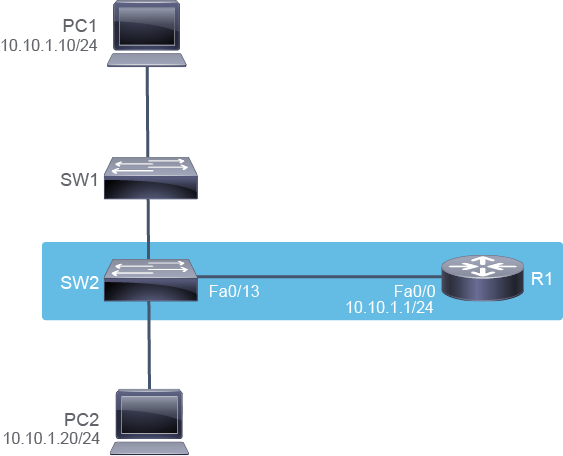
Job Aid
工作輔助資料
Device Information
裝置資訊
Device Information Table
裝置資訊表
Device 裝置 | Characteristic 特性 | Value 值 |
PC1 PC1 | IPv4 address IPv4 位址 | 10.10.1.10/24 10.10.1.10/24 |
PC2 PC2 | IPv4 address IPv4 位址 | 10.10.1.20/24 10.10.1.20/24 |
SW1 SW1 | VLAN 1 IPv4 address VLAN 1 IPv4 位址 | 10.10.1.2/24 10.10.1.2/24 |
SW1 SW1 | FastEthernet0/0 description FastEthernet0/0 描述 | Link to SW2 連接至 SW2 |
SW1 SW1 | FastEthernet0/2 description FastEthernet0/2 描述 | Link to PC1 連接至 PC1 |
SW2 SW2 | VLAN 1 IPv4 address VLAN 1 IPv4 位址 | 10.10.1.3/24 10.10.1.3/24 |
SW2 SW2 | FastEthernet0/0 description FastEthernet0/0 描述 | Link to SW1 連接至 SW1 |
SW2 SW2 | FastEthernet0/2 description FastEthernet0/2 描述 | Link to PC2 連接至 PC2 |
SW2 SW2 | FastEthernet0/13 description FastEthernet0/13 描述 | Link to R1 連接至 R1 |
R1 R1 | FastEthernet0/0 description FastEthernet0/0 描述 | Link to SW2 連接至 SW2 |
R1 R1 | FastEthernet0/0 IPv4 address FastEthernet0/0 IPv4 位址 | 10.10.1.1/24 10.10.1.1/24 |
Task 1: Troubleshoot Port Duplex Issues
任務 1:疑難排解連接埠雙工問題
Activity
活動
On SW2, verify that you have console logging enabled. Use the show logging command.
在 SW2 上,確認已啟用主控台記錄功能。使用 show logging 指令。
From the output, you can see that logging is enabled.
從輸出結果可以看出記錄功能已啟用。
SW2# show logging
Syslog logging: enabled (0 messages dropped, 0 messages rate-limited, 0 flushes, 0 overruns, xml disabled, filtering disabled)

No Active Message Discriminator.


No Inactive Message Discriminator.


    Console logging: level debugging, 15 messages logged, xml disabled,
                     filtering disabled
    Monitor logging: level debugging, 0 messages logged, xml disabled,
                     filtering disabled
    Buffer logging:  level debugging, 15 messages logged, xml disabled,
                    filtering disabled
    Exception Logging: size (4096 bytes)
    Count and timestamp logging messages: disabled
    Persistent logging: disabled
    Trap logging: level informational, 18 message lines logged
        Logging Source-Interface:       VRF Name:

<... output omitted ...>Press the Enter key or the Next button to get more information.
按下 Enter 鍵或 Next 按鈕以取得更多資訊。
Because you have console logging enabled, the switch is reporting its status. As a result, your colleague sees the duplex mismatch message.
由於你已啟用主控台記錄功能,交換器會回報其狀態。因此,你的同事看到了雙工不匹配的訊息。
The duplex mismatch message appears.
出現雙工不匹配的訊息。
%CDP-4-DUPLEX_MISMATCH: duplex mismatch discovered on FastEthernet0/13 (not full duplex), with R1 FastEthernet0/0 (full duplex).

SW2#Use the show interfaces FastEthernet0/13 command to identify the duplex setting on the interface.
使用 show interfaces FastEthernet0/13 指令來確認該介面的雙工設定。
SW2# show interfaces FastEthernet0/13
FastEthernet0/13 is up, line protocol is up (connected)
  Hardware is Fast Ethernet, address is 000b.5fe5.81cd (bia 000b.5fe5.81cd)
  MTU 1500 bytes, BW 100000 Kbit, DLY 100 usec,
     reliability 255/255, txload 1/255, rxload 1/255
  Encapsulation ARPA, loopback not set
  Keepalive set (10 sec)
 Half-duplex, Auto-speed, media type is 100BaseTX
  input flow-control is unsupported output flow-control is unsupported
  ARP type: ARPA, ARP Timeout 04:00:00
<" output omitted ">


SW2#
You can see that half duplex is set on the FastEthernet0/13 interface.
你可以看到 FastEthernet0/13 介面設定為半雙工。
Use the show ip interface brief | include 0/13 command to verify that the interface is functional.
使用 show ip interface brief | include 0/13 指令確認該介面是否正常運作。
SW2# show ip interface brief | include 0/13
FastEthernet0/13           unassigned      YES unset  up                  up
The output shows that the FastEthernet0/13 interface is in an "up/up" state. This status means that, although the duplex settings are mismatched on the link, it is still functional. The drawback is that the connection is not efficient. With a half-duplex operation, the device cannot send and receive data at the same time.
輸出結果顯示 FastEthernet0/13 介面處於「up/up」狀態。此狀態表示,儘管連結上的雙工設定不匹配,介面仍可正常運作。缺點是連線效率不佳。在半雙工運作下,裝置無法同時傳送與接收資料。
Now, you need to fix the issue that you identified. You need to enter the configuration mode and set the FastEthernet 0/13 interface duplex setting to "full" using the duplex full command.
現在,你需要修正剛才找到的問題。你需要進入設定模式,並使用 duplex full 指令將 FastEthernet 0/13 介面的雙工設定改為「full」。
On SW2, enter the following commands:
在 SW2 上,輸入以下指令:
SW2# configure terminalEnter configuration commands, one per line.  End with CNTL/Z.
SW2(config)# interface FastEthernet 0/13
SW2(config-if)# duplex fullDo not forget to save the changes that you made.
別忘了儲存你所做的變更。
Save your changes by copying the running configuration to the startup configuration. Usually, you would execute the copy running-config startup-config command from the privileged mode. But by adding the do command in front of it, you can also execute it from the interface configuration mode where you are currently in.
透過將執行中設定複製到啟動設定來儲存變更。通常你會在特權模式下執行 copy running-config startup-config 指令。但只要在指令前加上 do 指令,你也可以在目前所在的介面設定模式下執行該指令。
SW2(config-if)# do copy running-config startup-config
Destination filename [startup-config]? Building configuration...
[OK]