FASTLab 5: Troubleshoot VLANs and Trunk
FASTLab 5:疑難排解 VLAN 與中繼
Scenario
情境
The IT department of an airline company has asked you to help their new junior engineer named Marcus. Marcus has just set up a Proof of Concept (PoC) lab to better understand switching. He has set up a VLAN scheme where PCs are in two VLANs, while servers are in a different VLAN. These devices are spread across two switches SW1 and SW2, which have a trunk connection between them. Marcus has not set up the equipment properly, so it is up to you to troubleshoot the lab network and show him that the VLANs and trunks are working properly.
一家航空公司的資訊部門請你協助他們的新進初級工程師 Marcus。Marcus 剛建置了一個概念驗證(PoC)實驗環境,以更深入理解交換技術。他建立了一套 VLAN 架構:PC 分屬兩個 VLAN,伺服器則位於另一個 VLAN。這些裝置分散在兩台交換器 SW1 與 SW2 上,兩者之間有一條中繼連線。Marcus 尚未正確設定這些設備,因此需要你來疑難排解這個實驗網路,並向他證明 VLAN 與中繼運作正常。
- Ensure that the VLAN names have been configured correctly on the two switches SW1 and SW2, using the following VLAN name information:請確認兩台交換器 SW1 與 SW2 上的 VLAN 名稱已依照以下 VLAN 名稱資訊正確設定:
VLAN VLAN | Name 名稱 |
65 65 | Users1 Users1 |
13 13 | Users2 Users2 |
80 80 | Servers Servers |
- Ensure that the interfaces on SW1 and SW2 that are connected to PCs and Servers are configured correctly and are enabled.確認 SW1 與 SW2 上連接 PC 與伺服器的介面已正確設定並已啟用。
- Isolate and troubleshoot the issues that are related to the trunking between SW1 and SW2.找出並排解與 SW1 與 SW2 之間中繼相關的問題。
Topology
拓樸
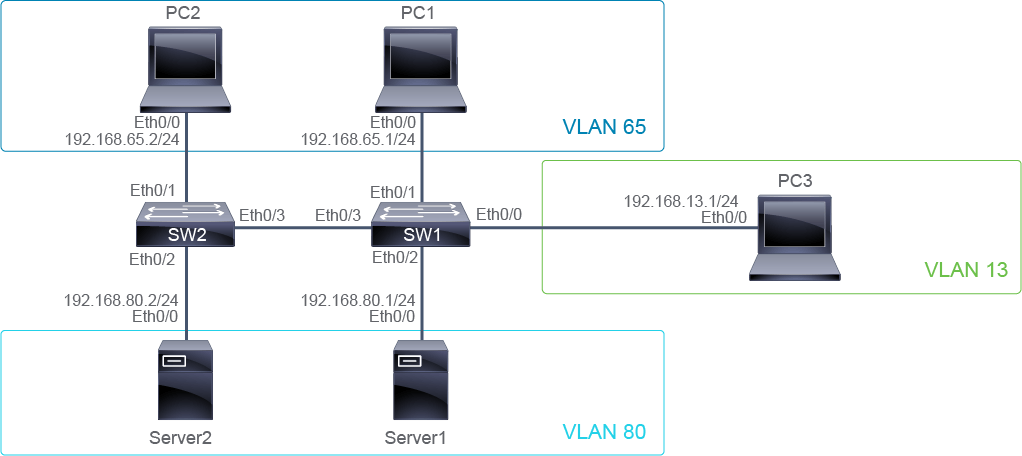
Job Aid
輔助資料
Device Information
裝置資訊
Device 裝置 | Interface 介面 | IPv4 Address IPv4 位址 | Remote 遠端 | Interface 介面 | VLAN VLAN |
PC1 PC1 | E0/0 E0/0 | 192.168.65.1/24 192.168.65.1/24 | SW1 SW1 | E0/1 E0/1 | 65 65 |
PC2 PC2 | E0/0 E0/0 | 192.168.65.2/24 192.168.65.2/24 | SW2 SW2 | E0/1 E0/1 | 65 65 |
PC3 PC3 | E0/0 E0/0 | 192.168.13.1/24 192.168.13.1/24 | SW1 SW1 | E0/0 E0/0 | 13 13 |
Server1 Server1 | E0/0 E0/0 | 192.168.80.1/24 192.168.80.1/24 | SW1 SW1 | E0/2 E0/2 | 80 80 |
Server2 Server2 | E0/0 E0/0 | 192.168.80.2/24 192.168.80.2/24 | SW2 SW2 | E0/2 E0/2 | 80 80 |
SW1 SW1 | E0/3 E0/3 | Trunk 中繼 | SW2 SW2 | E0/3 E0/3 | " " |
VLAN Name Information
VLAN 名稱資訊
VLAN VLAN | Name 名稱 |
65 65 | Users1 Users1 |
13 13 | Users2 Users2 |
80 80 | Servers Servers |
Configuration Tips
組態提示
- Use the
show vlancommand to see the VLANs configured. It will show the ports in each VLAN along with the VLAN names.使用show vlan指令查看已設定的 VLAN,它會顯示每個 VLAN 中的連接埠及其 VLAN 名稱。 - On SW1, VLAN 65 is "User," but it is supposed to be "Users1."在 SW1 上,VLAN 65 目前名稱為「User」,但正確名稱應為「Users1」。
- On SW1 and SW2, the VLAN for "Users2" is not named. Name VLAN 13 correctly.在 SW1 與 SW2 上,「Users2」對應的 VLAN 尚未命名,請正確命名 VLAN 13。
- The port on SW2 connecting to PC2 is configured to place traffic to the wrong VLAN.SW2 上連往 PC2 的連接埠被設定為將流量放入錯誤的 VLAN。
- Enable the port on SW1 that is connected to Server1.啟用 SW1 上連接 Server1 的連接埠。
- Verify the trunking configuration between SW1 and SW2. The port is set as an access port. Remove the configuration that is related to making the port an access port and apply the configuration making it a trunk unconditionally. Trunk links will not come up when the trunk ports do not have a matching configuration.驗證 SW1 與 SW2 之間的中繼組態。該連接埠被設定為存取埠。請移除與存取埠相關的設定,並套用讓該連接埠無條件成為中繼埠的組態。當中繼埠的組態不相符時,中繼鏈路將無法啟動。
- Use the
pingcommand to check connectivity between devices in the same VLAN. Thepingcommand will not work between devices in different VLANs.使用ping指令檢查同一 VLAN 內裝置之間的連線能力。ping指令在不同 VLAN 的裝置之間將無法運作。
Answer Key
解答金鑰
You need to complete the following tasks:
你需要完成以下任務:
- Ensure that the VLAN names have been configured correctly on the two switches SW1 and SW2:確認兩台交換器 SW1 與 SW2 上的 VLAN 名稱已正確設定:
- Inspect the VLAN table on SW1 and SW2.檢查 SW1 與 SW2 上的 VLAN 表。
SW1# show vlan brief VLAN Name Status Ports ---- -------------------------------- --------- ------------------------------- 1 default active 13 VLAN0013 active Et0/0, Et0/3 65 User active Et0/1 80 Servers active Et0/2- VLAN 65 is "User", but it is supposed to be "Users1". Make the correction to the name of VLAN 65.VLAN 65 目前名稱為「User」,但正確名稱應為「Users1」。請更正 VLAN 65 的名稱。
SW1(config)# vlan 65 SW1(config-vlan)# name Users1 SW1(config-vlan)# exit- The VLAN for "Users2" is not named. Remedy this by naming VLAN 13 correctly.「Users2」對應的 VLAN 尚未命名,請正確命名 VLAN 13 以修正此問題。
SW1(config)# vlan 13 SW1(config-vlan)# name Users2 SW1(config-vlan)# exit- Inspect the VLAN table on SW2. The VLAN entries should match. Correct the name for VLAN 13 here as well.檢查 SW2 上的 VLAN 表,VLAN 項目應該相符。同樣在此處更正 VLAN 13 的名稱。
SW2# show vlan brief VLAN Name Status Ports ---- -------------------------------- --------- ------------------------------- 1 default active Et0/0 13 VLAN0013 active 65 Users active 80 Servers active Et0/1, Et0/2 SW2(config)# vlan 13 SW2(config-vlan)# name Users2 SW2(config-vlan)# exit - Ensure that the interfaces on SW1 and SW2 that are connected to PCs and Servers are configured correctly and are enabled.確認 SW1 與 SW2 上連接 PC 與伺服器的介面已正確設定並已啟用。
- Check the VLAN assignment of the port that is connected to PC1 on SW1.檢查 SW1 上連接 PC1 的連接埠的 VLAN 指派。
SW1# show vlan brief

VLAN Name                             Status    Ports
---- -------------------------------- --------- -------------------------------
1    default                          active
13   Users2                           active    Et0/0, Et0/3
65   Users1                           active    Et0/1
80   Servers                          active    Et0/2
1002 fddi-default                     act/unsup
1003 token-ring-default               act/unsup
1004 fddinet-default                  act/unsup
1005 trnet-default                    act/unsup
SW1#
The port on SW1 that is connected to PC1 is correctly configured to tag the appropriate VLAN tag.
SW1 上連接 PC1 的連接埠已正確設定為標記適當的 VLAN 標籤。
- Check the VLAN assignment of the port that is connected to PC2 on SW2.檢查 SW2 上連接 PC2 的連接埠的 VLAN 指派。
SW2# show vlan brief

VLAN Name                             Status    Ports
---- -------------------------------- --------- -------------------------------
1    default                          active    Et0/0
13   Users2                           active
65   Users1                           active
80   Servers                          active    Et0/1, Et0/2
1002 fddi-default                     act/unsup
1003 token-ring-default               act/unsup
1004 fddinet-default                  act/unsup
1005 trnet-default                    act/unsup
SW2#
The port on SW2 connecting to PC2 is configured to encapsulate traffic to the wrong VLAN.
SW2 上連接 PC2 的連接埠被設定為將流量封裝到錯誤的 VLAN。
- Correct the VLAN assignment configuration on the port on SW2.更正 SW2 上該連接埠的 VLAN 指派組態。
SW2(config)# interface E0/1 SW2(config-if)# switchport access vlan 65- Check the VLAN assignment of the port that is connected to Server1 on SW1.檢查 SW1 上連接 Server1 的連接埠的 VLAN 指派。
SW1# show run interface E0/2
interface Ethernet E0/2
 switchport access vlan 80
 switchport mode access
 shutdown
 duplex auto
end
The port is configured with VLAN parameters correctly, but it is administratively disabled.
該連接埠的 VLAN 參數設定正確,但目前處於管理性停用狀態。
- Enable the port on SW1 that is connected to Server1.啟用 SW1 上連接 Server1 的連接埠。
SW1(config)# interface E0/2 SW1(config-if)# no shutdown- Check the VLAN assignment of the port that is connected to Server2 on SW2.檢查 SW2 上連接 Server2 的連接埠的 VLAN 指派。
SW2# show run interface E0/2
 switchport access vlan 80
 switchport mode access
 duplex auto
end
The port on SW2 that is connected to Server2 is correctly configured with the correct VLAN encapsulating parameters.
SW2 上連接 Server2 的連接埠已正確設定正確的 VLAN 封裝參數。
- Check the VLAN assignment of the port that is connected to PC3 on SW1.檢查 SW1 上連接 PC3 的連接埠的 VLAN 指派。
SW1# show run interface E0/0
 switchport access vlan 13
 switchport mode access
 duplex auto
end
The port on SW1 that is connected to PC3 is correctly configured with the correct VLAN-encapsulating parameters.
SW1 上連接 PC3 的連接埠已正確設定正確的 VLAN 封裝參數。
- Isolate and troubleshoot the issues that are related to the trunking between SW1 and SW2.找出並排解與 SW1 與 SW2 之間中繼相關的問題。
- Inspect the E0/3 port on SW1 that is one end of the trunk.檢查 SW1 上作為中繼一端的 E0/3 連接埠。
SW1# show run interface E0/3
interface Ethernet0/3
 switchport access vlan 13
 switchport trunk encapsulation dot1q
 switchport mode access
 duplex auto
end
The port is set as an access port.
該連接埠被設定為存取埠。
- Remove the configuration that is related to making the port an access port and apply the configuration making it a trunk unconditionally.移除與存取埠相關的設定,並套用讓該連接埠無條件成為中繼埠的組態。
SW1(config)# interface E0/3 SW1(config-if)# no switchport access vlan 13 SW1(config-if)# no switchport mode access SW1(config-if)# switchport mode trunk- Now inspect E0/3 on SW2 that is the other end of the trunk.接著檢查 SW2 上作為中繼另一端的 E0/3。
SW2# show run interface E0/3 interface Ethernet0/3 switchport trunk encapsulation dot1q switchport mode trunk duplex auto end- Confirm the trunk status on both switches.確認兩台交換器上的中繼狀態。
SW1# show interface trunk Port Mode Encapsulation Status Native vlan Et0/3 on 802.1q trunking 1 Port Vlans allowed on trunk Et0/3 1-4094 Port Vlans allowed and active in management domain Et0/3 1,13,65,80 Port Vlans in spanning tree forwarding state and not pruned Et0/3 1,13,65,80 SW1# SW2# show interface trunk Port Mode Encapsulation Status Native vlan Et0/3 on 802.1q trunking 1 Port Vlans allowed on trunk Et0/3 1-4094 Port Vlans allowed and active in management domain Et0/3 1,13,65,80 Port Vlans in spanning tree forwarding state and not pruned Et0/3 1,13,65,80- Check connectivity between devices on the same VLAN. PC1 should be able to ping PC2. Server1 should also be able to ping Server2.檢查同一 VLAN 中裝置之間的連線能力。PC1 應能 ping 通 PC2,Server1 也應能 ping 通 Server2。
Server1# ping 192.168.80.2 Sending 5, 100-byte ICMP Echo Packets to 192.168.80.2, timeout is 2 seconds !!!!! Success rate is 100 percent (5/5) PC1# ping 192.168.65.2Sending 5, 100-byte ICMP Echo Packets to 192.168.65.2, timeout is 2 seconds !!!!! Success rate is 100 percent (5/5)- PC1 and PC2 should not be able to ping Server1 and Server2 and vice versa.PC1 與 PC2 不應能 ping 通 Server1 與 Server2,反之亦然。
Server1# ping 192.168.65.1
Sending 5, 100-byte ICMP Echo Packets to 192.168.80.2, timeout is 2 seconds
.....
Success rate is 0 percent (0/5)

PC2# ping 192.168.80.2
Sending 5, 100-byte ICMP Echo Packets to 192.168.65.2, timeout is 2 seconds
.....
Success rate is 0 percent (0/5)
Troubleshoot VLANs and Trunk Questions
疑難排解 VLAN 與中繼問題
---- -------------------------------- --------- -------------------------------
1 default active
13 Users2 active Et0/0
65 Users1 active Et0/1
80 Servers active Et0/2
< --- output omitted --- >在 SW1 交換器上,哪個指令會顯示以下輸出?VLAN Name Status Ports
---- -------------------------------- --------- -------------------------------
1 default active
13 Users2 active Et0/0
65 Users1 active Et0/1
80 Servers active Et0/2
< --- output omitted --- >
Et0/3 on 802.1q trunking 1
Port Vlans allowed on trunk
Et0/3 1-4094
Port Vlans allowed and active in management domain
Et0/3 1,13,65,80
Port Vlans in spanning tree forwarding state and not pruned
Et0/3 1,13,65,80在 SW2 交換器上,哪個指令會顯示以下輸出?Port Mode Encapsulation Status Native vlan
Et0/3 on 802.1q trunking 1
Port Vlans allowed on trunk
Et0/3 1-4094
Port Vlans allowed and active in management domain
Et0/3 1,13,65,80
Port Vlans in spanning tree forwarding state and not pruned
Et0/3 1,13,65,80