A routing table contains a list of all networks known to the router and information about reaching those networks. Each line or entry of the routing table lists a destination network and the interface or next-hop address by which that destination network can be reached. The router’s goal when using the routing table is to find the appropriate exit interface out of which to send the traffic to reach a destination. The interface can already be specified as part of the routing table but if it is not, the router determines it by finding the interface through which the next-hop address for the destination network is reachable.
路由表包含路由器已知的所有網路清單,以及到達這些網路的相關資訊。路由表的每一行(項目)列出一個目的網路,以及可到達該目的網路的介面或下一跳位址。路由器使用路由表的目標,是找出應該送出流量以到達目的地的適當出口介面。介面可能已在路由表中指定;若沒有,路由器會透過找出可到達該目的網路下一跳位址的介面來決定。
This is very similar to how you make decisions on which exit to take while driving on a highway. For example, let’s say that you are trying to visit your friend in San Francisco. They give you their exact address and tell you to take the highway exit for San Jose and then continue toward San Francisco. While driving on the highway, you do not see any exit signs for your friend’s address or San Francisco but you know to take the exit for San Jose and there you will see more specific signs toward San Francisco and your friend’s address.
這與您在高速公路上開車時,決定要走哪一個交流道的方式非常類似。舉例來說,假設您要去舊金山拜訪朋友。他們給了您確切的地址,並告訴您走聖荷西(San Jose)交流道,然後繼續朝舊金山方向前進。行駛在高速公路上時,您看不到任何指向朋友地址或舊金山的出口標誌,但您知道要走聖荷西的交流道,到了那裡就會看到更明確的指標,指向舊金山及朋友的地址。
Similar to how you can get different navigational instructions from different people, a routing table may receive different types of entries from multiple sources. These entries then populate the routing table based on a set of rules, which help the router determine the best path.
就像您可能從不同的人那裡得到不同的導航指示一樣,路由表也可能從多個來源收到不同類型的項目。這些項目會依據一組規則填入路由表,幫助路由器判斷最佳路徑。
There are four types of entries, depending on the source and role:
依照來源與角色,項目共有四種類型:
- Directly connected networks直接連接的網路
- Dynamic routes動態路由
- Static routes靜態路由
- Default routes預設路由
Directly Connected Networks
直接連接的網路
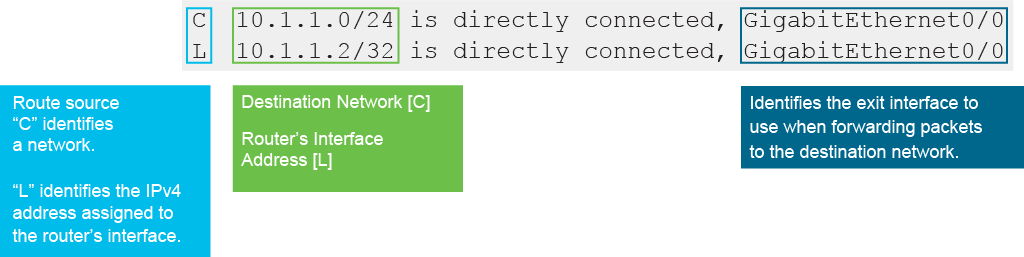
All directly connected networks are added to the routing table automatically. A newly deployed router, without any configured interfaces, has an empty routing table. The directly connected routes are added after you assign a valid IP address to the router interface, enable it with the no shutdown command, and when it receives a carrier signal from another device (router, switch, end device, and so on). In other words, when the interface status is up/up, the network of that interface is added to the routing table as a directly connected network. If the hardware fails or is administratively shut down, the entry for that network is removed from the routing table. The following figure shows examples of routing table entries for directly connected networks. An active, properly configured, directly connected interface, creates two routing table entries. The following figure displays the IPv4 routing table entries on R1 for the directly connected network 10.1.1.0/24.
所有直接連接的網路都會自動加入路由表。新部署、尚未設定任何介面的路由器,其路由表是空的。當您為路由器介面指定有效的 IP 位址、以 no shutdown 指令啟用它,並且該介面從另一個裝置(路由器、交換器、終端裝置等)收到載波訊號後,才會加入直接連接的路由。換句話說,當介面狀態變成 up/up 時,該介面所屬的網路就會以直接連接網路的形式加入路由表。若硬體故障或被手動關閉,該網路的項目就會從路由表中移除。下圖顯示直接連接網路的路由表項目範例。一個作用中且設定正確的直接連接介面,會產生兩筆路由表項目。下圖顯示 R1 上直接連接網路 10.1.1.0/24 的 IPv4 路由表項目。
The entries contain the following information:
這些項目包含以下資訊:
- Route source: Identifies how the route was learned. Directly connected interfaces have two route source codes. "C" identifies a directly connected network. "L" identifies the local IPv4 address assigned to the router’s interface.路由來源:標示該路由是如何被學習到的。直接連接介面有兩種路由來源代碼。「C」代表直接連接的網路。「L」代表指定給路由器介面的本地 IPv4 位址。
- Destination network: For directly connected networks, the destination networks are local to the router. The destination network address is indicated with a network address and subnet mask in the form of the prefix. Note that "L" entries, which identify the local IPv4 address of the interface, have a prefix of /32.目的網路:對直接連接的網路而言,目的網路就是路由器本身所在的本地網路。目的網路位址以網路位址與前綴形式的子網路遮罩表示。請注意,代表介面本地 IPv4 位址的「L」項目,前綴為 /32。
- Outgoing interface: Identifies the exit interface to use when forwarding packets to the destination network.出口介面:標示轉送封包到目的網路時要使用的出口介面。
Dynamic Routes
動態路由
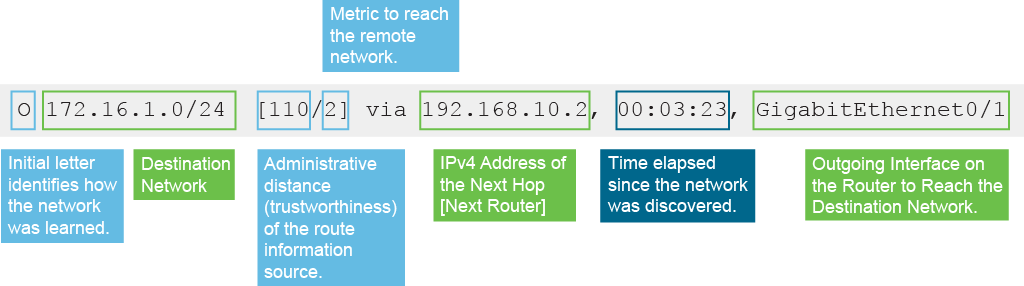
Routers use dynamic routing protocols to share information about the reachability and status of remote networks. A dynamic routing protocol allows routers to learn about remote networks from other routers automatically. These networks, and the best path to each, are added to the router's routing table and identified as a network learned by a specific dynamic routing protocol. Cisco routers can support a variety of dynamic IPv4 and IPv6 routing protocols, such as Border Gateway Protocol (BGP), Open Shortest Path First (OSPF), Enhanced Interior Gateway Routing Protocol (EIGRP), Intermediate System-to-Intermediate System (IS-IS), Routing Information Protocol (RIP), and so on. The routing information is updated when changes in the network occur. Larger networks require dynamic routing because there are usually many subnets and constant changes. These changes require updates to routing tables across all routers in the network to prevent connectivity loss. Dynamic routing protocols ensure that the routing table is automatically updated to reflect network changes. The following figure displays an IPv4 routing table entry on R1 for the route to remote network 172.16.1.0/24.
路由器使用動態路由協定分享遠端網路的可達性與狀態資訊。動態路由協定讓路由器能自動從其他路由器學習遠端網路的資訊。這些網路以及到達每個網路的最佳路徑,會被加入路由器的路由表,並標示為由特定動態路由協定學習到的網路。Cisco 路由器可支援多種動態 IPv4 與 IPv6 路由協定,例如邊界閘道協定(BGP)、開放最短路徑優先(OSPF)、增強型內部閘道路由協定(EIGRP)、中介系統對中介系統(IS-IS)、路由資訊協定(RIP)等。當網路發生變化時,路由資訊會隨之更新。較大型的網路通常有許多子網路且變動頻繁,因此需要動態路由。這些變動需要更新網路中所有路由器的路由表,以避免連線中斷。動態路由協定可確保路由表自動更新以反映網路變化。下圖顯示 R1 上到遠端網路 172.16.1.0/24 的 IPv4 路由表項目。
From the example entry, you can tell the following:
從範例項目中,您可以得知以下資訊:
- Route source: Identifies how the route was learned. "O" in the figure indicates that the source of the entry was the OSPF dynamic routing protocol.路由來源:標示該路由是如何被學習到的。圖中的「O」表示該項目的來源是 OSPF 動態路由協定。
- Destination network: Identifies the address of the remote network. The router knows how to reach 172.16.1.0/24 network.目的網路:標示遠端網路的位址。路由器知道如何到達 172.16.1.0/24 網路。
- Administrative distance: Identifies the trustworthiness of the route source. Lower values indicate the preferred route source. OSPF has a default administrative distance value of 110.管理距離:標示路由來源的可信度。數值越低,表示越優先採用的路由來源。OSPF 預設的管理距離值為 110。
- Metric: Identifies the value assigned to reach the remote network. Lower values indicate preferred routes. This OSPF route has a metric of 2 for the destination network 172.16.1.0/24.度量值:標示到達遠端網路所指定的數值。數值越低,表示越優先的路由。此 OSPF 路由到目的網路 172.16.1.0/24 的度量值為 2。
- Next-hop: Identifies the IPv4 address of the next router to forward the packet to. The IPv4 address of the next-hop is 192.168.10.2.下一跳:標示要轉送封包的下一個路由器的 IPv4 位址。此下一跳的 IPv4 位址為 192.168.10.2。
- Route time stamp: Identifies how much time has passed since the route was learned. The information in the example entry was learned 3 minutes and 23 seconds ago.路由時間戳記:標示自學習到此路由以來經過的時間。範例項目中的資訊是在 3 分 23 秒前學習到的。
- Outgoing interface: Identifies the exit interface to use to forward a packet toward the final destination. The packets destined to the 172.16.1.0/24 network will be forwarded out of the GigabitEthernet 0/1 interface.出口介面:標示轉送封包到最終目的地時要使用的出口介面。目的地為 172.16.1.0/24 網路的封包會經由 GigabitEthernet 0/1 介面轉送出去。
Static Routes
靜態路由
Static routes are entries that you manually enter directly into the configuration of the router. Static routes are not automatically updated and must be manually reconfigured if the network topology changes. Static routes can be effective for small, simple networks that do not change frequently. The benefits of using static routes include improved security and resource efficiency. The main disadvantage of using static routes is the lack of automatic reconfiguration if the network topology changes. There are two common types of static routes in the routing table—static routes to a specific network and the default static route.
靜態路由是您直接手動輸入到路由器設定中的項目。靜態路由不會自動更新,若網路拓樸改變,必須手動重新設定。靜態路由適用於變動不頻繁的小型、簡單網路。使用靜態路由的優點包括提升安全性與資源使用效率。使用靜態路由的主要缺點是,網路拓樸改變時無法自動重新設定。路由表中常見的靜態路由有兩種類型:指向特定網路的靜態路由,以及預設靜態路由。

From the example entry, you can tell the following:
從範例項目中,您可以得知以下資訊:
- Route source: Identifies how the route was learned. Static routes have a route source code "S".路由來源:標示該路由是如何被學習到的。靜態路由的路由來源代碼為「S」。
- Destination network: The destination network address is indicated with a network address and subnet mask in the prefix. The router knows how to reach 192.168.30.0/24 network.目的網路:目的網路位址以網路位址與前綴形式的子網路遮罩表示。路由器知道如何到達 192.168.30.0/24 網路。
- Administrative distance: Identifies the trustworthiness of the route source. Lower values indicate the preferred route source. Static routes have a default administrative value of 1.管理距離:標示路由來源的可信度。數值越低,表示越優先採用的路由來源。靜態路由預設的管理距離值為 1。
- Metric: Identifies the value assigned to reach the remote network. Static routes do not calculate metrics the same way as dynamic routes; metric is set. The default value for the metric of a static route is 0.度量值:標示到達遠端網路所指定的數值。靜態路由的度量值計算方式與動態路由不同,其度量值是固定設定的。靜態路由度量值的預設值為 0。
- Next-hop:Identifies the IPv4 address of the next router to forward the packet to. The IPv4 address of the next-hop is 192.168.10.2.下一跳:標示要轉送封包的下一個路由器的 IPv4 位址。此下一跳的 IPv4 位址為 192.168.10.2。
Default Routes
預設路由
A default route is an optional entry used by the router if a packet does not match any other, a more specific route in the routing table. A default route can be dynamically learned or statically configured. More than one source provides the default route, but the selected default route is presented in the routing table as Gateway of last resort.
預設路由是一種選用項目,當封包不符合路由表中其他更明確的路由時,路由器就會使用它。預設路由可以是動態學習來的,也可以是靜態設定的。可能有不只一個來源提供預設路由,但實際被選用的預設路由會在路由表中顯示為 最後手段閘道(Gateway of last resort)。

From the example entry, you can tell the following:
從範例項目中,您可以得知以下資訊:
- Route source: Identifies how the route was learned. The default route is marked with an asterisk (*). Depending on the source of a default route, an asterisk is added to the route source (S* in the example.)路由來源:標示該路由是如何被學習到的。預設路由會以星號(*)標示。依據預設路由的來源不同,星號會加在路由來源代碼上(範例中為 S*)。
- Destination network: The destination network for the default route is 0.0.0.0/0.目的網路:預設路由的目的網路為 0.0.0.0/0。
- Administrative distance: Identifies the trustworthiness of the route source. Lower values indicate the preferred route source. The default route has the same administrative distance as a source of a default route. In the example, the default route's source is a static route, with a default administrative distance value of 1.管理距離:標示路由來源的可信度。數值越低,表示越優先採用的路由來源。預設路由的管理距離與提供該預設路由的來源相同。在此範例中,預設路由的來源是靜態路由,其預設管理距離值為 1。
- Metric: Identifies the value assigned to reach the remote network. The default route inherits the metric value from the route source. In the example, since the default route is statically configured, the metric is 0.度量值:標示到達遠端網路所指定的數值。預設路由會繼承其路由來源的度量值。在此範例中,由於預設路由是靜態設定的,度量值為 0。
- Next-hop:Identifies the IPv4 address of the next router to forward the packet to. The IPv4 address of the next-hop for the default route in the example is 10.1.1.1.下一跳:標示要轉送封包的下一個路由器的 IPv4 位址。範例中預設路由的下一跳 IPv4 位址為 10.1.1.1。
IPv4 Routing Table Example
IPv4 路由表範例
On a Cisco router, the show ip route command can be used to display the IPv4 routing table of a router. The command output is used to verify that IPv4 networks and specific interface addresses have been installed in the IPv4 routing table. The following output displays the routing table of RouterA.
在 Cisco 路由器上,可使用 show ip route 指令來顯示路由器的 IPv4 路由表。此指令的輸出可用來驗證 IPv4 網路及特定介面位址是否已安裝到 IPv4 路由表中。以下輸出顯示 RouterA 的路由表。
RouterA# show ip route
Codes: L - local, C - connected, S - static, R - RIP, M - mobile, B - BGP
       D - EIGRP, EX - EIGRP external, O - OSPF, IA - OSPF inter area
       N1 - OSPF NSSA external type 1, N2 - OSPF NSSA external type 2
       E1 - OSPF external type 1, E2 - OSPF external type 2
       i - IS-IS, su - IS-IS summary, L1 - IS-IS level-1, L2 - IS-IS level-2
       ia - IS-IS inter area, * - candidate default, U - per-user static route
       o - ODR, P - periodic downloaded static route, + - replicated route

Gateway of last resort is 10.1.1.1 to network 0.0.0.0

C 10.1.1.0/24 is directly connected, GigabitEthernet0/0
L 10.1.1.2/32 is directly connected, GigabitEthernet0/0
R 172.16.0.0/16 [120/1] via 192.168.10.2, 00:01:08, GigabitEthernet0/1
O 172.16.1.0/24 [110/2] via 192.168.10.2, 00:03:23, GigabitEthernet0/1
D 192.168.20.0/24 [90/156160] via 10.1.1.1, 00:01:23, GigabitEthernet0/0
S 192.168.30.0/24 [1/0] via 192.168.10.2
C 192.168.10.0/24 is directly connected, GigabitEthernet0/1
L 192.168.10.1/32 is directly connected, GigabitEthernet0/1
S* 0.0.0.0/0 [1/0] via 10.1.1.1
The output shows that RouterA has received routes from multiple sources (static routes and routing protocols), which would be uncommon in a production network. However, this table is used here to demonstrate the various route sources. The first part of the output explains the codes, presenting the letters and the associated sources of the entries in the routing table.
輸出顯示 RouterA 從多個來源(靜態路由與路由協定)收到路由,這在正式環境的網路中並不常見。不過此處使用這張表,是為了示範各種路由來源。輸出的第一部分說明代碼,列出字母及其在路由表中對應的項目來源。
The letters are:
這些字母代表:
- C: Indicates directly connected networks; the first and seventh entries are directly connected networks.C:表示直接連接的網路;第一與第七筆項目為直接連接的網路。
- L: Indicates local interfaces within connected networks; the second and eighth entries are local interfaces.L:表示連接網路內的本地介面;第二與第八筆項目為本地介面。
- R: Indicates RIP; the third entry is the RIP route.R:表示 RIP;第三筆項目為 RIP 路由。
- O: Indicates OSPF; the fourth entry is an OSPF route.O:表示 OSPF;第四筆項目為 OSPF 路由。
- D: Indicates EIGRP; the fifth entry is an EIGRP route. The letter D stands for Diffusing Update Algorithm (DUAL), which is the update algorithm that EIGRP uses. The code letter E was previously taken by the legacy Exterior Gateway Protocol (EGP).D:表示 EIGRP;第五筆項目為 EIGRP 路由。字母 D 代表 EIGRP 所使用的更新演算法「擴散更新演算法」(Diffusing Update Algorithm,DUAL)。字母 E 先前已被舊式的外部閘道協定(Exterior Gateway Protocol,EGP)使用。
- S: Indicates static routes; the sixth and ninth entries are static routes.S:表示靜態路由;第六與第九筆項目為靜態路由。
- Asterisk (*): Indicates that this static route is a candidate for the default route.星號(*):表示此靜態路由是預設路由的候選項目。
show ip route command output from RouterA above. If you ping a device in the network 172.23.0.0 from the router, what does the router do with the packets?參考上方 RouterA 的 show ip route 指令輸出。若您從路由器對網路 172.23.0.0 中的裝置執行 ping,路由器會如何處理這些封包?show ip route command output from RouterA above. If you ping a device in the 192.168.30.0 network from the router, out of which interface does the router forward the traffic?參考上方 RouterA 的 show ip route 指令輸出。若您從路由器對 192.168.30.0 網路中的裝置執行 ping,路由器會經由哪個介面轉送流量?Codes: L - local, C - connected, S - static, R - RIP, M - mobile, B - BGP
D - EIGRP, EX - EIGRP external, O - OSPF, IA - OSPF inter area
N1 - OSPF NSSA external type 1, N2 - OSPF NSSA external type 2
E1 - OSPF external type 1, E2 - OSPF external type 2
i - IS-IS, su - IS-IS summary, L1 - IS-IS level-1, L2 - IS-IS level-2
ia - IS-IS inter area, * - candidate default, U - per-user static route
o - ODR, P - periodic downloaded static route, H - NHRP, l - LISP
a - application route
+ - replicated route, % - next hop override, p - overrides from PfR
Gateway of last resort is 209.165.202.130 to network 0.0.0.0
S* 0.0.0.0/0 [1/0] via 209.165.202.130
10.0.0.0/24 is subnetted, 5 subnets
O 10.0.10.0 [110/2] via 172.16.4.1, 03:14:10, GigabitEthernet0/3
O 10.10.20.0 [110/3] via 172.16.6.1, 02:41:53, GigabitEthernet0/2
O 10.20.50.0 [110/3] via 172.16.6.1, 02:41:53, GigabitEthernet0/2
O 10.20.55.0 [110/3] via 172.16.6.1, 02:12:37, GigabitEthernet0/2
O 10.40.10.0 [110/3] via 172.16.6.1, 02:41:43, GigabitEthernet0/2
[110/3] via 172.16.5.1, 02:41:43, GigabitEthernet0/1
172.16.0.0/16 is variably subnetted, 12 subnets, 2 masks
O 172.16.0.0/30 [110/2] via 172.16.5.1, 03:14:10, GigabitEthernet0/1
[110/2] via 172.16.4.1, 00:05:23, GigabitEthernet0/3
O 172.16.1.0/30 [110/2] via 172.16.5.1, 02:46:29, GigabitEthernet0/1
O 172.16.2.0/30 [110/2] via 172.16.6.1, 03:14:10, GigabitEthernet0/2
[110/2] via 172.16.5.1, 03:14:10, GigabitEthernet0/1
O 172.16.3.0/30 [110/2] via 172.16.6.1, 03:14:10, GigabitEthernet0/2
C 172.16.4.0/30 is directly connected, GigabitEthernet0/3
L 172.16.4.2/32 is directly connected, GigabitEthernet0/3
C 172.16.5.0/30 is directly connected, GigabitEthernet0/1
L 172.16.5.2/32 is directly connected, GigabitEthernet0/1
C 172.16.6.0/30 is directly connected, GigabitEthernet0/2
L 172.16.6.2/32 is directly connected, GigabitEthernet0/2
O 172.16.7.0/30 [110/3] via 172.16.6.1, 00:05:13, GigabitEthernet0/2
[110/3] via 172.16.5.1, 00:05:13, GigabitEthernet0/1
O 172.16.8.0/30 [110/2] via 172.16.6.1, 02:44:42, GigabitEthernet0/2
209.165.202.0/24 is variably subnetted, 2 subnets, 2 masks
C 209.165.202.128/27 is directly connected, GigabitEthernet0/0
L 209.165.202.129/32 is directly connected, GigabitEthernet0/0
參考 RouterC 的 show ip route 指令輸出。若您從路由器對網路 172.16.5.0/30 中的裝置執行 ping,路由器會經由哪個介面轉送流量?RouterC#show ip route
Codes: L - local, C - connected, S - static, R - RIP, M - mobile, B - BGP
D - EIGRP, EX - EIGRP external, O - OSPF, IA - OSPF inter area
N1 - OSPF NSSA external type 1, N2 - OSPF NSSA external type 2
E1 - OSPF external type 1, E2 - OSPF external type 2
i - IS-IS, su - IS-IS summary, L1 - IS-IS level-1, L2 - IS-IS level-2
ia - IS-IS inter area, * - candidate default, U - per-user static route
o - ODR, P - periodic downloaded static route, H - NHRP, l - LISP
a - application route
+ - replicated route, % - next hop override, p - overrides from PfR
Gateway of last resort is 209.165.202.130 to network 0.0.0.0
S* 0.0.0.0/0 [1/0] via 209.165.202.130
10.0.0.0/24 is subnetted, 5 subnets
O 10.0.10.0 [110/2] via 172.16.4.1, 03:14:10, GigabitEthernet0/3
O 10.10.20.0 [110/3] via 172.16.6.1, 02:41:53, GigabitEthernet0/2
O 10.20.50.0 [110/3] via 172.16.6.1, 02:41:53, GigabitEthernet0/2
O 10.20.55.0 [110/3] via 172.16.6.1, 02:12:37, GigabitEthernet0/2
O 10.40.10.0 [110/3] via 172.16.6.1, 02:41:43, GigabitEthernet0/2
[110/3] via 172.16.5.1, 02:41:43, GigabitEthernet0/1
172.16.0.0/16 is variably subnetted, 12 subnets, 2 masks
O 172.16.0.0/30 [110/2] via 172.16.5.1, 03:14:10, GigabitEthernet0/1
[110/2] via 172.16.4.1, 00:05:23, GigabitEthernet0/3
O 172.16.1.0/30 [110/2] via 172.16.5.1, 02:46:29, GigabitEthernet0/1
O 172.16.2.0/30 [110/2] via 172.16.6.1, 03:14:10, GigabitEthernet0/2
[110/2] via 172.16.5.1, 03:14:10, GigabitEthernet0/1
O 172.16.3.0/30 [110/2] via 172.16.6.1, 03:14:10, GigabitEthernet0/2
C 172.16.4.0/30 is directly connected, GigabitEthernet0/3
L 172.16.4.2/32 is directly connected, GigabitEthernet0/3
C 172.16.5.0/30 is directly connected, GigabitEthernet0/1
L 172.16.5.2/32 is directly connected, GigabitEthernet0/1
C 172.16.6.0/30 is directly connected, GigabitEthernet0/2
L 172.16.6.2/32 is directly connected, GigabitEthernet0/2
O 172.16.7.0/30 [110/3] via 172.16.6.1, 00:05:13, GigabitEthernet0/2
[110/3] via 172.16.5.1, 00:05:13, GigabitEthernet0/1
O 172.16.8.0/30 [110/2] via 172.16.6.1, 02:44:42, GigabitEthernet0/2
209.165.202.0/24 is variably subnetted, 2 subnets, 2 masks
C 209.165.202.128/27 is directly connected, GigabitEthernet0/0
L 209.165.202.129/32 is directly connected, GigabitEthernet0/0
show ip route command output from RouterC above. If you ping a device in the network 10.40.10.0/24 from the host directly connected to the router in network 172.16.4.0/30, which two interfaces will the router use to forward the traffic? (Choose two.)參考上方 RouterC 的 show ip route 指令輸出。若您從直接連接在網路 172.16.4.0/30 上的主機對網路 10.40.10.0/24 中的裝置執行 ping,路由器會使用哪兩個介面來轉送流量?(選擇兩項。)show ip route command output from RouterC above. If you ping a device with the IP address 172.16.8.68 from the router, which interface will the router use to forward the traffic?參考上方 RouterC 的 show ip route 指令輸出。若您從路由器對 IP 位址 172.16.8.68 執行 ping,路由器會使用哪個介面來轉送流量?