Time synchronization is crucial in secure management and reporting. Reviewing log files on multiple devices is common in a security event response process. If the clocks on the reporting devices are not consistent with each other, the analysis is much more difficult. In many jurisdictions, log files without valid time stamps are rejected as evidence in criminal prosecution. Also, synchronized clocks in log files are often requirements of security compliance standards. Accurate time status is critical for other aspects of security as well. Likewise, access policies may be time-based and digital certificates have explicit validity periods.
時間同步在安全管理與報告中至關重要。在安全事件回應流程中,檢視多台裝置上的日誌檔案是常見做法。如果報告裝置上的時鐘彼此不一致,分析工作會困難許多。在許多司法轄區,沒有有效時間戳記的日誌檔案會被拒絕作為刑事訴訟的證據。此外,日誌檔案中的時鐘同步通常也是安全合規標準的要求。準確的時間狀態對安全性的其他層面也同樣重要。同樣地,存取政策可能是以時間為基礎,而數位憑證也有明確的有效期限。
Imagine that there is an OSPF neighbor adjacency problem between two routers in your network. The central and branch routers do not synchronize their clocks. You have decided to look at the log messages that are stored on the routers. After further inspection, you notice that at the central router the neighbor adjacency went down at around 7:10 p.m. (1910), but you do not think to look for messages from the branch router that has a timestamp of around 1:35 p.m. (1335).
假設你的網路中兩台路由器之間發生 OSPF 鄰居關係問題。中央路由器與分支路由器的時鐘並未同步。你決定檢視儲存在路由器上的日誌訊息。進一步檢查後,你注意到在中央路由器上,鄰居關係在大約晚上 7:10(1910)中斷,但你沒想到要去查看分支路由器上時間戳記大約在下午 1:35(1335)的訊息。
Both messages appeared within 1 second of each other because the shutdown command was issued on one of the routers. Note that the clocks were not synchronized between the routers. Therefore, you can see that these two messages can be treated as two separate events, which makes it harder to troubleshoot the problems in your network.
由於 shutdown 指令是在其中一台路由器上下達的,兩則訊息實際上在 1 秒內就相繼出現。請注意,路由器之間的時鐘並未同步。因此,你可以看到這兩則訊息會被視為兩個各自獨立的事件,這使得排除網路問題變得更困難。
The heart of the time service is the system clock. Routers, switches, firewalls, and other networking devices have an internal system clock. The system clock runs from the moment the system starts and keeps track of the current date and time. The system clock can be set from several sources and, in turn, can be used to distribute the current time through various mechanisms to other systems. The system clock keeps track of time internally based on Coordinated Universal Time (UTC). The system clock keeps track of whether the time is authoritative or not. If it is not authoritative, the time is available only for display purposes and cannot be redistributed. Authoritative refers to the trustworthiness of the source. Nonauthoritative sources do not guarantee accurate time. It is recommended to set clocks on all network devices to UTC regardless of their location, and then configure the time zone to display the local time if desired.
時間服務的核心是系統時鐘。路由器、交換器、防火牆及其他網路裝置都有內建系統時鐘。系統時鐘從系統啟動的那一刻開始運作,並持續追蹤目前的日期與時間。系統時鐘可以從多種來源設定,進而透過各種機制將目前的時間分送給其他系統。系統時鐘內部以協調世界時(UTC)為基準來追蹤時間。系統時鐘也會記錄時間是否具有權威性。若不具權威性,該時間僅供顯示用途,不能重新分送。所謂「權威性」指的是來源的可信度。非權威來源不保證時間準確。建議不論裝置所在位置,皆將所有網路裝置的時鐘設定為 UTC,再視需要設定時區以顯示當地時間。
Software Clock
軟體時鐘
Like most computers, most Cisco IOS devices have two clocks: a software clock and a hardware clock, which in the CLI commands is referred to as calendar. The software clock is initialized at bootup from the hardware clock (which is operational even when the device is powered off). The software clock is basically a binary signal emitter, keeping track of seconds and microseconds, starting at boot up. The software clock is also referred to as system clock.
與大多數電腦一樣,大多數 Cisco IOS 裝置都有兩個時鐘:軟體時鐘與硬體時鐘,在 CLI 指令中硬體時鐘稱為 calendar。軟體時鐘在開機時會依硬體時鐘(即使裝置關機也持續運作)進行初始化。軟體時鐘基本上是一個二進位訊號產生器,從開機起持續追蹤秒與微秒。軟體時鐘也稱為系統時鐘。
To change the system clock manually, you need to use the clock set command from privileged exec mode and not global configuration mode. The date and time should be set in UTC and not the local time zone. The local time zone and, if applicable, daylight saving time needs to be configured.
若要手動變更系統時鐘,必須在特權執行模式(而非全域設定模式)下使用 clock set 指令。日期與時間應以 UTC 設定,而非當地時區。當地時區以及(若適用)日光節約時間則需另外設定。
To change the system clock, enter the following commands:
若要變更系統時鐘,請輸入以下指令:
If you add the detail keyword to the show clock command, it will tell you what the source of clock configuration is.
若在 show clock 指令後加上 detail 關鍵字,會顯示時鐘設定的來源。
The system clock keeps an authoritative flag that indicates whether the time is authoritative (believed to be accurate). The asterisk in front of the first line of the command output means that the time is not believed to be accurate.
系統時鐘會保留一個權威性旗標,指出時間是否具有權威性(被認為是準確的)。指令輸出第一行前的星號代表該時間被認為不準確。
You can also change the time zone and enable daylight saving time. In this example, Central European Time (CET) is used.
你也可以變更時區並啟用日光節約時間。本範例使用中歐時間(CET)。
Notice how clock settings now reflect local time, because Central European Summer Time (CEST) is 2 hours ahead of UTC.
請注意,時鐘設定現在已反映出當地時間,因為中歐夏令時間(CEST)比 UTC 快 2 小時。
To configure the time zone, use the clock timezonezone-name hours-offset [minutes-offset] global configuration command.
若要設定時區,請使用全域設定指令 clock timezonezone-name hours-offset [minutes-offset]。
Parameter 參數 | Description 說明 |
zone-name zone-name | The name is a 3-character string for the time zone acronym (for example, PST or CET). 時區縮寫的 3 字元字串名稱(例如 PST 或 CET)。 |
hours-offset hours-offset | Difference from UTC in hours 與 UTC 相差的小時數 |
minutes-offset minutes-offset | (Optional) Difference from UTC in minutes (選用)與 UTC 相差的分鐘數 |
Hardware Clock
硬體時鐘
The hardware clock is a chip with a rechargeable backup battery that can retain the time and date information across reboots of the device.
硬體時鐘是一顆搭配可充電後備電池的晶片,能在裝置重新開機時保留時間與日期資訊。
The hardware clock (also called the system calendar) maintains time separately from the software clock, but is usually updated from the software clock when the software clock is synchronized with an authoritative time source. The hardware clock continues to run when the system is restarted or when the power is turned off. Typically, the hardware clock needs to be manually set only once, when the system is installed, but to prevent drifting over time it needs to be readjusted at regular intervals. The other occasion might be when the battery is replaced.
硬體時鐘(也稱為系統 calendar)與軟體時鐘分開維護時間,但通常會在軟體時鐘與權威時間來源同步時,由軟體時鐘更新。當系統重新啟動或電源關閉時,硬體時鐘仍會持續運作。一般來說,硬體時鐘只需要在系統安裝時手動設定一次,但為了避免時間隨時間漂移,需要定期重新調整。另一個需要調整的情況是電池更換時。
You should avoid setting the hardware clock if you have access to a reliable external time source. Time synchronization should instead be established using NTP.
如果你能存取可靠的外部時間來源,應避免手動設定硬體時鐘。應改用 NTP 來建立時間同步。
You can update the hardware clock manually with a new software clock setting with the following command:
你可以使用以下指令,以新的軟體時鐘設定手動更新硬體時鐘:
Router# clock update-calendarAlternatively, it is possible to use the NTP-based update calendar configuration command:
另外,也可以使用以 NTP 為基礎的 update calendar 設定指令:
Router# configure terminal
Router (config)# ntp update-calendar
A typical use case when to configure the hardware clock updated by the NTP would be when the router is already several years old and the internal battery mentioned above is flat and cannot be rechargable any more.
設定由 NTP 更新硬體時鐘的典型使用情境,是當路由器已使用多年、上述內部電池已耗盡且無法再充電時。
In this case, on every reload, the time of the hardware clock is reverted to January 1st, 1970, at 00:00:00 UTC.
在這種情況下,每次重新載入時,硬體時鐘的時間都會回復為 1970 年 1 月 1 日 00:00:00 UTC。
NTP would fix the time of the hardware clock, upon the reload, and this time would be taken consequently by the software clock.
重新載入後,NTP 會修正硬體時鐘的時間,隨後軟體時鐘也會採用這個時間。
Network Time Protocol
網路時間協定
To maintain a consistent time across the network, the software clock must receive time updates from an authoritative time on the network. Network Time Protocol (NTP) is a protocol designed to time-synchronize a network of machines. A secure method of providing clocking for the network is for network administrators to implement their own private network master clocks that are synchronized to UTC-based satellite or radio. However, if network administrators do not wish to implement their own master clocks because of cost or other reasons, other clock sources are available on the internet, such as ntp.org, but this option is less secure.
為了在整個網路中維持一致的時間,軟體時鐘必須從網路上的權威時間來源接收時間更新。網路時間協定(NTP)是一種設計用來使一群機器時間同步的協定。提供網路計時的一種安全方法,是由網路管理員自行架設私有的網路主時鐘,並與以 UTC 為基準的衛星或無線電時間來源同步。然而,若網路管理員因成本或其他原因不想架設自己的主時鐘,網際網路上也有其他可用的時間來源,例如 ntp.org,但這種選項安全性較低。
NTP runs over UDP, using port 123 as both the source and destination, which in turn runs over IP. NTP distributes this time across the network. NTP is extremely efficient—no more than one packet per minute is necessary to synchronize two devices to within a millisecond of one another.
NTP 運作於 UDP 之上,來源與目的皆使用連接埠 123,而 UDP 又運作於 IP 之上。NTP 會將時間分送到整個網路。NTP 效率極高,通常每分鐘不到一個封包即可讓兩台裝置的時間同步到 1 毫秒以內。
NTP uses the concept of a stratum to describe how many NTP hops away a machine is from an authoritative time source, a stratum 0 source. A stratum 1 time server has a radio or atomic clock that is directly attached, a stratum 2 time server receives its time from a stratum 1 time server, and so on. A device running NTP automatically chooses as its time source the device with the lowest stratum number that it is configured to communicate with through NTP. This strategy effectively builds a self-organizing tree of NTP speakers.
NTP 使用「stratum(層級)」概念來描述一台機器距離權威時間來源(stratum 0 來源)有多少個 NTP 跳躍。stratum 1 時間伺服器直接連接無線電或原子鐘,stratum 2 時間伺服器則從 stratum 1 時間伺服器取得時間,依此類推。執行 NTP 的裝置會自動選擇它設定要與之通訊、stratum 值最低的裝置作為時間來源。這種策略實際上建構出一個自我組織的 NTP 樹狀結構。
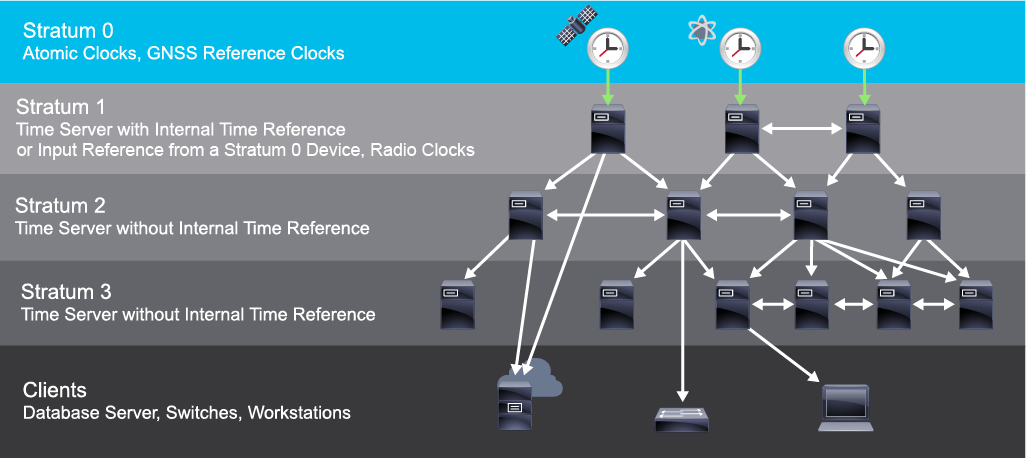
NTP can get the correct time from an internal or external time source:
NTP 可以從內部或外部時間來源取得正確時間:
- Local master clock本地主時鐘
- Master clock on the internet網際網路上的主時鐘
- Global positioning system (GPS) or atomic clock (stratum 0)全球定位系統(GPS)或原子鐘(stratum 0)
NTP has two ways to avoid synchronizing to a device whose time might be ambiguous:
NTP 有兩種方式可避免與時間可能不明確的裝置同步:
- NTP never synchronizes to a device that is not synchronized itself.NTP 絕不會與尚未自我同步的裝置進行同步。
- NTP compares the time that is reported by several devices and does not synchronize to a device whose time is significantly different from the others, even if its stratum is lower.NTP 會比較多台裝置回報的時間,並不會與時間明顯偏離其他裝置的裝置同步,即使該裝置的 stratum 值較低也一樣。
Configuring and Verifying NTP
設定與驗證 NTP
A router can act as an NTP server and client. Other devices (NTP clients) synchronize time with the router (acting as an NTP server).
路由器可以同時作為 NTP 伺服器與用戶端。其他裝置(NTP 用戶端)會與該路由器(作為 NTP 伺服器)同步時間。
To configure NTP on Cisco devices, use the following commands, as illustrated in the example:
若要在 Cisco 裝置上設定 NTP,請使用以下指令,如範例所示:

Central(config)# ntp master 2Branch(config)# ntp server 209.165.201.1SW1(config)# ntp server 10.1.1.1The figure shows an example configuration scenario. Both the Branch router and SW1 switch are configured as NTP clients using the ntp server ip-address global configuration command. The IP address of the NTP server is configured.
此圖顯示一個設定情境範例。Branch 路由器與 SW1 交換器都使用全域設定指令 ntp server ip-address,設定為 NTP 用戶端。此處會設定 NTP 伺服器的 IP 位址。
Note that a Cisco IOS device acting as an NTP client will also respond to received time requests. This fact enables SW1 to sync directly with the branch router and optimize traffic flows. Alternatively, you could configure SW1 to sync with the Central router (or even an external NTP server).
請注意,作為 NTP 用戶端的 Cisco IOS 裝置,也會回應收到的時間請求。這使得 SW1 能夠直接與 Branch 路由器同步,並優化流量走向。你也可以另外將 SW1 設定為與 Central 路由器(甚至是外部 NTP 伺服器)同步。
Cisco IOS devices can also act as NTP servers. To configure a Cisco IOS device as an NTP master clock to which peers synchronize themselves, use the ntp master command in the global configuration mode: ntp master[stratum].
Cisco IOS 裝置也可以作為 NTP 伺服器。若要將 Cisco IOS 裝置設定為 NTP 主時鐘,讓其他對等裝置與之同步,請在全域設定模式使用 ntp master 指令:ntp master[stratum]。
The stratum value is a number from 1 to 15. The lowest stratum value indicates a higher NTP priority. It also indicates the NTP stratum number that the system will claim.
stratum 值是介於 1 到 15 之間的數字。stratum 值越低,代表 NTP 優先順序越高,同時也代表系統自身會宣稱的 NTP stratum 編號。
Optionally, you can also configure a loopback interface, whose IP address will be used as the source IP address when sending NTP packets.
此外,你也可以設定一個 loopback 介面,其 IP 位址將作為傳送 NTP 封包時的來源 IP 位址。
For example, consider the following scenario, where you have multiple routers. The Central router acts as an authoritative NTP server, while the Branch1 and Branch2 routers act as NTP clients. In this case, initially Branch1 and Branch2 routers are referencing their clocks via NTP to the 172.16.1.5 IPv4 address, which belongs to Ethernet 0/0 interface on the Central router. Now imagine if that interface on the Central router fails, what do you think will happen? The Branch1 and Branch2 routers cannot reach that IPv4 address, which means that they will stop referencing their clocks via NTP and their clocks will become unsynchronized. The solution for that is to use a loopback interface, which is a virtual interface on a router and is always in up/up state. Therefore, even if one of the interfaces fails on the Central router, the Branch1 and Branch2 routers can still use NTP if they have a backup path to the IPv4 address of the loopback interface on the Central router.
舉例來說,假設有以下情境:你有多台路由器。Central 路由器作為權威 NTP 伺服器,而 Branch1 與 Branch2 路由器則作為 NTP 用戶端。在此情境中,Branch1 與 Branch2 路由器一開始是透過 NTP 參考 Central 路由器上 Ethernet 0/0 介面所屬的 172.16.1.5 IPv4 位址來校時。現在假設 Central 路由器上的該介面故障,你認為會發生什麼事?Branch1 與 Branch2 路由器將無法連上該 IPv4 位址,這表示它們將停止透過 NTP 參考時鐘,時鐘也會變得不同步。解決方法是使用 loopback 介面,這是路由器上的一個虛擬介面,永遠處於 up/up 狀態。因此,即使 Central 路由器上其中一個介面故障,只要 Branch1 與 Branch2 路由器有備援路徑能連到 Central 路由器上 loopback 介面的 IPv4 位址,它們仍可繼續使用 NTP。
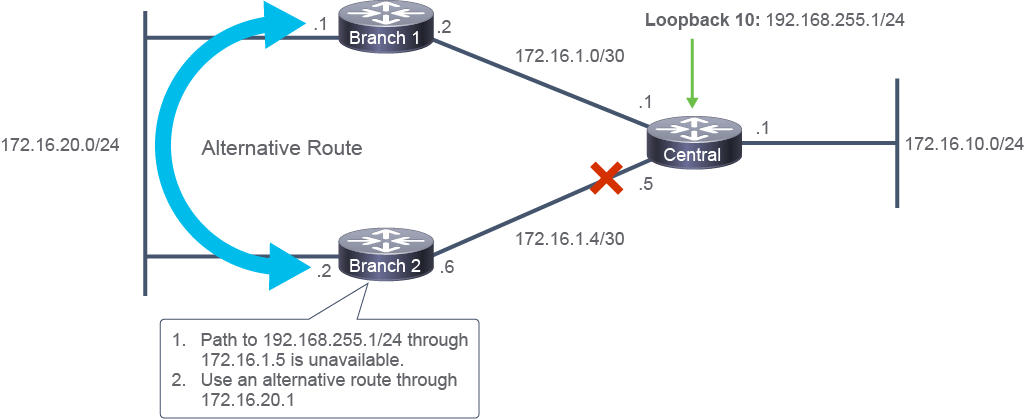
Configure the Central router as an NTP server:
將 Central 路由器設定為 NTP 伺服器:
Central(config)# interface Loopback 10
Central(config-if)# ip address 192.168.255.1 255.255.255.0
Central(config)# ntp master 2
Central(config)# ntp source Loopback10
Configure the Branch1 router as an NTP client, which will synchronize its time with the Central router:
將 Branch1 路由器設定為 NTP 用戶端,使其與 Central 路由器同步時間:
Branch1(config)# ntp server 192.168.255.1Configure the Branch2 router as an NTP client, which will synchronize its time with the Central router.
將 Branch2 路由器設定為 NTP 用戶端,使其與 Central 路由器同步時間。
Branch2(config)# ntp server 192.168.255.1Use the show ntp associations and the show ntp status commands to verify your configuration.
使用 show ntp associations 與 show ntp status 指令來驗證你的設定。
The NTP also provides the authentication option. This means that a network device synchronizes itself with a source only if they use the same password.
NTP 也提供驗證選項。這表示只有在雙方使用相同密碼時,網路裝置才會與某個來源同步。
This is a useful feature because you do not want that your network devices synchronize themselves with a non-authorized NTP source. To configure the NTP authentication, you must add the authentication commands on the NTP Server and the NTP Client devices.
這是一項實用功能,因為你不會希望自己的網路裝置與未經授權的 NTP 來源同步。若要設定 NTP 驗證,你必須在 NTP 伺服器與 NTP 用戶端裝置上都加入驗證指令。
The following is a configuration example on a Cisco router acting as an NTP Client:
以下是作為 NTP 用戶端的 Cisco 路由器的設定範例:
Branch2(config)# ntp server 192.168.255.1 key 1
Branch2(config)# ntp authenticate
Branch2(config)# ntp authentication-key 1 md5 [key-string]
Branch2(config)# ntp trusted-key 1