FASTLab 1: Implement the Initial Switch Configuration
FASTLab 1:實作交換器初始設定
Introduction
簡介
A law firm contracted CCS to install a switch that supports an administration desktop AdminPC and a file server Fileserver.
一家法律事務所委託 CCS 安裝一台交換器,用來支援管理桌機 AdminPC 與檔案伺服器 Fileserver。
The contract requires you to configure the following:
此合約要求你設定以下項目:
- Hostname as "SW1" for the switch.將交換器的主機名稱設為「SW1」。
- Enable interface VLAN 1 and configure the switch management IPv4 address on this interface with the correct subnet mask.啟用介面 VLAN 1,並在此介面上以正確的子網路遮罩設定交換器的管理 IPv4 位址。
- The default gateway for the switch SW1 should be 172.16.130.3.交換器 SW1 的預設閘道應為 172.16.130.3。
- The interface on the switch that is connected to AdminPC should be configured with a description—Link to AdminPC.連接到 AdminPC 的交換器介面應設定描述——Link to AdminPC。
- The interface on the switch that is connected to Fileserver should be configured with a description—Link to Fileserver.連接到 Fileserver 的交換器介面應設定描述——Link to Fileserver。
You must complete the initial configuration of the switch to meet the requirements of the contract.
你必須完成交換器的初始設定,以符合合約的要求。
Topology
拓樸
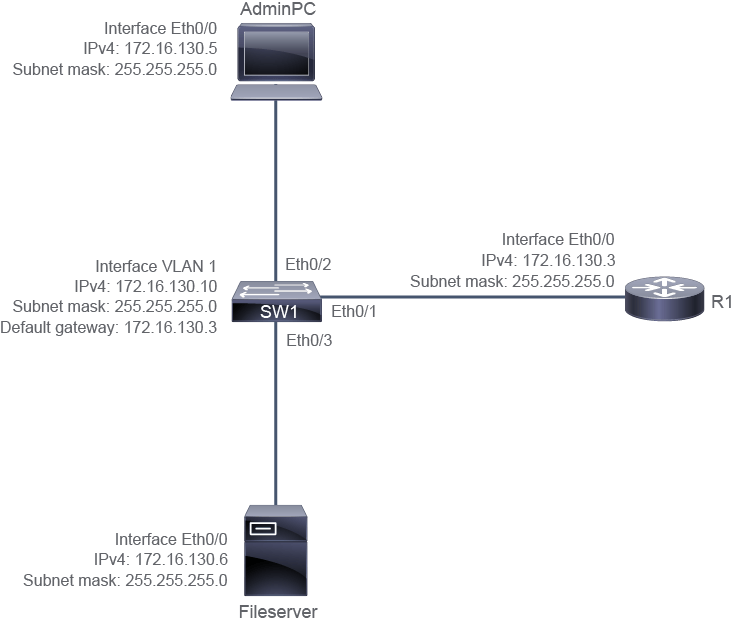
Job Aid
作業輔助資料
Device Connections
裝置連線
Device Connections
裝置連線
Device 裝置 | Interface 介面 | Connects to 連接到 | Neighbor Interface 鄰居介面 |
SW1 SW1 | E0/1 E0/1 | R1 R1 | E0/0 E0/0 |
SW1 SW1 | E0/2 E0/2 | AdminPC AdminPC | E0/0 E0/0 |
SW1 SW1 | E0/3 E0/3 | Fileserver Fileserver | E0/0 E0/0 |
IP Addressing
IP 定址
Device IP Address Information
裝置 IP 位址資訊
Device 裝置 | Interface 介面 | IPv4 Address IPv4 位址 |
SW1 SW1 | VLAN 1 VLAN 1 | 172.16.130.10 255.255.255.0 172.16.130.10 255.255.255.0 |
Router Router | E0/0 E0/0 | 172.16.130.3 255.255.255.0 172.16.130.3 255.255.255.0 |
AdminPC AdminPC | E0/0 E0/0 | 172.16.130.5 255.255.255.0 172.16.130.5 255.255.255.0 |
Fileserver Fileserver | E0/0 E0/0 | 172.16.130.6 255.255.255.0 172.16.130.6 255.255.255.0 |
The default gateway address is 172.16.130.3 for the SW1 switch, which is the IPv4 address on interface E0/0 on the Router.
SW1 交換器的預設閘道位址為 172.16.130.3,也就是路由器上 E0/0 介面的 IPv4 位址。
Configuration Tips
設定提示
- To assign the hostname to the switch, enter the global configuration mode of the switch and configure the hostname as SW1.若要為交換器指定主機名稱,請進入交換器的全域設定模式,並將主機名稱設為 SW1。
- For remote management of a switch, an IP address must be assigned to a VLAN interface on the switch. To assign an IPv4 address to the switch, configure IPv4 address 172.16.130.10 and subnet mask 255.255.255.0, as mentioned in the topology diagram for interface VLAN 1, and enable interface VLAN 1. Do not forget to enable the VLAN interface.若要遠端管理交換器,必須為交換器上的 VLAN 介面指定 IP 位址。若要為交換器指定 IPv4 位址,請依拓樸圖所示,在介面 VLAN 1 上設定 IPv4 位址 172.16.130.10 與子網路遮罩 255.255.255.0,並啟用介面 VLAN 1。別忘了要啟用該 VLAN 介面。
- Similar to any other host device, a switch must have a default gateway to reach the devices that are not connected to the same subnet to forward the IP packets to the destinations on the other networks. The default gateway is the address of the router interface that is directly connected to the switch. The default gateway address must be configured in the global configuration mode of the switch.與其他主機裝置一樣,交換器必須有預設閘道,才能將 IP 封包轉送到不在同一子網路上的裝置所在的其他網路目的地。預設閘道就是直接連接到該交換器的路由器介面位址。預設閘道位址必須在交換器的全域設定模式下設定。
- Identify the interface on the switch that is connected to the AdminPC, and configure the interface with the "Link to AdminPC" description. To configure the description for an interface, use the
descriptioncommand at the interface level.找出交換器上連接到 AdminPC 的介面,並在該介面設定描述「Link to AdminPC」。若要設定介面的描述,請在介面層級使用description指令。 - Identify the interface on the switch that is connected to the file server and configure the interface with the "Link to Fileserver" description. The contract requires that the link to the file server must have a description: Link to Fileserver. To configure the description for an interface, use the
descriptioncommand at the interface level.找出交換器上連接到檔案伺服器的介面,並在該介面設定描述「Link to Fileserver」。合約要求連接到檔案伺服器的連線必須有描述:Link to Fileserver。若要設定介面的描述,請在介面層級使用description指令。
Answer Key
解答
You need to complete the following tasks:
你需要完成以下任務:
- Configure the hostname as "SW1" on the switch.將交換器的主機名稱設定為「SW1」。
- In order to assign the hostname to the switch, enter the global configuration mode of the switch and configure the hostname as SW1.若要為交換器指定主機名稱,請進入交換器的全域設定模式,並將主機名稱設為 SW1。
Switch(config)# hostname SW1 - Enable interface VLAN 1 and configure the switch management IPv4 address on this interface with the correct subnet mask.啟用介面 VLAN 1,並在此介面上以正確的子網路遮罩設定交換器的管理 IPv4 位址。
- For remote management of a switch, an IP address must be assigned to a VLAN interface on the switch. To assign an IPv4 address to the switch, configure IPv4 address 172.16.130.10 and subnet mask 255.255.255.0, as mentioned in the topology diagram for interface VLAN 1.若要遠端管理交換器,必須為交換器上的 VLAN 介面指定 IP 位址。若要為交換器指定 IPv4 位址,請依拓樸圖所示,在介面 VLAN 1 上設定 IPv4 位址 172.16.130.10 與子網路遮罩 255.255.255.0。
SW1(config)# interface vlan 1 SW1(config-if)# ip address 172.16.130.10 255.255.255.0 SW1(config-if)# no shutdown - Configure the default gateway for the switch SW1 to be 172.16.130.3.將交換器 SW1 的預設閘道設定為 172.16.130.3。
- Like any other host device, a switch must have a default gateway to reach the devices that are not connected to the same segment to forward the IP packets to the destinations on the other networks. The default gateway is the address of the router interface that is directly connected to the switch. The default gateway address must be configured in the global configuration mode of the switch.與其他主機裝置一樣,交換器必須有預設閘道,才能將 IP 封包轉送到不在同一網段上的裝置所在的其他網路目的地。預設閘道就是直接連接到該交換器的路由器介面位址。預設閘道位址必須在交換器的全域設定模式下設定。
SW1(config)# ip default-gateway 172.16.130.3 - Identify the interface on the switch that is connected to the AdminPC, and configure the interface with the "Link to AdminPC" description.找出交換器上連接到 AdminPC 的介面,並在該介面設定描述「Link to AdminPC」。
- The contract requires that the link to the AdminPC must have a description: Link to AdminPC. Use the topology diagram to identify the port that the AdminPC is connected to (Ethernet0/2). To configure the description for an interface, use the
descriptioncommand at the interface level.合約要求連接到 AdminPC 的連線必須有描述:Link to AdminPC。請利用拓樸圖找出 AdminPC 所連接的連接埠(Ethernet0/2)。若要設定介面的描述,請在介面層級使用description指令。
SW1(config)# interface e0/2 SW1(config-if)# description Link to AdminPC - Identify the interface on the switch that is connected to the file server and configure the interface with the "Link to Fileserver" description.找出交換器上連接到檔案伺服器的介面,並在該介面設定描述「Link to Fileserver」。
- The contract requires that the link to the file server must have a description: Link to Fileserver. To configure the description for an interface, use the
descriptioncommand at the interface level.合約要求連接到檔案伺服器的連線必須有描述:Link to Fileserver。若要設定介面的描述,請在介面層級使用description指令。
SW1(config)# interface e0/3
SW1(config-if)# description Link to Fileserver
Implement the Initial Switch Configuration Questions
實作交換器初始設定問題
What is the expected result when you issue the
show running-config | include hostname command on the SW1?在 SW1 上執行 show running-config | include hostname 指令時,預期會得到什麼結果?In which two ways would you verify that VLAN 1 on SW1 is configured with the correct IP address, and the status of the corresponding interface is not shut down? (Choose two.)你會用哪兩種方式來確認 SW1 上的 VLAN 1 已設定正確的 IP 位址,且對應介面的狀態並未被關閉?(選擇兩項。)
Which option correctly configures the default gateway address on the SW1 switch?下列哪個選項可以正確設定 SW1 交換器上的預設閘道位址?
Which command displays the interface description as shown in the example? Port Name Status Vlan Duplex Speed Type
Et0/0 connected 1 auto auto unknown
Et0/1 connected 1 auto auto unknown
Et0/2 Link to AdminPC connected 1 auto auto unknown
Et0/3 Link to Fileserver connected 1 auto auto unknown哪個指令會顯示如範例所示的介面描述?Port Name Status Vlan Duplex Speed Type
Et0/0 connected 1 auto auto unknown
Et0/1 connected 1 auto auto unknown
Et0/2 Link to AdminPC connected 1 auto auto unknown
Et0/3 Link to Fileserver connected 1 auto auto unknown
Et0/0 connected 1 auto auto unknown
Et0/1 connected 1 auto auto unknown
Et0/2 Link to AdminPC connected 1 auto auto unknown
Et0/3 Link to Fileserver connected 1 auto auto unknown哪個指令會顯示如範例所示的介面描述?Port Name Status Vlan Duplex Speed Type
Et0/0 connected 1 auto auto unknown
Et0/1 connected 1 auto auto unknown
Et0/2 Link to AdminPC connected 1 auto auto unknown
Et0/3 Link to Fileserver connected 1 auto auto unknown