Introduction
簡介
This activity will guide you through a proof-of-concept scenario where you will connect a small network segment to the rest of the enterprise network. You will implement a simple connection where the R1 router will receive its IPv4 address via DHCP. You will also make sure that PC1 in one of the network segments receives its basic IPv4 address configuration from the DHCP server.
本活動將引導你完成一個概念驗證情境:將小型網路區段連接到企業網路的其餘部分。你會實作一個簡單的連線,讓 R1 路由器透過 DHCP 取得其 IPv4 位址。你也會確認其中一個網路區段中的 PC1 能從 DHCP 伺服器取得基本的 IPv4 位址設定。
Topology
拓樸
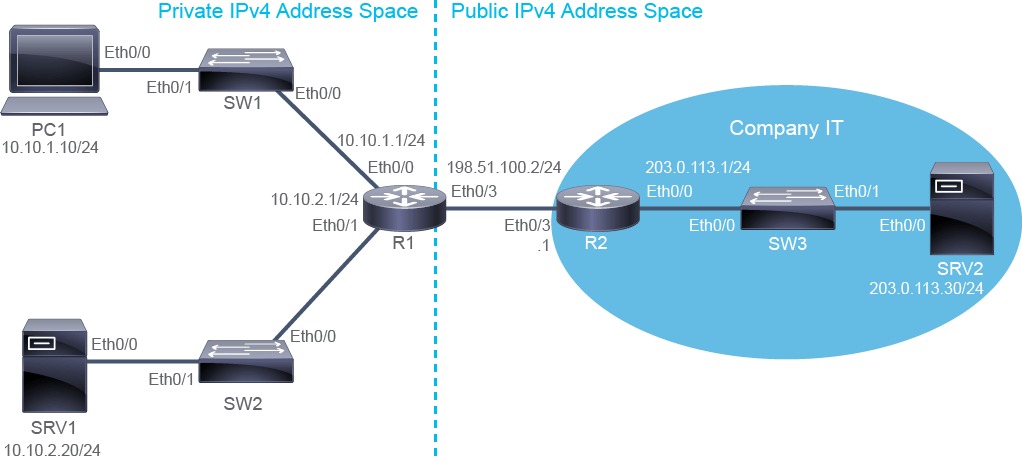
Job Aid
工作輔助資料
Device Information
裝置資訊
Device Information Table
裝置資訊表
Device 裝置 | Characteristic 特性 | Value 值 |
PC1 PC1 | IPv4 address IPv4 位址 | 10.10.1.10/24 10.10.1.10/24 |
PC1 PC1 | Default gateway 預設閘道 | 10.10.1.1 10.10.1.1 |
SRV1 SRV1 | IPv4 address IPv4 位址 | 10.10.2.20/24 10.10.2.20/24 |
SRV1 SRV1 | Default gateway 預設閘道 | 10.10.2.1 10.10.2.1 |
SRV2 SRV2 | IPv4 address IPv4 位址 | 203.0.113.30/24 203.0.113.30/24 |
SRV2 SRV2 | Default gateway 預設閘道 | 203.0.113.1 203.0.113.1 |
SW1 SW1 | VLAN 1 IPv4 address VLAN 1 IPv4 位址 | 10.10.1.4/24 10.10.1.4/24 |
SW1 SW1 | Default gateway 預設閘道 | 10.10.1.1 10.10.1.1 |
SW1 SW1 | Ethernet0/0 description Ethernet0/0 描述 | Link to R1 連接至 R1 |
SW1 SW1 | Ethernet0/1 description Ethernet0/1 描述 | Link to PC1 連接至 PC1 |
SW2 SW2 | VLAN 1 IPv4 address VLAN 1 IPv4 位址 | 10.10.2.4/24 10.10.2.4/24 |
SW2 SW2 | Default gateway 預設閘道 | 10.10.2.1 10.10.2.1 |
SW2 SW2 | Ethernet0/0 description Ethernet0/0 描述 | Link to R1 連接至 R1 |
SW2 SW2 | Ethernet0/1 description Ethernet0/1 描述 | Link to SRV1 連接至 SRV1 |
SW3 SW3 | VLAN 1 IPv4 address VLAN 1 IPv4 位址 | 203.0.113.4/24 203.0.113.4/24 |
SW3 SW3 | Default gateway 預設閘道 | 203.0.113.1 203.0.113.1 |
SW3 SW3 | Ethernet0/0 description Ethernet0/0 描述 | Link to R2 連接至 R2 |
SW3 SW3 | Ethernet0/1 description Ethernet0/1 描述 | Link to SRV2 連接至 SRV2 |
R1 R1 | Ethernet0/0 description Ethernet0/0 描述 | Link to SW1 連接至 SW1 |
R1 R1 | Ethernet0/0 IPv4 address Ethernet0/0 IPv4 位址 | 10.10.1.1/24 10.10.1.1/24 |
R1 R1 | Ethernet0/1 description Ethernet0/1 描述 | Link to SW2 連接至 SW2 |
R1 R1 | Ethernet0/1 IPv4 address Ethernet0/1 IPv4 位址 | 10.10.2.1/24 10.10.2.1/24 |
R1 R1 | Ethernet0/3 description Ethernet0/3 描述 | Link to R2 連接至 R2 |
R1 R1 | Ethernet0/3 IPv4 address Ethernet0/3 IPv4 位址 | 198.51.100.2/24 198.51.100.2/24 |
R2 R2 | Ethernet0/0 description Ethernet0/0 描述 | Link to SW3 連接至 SW3 |
R2 R2 | Ethernet0/0 IPv4 address Ethernet0/0 IPv4 位址 | 203.0.113.1/24 203.0.113.1/24 |
R2 R2 | Ethernet0/3 description Ethernet0/3 描述 | Link to R1 連接至 R1 |
R2 R2 | Ethernet0/3 IPv4 address Ethernet0/3 IPv4 位址 | 198.51.100.1/24 198.51.100.1/24 |
Global IPv4 Address Networks
全球 IPv4 位址網路
Address Block 位址區塊 | Host Starting Address 主機起始位址 | Host Ending Address 主機結束位址 | Broadcast Address 廣播位址 | Subnet Mask 子網路遮罩 |
192.0.2.0/24 192.0.2.0/24 | 192.0.2.1 192.0.2.1 | 192.0.2.254 192.0.2.254 | 192.0.2.255 192.0.2.255 | 255.255.255.0 255.255.255.0 |
198.51.100.0/24 198.51.100.0/24 | 198.51.100.1 198.51.100.1 | 198.51.100.254 198.51.100.254 | 198.51.100.255 198.51.100.255 | 255.255.255.0 255.255.255.0 |
203.0.113.0/24 203.0.113.0/24 | 203.0.113.1 203.0.113.1 | 203.0.113.254 203.0.113.254 | 203.0.113.255 203.0.113.255 | 255.255.255.0 255.255.255.0 |
Enterprise Internet Connectivity Options
企業網際網路連線選項
Modern enterprise IP networks are connected to the global internet and use it for some of their data communication needs. Enterprises provide many services to customers and business partners via the internet. Whether accessing resources in a cloud, connecting regional offices, or sharing web services with your customers, you must consider the options available to you. You should also understand how your company plans to use its internet connection.
現代企業 IP 網路都會連接到全球網際網路,並用它來滿足部分資料通訊需求。企業透過網際網路為客戶與商業夥伴提供許多服務。無論是存取雲端資源、連接分區辦公室,還是與客戶分享網頁服務,你都必須考慮可用的選項,也應了解公司規劃如何使用其網際網路連線。
The internet connection is established via an ISP. At the enterprise site, the router is the device used to connect to the ISP.
網際網路連線是透過 ISP 建立的。在企業站點,路由器是用來連接 ISP 的裝置。
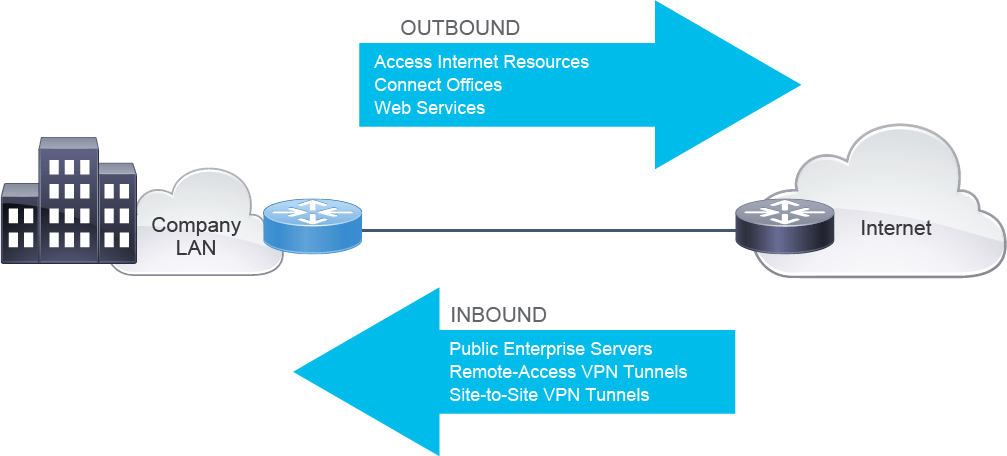
The figure illustrates enterprise internet connectivity requirements. Based on the direction of internet traffic, the connectivity requirements can be classified as outbound and inbound. For successful communication, an enterprise must ensure adequate resources for both outbound and inbound traffic.
此圖說明企業網際網路連線的需求。依網際網路流量方向,連線需求可分為出向與入向。為確保通訊成功,企業必須為出向與入向流量都準備足夠的資源。
The ISP can provide internet connectivity by providing statically assigned IPv4 addresses, or dynamically allocate them with DHCP. Depending on the option that is used, you must configure the internet-facing interfaces accordingly.
ISP 可以透過靜態指派 IPv4 位址,或以 DHCP 動態配置位址來提供網際網路連線。依所使用的選項不同,你必須相應地設定面向網際網路的介面。
Address assignment options:
位址指派選項:
- Statically assigned靜態指派
- Dynamically assigned, using DHCP使用 DHCP 動態指派

Statically assigned IPv4 addresses are useful in cases where a company or organization wants to have its servers or services publicly accessible. These static addresses can be linked to a domain name, such as http://www.cisco.com, which allows clients to find and access these servers and services.
靜態指派的 IPv4 位址適用於公司或組織希望其伺服器或服務可公開存取的情況。這些靜態位址可以連結到網域名稱,例如 http://www.cisco.com,讓用戶端能夠找到並存取這些伺服器與服務。
Configuring a static provider-assigned IPv4 address is a two-step process. The first step of the process is to assign a static IPv4 address on the internet-facing interface of the router. The second step is to configure a default route that will forward all traffic that is intended for the internet to the ISP. The ISP must provide you with a static IPv4 address that you can configure on the interface.
設定靜態的服務提供者指派 IPv4 位址是一個兩步驟的程序。第一步是在路由器面向網際網路的介面上指派靜態 IPv4 位址。第二步是設定一條預設路由,將所有要送往網際網路的流量轉送給 ISP。ISP 必須提供一個可設定在該介面上的靜態 IPv4 位址給你。
When dynamic assignment is used by the ISP, no manual assignment of addresses is needed. Instead, the router interface needs to be configured as a DHCP client. Other configuration parameters can also be obtained through DHCP, such as the default gateway address.
當 ISP 使用動態指派時,就不需要手動指派位址。相反地,路由器介面需要設定為 DHCP 用戶端。其他設定參數也可以透過 DHCP 取得,例如預設閘道位址。
The advantages of dynamic address assignment include:
動態位址指派的優點包括:
- Reduced configuration time.縮短設定時間。
- Reduced probability of configuration errors.降低設定錯誤的機率。
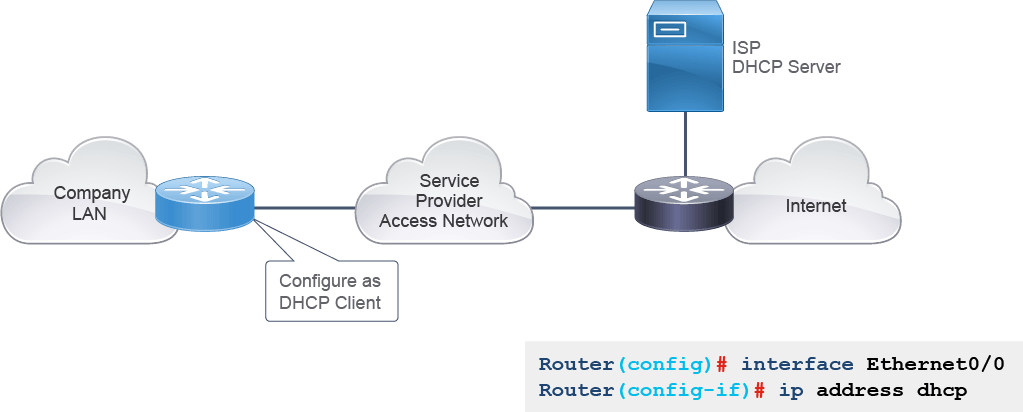
The figure illustrates how to configure the router interface to obtain an IPv4 address through DHCP.
此圖說明如何設定路由器介面以透過 DHCP 取得 IPv4 位址。
Obtaining an IPv4 address through DCHP involves configuring a DHCP client, which will request IPv4 addressing information from the DHCP server:
透過 DHCP 取得 IPv4 位址需要設定 DHCP 用戶端,用戶端會向 DHCP 伺服器請求 IPv4 定址資訊:
- The router requests IPv4 addressing information from the DHCP server.路由器向 DHCP 伺服器請求 IPv4 定址資訊。
- The router injects a static default route in its routing table based on the default gateway parameters received with the assigned IPv4 address.路由器根據取得的 IPv4 位址一併收到的預設閘道參數,在其路由表中植入一條靜態預設路由。
Task 1: Configure a Provider-Assigned IPv4 Address
任務 1:設定服務提供者指派的 IPv4 位址
Activity
活動
R1 is currently configured with a static IPv4 address on Ethernet0/3 interface. Verify this fact.
R1 目前在 Ethernet0/3 介面上設定了靜態 IPv4 位址,請確認這一點。
Access the console of R1 and examine the current IPv4 configuration on Ethernet0/3.
進入 R1 的主控台,檢查 Ethernet0/3 上目前的 IPv4 設定。
R1# show ip interface brief
Interface                  IP-Address      OK? Method Status                Protocol
Ethernet0/0                10.10.1.1       YES NVRAM  up                    up
Ethernet0/1                10.10.2.1       YES NVRAM  up                    up
Ethernet0/2                unassigned      YES NVRAM  administratively down down
Ethernet0/3                198.51.100.2    YES NVRAM  up                    up
Serial1/0                  unassigned      YES NVRAM  administratively down down
Serial1/1                  unassigned      YES NVRAM  administratively down down
Serial1/2                  unassigned      YES NVRAM  administratively down down
Serial1/3 unassigned YES NVRAM administratively down downRouting has not been configured on R1. Verify that only local and connected routes are present in the R1 routing table.
R1 尚未設定路由。請確認 R1 路由表中僅存在本地路由與連接路由。
On R1, enter the following command:
在 R1 上輸入以下指令:
R1# show ip route
Codes: L - local, C - connected, S - static, R - RIP, M - mobile, B - BGP
       D - EIGRP, EX - EIGRP external, O - OSPF, IA - OSPF inter area
       N1 - OSPF NSSA external type 1, N2 - OSPF NSSA external type 2
       E1 - OSPF external type 1, E2 - OSPF external type 2
       i - IS-IS, su - IS-IS summary, L1 - IS-IS level-1, L2 - IS-IS level-2
       ia - IS-IS inter area, * - candidate default, U - per-user static route
       o - ODR, P - periodic downloaded static route, H - NHRP, l - LISP
       + - replicated route, % - next hop override

Gateway of last resort is not set

      10.0.0.0/8 is variably subnetted, 4 subnets, 2 masks
C        10.10.1.0/24 is directly connected, Ethernet0/0
L        10.10.1.1/32 is directly connected, Ethernet0/0
C        10.10.2.0/24 is directly connected, Ethernet0/1
L        10.10.2.1/32 is directly connected, Ethernet0/1
      198.51.100.0/24 is variably subnetted, 2 subnets, 2 masks
C        198.51.100.0/24 is directly connected, Ethernet0/3
L        198.51.100.2/32 is directly connected, Ethernet0/3
Only L and C entries are present in the routing table.
路由表中只存在 L 與 C 項目。
Reconfigure the Ethernet0/3 interface on the R1 router to obtain its IPv4 address and default gateway via DHCP.
重新設定 R1 路由器上的 Ethernet0/3 介面,使其透過 DHCP 取得 IPv4 位址與預設閘道。
On R1, enter the following commands:
在 R1 上輸入以下指令:
R1# configure terminal
R1(config)# interface Ethernet0/3
R1(config-if)# ip address dhcp
R1(config-if)# end
R1#Wait up to 30 seconds. Verify that R1 displays a syslog message indicating that the Ethernet0/3 interface has been assigned an IPv4 address via DHCP.
等待最多 30 秒,確認 R1 顯示一則 syslog 訊息,指出 Ethernet0/3 介面已透過 DHCP 取得 IPv4 位址。
R1#
*Apr 19 14:47:21.312: %DHCP-6-ADDRESS_ASSIGN: Interface Ethernet0/3 assigned DHCP address 198.51.100.101, mask 255.255.255.0, hostname R1Verify that the IPv4 address is assigned to the Ethernet0/3 interface.
確認 IPv4 位址已指派給 Ethernet0/3 介面。
On R1, enter the following command:
在 R1 上輸入以下指令:
R1# show ip interface brief
Interface                  IP-Address      OK? Method Status                Protocol
Ethernet0/0                10.10.1.1       YES NVRAM  up                    up
Ethernet0/1                10.10.2.1       YES NVRAM  up                    up
Ethernet0/2                unassigned      YES NVRAM  administratively down down
Ethernet0/3                198.51.100.101  YES DHCP   up                    up
Serial1/0                  unassigned      YES NVRAM  administratively down down
Serial1/1                  unassigned      YES NVRAM  administratively down down
Serial1/2                  unassigned      YES NVRAM  administratively down down
Serial1/3                  unassigned      YES NVRAM  administratively down down
The address assigned is 198.51.100.101. Note the address now, because it will be useful later in the lab exercise, when you will examine DHCP server configuration on R2 router.
取得的位址是 198.51.100.101。請記下這個位址,因為在稍後的實驗練習中,當你要檢查 R2 路由器上的 DHCP 伺服器設定時會用到。
Verify that there is now a default route on R1, which uses the R2 198.51.100.1 address as the next hop.
確認 R1 上現在有一條預設路由,其以 R2 的 198.51.100.1 位址作為下一跳。
On R1, enter the following command:
在 R1 上輸入以下指令:
R1# show ip route
Codes: L - local, C - connected, S - static, R - RIP, M - mobile, B - BGP
       D - EIGRP, EX - EIGRP external, O - OSPF, IA - OSPF inter area
       N1 - OSPF NSSA external type 1, N2 - OSPF NSSA external type 2
       E1 - OSPF external type 1, E2 - OSPF external type 2
       i - IS-IS, su - IS-IS summary, L1 - IS-IS level-1, L2 - IS-IS level-2
       ia - IS-IS inter area, * - candidate default, U - per-user static route
       o - ODR, P - periodic downloaded static route, H - NHRP, l - LISP
       + - replicated route, % - next hop override

Gateway of last resort is 198.51.100.1 to network 0.0.0.0

S*    0.0.0.0/0 [254/0] via 198.51.100.1
      10.0.0.0/8 is variably subnetted, 4 subnets, 2 masks
C        10.10.1.0/24 is directly connected, Ethernet0/0
L        10.10.1.1/32 is directly connected, Ethernet0/0
C        10.10.2.0/24 is directly connected, Ethernet0/1
L        10.10.2.1/32 is directly connected, Ethernet0/1
      198.51.100.0/24 is variably subnetted, 2 subnets, 2 masks
C        198.51.100.0/24 is directly connected, Ethernet0/3
L 198.51.100.101/32 is directly connected, Ethernet0/3Verify the connectivity from R1 to the public IPv4 address side of the topology by pinging SRV2 (203.0.113.30). The ping should be successful.
透過 ping SRV2(203.0.113.30)來確認 R1 到拓樸中公用 IPv4 位址一側的連線。ping 應該要成功。
On R1, enter the following command:
在 R1 上輸入以下指令:
R1# ping 203.0.113.30
Type escape sequence to abort.
Sending 5, 100-byte ICMP Echos to 203.0.113.30, timeout is 2 seconds:
.!!!!
Success rate is 80 percent (4/5), round-trip min/avg/max = 1/1/1 msNow that R1 connects to the service provider via a DHCP assigned IPv4 address, configure PC1 to also acquire an address and a default gateway via DHCP. The R2 router is configured as a DHCP server also for the 10.10.1.0/24 subnet. First, remove the current default gateway configuration, and then configure the Ethernet0/0 interface to acquire an IPv4 address via DHCP and go to the privileged EXEC mode.
既然 R1 已透過 DHCP 指派的 IPv4 位址連接到服務提供者,接下來設定 PC1 也透過 DHCP 取得位址與預設閘道。R2 路由器同時也被設定為 10.10.1.0/24 子網路的 DHCP 伺服器。首先移除目前的預設閘道設定,然後設定 Ethernet0/0 介面透過 DHCP 取得 IPv4 位址,並進入特權 EXEC 模式。
On PC1, enter the following commands:
在 PC1 上輸入以下指令:
PC1# configure terminal
PC1(config)# no ip default-gateway 10.10.1.1
PC1(config)# interface Ethernet0/0
PC1(config-if)# ip address dhcp
PC1(config-if)# endVerify whether PC1 has the IPv4 address and default gateway assigned.
確認 PC1 是否已被指派 IPv4 位址與預設閘道。
On PC1, enter the following commands:
在 PC1 上輸入以下指令:
PC1# show ip interface brief
Interface                  IP-Address      OK? Method Status                Protocol
Ethernet0/0                unassigned      YES DHCP   up                    up
Ethernet0/1                unassigned      YES NVRAM  administratively down down
Ethernet0/2                unassigned      YES NVRAM  administratively down down
Ethernet0/3                unassigned      YES NVRAM  administratively down down
PC1# show ip route
Default gateway is not set

Host               Gateway           Last Use    Total Uses  Interface
ICMP redirect cache is empty
PC1 is not assigned an IPv4 address, although it is configured to receive information via DHCP. This situation is expected.
PC1 並未被指派 IPv4 位址,儘管它已設定為透過 DHCP 接收資訊。這是預期中的情況。
DHCP clients need to use UDP broadcasts to send their initial DHCPDISCOVER messages, because they don’t have information about the network to which they are attached to. If the client is on a network segment that does not include a server, UDP broadcasts are normally not forwarded, because most routers are configured to not forward broadcast traffic. So broadcast messages that are sent by PC1 arrive only to the Ethernet0/0 interface of R1 and do not cross the R1 router. Because the DHCP server is located on the R2 router, PC1 DHCP requests never reach the server.
DHCP 用戶端需要使用 UDP 廣播來傳送其初始的 DHCPDISCOVER 訊息,因為它們並不知道自己所連接網路的資訊。如果用戶端所在的網路區段中沒有伺服器,UDP 廣播通常不會被轉送,因為大多數路由器都設定為不轉送廣播流量。因此 PC1 傳送的廣播訊息只會到達 R1 的 Ethernet0/0 介面,不會穿越 R1 路由器。由於 DHCP 伺服器位於 R2 路由器上,PC1 的 DHCP 請求永遠無法到達伺服器。
You can remedy this situation by configuring the interface of the router that is receiving the broadcasts to forward certain classes of broadcast traffic to a specific IPv4 address, called helper address. You can use more than one helper address per interface. When configured with a helper address, the router is considered to be the relay agent.
你可以透過設定接收廣播的路由器介面,將特定類別的廣播流量轉送到一個稱為輔助位址(helper address)的特定 IPv4 位址,來解決此問題。每個介面可以使用一個以上的輔助位址。當設定了輔助位址後,該路由器就被視為中繼代理(relay agent)。
To configure a helper address, use the ip helper-address IPv4-address interface configuration mode command.
若要設定輔助位址,請使用 ip helper-address IPv4-address 這個介面設定模式指令。
When a helper address is configured for DHCP, the router "picks up" a broadcast packet from the interface it receives it on, and it generates new DHCP messages to send out to the indicated helper address. In the new DHCP message, the router (relay agent) inserts the IPv4 address of its interface, where broadcast message was received and where the ip helper-address command is configured, into the gateway IPv4 address (giaddr) field of the DHCP packet. This giaddr IPv4 address enables the DHCP server to determine which subnet should receive the offer and to identify the appropriate IPv4 address pool from which to select the address. The DHCP relay agent forwards the received broadcast as a unicast packet, to the address of the DHCP server specified by the ip helper-address command.
當 DHCP 設定了輔助位址後,路由器會從收到廣播封包的介面「取出」該封包,並產生新的 DHCP 訊息傳送到指定的輔助位址。在這則新的 DHCP 訊息中,路由器(中繼代理)會把收到廣播訊息、也就是設定了 ip helper-address 指令的那個介面的 IPv4 位址,填入 DHCP 封包的閘道 IPv4 位址(giaddr)欄位。這個 giaddr IPv4 位址讓 DHCP 伺服器能判斷應由哪個子網路接收此提供,並識別應從哪個適當的 IPv4 位址池中挑選位址。DHCP 中繼代理會將收到的廣播以單播封包的形式,轉送到 ip helper-address 指令所指定的 DHCP 伺服器位址。
Configure the R1 router to relay DHCP broadcasts.
設定 R1 路由器以中繼 DHCP 廣播。
On R1, enter the following command:
在 R1 上輸入以下指令:
R1# configure terminalR1(config)# interface Ethernet0/0R1(config-if)# ip helper-address 198.51.100.1R1(config-if)# endThe 198.51.100.1 address, specified as a helper address, is the address of the R2 router. R2 is the DHCP server for the 10.10.1.0/24 subnet.
設定為輔助位址的 198.51.100.1 位址,就是 R2 路由器的位址。R2 是 10.10.1.0/24 子網路的 DHCP 伺服器。
All broadcasts that R1 receives on its Ethernet0/0 interface will be forwarded to the 198.51.100.1 address as unicast messages. The router will add the 10.10.1.1 IPv4 address information to each of the unicast messages. It will add the address into the giaddr field of the DHCP message.
R1 在其 Ethernet0/0 介面上收到的所有廣播,都會以單播訊息的形式轉送到 198.51.100.1 位址。路由器會將 10.10.1.1 這個 IPv4 位址資訊加入每一則單播訊息中,並將該位址填入 DHCP 訊息的 giaddr 欄位。
Go to the console of PC1, and wait for about 30 seconds for the syslog message, informing about the DHCP assignment to be displayed in the console. Then, verify the IPv4 address information on PC1.
進入 PC1 的主控台,等待約 30 秒,直到主控台顯示告知 DHCP 指派情況的 syslog 訊息。接著確認 PC1 上的 IPv4 位址資訊。
On PC1, enter the following commands:
在 PC1 上輸入以下指令:
PC1#
*Apr 19 11:19:11.381: %DHCP-6-ADDRESS_ASSIGN: Interface Ethernet0/0 assigned DHCP address 10.10.1.101, mask 255.255.255.0, hostname PC1
PC1# show ip interface brief
Interface                  IP-Address      OK? Method Status                Protocol
Ethernet0/0                10.10.1.101     YES DHCP   up                    up
Ethernet0/1                unassigned      YES NVRAM  administratively down down
Ethernet0/2                unassigned      YES NVRAM  administratively down down
Ethernet0/3                unassigned      YES NVRAM  administratively down down

PC1# show ip route
Default gateway is 10.10.1.1

Host               Gateway           Last Use    Total Uses  Interface
ICMP redirect cache is empty
PC1 is assigned the IPv4 address of 10.10.1.101 and the default gateway 10.10.1.1.
PC1 被指派了 IPv4 位址 10.10.1.101 與預設閘道 10.10.1.1。
Using the show dhcp lease and show dhcp server commands, verify DHCP-specific information on PC1.
使用 show dhcp lease 與 show dhcp server 指令,確認 PC1 上與 DHCP 相關的資訊。
On PC1, enter the following command:
在 PC1 上輸入以下指令:
PC1# show dhcp lease
Temp IP addr: 10.10.1.101  for peer on Interface: Ethernet0/0
Temp  sub net mask: 255.255.255.0
 DHCP Lease server: 198.51.100.1, state: 5 Bound
   DHCP transaction id: 15DD
   Lease: 432000 secs,  Renewal: 216000 secs,  Rebind: 378000 secs
Temp default-gateway addr: 10.10.1.1
   Next timer fires after: 2d11h
   Retry count: 0   Client-ID: cisco-aabb.cc00.4800-Et0/0
   Client-ID hex dump: 636973636F2D616162622E636330302E
                       343830302D4574302F30
   Hostname: PC1

PC1# show dhcp server
   DHCP server: ANY (255.255.255.255)
    Leases:   2
    Offers:   1      Requests: 1     Acks : 1     Naks: 0
    Declines: 0      Releases: 0     Query: 0     Bad: 0
    Forcerenews: 0      Failures: 0
    Subnet: 255.255.255.0
The show dhcp commands verify the basic DHCP IPv4 address and default gateway information, along with DHCP-specific information. In the output of the show dhcp lease command, you can see the assigned IPv4 address, the local interface to which the DHCP address was assigned, the DHCP server that provided the information, default gateway, and lease duration expressed in seconds. The value of 432000 seconds corresponds to 5 days. The output of the show dhcp server command indicates which DHCP server is chosen by the device. For PC1, it is any available server.
show dhcp 指令可用來確認基本的 DHCP IPv4 位址與預設閘道資訊,以及 DHCP 相關的資訊。在 show dhcp lease 指令的輸出中,你可以看到已指派的 IPv4 位址、被指派 DHCP 位址的本地介面、提供資訊的 DHCP 伺服器、預設閘道,以及以秒為單位表示的租約期間。432000 秒的值相當於 5 天。show dhcp server 指令的輸出則指出該裝置所選用的 DHCP 伺服器。對 PC1 而言,是任何可用的伺服器。
R2 is configured as the DHCP server for both the 198.51.100.0/24 and 10.10.1.0/24 segments. Although the DHCP server configuration is beyond the scope of this course, you can view the configuration, to understand what information is required to be configured on the DHCP server. DHCP configuration lines are present in the running configuration and startup configuration file of R2. To filter out only DHCP-related information from the startup configuration file, use the show startup-config | section dhcp command.
R2 同時被設定為 198.51.100.0/24 與 10.10.1.0/24 兩個網段的 DHCP 伺服器。雖然 DHCP 伺服器設定超出本課程範圍,你仍可以查看其設定,以了解 DHCP 伺服器需要哪些設定資訊。DHCP 設定命令列存在於 R2 的執行中設定與啟動設定檔案中。若要從啟動設定檔案中僅篩選出與 DHCP 相關的資訊,可使用 show startup-config | section dhcp 指令。
On R2, enter the following command:
在 R2 上輸入以下指令:
R2# show startup-config | section dhcp
ip dhcp excluded-address 198.51.100.1 198.51.100.100
ip dhcp excluded-address 10.10.1.1 10.10.1.100
ip dhcp pool ClientRouter
 network 198.51.100.0 255.255.255.0
 default-router 198.51.100.1
 lease 7
ip dhcp pool Client_10_10_1_0
 network 10.10.1.0 255.255.255.0
 default-router 10.10.1.1
 lease 5
IPv4 parameters meant to be assigned on the 198.51.100.0/24 segment are specified in the DHCP pool ClientRouter. The pool specifies that addresses from the range 198.51.10.0/24 should be offered to DHCP clients. The default gateway for the segment is 198.51.100.1, and the lease period is 7 days. The configuration also specifies, in the ip dhcp excluded-addresses command, that addresses from 198.51.100.1 to 198.51.100.100 should not be offered. Therefore, the R1 router has received the address 198.51.100.101, the first available address from the ClientRouter pool. Address 198.51.100.1 is excluded, because it is already statically assigned to the R2 router Ethernet 0/3 interface, and it should not be assigned to any other host.
要在 198.51.100.0/24 網段上指派的 IPv4 參數,是在 DHCP 位址池 ClientRouter 中指定的。該位址池指定應向 DHCP 用戶端提供 198.51.10.0/24 範圍內的位址。此網段的預設閘道為 198.51.100.1,租約期間為 7 天。設定中也在 ip dhcp excluded-addresses 指令中指定,198.51.100.1 到 198.51.100.100 之間的位址不應被提供。因此,R1 路由器取得了 198.51.100.101 這個位址,也就是 ClientRouter 位址池中第一個可用的位址。198.51.100.1 位址被排除在外,因為它已靜態指派給 R2 路由器的 Ethernet 0/3 介面,不應再指派給任何其他主機。
IPv4 parameters meant to be assigned on the 10.10.1.0/24 segment are specified in the DHCP pool Client_10_10_1_0. The pool specifies that addresses from the range 10.10.1.0/24 should be offered to DHCP clients. The default gateway for the segment is 10.10.1.1, and the lease period is 5 days. The configuration also specifies, in the ip dhcp excluded-addresses command, that addresses from 10.10.1.0 to 10.10.1.100 should not be offered. Therefore, PC1 has received the 10.10.1.101 address, the first available address from the Client_10_10_1_0 pool. The 10.10.1.1 address is excluded, because it is already statically assigned to the R1 router Ethernet 0/0 interface and it should not be assigned to any other host in the 10.10.1.0/24 segment.
要在 10.10.1.0/24 網段上指派的 IPv4 參數,是在 DHCP 位址池 Client_10_10_1_0 中指定的。該位址池指定應向 DHCP 用戶端提供 10.10.1.0/24 範圍內的位址。此網段的預設閘道為 10.10.1.1,租約期間為 5 天。設定中也在 ip dhcp excluded-addresses 指令中指定,10.10.1.0 到 10.10.1.100 之間的位址不應被提供。因此,PC1 取得了 10.10.1.101 位址,也就是 Client_10_10_1_0 位址池中第一個可用的位址。10.10.1.1 位址被排除在外,因為它已靜態指派給 R1 路由器的 Ethernet 0/0 介面,不應再指派給 10.10.1.0/24 網段中的任何其他主機。