Introduction
簡介
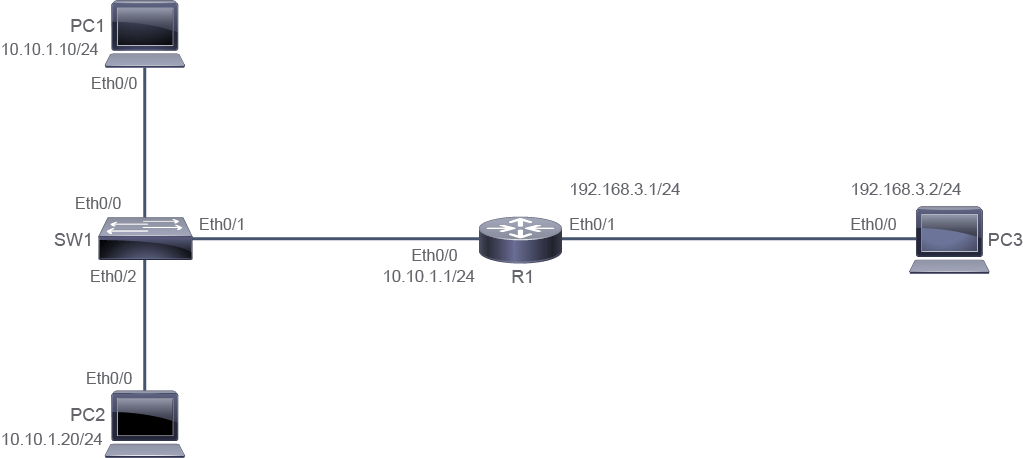
This activity will help you explore how ARP maps IPv4 addresses to MAC addresses and how default gateways allow access to hosts on remote subnets. The lab is prepared with the devices represented in the topology diagram with the IPv4 addresses depicted in the table. Note that PC2, PC3, SW1, and R1 are fully configured.
此活動將協助你探索 ARP 如何將 IPv4 位址對應到 MAC 位址,以及預設閘道如何讓主機存取遠端子網路。實驗室已依拓樸圖與表格中列出的 IPv4 位址完成裝置設定,其中 PC2、PC3、SW1 與 R1 皆已完整設定。
Topology
拓樸
Job Aid
輔助資料
Device Information
裝置資訊
Device Information Table
裝置資訊表
Device 裝置 | Characteristic 特性 | Value 值 |
PC1 PC1 | IPv4 address IPv4 位址 | 10.10.1.10/24 10.10.1.10/24 |
PC1 PC1 | Default gateway 預設閘道 | Not configured 尚未設定 |
PC2 PC2 | IPv4 address IPv4 位址 | 10.10.1.20/24 10.10.1.20/24 |
PC2 PC2 | Default gateway 預設閘道 | 10.10.1.1 10.10.1.1 |
PC3 PC3 | IPv4 address IPv4 位址 | 192.168.3.2/24 192.168.3.2/24 |
PC3 PC3 | Default gateway 預設閘道 | 192.168.3.1 192.168.3.1 |
SW1 SW1 | VLAN 1 IPv4 address VLAN 1 IPv4 位址 | 10.10.1.2/24 10.10.1.2/24 |
SW1 SW1 | Default gateway 預設閘道 | 10.10.1.1 10.10.1.1 |
SW1 SW1 | Ethernet0/0 description Ethernet0/0 描述 | Link to PC1 連接到 PC1 |
SW1 SW1 | Ethernet0/1 description Ethernet0/1 描述 | Link to R1 連接到 R1 |
SW1 SW1 | Ethernet0/2 description Ethernet0/2 描述 | Link to PC2 連接到 PC2 |
R1 R1 | Ethernet0/0 description Ethernet0/0 描述 | Link to SW1 連接到 SW1 |
R1 R1 | Ethernet0/0 IPv4 address Ethernet0/0 IPv4 位址 | 10.10.1.1/24 10.10.1.1/24 |
R1 R1 | Ethernet0/1 IPv4 address Ethernet0/1 IPv4 位址 | 192.168.3.1/24 192.168.3.1/24 |
R1 R1 | Loopback 0 IPv4 Loopback 0 IPv4 | 10.10.3.1/24 10.10.3.1/24 |
Task 1: Configure Default Gateway
任務 1:設定預設閘道
Activity
活動
Verify that PC1 does not have a default route in its routing table.
確認 PC1 的路由表中沒有預設路由。
On PC1, enter the following command:
在 PC1 上輸入下列指令:
PC1# show ip route
Default gateway is not set

Host               Gateway           Last Use    Total Uses  Interface
ICMP redirect cache is emptyAll devices in the network that have IPv4 addresses maintain an ARP cache. Via the ARP process, devices learn the MAC address of other hosts on their local subnet with which they need to communicate. Access the console of PC1 and execute the show arp command.
網路中所有具有 IPv4 位址的裝置都會維護一個 ARP 快取。裝置透過 ARP 程序,學習到需要通訊的本地子網路上其他主機的 MAC 位址。存取 PC1 的主控台並執行 show arp 指令。
PC1 should have an entry for itself (10.10.1.10).
PC1 應該會有一筆自己的項目(10.10.1.10)。
PC1# show arp
Protocol  Address          Age (min)  Hardware Addr   Type   Interface
Internet  10.10.1.10              -   aabb.cc00.2200  ARPA   Ethernet0/0
If there was activity within the discovery before executing the show arp command, you may find that there are other entries in the table.
如果在執行 show arp 指令之前,探索活動中已有其他活動發生,你可能會發現表中還有其他項目。
The command show arp does not work on PCs. It is used here because the actual device that is used to simulate a PC is a router. The command on a Windows, Mac, or Linux system would be arp "a.
show arp 指令在 PC 上並不適用。這裡之所以能使用,是因為用來模擬 PC 的實際裝置是路由器。在 Windows、Mac 或 Linux 系統上,對應的指令是 arp "a。
MAC addresses in your output may be different.
你輸出的 MAC 位址可能會不同。
To initiate communication between PC1 and other devices on the subnet, which will initiate the ARP process to learn the appropriate MAC addresses, use the ping command. Ping PC2 (10.10.1.20), R1 (10.10.1.1), and SW1 (10.10.1.2).
若要在 PC1 與同一子網路上的其他裝置之間發起通訊,藉此觸發 ARP 程序以學習相應的 MAC 位址,請使用 ping 指令。分別 ping PC2(10.10.1.20)、R1(10.10.1.1)與 SW1(10.10.1.2)。
Sometimes, the first ping times out because of the delay that the ARP process caused.
有時候,因為 ARP 程序造成的延遲,第一次 ping 會逾時。
PC1# ping 10.10.1.20
Type escape sequence to abort.
Sending 5, 100-byte ICMP Echos to 10.10.1.20, timeout is 2 seconds:
.!!!!
Success rate is 80 percent (4/5), round-trip min/avg/max = 1/1/1 ms
PC1# ping 10.10.1.1
Type escape sequence to abort.
Sending 5, 100-byte ICMP Echos to 10.10.1.1, timeout is 2 seconds:
!!!!!
Success rate is 100 percent (5/5), round-trip min/avg/max = 1/201/1003 ms
PC1# ping 10.10.1.2
Type escape sequence to abort.
Sending 5, 100-byte ICMP Echos to 10.10.1.2, timeout is 2 seconds:
!!!!!
Success rate is 100 percent (5/5), round-trip min/avg/max = 1/203/1004 msExamine the ARP cache on PC1 again.
再次檢視 PC1 的 ARP 快取。
The ARP cache is now populated with all four hosts that have IPv4 addresses on the 10.10.1.0/24 subnet.
此時 ARP 快取已填入 10.10.1.0/24 子網路上所有四台具有 IPv4 位址的主機。
PC1# show arp
Protocol  Address          Age (min)  Hardware Addr   Type   Interface
Internet  10.10.1.1               2   aabb.cc00.2100  ARPA   Ethernet0/0
Internet  10.10.1.2               0   aabb.cc80.2a00  ARPA   Ethernet0/0
Internet  10.10.1.10              -   aabb.cc00.2200  ARPA   Ethernet0/0
Internet 10.10.1.20 2 aabb.cc00.2800 ARPA Ethernet0/0From PC1, ping 192.168.3.2, which is a PC on a different subnet.
從 PC1 ping 192.168.3.2,這是位於不同子網路上的一台 PC。
From PC1, ping PC3:
從 PC1 ping PC3:
PC1# ping 192.168.3.2
Type escape sequence to abort.
Sending 5, 100-byte ICMP Echos to 192.168.3.2, timeout is 2 seconds:
.!!!!
Success rate is 80 percent (4/5), round-trip min/avg/max = 1/1/1 ms
View the ARP cache on PC1.
檢視 PC1 上的 ARP 快取。
PC1# show arp
Protocol  Address          Age (min)  Hardware Addr   Type   Interface
Internet  10.10.1.1               1   aabb.cc00.2100  ARPA   Ethernet0/0
Internet  10.10.1.2               0   aabb.cc80.2a00  ARPA   Ethernet0/0
Internet  10.10.1.10              -   aabb.cc00.2200  ARPA   Ethernet0/0
Internet  10.10.1.20              1   aabb.cc00.2800  ARPA   Ethernet0/0
Internet  192.168.3.2             0   aabb.cc00.2100  ARPA   Ethernet0/0
There is an ARP cache entry for 192.168.3.2. The MAC addresses for 192.168.3.2 and 10.10.1.1 are identical. This behavior results from the Proxy ARP feature, which is enabled on Cisco IOS routers by default. PC1 does not have a default gateway configured, so it attempts to use ARP for all addresses. R1 saw the ARP request for a remote address available in its routing table and sent an ARP reply with its own MAC address. PC1 can then forward traffic destined to 192.168.3.2 to the R1 MAC address, and R1 will forward as necessary. While proxy ARP can be helpful as a last resort, properly configuring a default gateway is a better practice.
你會發現有一筆 192.168.3.2 的 ARP 快取項目。192.168.3.2 與 10.10.1.1 的 MAC 位址是相同的。這是因為 Proxy ARP(代理 ARP)功能在 Cisco IOS 路由器上預設是啟用的。PC1 並未設定預設閘道,因此它會嘗試對所有位址使用 ARP。R1 看到針對其路由表中可用的遠端位址所發出的 ARP 請求,於是以自己的 MAC 位址送出 ARP 回覆。之後 PC1 便可以將目的地為 192.168.3.2 的流量轉送到 R1 的 MAC 位址,再由 R1 視需要進行轉送。雖然代理 ARP 在萬不得已時可能有幫助,但正確設定預設閘道才是較好的做法。
Configure R1 as the default gateway for PC1.
將 R1 設定為 PC1 的預設閘道。
On PC1, enter the following command:
在 PC1 上輸入下列指令:
PC1# configure terminal
Enter configuration commands, one per line.  End with CNTL/Z.
PC1(config)# ip default-gateway 10.10.1.1
PC1(config)# end
PC1#
Verify the routing table on PC1 again:
再次驗證 PC1 上的路由表:
PC1# show ip route
Default gateway is 10.10.1.1

Host               Gateway           Last Use    Total Uses  Interface
ICMP redirect cache is empty
Default gateway, along with the IPv4 address and the subnet mask, is one of the main configuration parameters for the end device. The default gateway is used when there is a need to communicate with the devices outside the local subnet. The sending device examines the destination address to determine the destination network ID. It then compares this destination subnet ID with its own subnet ID. If subnet IDs are different, the sending device forwards the packet to the default gateway for further routing. The default gateway is an IPv4 address of a router interface that is connected to the local subnet. In other words, a default gateway always belongs to the same subnet as the end device.
預設閘道與 IPv4 位址、子網路遮罩一樣,都是終端裝置的主要設定參數之一。當需要與本地子網路以外的裝置通訊時,就會用到預設閘道。傳送裝置會檢視目的位址以判斷目的網路 ID,然後將此目的子網路 ID 與自己的子網路 ID 比較。如果子網路 ID 不同,傳送裝置就會將封包轉送至預設閘道,以進行後續路由。預設閘道是連接到本地子網路的路由器介面之 IPv4 位址。換句話說,預設閘道一定與終端裝置屬於同一個子網路。
Remove the entry for 192.168.3.2 from the ARP cache of PC1 using the clear ip arp 192.168.3.2 command and verify that the entry has been removed using the show arp command.
使用 clear ip arp 192.168.3.2 指令,從 PC1 的 ARP 快取中移除 192.168.3.2 的項目,並使用 show arp 指令確認該項目已被移除。
On PC1, enter the following commands:
在 PC1 上輸入下列指令:
PC1# clear ip arp 192.168.3.2
PC1# show arp
Protocol  Address          Age (min)  Hardware Addr   Type   Interface
Internet  10.10.1.1               6   aabb.cc00.2100  ARPA   Ethernet0/0
Internet  10.10.1.2               6   aabb.cc80.2a00  ARPA   Ethernet0/0
Internet  10.10.1.10              -   aabb.cc00.2200  ARPA   Ethernet0/0
Internet 10.10.1.20 6 aabb.cc00.2800 ARPA Ethernet0/0Ping 192.168.3.2 again.
再次 ping 192.168.3.2。
On PC1, enter the following commands:
在 PC1 上輸入下列指令:
PC1# ping 192.168.3.2
Type escape sequence to abort.
Sending 5, 100-byte ICMP Echos to 192.168.3.2, timeout is 2 seconds:
!!!!!
Success rate is 100 percent (5/5), round-trip min/avg/max = 1/1/1 ms
You can verify that there is no entry for 192.168.3.2 in the ARP cache of PC1.
你可以確認 PC1 的 ARP 快取中已沒有 192.168.3.2 的項目。
PC1# show arp
Protocol  Address          Age (min)  Hardware Addr   Type   Interface
Internet  10.10.1.1               8   aabb.cc00.2100  ARPA   Ethernet0/0
Internet  10.10.1.2               8   aabb.cc80.2a00  ARPA   Ethernet0/0
Internet  10.10.1.10              -   aabb.cc00.2200  ARPA   Ethernet0/0
Internet  10.10.1.20              8   aabb.cc00.2800  ARPA   Ethernet0/0
For all addresses outside of the 10.10.1.0/24 subnet, PC1 will now use the destination MAC address of 10.10.1.1 (R1, its default gateway). R1 will then forward the packet appropriately because of its routing table.
對於 10.10.1.0/24 子網路以外的所有位址,PC1 現在都會使用 10.10.1.1(R1,即其預設閘道)的目的 MAC 位址。R1 接著會依據其路由表適當地轉送封包。