Normally, the Cisco IOS image is a file that is stored in flash on the router. To understand the management and maintenance of IOS, you must first understand the Cisco IOS file system. There are many similarities between the Cisco IOS file system and the file systems that are used by computer operating systems such as Windows, Linux, and UNIX. If you are familiar with those file systems, the experience will translate well to the Cisco IOS file system.
通常,Cisco IOS 映像檔是儲存在路由器快閃記憶體(flash)中的一個檔案。若要了解 IOS 的管理與維護,必須先了解 Cisco IOS 檔案系統。Cisco IOS 檔案系統與 Windows、Linux、UNIX 等電腦作業系統所使用的檔案系統有許多相似之處。若您熟悉這些檔案系統,這些經驗也能很好地套用到 Cisco IOS 檔案系統上。
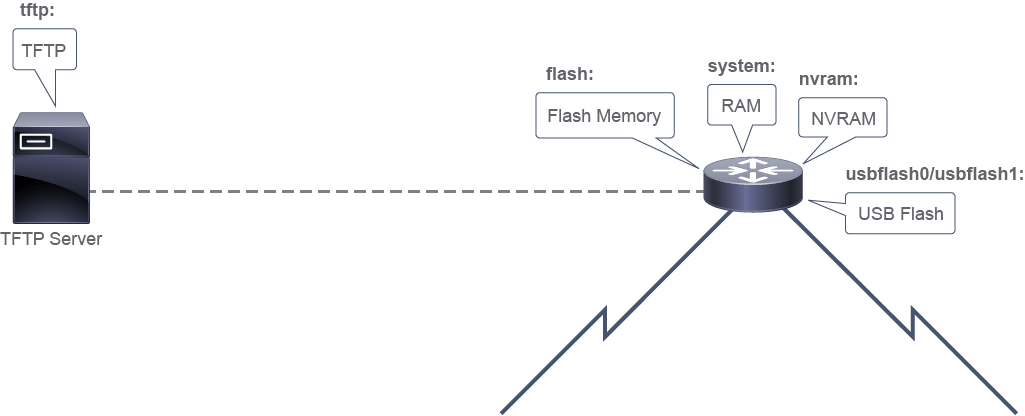
The Cisco IOS file system allows for the storage, retrieval, and manipulation of files by Cisco IOS and by administrators. The file system interface uses URLs to specify the location of a file. URLs are commonly used to specify files or locations on the web. On Cisco routers, URLs can be used to specify the location of files on the router or remote file servers. Files are stored in different locations or accessible by different protocols, specified by a prefix. There are many potential prefixes. The hardware and configuration of a device will handle local prefixes, and the network and server configuration will handle the remote prefixes. Prefix specifications end with a colon (for example, "flash:," "ftp:").
Cisco IOS 檔案系統讓 Cisco IOS 與管理員可以儲存、擷取及操作檔案。此檔案系統介面使用 URL 來指定檔案的位置。URL 通常用於指定網頁上的檔案或位置。在 Cisco 路由器上,URL 可用來指定路由器本機或遠端檔案伺服器上的檔案位置。檔案儲存在不同的位置,或可透過不同的通訊協定存取,並以前綴(prefix)表示。可能的前綴有很多種。裝置的硬體與設定會處理本機前綴,而網路與伺服器設定則會處理遠端前綴。前綴規格的結尾為冒號(例如「flash:」「ftp:」)。
Cisco IOS devices provide a feature that is called the Cisco IOS Integrated File System (IFS). This system allows you to create, navigate, and manipulate files and directories on a Cisco device. The directories that are available depend on the platform. The Cisco IFS feature provides a single interface to all the file systems that a Cisco device uses, including these systems:
Cisco IOS 裝置提供一項稱為 Cisco IOS 整合式檔案系統(IFS)的功能。此系統讓您可以在 Cisco 裝置上建立、瀏覽及操作檔案與目錄。可用的目錄視平台而定。Cisco IFS 功能為 Cisco 裝置所使用的所有檔案系統提供單一介面,包括:
- Flash memory file systems快閃記憶體檔案系統
- Network file systems such as TFTP, Remote Copy Protocol (RCP), and FTP網路檔案系統,例如 TFTP、遠端複製協定(RCP)與 FTP
- Any other memory available for reading or writing data, such as NVRAM and RAM任何其他可供讀寫資料的記憶體,例如 NVRAM 與 RAM
The following example shows the output of the show file systems command, which lists all the available file systems on a Cisco Integrated Services Router. This command provides insightful information, such as the amount of available and free memory and the type of file system and its permissions. Permissions include read only (indicated by the "ro" flag), write only (indicated by the "wo" flag), and read and write (indicated by the "rw" flag). The flash file system (FFS) has an asterisk preceding it, which indicates it is the current default file system. The bootable Cisco IOS Software is located in the flash memory, so the pound symbol (#) that is appended to the flash listing indicates a bootable disk.
以下範例顯示 show file systems 指令的輸出,此指令會列出 Cisco 整合式服務路由器上所有可用的檔案系統。此指令提供許多有用的資訊,例如可用與剩餘的記憶體容量、檔案系統類型及其權限。權限包括唯讀(以「ro」標記表示)、唯寫(以「wo」標記表示),以及讀寫(以「rw」標記表示)。快閃檔案系統(FFS)前面有一個星號,表示它是目前的預設檔案系統。可開機的 Cisco IOS 軟體位於快閃記憶體中,因此附加在 flash 列表後面的井字符號(#)表示這是一個可開機的磁碟。
Branch# show file systems
File Systems:
       Size(b)       Free(b)      Type  Flags  Prefixes
             -             -    opaque     rw   archive:
             -             -    opaque     rw   system:
             -             -    opaque     rw   tmpsys:
             -             -    opaque     rw   null:
             -             -   network     rw   tftp:
*    256610304     153710592      disk     rw   flash0: flash:#
             -             -      disk     rw   flash1:
        262136        255626     nvram     rw   nvram:
             -             -    opaque     wo   syslog:
             -             -    opaque     rw   xmodem:
             -             -    opaque     rw   ymodem:
             -             -   network     rw   rcp:
             -             -   network     rw   http:
             -             -   network     rw   ftp:
             -             -   network     rw   scp:
             -             -    opaque     ro   tar:
             -             -   network     rw   https:
             -             -    opaque     ro   cns:
An important feature of the Cisco IFS is the use of the URL convention to specify files on network devices and the network. The URL prefix specifies the file location.
Cisco IFS 的一項重要特色,是使用 URL 慣例來指定網路裝置與網路上的檔案。URL 前綴指定了檔案的位置。
Commonly used prefix examples include the following:
常見的前綴範例包括:
- flash:The primary flash device. Some devices have more than one flash location, such as slot0: and slot1:. In such cases, an alias is implemented to resolve flash: to the flash device that is considered primary.flash:主要的快閃記憶體裝置。部分裝置有多個 flash 位置,例如 slot0: 與 slot1:。在這種情況下,會實作一個別名,將 flash: 對應到被視為主要的快閃記憶體裝置。
- nvram: NVRAM. Among other things, NVRAM is where the startup configuration is stored.nvram: NVRAM。啟動設定(startup configuration)等內容即儲存於此。
- system: A partition that is built in RAM that holds, among other things, the running configuration.system: 一個建立在 RAM 中的分割區,其中儲存了執行中設定(running configuration)等內容。
- tftp: Indicates that the file is stored on a server that can be accessed using the TFTP protocol.tftp: 表示此檔案儲存在可透過 TFTP 通訊協定存取的伺服器上。
- ftp: Indicates that the file is stored on a server that can be accessed using the FTP protocol.ftp:表示此檔案儲存在可透過 FTP 通訊協定存取的伺服器上。
- scp: Indicates that the file is stored on a server that can be accessed using the Secure Copy Protocol (SCP).scp: 表示此檔案儲存在可透過安全複製通訊協定(SCP)存取的伺服器上。
Directories and subdirectories can be used to organize files in manageable containers. A preceding slash (/) character indicates the root directory, and the slash character is also used to separate directory names from the directory’s contents. Individual files have names, which must be unique within the directory in which they are stored. URLs are used to specify files and they provide full specification of a locally stored file, including the prefix, directory path, and filename.
可以使用目錄與子目錄,將檔案組織成方便管理的容器。前面的斜線(/)字元表示根目錄,斜線字元也用來將目錄名稱與該目錄的內容分開。每個檔案都有各自的名稱,在儲存該檔案的目錄中必須是唯一的。URL 用來指定檔案,並可完整指出本機儲存檔案的位置,包括前綴、目錄路徑與檔名。
Here are some examples:
以下是一些範例:
- flash:/c2900-universalk9-mz.SPA.153-1.T.binflash:/c2900-universalk9-mz.SPA.153-1.T.bin
- nvram:/startup-confignvram:/startup-config
- system:/running-configsystem:/running-config
URLs that specify remote files can be more complex. After the prefix, a server location (IP address or resolvable hostname) must be specified. For protocols that require user authentication, usernames and passwords may be specified. If they are not specified in the URL, they will need to be specified interactively by the application.
指定遠端檔案的 URL 可能較為複雜。在前綴之後,必須指定伺服器位置(IP 位址或可解析的主機名稱)。對於需要使用者驗證的通訊協定,可指定使用者名稱與密碼。若未在 URL 中指定,應用程式會在互動過程中要求輸入。
Here are some examples of remote file specifications:
以下是遠端檔案指定的一些範例:
- tftp://10.10.10.10/backup-cfg.txttftp://10.10.10.10/backup-cfg.txt
- ftp://10.10.20.20/admin:Adm1nPwd/c2900-universalk9-mz.SPA.154-1.T.binftp://10.10.20.20/admin:Adm1nPwd/c2900-universalk9-mz.SPA.154-1.T.bin
- scp://cfg-srv/admin:Adm1nPwd/c2900-universalk9-mz.SPA.154-1.T2.binscp://cfg-srv/admin:Adm1nPwd/c2900-universalk9-mz.SPA.154-1.T2.bin
show file systems command?在 show file systems 指令輸出中,井字符號(#)顯示在檔案系統項目旁邊時代表什麼意思?