The term duplex communication is used to describe a communications channel that can carry signals in both directions, as opposed to a simplex channel, which carries a signal in only one direction. There are two types of duplex settings that are used for communications on an Ethernet network—full duplex and half duplex.
雙工通訊一詞用來描述能同時在雙向傳送信號的通訊通道,這與只能單向傳送信號的單工通道相對。乙太網路上使用的雙工設定有兩種:全雙工與半雙工。
Half Duplex
半雙工
Half-duplex communication relies on a unidirectional data flow, which means that data can go only in one direction at a time. Sending and receiving data are not performed at the same time. Half-duplex communication is similar to communication with walkie-talkies or two-way radios, in which only one person can talk at a time. Because data can flow in only one direction at a time, each device in a half-duplex system must constantly wait its turn to transmit data. This constant waiting results in performance issues. As a result, full-duplex communication has replaced half-duplex communication in more current hardware. Half-duplex connections are typically seen in older hardware such as hubs.
半雙工通訊採用單向資料流,意即資料一次只能往一個方向傳送。傳送與接收資料不會同時進行。半雙工通訊類似於使用對講機或雙向無線電通訊,一次只能有一個人說話。由於資料一次只能往一個方向流動,半雙工系統中的每台裝置都必須不斷等待輪到自己傳送資料。這種持續的等待會造成效能問題。因此,在較新的硬體中,全雙工通訊已取代半雙工通訊。半雙工連線通常出現在集線器等較舊的硬體中。
The following are characteristics of half-duplex operation:
以下是半雙工運作的特性:
- Unidirectional data flow單向資料流
- Legacy connectivity舊式連接方式
- May have collision issues可能有碰撞問題
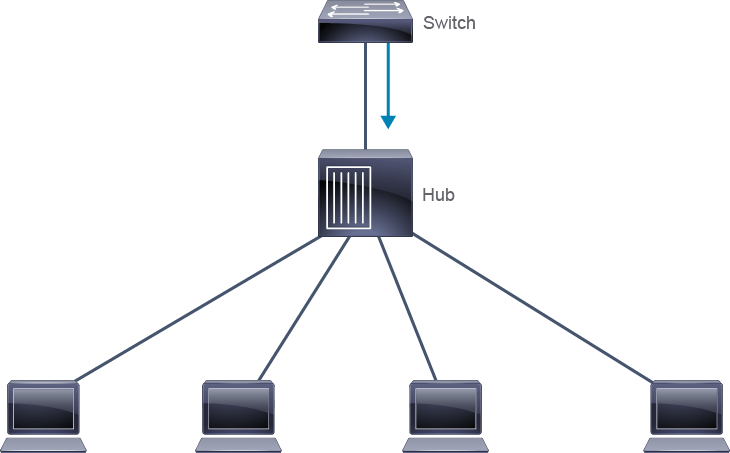
If a device transmits while another is also transmitting, a collision occurs. Therefore, half-duplex communication implements Ethernet Carrier Sense Multiple Access with Collision Detection (CSMA/CD) to help reduce the potential for collisions and to detect them when they do occur. CSMA/CD allows a collision to be detected, which causes the offending devices to stop transmitting. Each device retransmits after a random amount of time has passed. Because the time at which each device retransmits is random, the possibility that they again collide during retransmission is very small.
如果一台裝置在另一台裝置也在傳送時進行傳送,就會發生碰撞。因此,半雙工通訊採用乙太網路載波感應多重存取/碰撞偵測(CSMA/CD),以協助降低碰撞發生的可能性,並在碰撞發生時加以偵測。CSMA/CD 能偵測碰撞,使發生碰撞的裝置停止傳送。每台裝置會在經過一段隨機時間後重新傳送。由於每台裝置重新傳送的時間是隨機的,它們在重新傳送時再次發生碰撞的可能性非常低。
Full Duplex
全雙工
Full-duplex communication is like telephone communication, in which each person can talk and hear what the other person says simultaneously. In full-duplex communication, the data flow is bidirectional, so that data can be sent and received at the same time. The bidirectional support enhances performance by reducing the wait time between transmissions. Ethernet, Fast Ethernet, and Gigabit Ethernet NICs sold today offer the full-duplex capability. In full-duplex mode, the collision-detection circuit is disabled. Frames that the two connected end nodes send cannot collide because the end nodes use two separate circuits in the network cable.
全雙工通訊類似於電話通訊,通話雙方可以同時說話並聽到對方說的內容。在全雙工通訊中,資料流是雙向的,因此可以同時傳送與接收資料。這種雙向支援藉由減少傳輸之間的等待時間來提升效能。目前市面上銷售的乙太網路、快速乙太網路與 Gigabit 乙太網路網路卡都提供全雙工能力。在全雙工模式下,碰撞偵測電路會被停用。由於兩端連接的節點使用網路線中兩條獨立的電路,它們所傳送的框架不會發生碰撞。
The following are characteristics of full-duplex operation:
以下是全雙工運作的特性:
- Point-to-point only僅限點對點
- Attached to a dedicated switched port連接至專屬的交換連接埠
- Requires full-duplex support on both ends兩端都必須支援全雙工
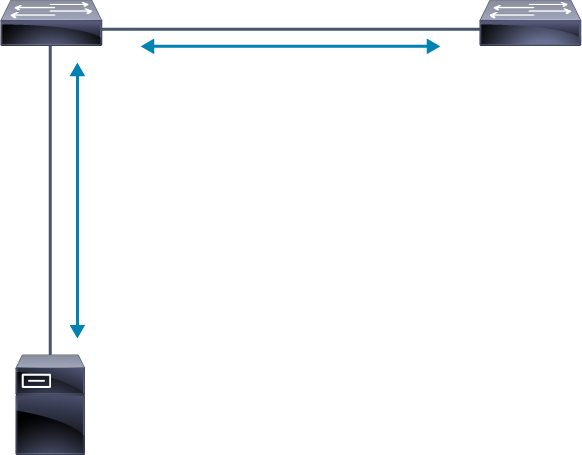
Each full-duplex connection uses only one port. Full-duplex communications require a direct connection between two nodes that both support full duplex. If one of the nodes is a switch, the switch port to which the other node is connected must be configured to operate in the full-duplex mode. The primary cause of duplex issues is mismatched settings on two directly connected devices. For example, the switch is configured for a full duplex, and the attached PC is configured for a half duplex.
每個全雙工連線只使用一個連接埠。全雙工通訊需要在兩個都支援全雙工的節點之間建立直接連線。如果其中一個節點是交換器,則連接另一個節點的交換器連接埠必須設定為全雙工模式運作。造成雙工問題的主要原因,是兩台直接連接的裝置設定不一致。舉例來說,交換器設定為全雙工,而連接的 PC 卻設定為半雙工。
The duplex Command
duplex 指令
The duplex command is used to specify the duplex mode of operation for switch ports. The duplex command supports the following options:
duplex 指令用於指定交換器連接埠的雙工運作模式。duplex 指令支援下列選項:
- The
fulloption sets the full-duplex mode.full選項設定全雙工模式。 - The
halfoption sets the half-duplex mode.half選項設定半雙工模式。 - The
autooption sets autonegotiation of the duplex mode. With autonegotiation enabled, the two ports communicate to decide the best mode of operation.auto選項設定雙工模式的自動協商。啟用自動協商後,兩個連接埠會互相溝通,以決定最佳的運作模式。
The figure shows an example of duplex and speed configurations on the Fast Ethernet interfaces of two switches. To prevent mismatch issues, the settings on each interface are configured to match the settings of the directly connected interfaces. For example, the Fa0/5 interface on SwitchX and Fa0/3 on SwitchY are configured to autonegotiate speed and duplex settings with the connected PC. The Fa0/1 interface on SwitchX that is connected to SwitchY is configured for full duplex and speed 100 Mbps, which is the same as the configuration on the Fa0/1 interface on SwitchY.
下圖顯示兩台交換器的快速乙太網路介面上雙工與速度設定的範例。為避免不匹配問題,每個介面的設定都會配合直接連接介面的設定。舉例來說,SwitchX 上的 Fa0/5 介面與 SwitchY 上的 Fa0/3 介面設定為與所連接的 PC 自動協商速度與雙工設定。連接 SwitchY 的 SwitchX 上 Fa0/1 介面則設定為全雙工,速度為 100 Mbps,這與 SwitchY 上 Fa0/1 介面的設定相同。
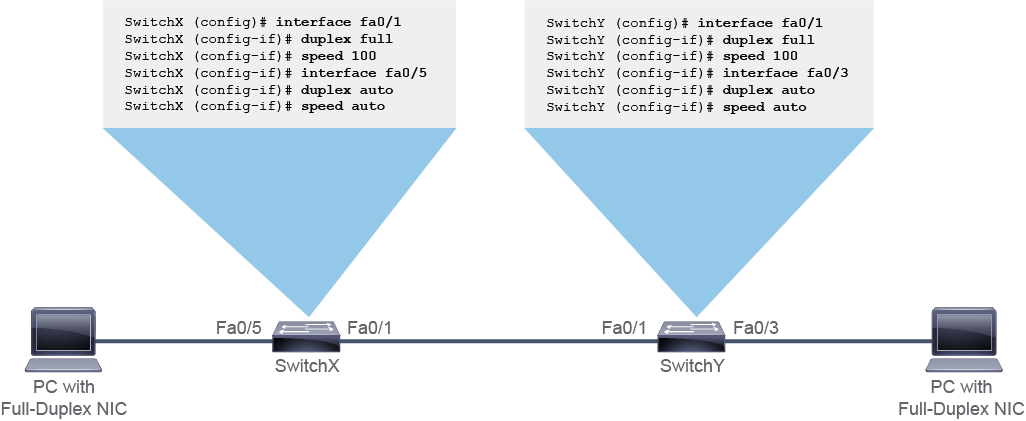
For 100BASE-FX ports, the default option is full, and they cannot autonegotiate. 100BASE-FX ports operate only at 100 Mbps in full-duplex mode. For Fast Ethernet and 10/100/1000 ports, the default option is auto. The 10/100/1000 ports operate in either half-duplex or full-duplex mode when their speed is set to 10 or 100 Mbps, but when their speed is set to 1000 Mbps, they operate only in the full-duplex mode.
對於 100BASE-FX 連接埠,預設選項為 full,且無法自動協商。100BASE-FX 連接埠僅能以 100 Mbps 的全雙工模式運作。對於快速乙太網路與 10/100/1000 連接埠,預設選項為 auto。10/100/1000 連接埠在速度設定為 10 或 100 Mbps 時,可以半雙工或全雙工模式運作,但當速度設定為 1000 Mbps 時,則只能以全雙工模式運作。
Autonegotiation can at times produce unpredictable results. By default, when autonegotiation fails, a Cisco Catalyst switch sets the corresponding switch port to half-duplex mode. Autonegotiation failure occurs when an attached device does not support autonegotiation. If the attached device is manually configured to also operate in the half-duplex mode, there is no problem. However, if the device is manually configured to operate in the full-duplex mode, there is a duplex mismatch. A duplex mismatch causes late collision errors at the end of the connection. To avoid this situation, manually set the duplex parameters of the switch to match the attached device.
自動協商有時可能產生無法預期的結果。根據預設,當自動協商失敗時,Cisco Catalyst 交換器會將對應的交換器連接埠設為半雙工模式。當所連接的裝置不支援自動協商時,就會發生自動協商失敗。如果所連接的裝置也被手動設定為半雙工模式運作,就不會有問題。然而,如果該裝置被手動設定為全雙工模式運作,就會發生雙工不匹配。雙工不匹配會在連線末端造成延遲碰撞錯誤。為避免這種情況,應手動設定交換器的雙工參數,使其與所連接裝置相符。
In the example, the switch ports connected to the PCs are configured for autonegotiation since the PC's network card supports autonegotiation. The interconnection ports between the switches have a static configuration to avoid autonegotiation failures if someone connects a device that only does 10 Mbps or a hub.
在此範例中,連接 PC 的交換器連接埠設定為自動協商,因為該 PC 的網路卡支援自動協商。交換器之間的互連連接埠則採用靜態設定,以避免有人連接僅支援 10 Mbps 的裝置或集線器時發生自動協商失敗。
You can use the show interfaces command in the privileged EXEC mode to verify the duplex settings on a switch. This command displays statistics and statuses for all interfaces or for the interface that you specify. The following example shows the duplex and speed settings of a Fast Ethernet interface.
您可以在特權 EXEC 模式下使用 show interfaces 指令,來驗證交換器上的雙工設定。此指令會顯示所有介面,或您指定介面的統計資料與狀態。以下範例顯示某快速乙太網路介面的雙工與速度設定。
SwitchX# show interfaces FastEthernet0/5
FastEthernet0/5 is up, line protocol is up (connected)
  Hardware is Fast Ethernet, address is 0022.91c4.0e01 (bia 0022.91c4.0e01)
  MTU 1500 bytes, BW 100000 Kbit, DLY 100 usec,
     reliability 255/255, txload 1/255, rxload 1/255
  Encapsulation ARPA, loopback not set
  Keepalive set (10 sec)
 Full-duplex, 100Mb/s, media type is 10/100BaseTX
  input flow-control is off, output flow-control is unsupported
  <... output omitted ...>
  5 minute input rate 0 bits/sec, 0 packets/sec
  5 minute output rate 0 bits/sec, 0 packets/sec
     7289 packets input, 927927 bytes, 0 no buffer
     Received 184 broadcasts (1380 multicasts
     0 runts, 0 giants, 0 throttles
     0 input errors, 0 CRC, 0 frame, 0 overrun, 0 ignored
     0 watchdog, 1380 multicast, 0 pause input
     0 input packets with dribble condition detected
     39965 packets output, 7985339 bytes, 0 underruns
     0 output errors, 0 collisions, 1 interface resets
     0 babbles, 0 late collision, 0 deferred
     0 lost carrier, 0 no carrier, 0 PAUSE output
     0 output buffer failures, 0 output buffers swapped out